

AWS Cloud Server Pricing: 15 Amazon Web Services
[Updated: April 02, 2026]
Your first AWS bill surprises you. Not because of compute costs, but because of hidden data transfer charges nobody mentioned.
This guide breaks down 2026 pricing for 15 AWS cloud services, compares all five pricing models, and shows you where the real costs hide.
Key Takeaways
AWS cloud server pricing = pay only for what you use, with no upfront costs or long-term contracts. Prices range from free (IAM, VPC) to pennies per hour for compute and storage.
Perfect for: E-commerce stores with variable traffic, businesses scaling on Amazon Web Services, teams comparing cloud computing costs
Not ideal for: Fixed-budget projects needing predictable monthly bills, teams without cloud expertise
How AWS Cloud Server Pricing Works
As the largest cloud computing services platform, AWS charges based on consumption. No upfront fees. No termination penalties. You start a service, you pay. You stop, the charges stop.
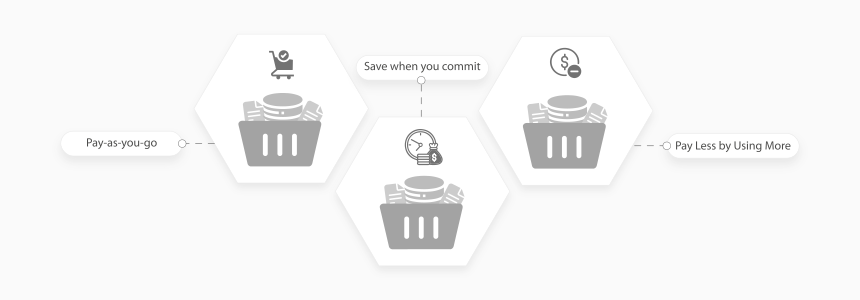
Three core principles define the AWS pricing structure:
- Pay-as-you-go. Use resources by the second (Amazon Elastic Compute Cloud, or EC2) or by the request (AWS Lambda). Costs scale with your actual traffic.
- Save when you commit. Lock in a one-year or three-year term and save up to 72% over on-demand rates.
- Pay less as you grow. Volume discounts kick in at higher usage tiers. S3 storage gets cheaper per GB the more you store.
For Magento stores, the compute instance is the biggest cost driver. Choosing the wrong instance type can double your monthly bill. See our guide on choosing the right EC2 instance for Magento before committing.
The actual cost depends on four factors:
| Factor | How It Affects Your Bill |
|---|---|
| Instance type | More CPU and RAM costs more per hour |
| Region | US East is the cheapest region. Asia Pacific and Europe cost 10-20% more |
| Data transfer | Inbound is free. Outbound costs $0.09/GB after the first 100 GB |
| Commitment level | Reserved Instances and Savings Plans cut costs 30-72% |
5 AWS Pricing Models Compared
AWS offers five pricing models. Each fits a different workload pattern.
| Model | How It Works | Savings vs On-Demand | Best For |
|---|---|---|---|
| Free Tier | 750 hrs EC2, 5 GB S3, 25 GB DynamoDB per month | 100% | Testing, dev environments, learning AWS |
| On-Demand | Pay by the second, no commitment | Baseline (0%) | Unpredictable workloads, short-term projects |
| Savings Plans | Commit to $/hour for 1 or 3 years | Up to 72% | Steady-state production workloads |
| Reserved Instances | Reserve specific instance types for 1 or 3 years | Up to 72% | Databases, always-on servers |
| Spot Instances | Use unused EC2 capacity at steep discounts | Up to 90% | Batch processing, CI/CD, fault-tolerant jobs |
Savings Plans come in two types: Compute Savings Plans cover EC2, Fargate, and Lambda across any region or instance family. EC2 Instance Savings Plans lock you into a specific instance family in one region but offer a deeper discount. Both require a long-term commitment: a dollar amount per hour for 1-3 years. For most production workloads, Compute Savings Plans are the better choice over Reserved Instances.
Spot Instances offer the deepest discount but AWS can reclaim capacity with a 2-minute warning. There is no bidding. AWS sets the Spot price based on supply and demand. Use them for workloads that handle interruption: batch processing, image rendering, or CI/CD pipelines.
Reserved Instances still make sense for databases and other services that run 24/7 on a fixed instance type. Payment options include all upfront, partial upfront, or no upfront, each with different discount levels.
15 AWS Cloud Services and Their 2026 Pricing
Note: Amazon Cloud Directory was removed from this list. AWS closed it to new customers in November 2025. Use DynamoDB or Neptune for directory workloads instead.
AWS Free Tier: What You Get for Free
The AWS Free Tier has three categories:
Always Free (no time limit):
- 1 million Lambda requests per month
- 25 GB DynamoDB storage
- 1 million SQS messages per month
- IAM, VPC, and Auto Scaling (all features)
- 1 TB CloudFront data transfer per month
12 Months Free (from signup):
- 750 hours EC2 t2.micro or t3.micro per month
- 5 GB S3 Standard storage
- 750 hours RDS db.t2.micro per month
- 100 GB data transfer out per month
Short-Term Trials:
- SageMaker: 250 hours in the first 2 months
- Bedrock: varies by model
- Redshift: 750 hours of dc2.large per month for 2 months
For simple websites, Amazon Lightsail offers fixed pricing from $3.50/month with predictable monthly bills.
The AWS Free Tier covers development and testing. Production stores need paid instances. A managed Magento hosting setup on AWS starts around $200/month for a single-server configuration with proper caching, security, and monitoring included.
Hidden Costs Most People Miss
AWS pricing pages highlight compute and storage rates. These line items catch teams off guard:
| Hidden Cost | What It Is | Typical Monthly Impact |
|---|---|---|
| Data transfer out | $0.09/GB after 100 GB free | $50-500 for busy stores |
| NAT Gateway | $0.045/hr + $0.045/GB processed | $32/month minimum (idle) |
| EBS Snapshots | $0.05/GB-month for stored snapshots | $10-50 for regular backups |
| Elastic IPs | Free when attached. $0.005/hr when idle | $3.60/month per unused IP |
| Support plans | Business: $100/mo minimum. Enterprise: $15K/mo | Adds 3-10% to total bill |
| Cross-AZ traffic | $0.01/GB between availability zones | $10-100 for multi-AZ setups |
Data transfer is the biggest surprise. Every image, CSS file, and API response leaving AWS costs money. A Magento store serving 100,000 pageviews per month can transfer 500+ GB of data. At $0.09/GB, that adds $45/month on top of compute costs.
Use CloudFront CDN to reduce data transfer fees. CloudFront pricing is lower than direct EC2 outbound transfer, and the first 1 TB per month is free.
How to Reduce Your AWS Bill
Seven strategies that cut cloud costs:
1. Right-size instances. Most teams over-provision by 30-40%. Use AWS Compute Optimizer to find the correct instance type for your workload. Downsizing from m5.xlarge to m5.large saves $70/month per instance.
2. Use Savings Plans. Commit to a dollar amount per hour for 1-3 years. Covers EC2, Fargate, and Lambda. Saves up to 72% on production workloads.
3. Schedule non-production resources. Shut down dev and staging servers outside business hours. This saves 65% on those instances without affecting production.
4. Enable S3 Intelligent-Tiering. Moves infrequent data to cheaper storage classes with zero retrieval fees. Saves 20-40% on storage costs.
5. Use Spot Instances for batch jobs. CI/CD pipelines, image processing, and data analysis run well on Spot capacity. Save up to 90%.
6. Monitor with AWS Cost Explorer. AWS provides built-in cost management tools. Set budget alerts. Review cost breakdowns each week. The AWS Pricing Calculator (calculator.aws) helps estimate costs before deploying new services.
7. Consider managed hosting. A Magento hosting provider handles instance selection, auto-scaling, and cost optimization. For enterprise Magento stores, managed hosting often costs less than self-managed AWS because the provider purchases Reserved Instances in bulk and passes savings to customers.
FAQ
How much does an AWS cloud server cost per month?
A basic AWS cloud server (t3.micro with 2 vCPUs and 1 GB RAM) costs about $7.60/month on-demand. A production server for e-commerce (m5.xlarge with 4 vCPUs and 16 GB RAM) runs $140/month on-demand, or $84/month with a Savings Plan. Total AWS costs include storage, data transfer, and database services on top of compute.
Can I use AWS for free?
Yes. The AWS Free Tier includes 750 hours of EC2 t2.micro per month for 12 months from signup. Some services are free forever: IAM, VPC, Auto Scaling, and 1 million Lambda requests per month. The free tier is enough for development and testing but not for production workloads.
Who is cheaper, AWS or Azure?
AWS and Azure price at similar levels for most workloads. AWS tends to be 5-10% cheaper for Linux compute (EC2 vs Azure VMs). Azure offers better rates for Windows workloads and SQL Server licensing. The real difference comes down to data transfer costs and discount structures. Compare both using their pricing calculators for your specific setup.
How does AWS billing work?
AWS bills monthly based on actual consumption. Each service tracks its own usage metric: EC2 charges by the second, S3 by the GB stored, Lambda by the number of requests. You receive a detailed invoice at the end of each billing cycle with line items per service and region. Set up AWS Budgets alerts to avoid unexpected charges.
What is the AWS Pricing Calculator?
The AWS Pricing Calculator at calculator.aws lets you estimate monthly costs before deploying resources. Input your expected usage for each AWS service and get a detailed cost breakdown. It supports all major services and accounts for regional pricing differences. Use it to compare on-demand versus reserved pricing for your workload.
Is AWS more expensive than traditional hosting?
Raw AWS compute costs more per hour than a dedicated server lease. But AWS eliminates upfront hardware costs, over-provisioning waste, and manual scaling labor. For variable-traffic e-commerce stores, AWS costs 20-40% less than maintaining equivalent peak-capacity dedicated servers year-round.
What factors affect AWS server pricing the most?
Three factors drive most of the cost: instance type (CPU and RAM), region selection, and data transfer volume. Instance type alone determines 50-70% of a typical bill. Choosing US East over Asia Pacific saves 10-20%. Data transfer costs surprise teams that serve heavy media content or high API traffic.
How do Reserved Instances differ from Savings Plans?
Reserved Instances lock you into a specific instance type, region, and operating system for 1-3 years. Savings Plans commit to a dollar amount per hour across any instance type or region. Savings Plans offer more flexibility for changing workloads. Both save up to 72% over on-demand pricing.
What is the cheapest AWS instance for a website?
The t4g.nano (2 vCPUs, 0.5 GB RAM) costs $0.0042/hour, about $3/month. It runs on ARM-based Graviton processors. For a production website, the t4g.small (2 vCPUs, 2 GB RAM) at $12/month offers a better balance of cost and performance. Magento stores need at minimum a t3.large (8 GB RAM) for stable operation.
How much does AWS charge for data transfer?
Inbound data transfer to AWS is free. Outbound to the internet costs $0.09/GB for the first 10 TB per month, dropping to $0.085/GB for the next 40 TB. The first 100 GB per month is free. Transfer between AWS regions costs $0.02/GB. Use CloudFront CDN to reduce outbound transfer costs since CDN pricing is lower than direct EC2 egress.
Summary
AWS cloud server pricing follows a flexible pricing model: pay-as-you-go with no upfront commitments. Prices range from free (IAM, VPC, Auto Scaling) to fractions of a cent per second for compute.
Key points:
- 5 pricing models let you optimize for flexibility or maximum savings
- 15 core services cover compute, storage, databases, networking, and AI
- Free Tier provides enough capacity for development and testing
- Hidden costs like data transfer, NAT Gateway, and EBS snapshots add 15-30% to expected bills
- Savings Plans cut production costs up to 72% with flexible commitments
For e-commerce stores running on Magento, MGT Commerce handles AWS cost optimization, auto-scaling, security patching, and 24/7 monitoring. This removes the need for in-house AWS expertise while keeping monthly costs predictable.
