

Magento 2 Admin Loading Slow: 10 Causes and How to Fix Them
[Updated: March 16, 2026]
A slow Magento 2 admin panel costs you time on every product save, every order review, every config change. The fix depends on the root cause.
This guide covers the 10 most common causes of Magento 2 admin slowness and the exact steps to resolve each one.
Key Takeaways
- Cache mismanagement, bloated databases, and wrong indexer settings cause most admin slowdowns.
- Switching to "Update by Schedule" for indexers prevents save-operation freezes.
- PHP 8.3/8.4 with tuned OPcache settings delivers measurable speed gains on Magento 2.4.8.
- OpenSearch replaces Elasticsearch as the default search engine starting with Magento 2.4.8.
- Production mode eliminates the static file compilation overhead that slows every admin page load.
- Server profiling tools like New Relic and Blackfire pinpoint the exact bottleneck faster than guesswork.
Quick Answer
Magento 2 admin slow = one or more server, database, or configuration issues forcing the backend to process requests inefficiently. The most common fixes are clearing cache, switching indexers to scheduled mode, and running production mode.
Perfect for: Store owners seeing slow admin saves, sluggish grids, or unresponsive backend pages.
Not ideal for: Frontend-only speed issues (those need a separate performance audit).
1. Clear and Configure Cache
Cache prevents the server from reprocessing identical requests. When cache containers overflow or become stale, the admin panel slows down.
Flush cache from the command line:
php bin/magento cache:flush
Or navigate to System > Tools > Cache Management and flush all cache types.
Clear the var directory:
rm -rf var/cache/* var/page_cache/* var/session/*
For production stores, use Redis as your cache backend. Redis stores all data in memory instead of on disk, which eliminates filesystem I/O bottlenecks. Magento 2.4.8 also supports Valkey 8 as a Redis alternative.
Database session cleanup: If sessions are stored in the database, truncate the session table. Cache tables (cache, cache_tag) can also grow fast and need periodic cleanup.
2. Remove Unused Extensions
Every installed extension adds load to the admin panel, even disabled ones. Disabled modules remain in the database and increase read times.
The fix:
- Profile all third-party modules:
php bin/magento module:status - Remove (not just disable) unused modules:
php bin/magento module:uninstall Vendor_Module - Run
php bin/magento setup:upgradeafter removal
Poorly coded extensions are the single biggest cause of admin slowdowns. Each module adds database queries, event observers, and plugin interceptors that execute on every admin page load. If you cannot identify the culprit, use a profiling tool like Blackfire or New Relic to trace which module consumes the most execution time.
3. Clean Up Products, Categories, and Attributes
Every product in your catalog consumes database resources during admin operations. Products marked as "not visible" still get processed by the backend.
Actions to take:
- Delete products no longer sold or relevant
- Remove empty or duplicate categories
- Audit product attributes: Stores > Attributes > Product and delete unused ones
- Magento does not support mass attribute deletion, so remove each one through the admin UI
For stores with 50,000+ SKUs, this cleanup can cut admin page load times in half. A leaner database means faster reads, faster saves, and faster grid rendering.
4. Switch Indexers to "Update by Schedule"
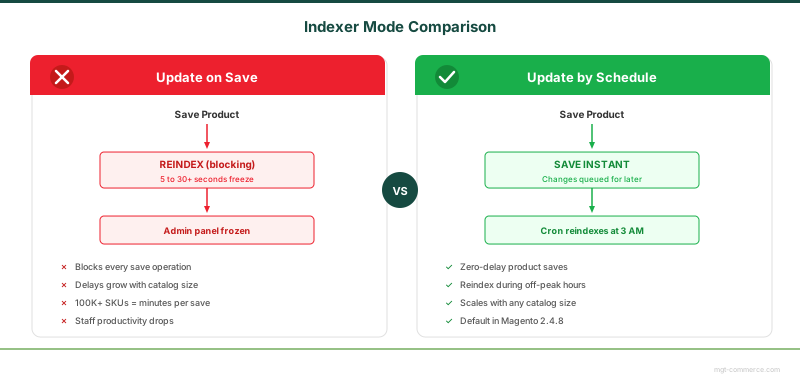
By default, Magento reindexes data every time you save a product or category. This causes the admin to freeze during save operations, with delays of 5 to 30+ seconds depending on catalog size.
Fix this in two steps:
- Navigate to System > Index Management
- Switch all indexers from "Update on Save" to "Update by Schedule"
Then configure a cron job to reindex during off-peak hours:
0 3 * * * /usr/bin/php /path/to/magento/bin/magento indexer:reindex
For stores with 100,000+ SKUs, reindexing can take several hours. Schedule it during low-traffic windows (2 AM to 5 AM in your server timezone).
Verify cron is installed:
php bin/magento cron:install --force
5. Optimize the Database
An unoptimized MySQL or MariaDB instance is often the hidden cause of admin slowness. Magento 2.4.8 requires MySQL 8.4 or MariaDB 11.4.
Run MySQLTuner for a diagnostic report:
wget https://raw.githubusercontent.com/major/MySQLTuner-perl/master/mysqltuner.pl
chmod +x mysqltuner.pl
./mysqltuner.pl
The output flags issues like undersized buffer pools, excessive temporary tables, and missing indexes. Focus on entries marked with [!!].
Key MySQL settings to tune:
| Setting | Recommended Value | Why |
|---|---|---|
innodb_buffer_pool_size |
70-80% of available RAM | Keeps frequently accessed data in memory |
innodb_log_file_size |
256M to 1G | Reduces disk writes during transactions |
max_connections |
150-300 | Prevents connection exhaustion under load |
tmp_table_size |
64M-256M | Reduces disk-based temporary tables |
Regular maintenance tasks:
- Truncate log tables:
report_event,customer_log,report_viewed_product_index - Optimize tables:
mysqlcheck -o magento_db -u root -p - Review and remove data from abandoned carts and old quotes
6. Tune PHP Configuration
Magento 2.4.8 requires PHP 8.3 or 8.4. Beyond the version, specific PHP settings have a direct impact on admin performance.
Critical php.ini settings:
memory_limit = 2G
max_execution_time = 18000
realpath_cache_size = 10M
realpath_cache_ttl = 7200

opcache.enable = 1
opcache.memory_consumption = 512
opcache.max_accelerated_files = 60000
opcache.validate_timestamps = 0
opcache.consistency_checks = 0
opcache.save_comments = 1
Why these matter:
-
memory_limitbelow 2G causes scripts to crash (blank pages or 500 errors, not just slowness) -
realpath_cache_sizeat 10M eliminates redundant filesystem lookups that Magento triggers on every request - OPcache with
validate_timestamps = 0in production skips file modification checks, saving 10-30ms per request
Set validate_timestamps = 1 in development environments so code changes take effect without cache clearing.
7. Switch to Production Mode
Running Magento in Developer or Default mode adds overhead to every page load. In these modes, Magento compiles static files on the fly using PHP.
Switch to production mode:
php bin/magento deploy:mode:set production
This command pre-compiles all static assets and disables real-time error reporting. The difference is measurable: admin pages that take 3 to 5 seconds in developer mode load in under 2 seconds in production mode.
Verify your current mode:
php bin/magento deploy:mode:show
8. Configure OpenSearch (Replace Elasticsearch)
Magento 2.4.8 shifts from Elasticsearch to OpenSearch as the primary search engine. On Adobe Commerce Cloud, Elasticsearch support has been removed. On-premises installations support both OpenSearch 2.19 and Elasticsearch 8.17, but OpenSearch is the forward path.
To configure OpenSearch:
- Navigate to Stores > Configuration > Catalog > Catalog Search
- Set the search engine to OpenSearch
- Enter your OpenSearch host and port
- Click Test Connection to verify
OpenSearch is an open-source fork of Elasticsearch 7.10.2 with active development. It handles catalog search, layered navigation, and admin grid search queries. A well-configured OpenSearch instance reduces admin grid load times for stores with large catalogs.
9. Merge JavaScript Files and Configure CDN
Multiple JavaScript files create separate HTTP requests that add up on every admin page load.
Enable JS merging:
Stores > Configuration > Advanced > Developer > JavaScript Settings > Merge JavaScript Files > Yes
This setting applies store-wide (frontend and backend). To apply it to the admin panel only:
- Enable merging at the global scope
- Disable it at the individual store view level
For static assets (images, CSS, JS), configure a Content Delivery Network to serve files from edge locations closer to the admin user:
Stores > Configuration > General > Web > Base URLs and update the static file base URL to your CDN endpoint.
10. Use Lightweight Admin Themes
Heavy admin themes with excessive JavaScript frameworks slow down every backend page. The default Magento admin theme (Magento/backend) is adequate for most stores.
Custom admin themes that add visual elements, dashboards, or Knockout.js components increase DOM complexity and rendering time.
Before modifying the admin theme:
- Test changes on a staging server first
- Removing Knockout.js components can break core modules
- Measure page load before and after with browser DevTools
How to Diagnose the Root Cause

Before applying fixes, identify what type of slowness you face:
| Symptom | Likely Cause | First Fix |
|---|---|---|
| All admin pages slow | Developer mode, full cache, low memory | Switch to production mode, flush cache |
| Grids take long to load | Missing database indexes, large catalog | Run indexer:reindex, clean unused products |
| Saving products freezes | "Update on Save" indexer mode | Switch to "Update by Schedule" |
| Dashboard loads slow | Excessive admin analytics queries | Disable unnecessary dashboard widgets |
| Intermittent slowness | Server resource contention | Profile with New Relic or Magento monitoring tools |
Use profiling tools to trace specific bottlenecks:
- New Relic APM: Transaction traces show which PHP function or SQL query causes delays
- Blackfire: Call graphs reveal which extension consumes the most time
-
Magento Profiler: Built-in tool activated via CLI:
php bin/magento dev:profiler:enable
Magento 2.4.8 System Requirements (2026)
Running the correct software stack is a prerequisite for good admin performance. Outdated versions create compatibility issues and miss performance improvements.
| Component | Required Version (2.4.8) |
|---|---|
| PHP | 8.3 or 8.4 |
| MySQL | 8.4 |
| MariaDB | 11.4 |
| OpenSearch | 2.19 |
| Elasticsearch | 8.17 (on-prem only) |
| Redis | 7.1 |
| Valkey | 8 |
| Composer | 2.9.3+ |
| nginx | 1.26 |
Source: Adobe Commerce System Requirements
Upgrading PHP alone from 8.2 to 8.3 or 8.4 provides measurable performance gains through engine-level optimizations. Pair this with the OPcache settings from Section 6 for the best results.
Pros and Cons of Self-Managed Admin Optimization
For stores that need admin performance without the operational burden, managed Magento hosting handles server tuning, cache configuration, and monitoring as part of the service.
FAQ
Why does my Magento admin freeze when saving products?
The most common cause is indexers set to "Update on Save." Every product save triggers a full reindex, which can take 5 to 30+ seconds. Switch to "Update by Schedule" under System > Index Management.
How much RAM does Magento 2 need for smooth admin performance?
Set PHP memory_limit to at least 2G. The server itself should have 16GB+ RAM for production stores, with 70-80% of available memory allocated to innodb_buffer_pool_size.
Does production mode make the admin panel faster?
Yes. Production mode pre-compiles static assets and disables on-the-fly compilation. Admin pages that take 3 to 5 seconds in developer mode load in under 2 seconds in production mode.
Should I use Redis or Valkey for Magento caching?
Both work well. Redis 7.1 is the established choice with extensive Magento documentation. Valkey 8 (supported in Magento 2.4.8) is a Redis fork with community-driven development. Either option is faster than file-based caching.
How do I find which extension is slowing down my admin?
Use Blackfire or New Relic to profile admin page loads. These tools show execution time per module. You can also disable extensions one by one and measure the impact, but profiling is faster and more precise.
Is Elasticsearch still supported in Magento 2.4.8?
On-premises installations support both OpenSearch 2.19 and Elasticsearch 8.17. On Adobe Commerce Cloud, Elasticsearch has been removed. OpenSearch is the recommended path forward for all deployments.
How often should I reindex my Magento store?
Schedule a full reindex during off-peak hours (2 AM to 5 AM). For stores with frequent catalog changes, run partial reindexes via cron every 1 to 2 hours. Avoid "Update on Save" for stores with more than 10,000 SKUs.
Can too many products slow down the admin panel?
Yes. Every product adds database rows that get queried during admin operations. Products marked as disabled or not visible are still processed. Regular cleanup of outdated products improves both grid loading and save times.
What PHP version should I use for the fastest Magento admin?
PHP 8.4 with OPcache enabled delivers the best performance for Magento 2.4.8. PHP 8.3 is also supported. Earlier versions (8.1, 8.2) are not compatible with 2.4.8.
Does managed hosting fix admin slowness?
Managed hosting providers pre-configure Redis, OPcache, database tuning, and server monitoring. This eliminates the most common causes of admin slowness without requiring manual server administration.
Also explore our guide on admin permissions.
Explore our guide on admin permissions.
Summary
A slow Magento 2 admin panel traces back to one or more of these 10 causes: stale cache, unused extensions, bloated catalogs, wrong indexer settings, unoptimized databases, outdated PHP config, developer mode, missing search engine optimization, excessive JS files, or heavy admin themes.
Start with the diagnostic table above to match your symptoms to the right fix. For most stores, switching to production mode, configuring Redis caching, and scheduling indexers eliminates the majority of admin slowdowns.
For stores that need consistent admin performance without ongoing server management, MGT Commerce managed hosting provides pre-tuned servers optimized for Magento 2.4.8.
