

Magento 2 AWS Elasticsearch and OpenSearch: Setup, Migration, and Best Practices
[Updated: March 20, 2026]
Magento 2.4.8 dropped Elasticsearch support. If your store still runs Elasticsearch on AWS, you need to migrate to OpenSearch before upgrading. This guide covers the complete AWS OpenSearch setup for Magento 2, migration from Elasticsearch, real pricing, and production-tested configuration practices.
Key Takeaways
- Magento 2.4.8 and later require OpenSearch. Elasticsearch is no longer supported.
- AWS OpenSearch Service starts at $0.036/hour with a free tier for testing.
- Migration from Elasticsearch needs no data transfer. Magento rebuilds all indexes on reindex.
- Production stores need at least a t3.medium.search instance (4 GiB RAM) with Multi-AZ for fault tolerance.
- Index prefixes must use lowercase characters (enforced since Magento 2.4.7-p7).
What is OpenSearch for Magento 2?
OpenSearch for Magento 2 = The required search engine that powers catalog search, layered navigation, and product filtering in Magento 2.4.8+. It replaced Elasticsearch as the default search engine starting with Adobe Commerce 2.4.6.
Perfect for: Production Magento stores on AWS, stores upgrading to 2.4.8, merchants who need fast full-text search across large catalogs.
Not ideal for: Development environments with small catalogs (MySQL search works for local testing), stores running Magento 2.3 or earlier.
OpenSearch is an open-source search and analytics engine forked from Elasticsearch 7.10.2. AWS maintains it as a managed service called AWS OpenSearch Service. For Magento stores, it handles catalog search, autocomplete, layered navigation filters, and search suggestions.
The core difference from Elasticsearch: OpenSearch is community-driven and free from Elastic's licensing restrictions. AWS invested in OpenSearch after Elastic changed Elasticsearch to a proprietary license in 2021. For Magento merchants on AWS, OpenSearch Service is the natural choice because it integrates with IAM, VPC, and CloudWatch without extra configuration.
Elasticsearch vs OpenSearch: Version Compatibility
Magento's search engine requirements changed across recent versions. This table shows which search engine works with which Magento release.
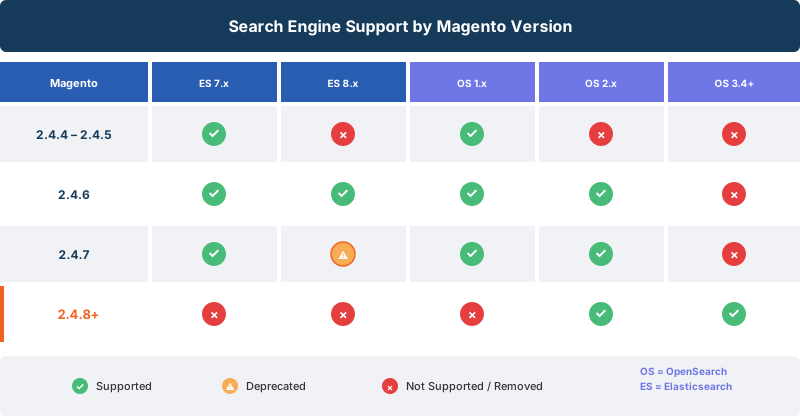
| Magento Version | Elasticsearch 7.x | Elasticsearch 8.x | OpenSearch 1.x | OpenSearch 2.x | OpenSearch 3.4+ |
|---|---|---|---|---|---|
| 2.4.4 - 2.4.5 | Supported | Not supported | Supported | Not supported | Not supported |
| 2.4.6 | Supported | Supported | Supported | Supported | Not supported |
| 2.4.7 | Supported | Supported (deprecated) | Supported | Supported | Not supported |
| 2.4.8+ | Removed | Removed | Not supported | Supported | Supported |
The migration deadline is clear. Stores planning to upgrade to Magento 2.4.8 must switch to OpenSearch. Elasticsearch is not an option. Adobe removed all Elasticsearch engine options from the admin panel in 2.4.8.
For stores on Magento 2.4.6 or 2.4.7, OpenSearch works as a drop-in replacement. The migration path is straightforward because Magento's search abstraction layer treats both engines with the same interface.
Why Use AWS OpenSearch Service for Magento
AWS OpenSearch Service eliminates the operational overhead of running your own search cluster. Here is what it provides for Magento stores hosted on AWS.
| Feature | What It Means for Your Store |
|---|---|
| Managed Infrastructure | AWS handles patching, backups, and node replacement. No search engine maintenance on your end. |
| Auto-Scaling | Scale data nodes based on catalog size and query load. Handle traffic spikes during sales events without manual intervention. |
| Multi-AZ Deployment | Replicate data across availability zones. Your search stays available even if an entire data center goes offline. |
| VPC Integration | Run OpenSearch inside your private network. No public internet exposure for search data. |
| CloudWatch Monitoring | Track cluster health, query latency, and indexing throughput with native AWS monitoring. |
| Encryption | Data encrypted at rest (AES-256) and in transit (TLS). Meets PCI DSS requirements for e-commerce data. |
| Snapshot Backups | Automated hourly snapshots stored in S3. Restore to any point in time within the 14-day retention window. |
The managed service costs more per hour than self-hosted OpenSearch. But it eliminates the need for a dedicated DevOps engineer to maintain the search cluster. For most Magento stores, the tradeoff favors the managed service.
How to Set Up AWS OpenSearch Service for Magento 2
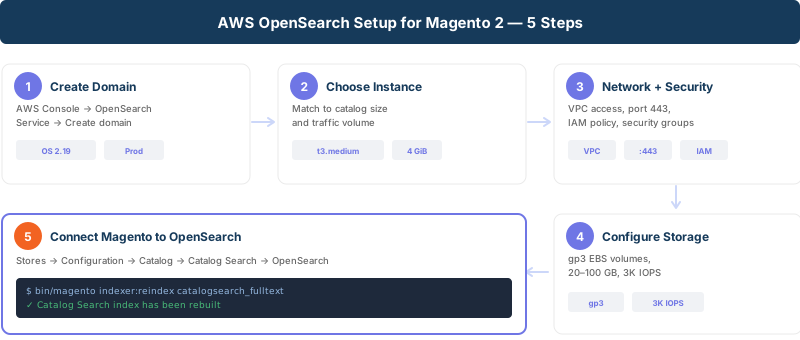
Step 1: Create an OpenSearch Domain
Open the AWS Console and navigate to Amazon OpenSearch Service. Click "Create domain" and configure:
-
Domain name: Use a descriptive name like
magento-search-prod - Engine version: OpenSearch 2.19 (for Magento 2.4.8 compatibility)
- Deployment type: Production for live stores, Development for staging
Step 2: Choose Instance Types
| Store Size | Recommended Instance | vCPU | RAM | Cost (On-Demand) |
|---|---|---|---|---|
| Small (under 10K products) | t3.small.search | 2 | 2 GiB | $0.036/hr (~$26/month) |
| Medium (10K-100K products) | t3.medium.search | 2 | 4 GiB | $0.073/hr (~$53/month) |
| Large (100K+ products) | m6g.large.search | 2 | 8 GiB | $0.128/hr (~$92/month) |
| High-Traffic | m6g.xlarge.search | 4 | 16 GiB | $0.256/hr (~$184/month) |
Prices shown for US East (N. Virginia). Costs vary by region.
For production stores, enable Multi-AZ with Standby which doubles the instance count but ensures zero-downtime failover.
Step 3: Configure Network and Security
- VPC access (recommended): Place the domain in the same VPC as your Magento hosting infrastructure. This keeps search traffic internal and reduces latency.
- Security groups: Allow inbound TCP port 443 from your Magento application servers only.
- IAM access policy: Restrict domain access to your application's IAM role.
Step 4: Configure Storage
EBS storage is the default for most instance types:
- Volume type: gp3 (General Purpose SSD)
- Size: Start with 20 GB for small catalogs, 100 GB for large catalogs
- IOPS: Default 3,000 IOPS handles most Magento workloads
Step 5: Wait for Domain Creation
AWS provisions the domain in 15 to 30 minutes. Note the Domain endpoint URL once the status shows "Active." You need this for Magento configuration.
Configuring OpenSearch in the Magento Admin Panel
Once your AWS OpenSearch domain is active, connect Magento to it.
- Navigate to search settings: Stores > Configuration > Catalog > Catalog Search
- Select search engine: Choose "OpenSearch" from the dropdown
-
Enter connection details:
-
Server Hostname: Your AWS OpenSearch domain endpoint (without
https://) - Server Port: 443 (AWS OpenSearch uses HTTPS on port 443, not the default 9200)
-
Index Prefix: A lowercase identifier like
magento2_prod. OpenSearch itself accepts mixed-case prefixes, but Magento enforces lowercase since version 2.4.7-p7. Use lowercase from the start to avoid reindexing issues during upgrades.
-
Server Hostname: Your AWS OpenSearch domain endpoint (without
- Enable HTTP Auth if your domain uses fine-grained access control
- Click "Test Connection" to verify connectivity
- Save Configuration
After saving, reindex the catalog search index:
bin/magento indexer:reindex catalogsearch_fulltext
Then flush the cache:
bin/magento cache:flush
Verify search works by searching for a product on the storefront. Check the OpenSearch domain's CloudWatch metrics to confirm queries are hitting the cluster.
Migrating from Elasticsearch to OpenSearch on AWS
If your store runs Elasticsearch and you plan to upgrade to Magento 2.4.8, migration is required. The good news: Magento handles most of the work.
Migration Steps
- Create a new AWS OpenSearch domain following the setup steps above
- Update Magento configuration to point to the new OpenSearch endpoint (Stores > Configuration > Catalog > Catalog Search)
- Change the search engine dropdown from "Elasticsearch 7" or "Elasticsearch 8" to "OpenSearch"
-
Reindex catalog search:
bin/magento indexer:reindex catalogsearch_fulltext - Verify search on the storefront
- Decommission the old Elasticsearch cluster once confirmed
No data migration is needed. Magento rebuilds all search indexes from the database during reindexing. The old Elasticsearch indexes are not transferred. This makes the migration clean and risk-free.
Common Migration Pitfalls
- Port mismatch: AWS OpenSearch uses port 443 (HTTPS), not 9200. Update the port in Magento configuration.
- Index prefix case: Magento 2.4.7-p7 and later enforce lowercase index prefixes. If your old prefix used uppercase characters, choose a new lowercase prefix.
- VPC routing: Ensure your Magento servers can reach the new OpenSearch domain. Check security groups and network configuration.
- DNS resolution: AWS OpenSearch endpoints use long DNS names. Verify DNS resolution works from your application servers.
AWS OpenSearch Pricing for Magento Stores
AWS OpenSearch Service pricing has three components: compute, storage, and data transfer.
Compute Costs
| Instance | vCPU | RAM | On-Demand/hr | Monthly (est.) | Reserved 1-yr |
|---|---|---|---|---|---|
| t3.small.search | 2 | 2 GiB | $0.036 | ~$26 | N/A |
| t3.medium.search | 2 | 4 GiB | $0.073 | ~$53 | ~$44 |
| m6g.large.search | 2 | 8 GiB | $0.128 | ~$92 | ~$64 |
| m6g.xlarge.search | 4 | 16 GiB | $0.256 | ~$184 | ~$129 |
US East (N. Virginia) pricing. Multi-AZ doubles compute cost. Reserved = 1-yr No Upfront.
Storage Costs
- gp3 EBS: $0.122 per GB/month
- Provisioned IOPS: $0.008 per IOPS/month beyond the 3,000 free IOPS baseline
Free Tier
AWS includes OpenSearch in the free tier for new accounts:
- 750 instance-hours per month on t3.small.search (single-AZ)
- 10 GB of EBS storage per month
- Valid for 12 months
Database Savings Plans (New: March 2026)
AWS announced Database Savings Plans support for OpenSearch Service in March 2026. Commit to consistent usage for one year and save up to 35% compared to on-demand pricing.
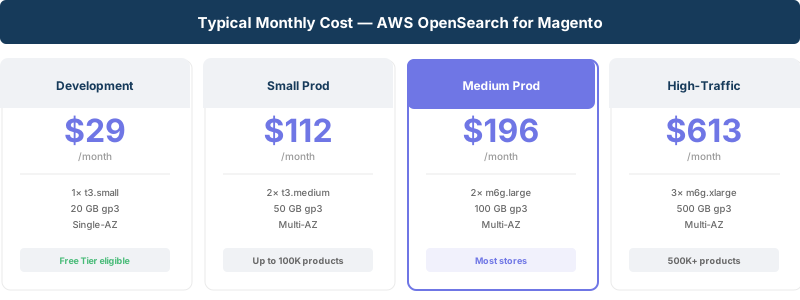
Typical Monthly Cost for Magento
| Setup | Configuration | Est. Monthly Cost |
|---|---|---|
| Development/Staging | 1x t3.small, 20 GB gp3, single-AZ | ~$29 |
| Small Production | 2x t3.medium, 50 GB gp3, Multi-AZ | ~$112 |
| Medium Production | 2x m6g.large, 100 GB gp3, Multi-AZ | ~$196 |
| Large/High-Traffic | 3x m6g.xlarge, 500 GB gp3, Multi-AZ | ~$613 |
Best Practices for OpenSearch Performance
Index and Search Optimization
- Set shard count based on data size. One shard per 10-50 GB of data. Over-sharding degrades performance.
- Use aliases for zero-downtime reindexing. Create a new index, reindex into it, then swap the alias.
- Configure refresh intervals. The default 1-second refresh interval works for most stores. Increase it during bulk imports for faster indexing.
Hardware Sizing
- JVM heap: AWS manages this for managed instances. For self-hosted, set heap to 50% of available RAM (max 32 GB).
- Storage throughput: Use gp3 volumes for consistent performance. Avoid gp2 for production workloads with large catalogs.
- Dedicated master nodes: Enable for clusters with 3+ data nodes. Use c6g.large.search for monitoring and cluster coordination.
Security Hardening
- VPC-only access. Never expose OpenSearch domains to the public internet.
- Fine-grained access control. Create separate IAM roles for Magento read/write and admin operations.
- Encryption everywhere. Enable encryption at rest and enforce HTTPS for all connections.
- Audit logging. Enable audit logs to CloudWatch for compliance tracking.
Backup Strategy
- Automated snapshots: AWS creates hourly snapshots and retains them for 14 days (configurable).
- Manual snapshots: Create manual snapshots to S3 before major changes like Magento upgrades or cache configuration changes.
- Cross-region replication: For disaster recovery, replicate snapshots to a second AWS region.
Troubleshooting Common OpenSearch Issues
| Issue | Cause | Solution |
|---|---|---|
| Connection refused | Wrong port or security group blocking traffic | Use port 443 for AWS OpenSearch (not 9200). Check security group allows inbound from Magento servers. |
| Cluster status RED | Unassigned primary shards, often from storage full | Check EBS volume usage. Increase storage or delete old indexes. |
| Cluster status YELLOW | Unassigned replica shards (common in single-node setups) | Add a second node or accept YELLOW for dev environments. |
| Slow search queries | Large result sets, missing index optimization | Reduce returned fields, use filters instead of queries, check shard count. |
| Reindex takes hours | Large catalog with default settings | Increase refresh interval to 30s during reindex. Use parallel reindexing in Magento. |
| Index prefix error | Uppercase characters in prefix (Magento 2.4.7-p7+) | Change to lowercase prefix in admin. Reindex after changing. |
| JVM memory pressure > 80% | Instance too small for catalog size | Scale up to a larger instance type. Check for memory leaks in custom plugins. |
| Authentication failures | IAM policy mismatch or wrong credentials | Verify IAM role permissions. Check fine-grained access control users. |
Pros and Cons of AWS OpenSearch Service
| Pros | Cons |
|---|---|
| Zero maintenance for search infrastructure | Higher cost than self-hosted OpenSearch |
| Built-in Multi-AZ failover | Vendor lock-in to AWS ecosystem |
| Native integration with IAM, VPC, CloudWatch | Limited control over cluster internals |
| Automated backups and patching | Domain creation takes 15-30 minutes |
| Scales from small stores to enterprise catalogs | Cross-region replication costs extra |
FAQ
What search engine does Magento 2.4.8 require?
Magento 2.4.8 requires OpenSearch. Adobe removed Elasticsearch support in this version. Stores must migrate to OpenSearch 2.x or 3.4.0+ before upgrading.
Can I still use Elasticsearch with Magento 2.4.7?
Yes. Magento 2.4.7 supports Elasticsearch 7.x and 8.x alongside OpenSearch. However, Elasticsearch is deprecated in 2.4.7. Plan your migration to OpenSearch before upgrading to 2.4.8.
How much does AWS OpenSearch cost for a Magento store?
A small production setup with Multi-AZ runs about $112 per month (2x t3.medium instances + 50 GB storage). Development environments cost around $29 per month. AWS also offers a 12-month free tier with t3.small instances.
Do I need to transfer data when migrating from Elasticsearch to OpenSearch?
No. Magento rebuilds all search indexes from the database during reindexing. Point Magento to the new OpenSearch domain, change the search engine setting, and run bin/magento indexer:reindex catalogsearch_fulltext. No data migration is needed.
What instance type should I choose for my Magento store?
Start with t3.medium.search (4 GiB RAM) for stores with up to 100K products. Stores with larger catalogs or high query volumes should use m6g.large.search or larger. Monitor JVM memory pressure in CloudWatch and scale up if it stays above 75%.
Should I use VPC or public access for OpenSearch?
VPC access. Public access exposes your search domain to the internet. VPC access keeps all traffic internal, reduces latency, and meets security compliance requirements for e-commerce stores.
How long does migration from Elasticsearch to OpenSearch take?
The configuration change takes minutes. Reindexing depends on catalog size: stores with under 50K products finish in under 10 minutes. Stores with 500K+ products may need 30 to 60 minutes. Plan for a maintenance window during off-peak hours.
What is the difference between OpenSearch and Elasticsearch for Magento?
Both engines use the same core search technology (forked from Elasticsearch 7.10.2). OpenSearch is open-source under the Apache 2.0 license. Elasticsearch switched to a proprietary license in 2021. For Magento, they function the same way. The admin panel configuration is identical except for the engine dropdown selection.
Conclusion
AWS OpenSearch Service is the standard search engine for Magento 2.4.8 and later. The managed service eliminates infrastructure overhead while providing the search performance production stores need.
For stores still running Elasticsearch, the migration path is clean. Create a new OpenSearch domain, update the Magento configuration, reindex, and verify. No data transfer, no downtime, no risk.
The investment starts at $29 per month for development and scales with your catalog. Combined with managed Magento hosting on AWS, OpenSearch delivers fast search, automatic failover, and zero maintenance for your search infrastructure.
