

Magento 2 AWS Elasticsearch Integration: OpenSearch Migration Guide
[Updated: March 20, 2026]
AWS renamed its Elasticsearch Service to Amazon OpenSearch Service in September 2021. Magento 2.4.8 no longer supports Elasticsearch. If your store still runs on the old service, you need to migrate.
This guide covers the full picture: what changed, how to set up Amazon OpenSearch Service for Magento 2, migration steps from Elasticsearch, troubleshooting, and AWS pricing.
Key Takeaways
-
AWS Elasticsearch Service became Amazon OpenSearch Service in September 2021. All new deployments should use OpenSearch.
-
Magento 2.4.8 is optimized for OpenSearch 2.19. Elasticsearch 8 is deprecated and no longer supported by Adobe.
-
Adobe Commerce on Cloud uses OpenSearch as the sole search engine. Elasticsearch is no longer an option for cloud deployments.
-
Migration from Elasticsearch to OpenSearch requires snapshot and restore, reindexing, and Magento Admin reconfiguration.
-
Managed Magento hosting providers handle search engine configuration, updates, and migration without store owner involvement.
What is Amazon OpenSearch Service?
Amazon OpenSearch Service = the successor to AWS Elasticsearch Service, renamed in September 2021. It runs OpenSearch (an open source fork of Elasticsearch 7.10) as a managed search and analytics service on AWS.
Perfect for: Magento stores on AWS needing managed search, teams without dedicated Elasticsearch expertise, high traffic stores requiring auto-scaling search clusters.
Not ideal for: Stores on non-AWS infrastructure, small stores where native MySQL/MariaDB search is sufficient.
Amazon OpenSearch Service deploys, operates, and scales OpenSearch clusters in the AWS cloud. The service handles node provisioning, patching, backups, and monitoring.
For Magento 2 stores, OpenSearch powers catalog search, faceted navigation, autocomplete, and product filtering. It replaces the older MySQL full-text search that Magento used before version 2.4.
The rename from Elasticsearch to OpenSearch changed the service name and API endpoints, but the core search functionality remains compatible. Existing Elasticsearch 7.x configurations work with OpenSearch 1.x through a compatibility mode that reports the cluster version as 7.10.
Magento 2.4.8 Search Engine Requirements
Magento 2.4.8 marks a clear break from Elasticsearch. Adobe no longer supports Elasticsearch and recommends OpenSearch for all deployments.
| Magento Version | OpenSearch | Elasticsearch | Notes |
|---|---|---|---|
| 2.4.8 | 2.x (optimized for 2.19) | Deprecated, no longer supported | ES modules deprecated in codebase |
| 2.4.8-p2+ | 2.x, 3.x | Deprecated, no longer supported | OpenSearch 3 support added |
| Commerce Cloud | 2.x | Not available | OpenSearch is the sole option |
All Elasticsearch 7 and 8 modules carry deprecation notices in the Magento 2.4.8 codebase. When you select Elasticsearch in the Admin, Magento displays a warning: "This search engine option is no longer supported by Adobe."
Adobe Commerce on Cloud dropped Elasticsearch entirely. Cloud deployments run OpenSearch with no alternative. On-premises installations can still load Elasticsearch 8 modules, but Adobe provides no support, bug fixes, or security patches for them.
Bottom line: New Magento 2 installations must use OpenSearch. Existing stores on Elasticsearch should migrate to OpenSearch now.
How to Set Up AWS OpenSearch for Magento 2
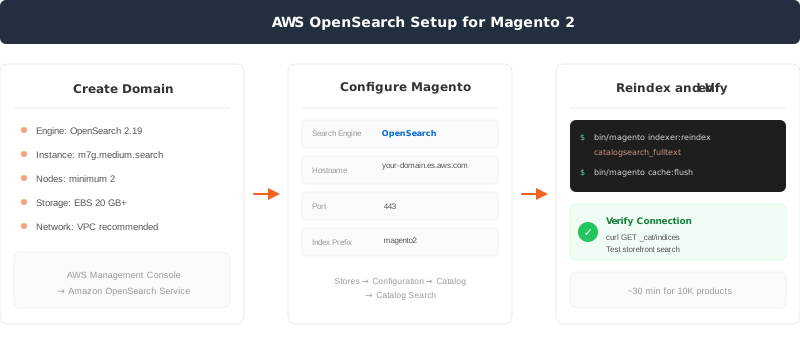
Step 1: Create an OpenSearch Domain in AWS
Log into the AWS Management Console and navigate to Amazon OpenSearch Service. Create a new domain with these settings:
- Engine version: OpenSearch 2.19 for Magento 2.4.8 (or 3.x for 2.4.8-p2+; AWS supports up to OpenSearch 3.5 as of March 2026)
-
Instance type:
m7g.medium.searchfor small stores,m7g.large.searchfor production - Number of nodes: Minimum 2 for high availability
- Storage: EBS with 20 GB minimum (scale based on catalog size)
- Network: VPC access recommended for security
Set the access policy to allow connections from your Magento server on AWS. Use a security group that permits inbound traffic on port 443 (HTTPS) from your Magento application servers.
Step 2: Configure Magento to Use OpenSearch
In the Magento Admin, navigate to Stores > Configuration > Catalog > Catalog Search.
Update these fields:
- Search Engine: OpenSearch
-
OpenSearch Server Hostname: Your AWS OpenSearch domain endpoint (without
https://) - OpenSearch Server Port: 443 (for AWS managed service)
-
OpenSearch Index Prefix:
magento2(or your preferred prefix) - Enable OpenSearch HTTP Auth: No (AWS handles authentication through IAM)
Save the configuration.
Step 3: Reindex and Verify
Run the catalog search reindex from the command line:
bin/magento indexer:reindex catalogsearch_fulltext
bin/magento cache:flush
Verify the connection by querying your OpenSearch domain:
curl -XGET "https://your-domain.us-east-1.es.amazonaws.com/_cat/indices/*?v=true"
You should see Magento indices listed. Test a product search in your storefront to confirm results appear.
How to Migrate from Elasticsearch to OpenSearch on AWS
If your store runs on the old AWS Elasticsearch Service, migration requires these steps.
Test in staging first. API endpoints change after migration (e.g., Kibana moves from /_plugin/kibana to /_dashboards). Elasticsearch-specific analyzers or custom plugins may need adjustments under OpenSearch.
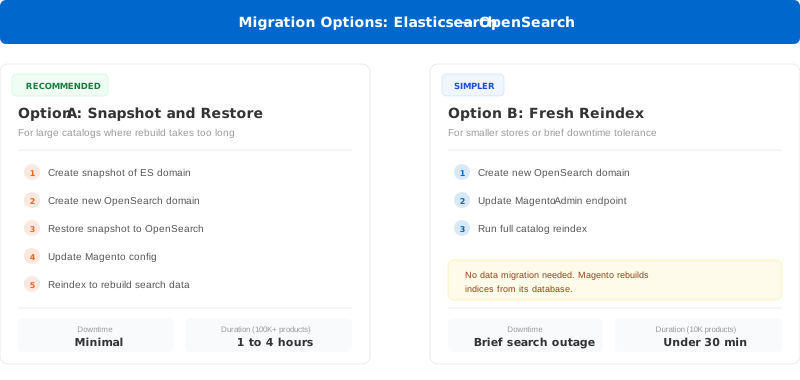
Option A: Snapshot and Restore (Recommended)
This approach works for stores with large catalogs where recreating indices takes too long.
- Create a snapshot of your current Elasticsearch domain
- Create a new OpenSearch domain (see setup steps above)
- Restore the snapshot to the new OpenSearch domain
- Update Magento configuration to point to the new endpoint
- Reindex to rebuild search data under OpenSearch
AWS provides the Migration Assistant for Amazon OpenSearch Service to automate this process.
Option B: Fresh Reindex (Simpler)
For smaller stores or stores that can tolerate brief search downtime:
- Create a new OpenSearch domain on AWS
- Update Magento Admin with the new OpenSearch endpoint
- Run full reindex:
bin/magento indexer:reindex catalogsearch_fulltext
bin/magento cache:flush
This rebuilds all search indices from scratch on OpenSearch. No data migration needed because Magento regenerates the indices from its database.
What Changes After Migration
| Component | Before (Elasticsearch) | After (OpenSearch) |
|---|---|---|
| Dashboards URL | /_plugin/kibana |
/_dashboards |
| API version | 2015-01-01 |
2021-01-01 |
| Instance naming | m5.large.elasticsearch |
m5.large.search |
| CloudWatch metrics | ElasticsearchRequests |
OpenSearchRequests |
Update any monitoring dashboards, CloudWatch alarms, or IAM policies that reference the old naming conventions. AWS redirects the old Kibana endpoint, but update your bookmarks and scripts to use the new paths.
Troubleshooting Magento 2 OpenSearch Integration
Connection Refused or Timeout
Cause: Security group or VPC configuration blocks traffic between Magento and OpenSearch.
Fix: Verify your OpenSearch domain's security group allows inbound traffic on port 443 from your Magento server's security group or IP range. For VPC domains, confirm both resources share the same VPC or have proper peering.
Indices Not Created After Reindex
Cause: Magento cannot authenticate with the OpenSearch domain.
Fix: Check the access policy on your OpenSearch domain. For VPC-based domains, use an IP-based or IAM-based access policy. Run bin/magento indexer:status to check for errors.
Search Returns No Results
Cause: Index prefix mismatch between Magento configuration and OpenSearch.
Fix: Verify the index prefix in Stores > Configuration > Catalog > Catalog Search matches what exists on your OpenSearch domain. Run curl -XGET "https://your-endpoint/_cat/indices/*?v=true" to list current indices.
Slow Search Performance
Cause: Undersized OpenSearch instances or missing index optimization.
Fix: Check CloudWatch metrics for CPU and memory usage on your OpenSearch nodes. Scale up the instance type or add nodes. Consider enabling search settings optimization in Magento for better query performance.
Elasticsearch Deprecation Warning in Magento Admin
Cause: Magento 2.4.8 flags Elasticsearch as deprecated.
Fix: This warning confirms you should migrate to OpenSearch. Follow the migration steps in this guide. The warning does not affect current functionality but signals that future Magento versions will remove Elasticsearch support.
Version Compatibility Errors
Cause: OpenSearch version does not match Magento requirements.
Fix: Magento 2.4.8 requires OpenSearch 2.x (optimized for 2.19). Version 2.4.8-p2 adds OpenSearch 3.x support. Check your Elasticsearch configuration guide and upgrade the OpenSearch domain if needed.
AWS OpenSearch Pricing Overview
Amazon OpenSearch Service charges based on three factors: compute instances, storage, and data transfer. Prices below reflect US East (N. Virginia) as of March 2026. Check the current AWS pricing page for your region.
| Component | Pricing (US East, 2026) | Notes |
|---|---|---|
| m7g.medium.search | ~$0.068/hour | Good for small stores |
| m7g.large.search | ~$0.136/hour | Production workloads |
| m7g.xlarge.search | ~$0.271/hour | High traffic stores |
| EBS Storage | $0.122/GB/month | Standard SSD |
| S3 Remote Storage | $0.024/GB/month | Cold storage option |
Cost saving options:
- Reserved Instances: 1 or 3 year commitments with savings over on-demand pricing
- Database Savings Plans: Up to 35% savings with hourly commitment (available since March 2026)
- OpenSearch Serverless: Pay-per-use option for variable traffic patterns
A typical Magento store with 10,000 products runs well on two m7g.medium.search nodes. That costs about $100/month for compute plus storage. Larger catalogs with 100,000+ products need larger instances and more storage.
Alternative: Managed Magento hosting includes search engine configuration and management as part of the hosting package. No separate AWS OpenSearch costs or configuration needed.
Pros and Cons of AWS OpenSearch for Magento 2
FAQ
What is the difference between AWS Elasticsearch and Amazon OpenSearch Service?
Amazon OpenSearch Service is the renamed successor to AWS Elasticsearch Service. AWS made this change in September 2021 when Elasticsearch changed its license. OpenSearch is an open source fork of Elasticsearch 7.10 maintained by AWS. The core search functionality remains the same.
Does Magento 2.4.8 still support Elasticsearch?
Elasticsearch 8 modules exist in the codebase but Adobe marks them as deprecated and no longer supported. Adobe Commerce on Cloud dropped Elasticsearch. All Elasticsearch modules in the Magento 2.4.8 codebase carry deprecation notices. Migrate to OpenSearch to maintain support and security updates.
Which OpenSearch version should I use with Magento 2?
Use OpenSearch 2.19 for Magento 2.4.8. Adobe confirms 2.4.8 is optimized for this version. If you run Magento 2.4.8-p2 or later, OpenSearch 3.x is also supported. AWS offers up to OpenSearch 3.5 as of March 2026.
How long does migration from Elasticsearch to OpenSearch take?
Fresh reindex migration takes minutes to hours depending on catalog size. A store with 10,000 products completes reindexing in under 30 minutes. Snapshot and restore migration for large catalogs (100,000+ products) takes 1 to 4 hours including verification.
Can I use OpenSearch Serverless with Magento 2?
OpenSearch Serverless is designed for variable workloads and eliminates cluster management. However, Magento 2 requires a persistent connection endpoint. Test compatibility with your Magento version before deploying serverless in production.
What happens if I do not migrate from Elasticsearch?
Your store continues to function on Elasticsearch 8, but you receive deprecation warnings in the Magento Admin. Future Magento releases will remove Elasticsearch support. Adobe provides no bug fixes or security patches for deprecated Elasticsearch modules.
How much does AWS OpenSearch cost for a Magento store?
A small to medium Magento store runs on two m7g.medium.search nodes for about $100/month. Large stores with extensive catalogs and high traffic need $200 to $500/month depending on instance size and storage. Reserved Instances reduce costs by up to 35%.
Do I need to change my Magento code when switching to OpenSearch?
No code changes are needed. Magento handles the switch through Admin configuration. Update the search engine dropdown to OpenSearch, enter the new endpoint, and reindex. The Magento search API layer abstracts the underlying engine.
Summary
AWS Elasticsearch Service no longer exists. Amazon OpenSearch Service replaced it in 2021, and Magento 2.4.8 no longer supports Elasticsearch. The migration path is straightforward: create an OpenSearch domain, update your Magento configuration, and reindex.
For stores on AWS, OpenSearch delivers the same search capabilities with continued support and active development. Pricing starts around $100/month for a production-ready two-node cluster.
The simplest path is hosting that includes search engine management where the provider handles OpenSearch setup, scaling, and maintenance as part of the package.
