

Magento 2 Elasticsearch vs MySQL: Why MySQL Search Was Removed
[Updated: March 24, 2026]
Searching for a Magento 2 Elasticsearch vs MySQL comparison? Adobe removed MySQL as a search engine in Magento 2.4.0 back in 2020. Elasticsearch became mandatory. Now, with Magento 2.4.8, even Elasticsearch is deprecated in favor of OpenSearch.
This guide covers the full evolution, why MySQL was removed, and what your store needs in 2026.
Key Takeaways
-
MySQL search was removed in Magento 2.4.0 (July 2020). It is not a viable option for any current Magento store.
-
Elasticsearch served as the required search engine from version 2.4.0 through 2.4.7.
-
OpenSearch 2.19 is now the required search engine in Magento 2.4.8. Elasticsearch 7 and 8 are deprecated.
-
OpenSearch is a fork of Elasticsearch 7.10 and works almost the same way. Migration requires minimal effort.
-
Search engine choice affects server resource needs. Managed hosting handles the infrastructure complexity for you.
Quick Answer
Magento 2 Elasticsearch vs MySQL = MySQL search no longer exists in Magento 2.4+. Adobe removed it in 2020 and made Elasticsearch mandatory. As of Magento 2.4.8, OpenSearch replaces Elasticsearch as the supported search engine.
You need OpenSearch if: Running Magento 2.4.8 or planning to upgrade.
Elasticsearch still works if: Running Magento 2.4.4 through 2.4.7 (but deprecated).
The Evolution of Magento Search Engines
Magento search technology went through three distinct phases. Understanding this timeline explains why the "Elasticsearch vs MySQL" comparison no longer applies.
Phase 1: MySQL Search (Magento 1.x through 2.3.x)
MySQL handled all search queries through basic full-text matching. It scanned database tables row by row to find products matching a search term. This approach worked for small catalogs but degraded fast as stores grew beyond 10,000 SKUs.
MySQL search had no support for typo correction, autocomplete, synonym matching, or relevance scoring. Customers who misspelled a product name got zero results. Stores with large catalogs experienced slow search responses that hurt conversion rates.
Phase 2: Elasticsearch (Magento 2.4.0 through 2.4.7)
Adobe made Magento 2 Elasticsearch mandatory in version 2.4.0, released July 2020. MySQL search was removed from the codebase. Every store upgrading to 2.4.0 or later needed Elasticsearch running as a separate service.
This shift delivered measurable improvements: inverted indexing for sub-second search responses, fuzzy matching for typo tolerance, autocomplete suggestions, and relevance-based result scoring.
Phase 3: OpenSearch (Magento 2.4.4+ and Required in 2.4.8)
When Elastic changed its licensing in 2021, Amazon forked Elasticsearch 7.10 into OpenSearch under the Apache 2.0 license. Adobe adopted OpenSearch as the default search engine starting with Magento 2.4.4.
In Magento 2.4.8, Adobe deprecated all Elasticsearch 7 and 8 modules. The Admin panel now labels Elasticsearch options as "(Deprecated)" and displays a warning to switch to OpenSearch. The system requirements for 2.4.8 specify OpenSearch 2.19 and 3 as supported versions.
Why Adobe Removed MySQL Search
Adobe had clear technical reasons to drop MySQL as a search engine.
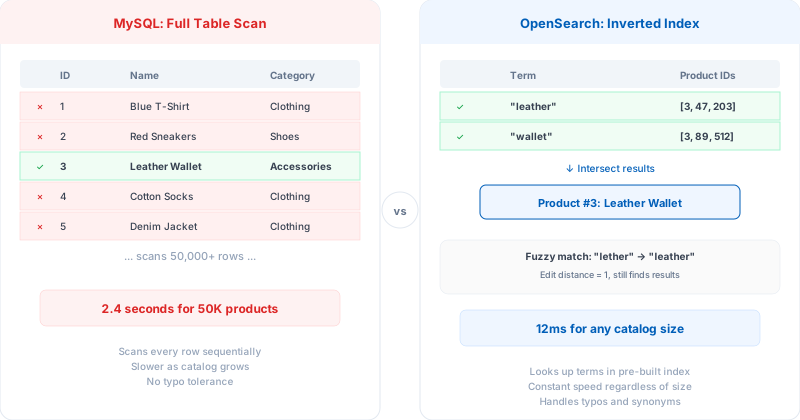
Scaling limits. MySQL full-text search performs sequential table scans. With 50,000+ products, search queries took seconds instead of milliseconds. Adding product attributes or complex filters made performance worse.
No advanced search features. MySQL matched exact keywords only. It could not handle misspellings, partial matches, or synonym recognition. A customer searching "runnig shoes" instead of "running shoes" got empty results.
Architecture mismatch. Modern ecommerce search requires a dedicated search index separate from the transactional database. Running search queries against the same MySQL instance that handles orders, inventory, and customer sessions created resource contention.
Industry standard. Dedicated search engines became the norm across all major ecommerce platforms. Keeping MySQL search meant maintaining legacy code that served a shrinking user base.
How Elasticsearch and OpenSearch Work in Magento
Both Elasticsearch and OpenSearch use the same core technology (OpenSearch forked from Elasticsearch 7.10). The fundamental architecture is identical.
Inverted Indexing
Instead of scanning every product row, the search engine builds an inverted index. This maps every word to the products containing it. Searching "leather wallet" looks up two index entries and intersects the results. Response time stays consistent whether the catalog has 1,000 or 1,000,000 products.
Fuzzy Matching
The search engine calculates edit distance between the search term and indexed terms. A query for "mageto" still returns results for "Magento" because the edit distance is 1. This catches common typos without manual configuration.
Relevance Scoring
Each search result receives a relevance score based on term frequency, field weights, and custom boost rules. Products where the search term appears in the title score higher than products where it appears only in the description. Store owners can customize these weights through the catalog search configuration.
Real-Time Indexing
Product changes (price updates, new items, stock changes) reflect in search results within seconds. MySQL search required manual reindexing or scheduled cron jobs, which meant search results could show outdated data for hours.
Elasticsearch vs MySQL: Historical Performance Comparison
For stores still on Magento 2.3.x considering an upgrade, this comparison shows why the migration to Elasticsearch delivers real value.
| Feature | MySQL Search (pre-2.4) | Elasticsearch/OpenSearch (2.4+) |
|---|---|---|
| Search speed | Degrades with catalog size. Seconds for 50K+ products | Sub-second for catalogs of any size |
| Typo handling | None. Exact match only | Fuzzy matching with configurable edit distance |
| Autocomplete | Not supported | Built-in with suggestion API |
| Synonym support | Not supported | Configurable synonym dictionaries |
| Relevance scoring | None. Results ordered by basic matching | TF-IDF scoring with custom field weights |
| Multilingual | Limited. No stemming or tokenization | Full linguistic analysis per language |
| Scalability | Single server only | Distributed clusters with horizontal scaling |
| Resource usage | Shared with transactional DB | Separate service with dedicated resources |
Magento Version and Search Engine Compatibility
This table shows which search engines work with each Magento version.
| Magento Version | MySQL Search | Elasticsearch | OpenSearch | Status |
|---|---|---|---|---|
| 2.3.x and earlier | Supported | Optional (ES 5.x, 6.x) | Not available | End of life |
| 2.4.0 through 2.4.3 | Removed | Required (ES 7.x) | Not available | End of life |
| 2.4.4 through 2.4.5 | Removed | Supported (ES 7.x) | Supported (OS 1.x, 2.x) | Security patches only |
| 2.4.6 through 2.4.7 | Removed | Supported (ES 7.x, 8.x) | Supported (OS 2.x) | Active support |
| 2.4.8 | Removed | Deprecated (ES 8.x) | Required (OS 2.19, 3) | Current release |
Source: Adobe Commerce System Requirements, March 2026
Current Stack for Magento 2.4.8
| Component | Supported Version |
|---|---|
| PHP | 8.3, 8.4 |
| MySQL | 8.4 |
| MariaDB | 11.4 |
| OpenSearch | 2.19, 3 |
| Elasticsearch | 8 (deprecated) |
How to Migrate from Elasticsearch to OpenSearch
The migration is straightforward because OpenSearch is API-compatible with Elasticsearch 7.x.
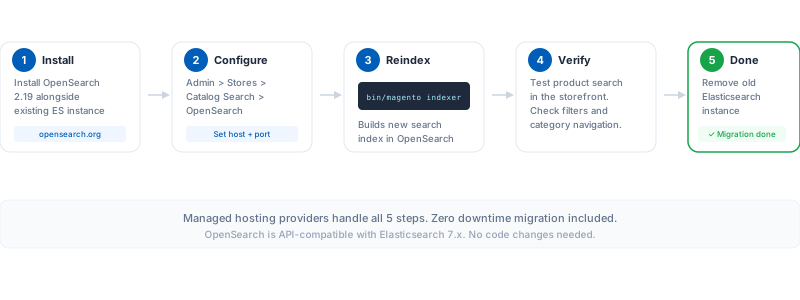
Step 1: Install OpenSearch 2.19 on your server alongside the existing Elasticsearch instance.
Step 2: Update Magento configuration. In Admin > Stores > Configuration > Catalog > Catalog Search, change the Search Engine from Elasticsearch to OpenSearch. Enter the OpenSearch host and port.
Step 3: Reindex. Run bin/magento indexer:reindex catalogsearch_fulltext to build the OpenSearch index.
Step 4: Verify search works by testing product searches in the storefront.
Step 5: Remove Elasticsearch after confirming OpenSearch works correct.
For stores on managed Magento hosting, the hosting provider handles the search engine infrastructure. This includes installation, configuration, resource allocation, and updates.
Server Requirements for Search Engines
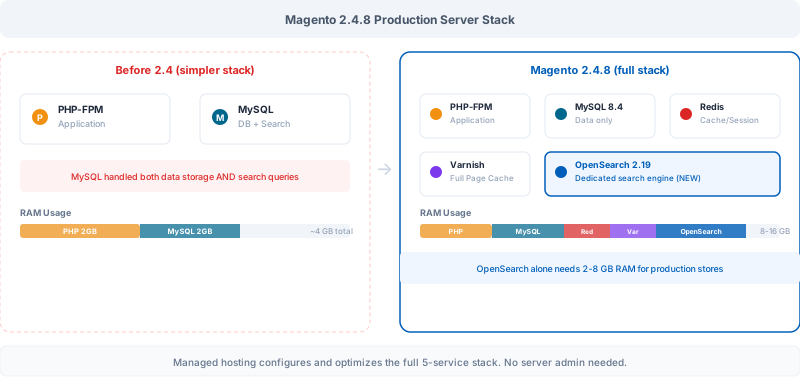
Running OpenSearch or Elasticsearch as a separate service adds resource requirements beyond what MySQL search needed.
Minimum Hardware
| Resource | MySQL Search (legacy) | OpenSearch/Elasticsearch |
|---|---|---|
| RAM | Shared with MySQL | 2 GB dedicated minimum, 4-8 GB for production |
| CPU | Shared with MySQL | 2+ dedicated cores |
| Disk | Shared with MySQL | SSD with space for search indices (varies by catalog size) |
| Network | Localhost only | Can run on separate nodes for scalable setups |
Why This Matters for Hosting
The separate search engine service is the main reason bare-minimum hosting plans struggle with Magento 2.4+. A store needs enough resources for PHP-FPM, MySQL/MariaDB, Redis, Varnish, AND OpenSearch running at the same time.
Budget shared hosting cannot handle this stack. Dedicated or cloud-based hosting with proper resource allocation is essential for stable search performance. This is where managed hosting providers add value: they configure and optimize the full stack, including the search engine, so store owners focus on selling products instead of tuning server configurations.
Troubleshooting Common Search Issues
OpenSearch Connection Errors
Verify OpenSearch is running: curl -X GET 'localhost:9200'. Check the host and port in Magento Admin match the running instance. Review firewall rules if OpenSearch runs on a separate server. Our OpenSearch error resolution guide covers specific error messages and fixes.
Outdated Search Results
Run a full reindex: bin/magento indexer:reindex catalogsearch_fulltext. Verify cron is running for incremental index updates. Check that product attributes are set to "Use in Search" in the attribute configuration.
Slow Search Performance
Monitor OpenSearch cluster health with curl -X GET 'localhost:9200/_cluster/health'. Allocate more heap memory if the JVM heap usage exceeds 75%. Consider moving OpenSearch to a dedicated node for stores with 100K+ products.
Pros and Cons of OpenSearch for Magento 2
FAQ
Is MySQL still a valid search engine for Magento 2?
No. Adobe removed MySQL search in Magento 2.4.0, released July 2020. All current Magento 2.4.x versions require either Elasticsearch or OpenSearch. Third-party extensions exist that re-enable MySQL search, but Adobe does not support this configuration.
What is the difference between Elasticsearch and OpenSearch?
OpenSearch is a fork of Elasticsearch 7.10, created by Amazon under the Apache 2.0 license. The core technology, APIs, and query syntax are almost identical. The main difference is licensing and long-term development direction. For Magento stores, they function the same way.
Which search engine does Magento 2.4.8 require?
Magento 2.4.8 supports OpenSearch 2.19 and OpenSearch 3. Elasticsearch 7 and 8 still work but are marked as deprecated in the Admin panel. Adobe recommends migrating to OpenSearch for continued support.
How much RAM does OpenSearch need for Magento?
Allocate a minimum of 2 GB for small stores. Production stores with 10,000+ products need 4 to 8 GB. Large catalogs with 100K+ products may need 16 GB or more. The JVM heap should be set to 50% of available RAM, never exceeding 32 GB.
Can I run Magento 2.4 without Elasticsearch or OpenSearch?
Not with the core installation. Magento 2.4+ requires a search engine service for catalog search and layered navigation to function. Without it, category pages and search results will not load. Third-party modules can substitute MySQL search, but this is unsupported by Adobe.
How do I check which search engine my Magento store uses?
Go to Admin > Stores > Configuration > Catalog > Catalog Search. The "Search Engine" dropdown shows the active engine. You can also check via CLI: bin/magento config:show catalog/search/engine.
Does switching from Elasticsearch to OpenSearch require reindexing?
Yes. After changing the search engine configuration, run bin/magento indexer:reindex catalogsearch_fulltext to build the new search index. The existing Elasticsearch index cannot be reused direct by OpenSearch.
What happens if I upgrade to Magento 2.4.8 with Elasticsearch?
Elasticsearch still works in 2.4.8 but the Admin panel shows deprecation warnings. Adobe will not fix Elasticsearch-specific bugs going forward. Plan your migration to OpenSearch before the next major release to avoid compatibility issues.
Summary
The Magento 2 Elasticsearch vs MySQL comparison is no longer relevant for current stores. MySQL search was removed in 2020 with Magento 2.4.0. Elasticsearch served as the mandatory engine through version 2.4.7. Now, OpenSearch 2.19 and 3 are the supported search engines for Magento 2.4.8.
For stores still on Magento 2.3.x, upgrading to 2.4.8 means adding OpenSearch to your server stack. This requires dedicated RAM, CPU, and proper configuration. Managed Magento hosting handles the full infrastructure, including OpenSearch setup and optimization, so your team focuses on growing the store instead of managing servers.
