

Magento System Requirements 2026: Complete Server Stack Guide
[Updated: March 30, 2026]
Running Magento on the wrong PHP version or database crashes your store. Every component in the stack has a specific version requirement that Adobe tests and supports.
This guide lists every requirement for Magento 2.4.8 and previews what 2.4.9 needs when it launches in May 2026.
Key Takeaways
- Magento 2.4.8 requires PHP 8.3 or 8.4, MySQL 8.4, and OpenSearch 2.19
- Elasticsearch is still supported but deprecated in favor of OpenSearch
- Valkey 8 replaces Redis as the recommended cache/session backend
- Minimum 4 GB RAM for production, 8 GB+ recommended
- 2.4.9 (May 2026) will require PHP 8.4/8.5 and drop MySQL 8.0
Quick Answer
Magento system requirements = PHP 8.3/8.4, MySQL 8.4 or MariaDB 11.4, OpenSearch 2.19, Valkey 8 or Redis 7.2, Varnish 7.6, Nginx 1.26, Composer 2.9.3+. Production stores need minimum 4 GB RAM and SSD storage.
Critical: PHP 8.1 and 8.2 are no longer supported. MySQL 8.0 works but 8.4 is recommended. Elasticsearch is deprecated.
Magento 2.4.8 System Requirements
This is the complete server stack for Magento 2.4.8-p4 (current stable release, March 2026).
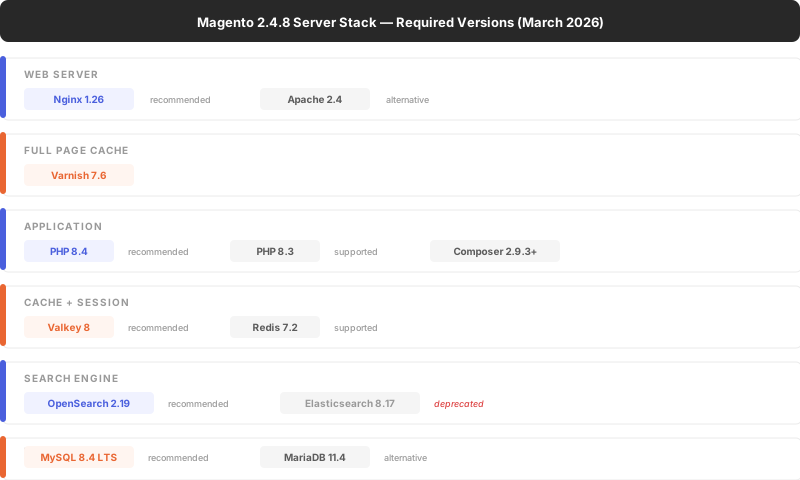
Source: Adobe Commerce System Requirements
Operating System
Magento runs on Linux x86-64 distributions:
- Ubuntu 22.04 LTS or 24.04 LTS (recommended for new setups)
- Debian 11 or 12
- Red Hat Enterprise Linux 8 or 9
- CentOS Stream 8 or 9
macOS works for local development but is not supported for production. Windows is not supported.
PHP Requirements
PHP 8.4 is the recommended version for Magento 2.4.8 production stores. PHP 8.3 is also supported.
Required PHP Extensions
bcmath, ctype, curl, dom, gd, hash, iconv, intl, mbstring,
openssl, pdo_mysql, simplexml, soap, xsl, zip, sockets,
xml, xmlreader, xmlwriter, libxml
Recommended php.ini Settings
| Setting | Value | Why |
|---|---|---|
memory_limit |
2G | Complex operations need headroom |
max_execution_time |
18000 | Reindexing and imports take time |
upload_max_filesize |
64M | Product image uploads |
realpath_cache_size |
10M | Reduces filesystem lookups |
opcache.memory_consumption |
512 | Bytecode caching for speed |
opcache.max_accelerated_files |
60000 | Magento has 60K+ PHP files |
PHP Version History
| Magento Version | PHP Versions |
|---|---|
| 2.4.8 (current) | 8.3, 8.4 |
| 2.4.7 | 8.2, 8.3 |
| 2.4.6 (EOL Aug 2026) | 8.1, 8.2 |
| 2.4.9 (beta, May GA) | 8.4, 8.5 |
Database Requirements
Magento 2.4.8 supports two database engines. Choose one.
MySQL 8.4 LTS (Recommended)
MySQL 8.4 is the Long-Term Support release. It receives security updates through April 2032.
Key settings for Magento:
[mysqld]
innodb_buffer_pool_size = 4G
innodb_log_file_size = 256M
innodb_thread_concurrency = 0
max_connections = 300
query_cache_type = 0
MariaDB 11.4
MariaDB 11.4 is the alternative for stores that prefer open-source licensing. It is fully compatible with Magento 2.4.8.
Database Version History
| Magento Version | MySQL | MariaDB |
|---|---|---|
| 2.4.8 | 8.4 | 11.4 |
| 2.4.7 | 8.0 | 10.6 |
| 2.4.6 | 8.0 | 10.6 |
| 2.4.9 (beta) | 8.4 | 11.4 |
MySQL 8.0 and MariaDB 10.6 are dropped in 2.4.9. Plan your database upgrade alongside the Magento upgrade.
Search Engine Requirements
Magento 2.4.8 requires a dedicated search engine for catalog search. The built-in MySQL search was removed in 2.4.0.
OpenSearch 2.19 (Recommended)
OpenSearch is the recommended search engine. It is the open-source fork of Elasticsearch maintained by AWS. Magento 2.4.8 supports OpenSearch 2.19.
Elasticsearch 8.17 (Deprecated)
Elasticsearch still works but Adobe deprecated it in favor of OpenSearch. New installations should use OpenSearch. Existing Elasticsearch setups continue working but will lose support in a future release.
For migration details, see our guide on configuring Magento search.
Cache and Session Requirements
Valkey 8 (Recommended)
Valkey is the community fork of Redis, maintained by the Linux Foundation. Magento 2.4.8 added Valkey 8 support. It is the recommended choice for new installations.
Redis 7.2
Redis 7.2 remains supported for cache, session storage, and page cache backends. Existing Redis setups work without changes.
Both Valkey and Redis handle three Magento backends:
| Backend | DB Index | Purpose |
|---|---|---|
| Default cache | 0 | Config, layout, block HTML |
| Page cache | 1 | Full page cache (if not using Varnish) |
| Session | 2 | Customer sessions |
Varnish 7.6
Varnish handles full page cache in front of Nginx/Apache. It serves cached pages without hitting PHP, reducing response times from seconds to milliseconds.
Magento ships a VCL (Varnish Configuration Language) file optimized for its cache invalidation patterns. Use it as your starting point.
Hardware Requirements
Hardware needs depend on catalog size, traffic, and extension count.
| Component | Minimum | Recommended | Enterprise |
|---|---|---|---|
| CPU | 2 cores | 4 cores | 8+ cores |
| RAM | 4 GB | 8 GB | 32 GB+ |
| Storage | 120 GB SSD | 240 GB NVMe | 500 GB+ NVMe |
| Network | 100 Mbps | 1 Gbps | 10 Gbps |
Real-world sizing for production:
- Small store (< 5K SKUs, < 1K daily orders): 4 cores, 8 GB RAM, 240 GB SSD
- Medium store (5-50K SKUs, 1-10K orders): 8 cores, 32 GB RAM, 500 GB NVMe
- Large store (50K+ SKUs, 10K+ orders): Multi-server setup with load balancing
Separate your web server and database server on dedicated machines for production. This distributes the workload and improves stability under load.
For stores that want right-sized infrastructure without managing servers, Magento managed hosting handles capacity planning, auto-scaling, and performance tuning.
SSL and Security Requirements
- TLS 1.2 or higher is mandatory. TLS 1.0 and 1.1 are not supported.
- A valid SSL certificate is required. Self-signed certificates are not supported for production.
- HTTPS is required for admin panel access and checkout.
Magento 2.4.9 Requirements Preview
Magento 2.4.9-beta1 launched March 10, 2026. GA is expected May 2026.
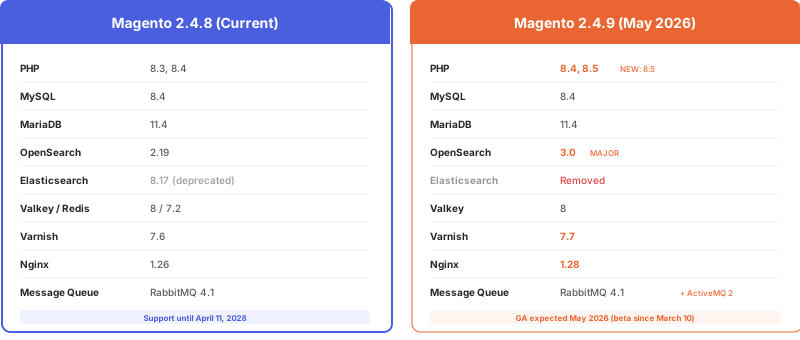
The biggest change: PHP 8.5 support and the framework modernization (Laminas → native PHP MVC, TinyMCE → HugeRTE, Zend_Cache → Symfony Cache). Check our Magento release schedule for all dates and details.
Common Requirement Mistakes
Using PHP 8.1 or 8.2 with 2.4.8: These versions are not supported. Extensions compiled for PHP 8.1 will break. Update PHP before upgrading Magento.
Running MySQL 5.7: Dropped since 2.4.4. Upgrade to MySQL 8.4 LTS.
Skipping OpenSearch/Elasticsearch: Magento 2.4+ has no built-in MySQL search. Without a search engine, catalog search breaks completely.
2 GB RAM for production: The minimum 2 GB is for development only. Production stores with extensions, cron jobs, and traffic need 8 GB+. Underpowered servers cause slow admin panels, failed reindexing, and checkout timeouts.
Using shared hosting: Magento requires dedicated resources. Shared hosting leads to performance issues, security risks, and limited control. Use dedicated Magento hosting or a VPS at minimum.
FAQ
What PHP version does Magento 2.4.8 need?
Magento 2.4.8 requires PHP 8.3 or 8.4. PHP 8.4 is recommended for production. PHP 8.1 and 8.2 are no longer supported on 2.4.8.
What database does Magento 2.4.8 use?
Magento 2.4.8 supports MySQL 8.4 LTS and MariaDB 11.4. MySQL 8.4 is recommended. MySQL 8.0 still works but 8.4 is the tested and supported version.
How much RAM does Magento need?
The absolute minimum is 2 GB for development. Production stores need 4 GB minimum, 8 GB recommended, and 32 GB+ for enterprise stores with large catalogs and high traffic.
Does Magento still support Elasticsearch?
Yes, Magento 2.4.8 supports Elasticsearch 8.17. But Adobe deprecated Elasticsearch in favor of OpenSearch. New installations should use OpenSearch 2.19. Elasticsearch support will be removed in a future release.
What is Valkey and do I need it?
Valkey is the community fork of Redis, maintained by the Linux Foundation after Redis changed its license. Magento 2.4.8 supports both Valkey 8 and Redis 7.2. For new setups, Valkey is recommended. Existing Redis installations continue working.
Can I run Magento on Windows?
No. Magento requires a Linux-based operating system for production. macOS works for local development. Windows is not a supported platform.
What web server should I use for Magento?
Nginx 1.26 is recommended over Apache 2.4. Nginx handles concurrent connections better and integrates with Varnish for full page caching. Most production Magento hosting uses Nginx.
What are the requirements for Magento 2.4.9?
Magento 2.4.9 (GA expected May 2026) requires PHP 8.4 or 8.5, MySQL 8.4, OpenSearch 3.0, and Varnish 7.7. PHP 8.3 support is dropped. The release includes framework modernization with native PHP MVC replacing Laminas.
Is shared hosting enough for Magento?
No. Magento needs dedicated CPU, RAM, and disk resources. Shared hosting causes performance issues, limits PHP configuration options, and creates security risks. Use a VPS or dedicated server at minimum.
How do I check my current Magento version?
Run bin/magento --version from the Magento root directory. Or check composer.json for the magento/product-community-edition or magento/product-enterprise-edition version number.
Conclusion
Magento 2.4.8 requires a modern server stack: PHP 8.4, MySQL 8.4, OpenSearch 2.19, and Valkey 8. Running outdated components causes security vulnerabilities, performance degradation, and compatibility failures.
Keep your stack current by checking requirements before every Magento upgrade. For stores that need their server stack managed and updated without downtime, Magento managed hosting keeps every component at the right version.
