

Magento Log Rotation: Prevent Disk Bloat and Server Crashes
[Updated: March 27, 2026]
Your Magento var/log/ directory hit 30 GB overnight. Backups fail, disk I/O tanks, and your store throws 500 errors. One missing logrotate config caused all of it.
This guide gives you the complete logrotate setup, cron automation, and Monolog 3 changes for Magento 2.4.8.
Key Takeaways
- Magento log files (
system.log,exception.log,debug.log) grow without limit and can fill your disk - Linux
logrotateis the standard tool for automated log rotation on self-hosted servers - Magento 2.4.8 upgraded to Monolog 3, which requires
LogRecordinstead ofarrayin custom handlers - Adobe Commerce Cloud handles log rotation built-in, but self-hosted servers need manual configuration
- Managed hosting providers handle log rotation for you as part of server maintenance
What Is Magento Log Rotation?
Magento log rotation = an automated process that archives, compresses, or deletes old log files to prevent disk space exhaustion. Without it, Magento log files grow until your server runs out of disk space.
Perfect for: Self-hosted Magento stores, DevOps teams managing VPS or dedicated servers, agencies maintaining client stores.
Not ideal for: Adobe Commerce Cloud users (built-in), stores on managed hosting (provider handles it).
Magento uses Monolog (PSR-3 compliant) to write log entries to files in the var/log/ directory. These files have no built-in size limit. A busy store with debug logging enabled can generate 1-5 GB of logs per week.
Log rotation solves this by compressing old logs and deleting archives older than a retention period. The standard Linux tool for this is logrotate, which ships pre-installed on most distributions.
Magento 2 Log File Types
Magento 2 writes to several log files. Each serves a different purpose.
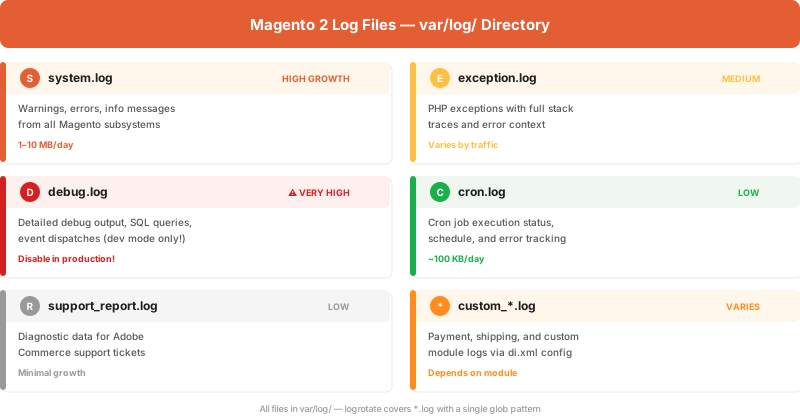
The biggest offenders are system.log and debug.log. A production store should never run with debug logging enabled. Check your app/etc/env.php:
// In app/etc/env.php — set to 0 in production
'system' => [
    'default' => [
        'dev' => [
            'debug' => [
                'debug_logging' => 0
            ]
        ]
    ]
]
Log Levels (RFC 5424)
Magento follows RFC 5424 severity levels through Monolog:
| Level | Constant | When Used |
|---|---|---|
| 600 | EMERGENCY | System is unusable |
| 550 | ALERT | Action must be taken now |
| 500 | CRITICAL | Critical conditions |
| 400 | ERROR | Runtime errors |
| 300 | WARNING | Exceptional occurrences |
| 250 | NOTICE | Normal but noteworthy |
| 200 | INFO | Informational messages |
| 100 | DEBUG | Detailed debug info |
Production stores should log WARNING (300) and above. Logging INFO or DEBUG in production generates massive log files with minimal value.
Complete Logrotate Configuration
Create a config file at /etc/logrotate.d/magento:
/var/www/magento/var/log/*.log {
    daily
    missingok
    rotate 30
    compress
    delaycompress
    notifempty
    size 50M
    dateext
    dateformat -%Y%m%d
    su www-data www-data
    create 640 www-data www-data
    olddir /var/www/magento/var/log/archive/
    sharedscripts
    postrotate
        # No service restart needed — Magento opens log files per-request
    endscript
}
Directive Reference
| Directive | Value | Purpose |
|---|---|---|
daily |
— | Rotate once per day |
missingok |
— | Skip without error if log file is missing |
rotate 30 |
30 | Keep 30 rotated files before deletion |
compress |
— | Compress rotated files with gzip |
delaycompress |
— | Skip compression for the most recent rotation |
notifempty |
— | Do not rotate empty files |
size 50M |
50M | Only rotate when file exceeds 50 MB |
dateext |
— | Add date to rotated filename instead of number |
su www-data www-data |
user group | Run as the web server user (match your setup) |
create 640 |
mode user group | Set permissions on new log file |
olddir |
path | Move rotated files to archive directory |
Create the archive directory before first run:
mkdir -p /var/www/magento/var/log/archive/
chown www-data:www-data /var/www/magento/var/log/archive/
Test Your Configuration
Dry-run (no changes made):
logrotate -d /etc/logrotate.d/magento
Force rotation (immediate):
logrotate -f /etc/logrotate.d/magento
Check the state file for last rotation timestamps:
cat /var/lib/logrotate/status | grep magento
Cron Automation
Most Linux distributions run logrotate via a daily cron job in /etc/cron.daily/logrotate. Verify this exists:
ls -la /etc/cron.daily/logrotate
If your Magento cron setup runs under a different user than root, you may need a separate cron entry:
# Run every 6 hours as www-data
0 */6 * * * /usr/sbin/logrotate -s /var/www/magento/var/log/logrotate.state /etc/logrotate.d/magento
The -s flag specifies a custom state file. This prevents conflicts with the system-wide logrotate state.
Monolog 3 in Magento 2.4.8
Magento 2.4.8 upgraded from Monolog 2.x to Monolog 3.x. This is a breaking change for custom log handlers.
What Changed
| Monolog 2.x | Monolog 3.x (2.4.8+) |
|---|---|
write(array $record) |
write(LogRecord $record) |
$record['message'] |
$record->message |
$record['context'] |
$record->context |
$record['level'] |
$record->level |
Update Your Custom Handlers
Before (Monolog 2.x):
use Monolog\Handler\AbstractProcessingHandler;

class CustomHandler extends AbstractProcessingHandler
{
    protected function write(array $record): void
    {
        $message = $record['message'];
        $level = $record['level'];
        // Custom logic
    }
}
After (Monolog 3.x / Magento 2.4.8+):
use Monolog\Handler\AbstractProcessingHandler;
use Monolog\LogRecord;

class CustomHandler extends AbstractProcessingHandler
{
    protected function write(LogRecord $record): void
    {
        $message = $record->message;
        $level = $record->level;
        // Custom logic
    }
}
If you need to support both Monolog 2 and 3 during migration, use $record->toArray() inside Monolog 3 handlers to get the old array format.
Custom Log Files with di.xml
Magento lets you create custom log files per module using virtual types in di.xml. This keeps module logs separate from the main Magento error handling output.
Virtual Type Approach
<!-- app/code/Vendor/Module/etc/di.xml -->

<!-- Step 1: Define the log file path -->
<virtualType name="Vendor\Module\Logger\Handler\Custom"
             type="Magento\Framework\Logger\Handler\Base">
    <arguments>
        <argument name="fileName" xsi:type="string">/var/log/vendor_module.log</argument>
    </arguments>
</virtualType>

<!-- Step 2: Create the logger with custom handler -->
<virtualType name="Vendor\Module\Logger\CustomLogger"
             type="Magento\Framework\Logger\Monolog">
    <arguments>
        <argument name="handlers" xsi:type="array">
            <item name="debug" xsi:type="object">Vendor\Module\Logger\Handler\Custom</item>
        </argument>
    </arguments>
</virtualType>

<!-- Step 3: Inject into your class -->
<type name="Vendor\Module\Model\MyService">
    <arguments>
        <argument name="logger" xsi:type="object">Vendor\Module\Logger\CustomLogger</argument>
    </arguments>
</type>
Your logrotate config already covers custom logs because it uses *.log as the glob pattern.
Disk Space Monitoring
Log rotation alone is not enough. Monitor your disk usage to catch problems before they cause outages.
CLI Commands
# Check var/log/ total size
du -sh /var/www/magento/var/log/

# Find largest log files
ls -lhS /var/www/magento/var/log/*.log | head -10

# Check disk usage percentage
df -h /var/www/magento/
Automated Alert
Add a cron job that sends an alert when var/log/ exceeds a threshold:
# Alert when log directory exceeds 1 GB
0 */4 * * * [ $(du -sm /var/www/magento/var/log/ | cut -f1) -gt 1024 ] && echo "Magento logs exceed 1GB" | mail -s "Log Alert" admin@example.com
Log Cleanup Commands
For immediate space recovery:
# Truncate (keep the file, clear content)
truncate -s 0 /var/www/magento/var/log/debug.log

# Remove old rotated files (older than 30 days)
find /var/www/magento/var/log/archive/ -name "*.gz" -mtime +30 -delete

# Check what logrotate would clean up
logrotate -d /etc/logrotate.d/magento 2>&1 | grep "rotating"
Never delete an active log file with rm. Use truncate instead. Deleting an open file causes Magento to lose the file handle, and no new logs get written until Apache/PHP-FPM restarts.
Self-Hosted vs Managed vs Cloud
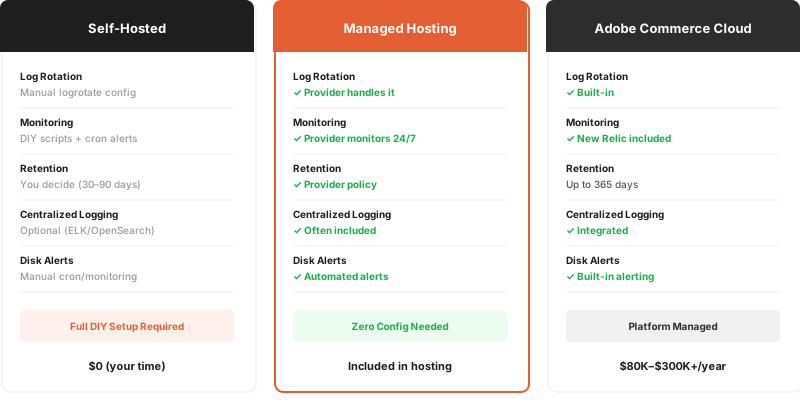
Self-hosted stores need the full logrotate setup described above. With managed Magento hosting, log rotation, monitoring, and alerting are part of the service.
Common Problems and Fixes
Logrotate Not Running
# Check if logrotate cron exists
cat /etc/cron.daily/logrotate

# Run manually with verbose output
logrotate -v /etc/logrotate.d/magento

# Check for config syntax errors
logrotate -d /etc/logrotate.d/magento
Permission Errors
The su directive in your logrotate config must match the web server user. Check which user owns the log files:
ls -la /var/www/magento/var/log/system.log
If the owner is www-data, your config needs su www-data www-data. If it is nginx, use su nginx nginx.
Logs Growing Between Rotations
If system.log grows faster than daily rotation can handle:
- Reduce log verbosity in production (disable DEBUG level)
- Lower the
sizethreshold to trigger rotation sooner (e.g.,size 10M) - Add more frequent cron runs (every 6 hours instead of daily)
- Check for extensions that log excessively, review your Magento log management setup
Debug Log Filling Disk
Disable debug logging in production:
bin/magento config:set dev/debug/debug_logging 0
bin/magento cache:clean config
truncate -s 0 var/log/debug.log
Centralized Logging (Advanced)
For multi-server setups or stores needing search across logs, consider centralized logging with OpenSearch (the search engine Magento 2.4.8 uses for catalog search).
A basic setup sends logs from each Magento server to a central OpenSearch cluster via Filebeat:
- Install Filebeat on each Magento server
- Configure Filebeat to watch
var/log/*.log - Ship logs to OpenSearch
- View and search logs in OpenSearch Dashboards
This approach replaces local log file analysis with real-time, searchable log aggregation. It also eliminates the need for SSH access to read logs.
FAQ
How often should I rotate Magento logs?
Daily rotation works for most stores. High-traffic stores generating over 100 MB of logs per day should rotate every 6-12 hours using a custom cron schedule.
What is the default log retention period?
There is no default. Magento does not rotate logs on its own. You must configure logrotate or a similar tool. A 30-day retention period balances disk usage with debugging needs.
Can I disable specific Magento log files?
Yes. Set the log level to EMERGENCY (600) for handlers you want to silence. You can also remove specific handlers from the logger configuration in di.xml. Disabling debug logging in production is recommended.
Does logrotate require a Magento restart?
No. Magento opens log files per-request through PHP-FPM. After logrotate moves the old file and creates a new one, the next PHP request writes to the new file. No restart of Apache, Nginx, or PHP-FPM is needed.
How do I check current log file sizes?
Run du -sh var/log/ for the total directory size, or ls -lhS var/log/*.log to list files sorted by size. Automate monitoring with a cron job that alerts when the directory exceeds your threshold.
What changed with logging in Magento 2.4.8?
Magento 2.4.8 upgraded to Monolog 3.x. Custom log handlers must change their write() method signature from array $record to LogRecord $record. Property access changes from $record['message'] to $record->message.
Should I compress rotated log files?
Yes. The compress directive in logrotate uses gzip, which reduces log file size by 80-90%. A 500 MB system.log compresses to about 50 MB. Use delaycompress to keep the most recent rotated file uncompressed for quick access.
How do I rotate logs on Adobe Commerce Cloud?
Adobe Commerce Cloud handles log rotation for you. Cloud logs are available through the CLI (magento-cloud log) with configurable retention up to 365 days. You do not need to configure logrotate on Cloud environments.
What happens if my disk fills up from logs?
Magento throws 500 errors because PHP cannot write to the session, cache, or log directories. Database operations may also fail if MySQL uses the same partition. This is a full outage scenario. Prevent it with disk monitoring and automated alerts.
Can I send Magento logs to an external service?
Yes. Use Filebeat, Fluentd, or rsyslog to ship logs to OpenSearch, Elasticsearch, or cloud logging services. This is the preferred approach for multi-server deployments where SSH access to each node for log analysis is not practical.
Conclusion
Magento log rotation is not optional for self-hosted stores. Without it, system.log and debug.log grow until your disk fills up and your store crashes. The logrotate config in this guide handles rotation, compression, and retention for all Magento log files.
For stores that want log management handled as part of their hosting, Magento managed hosting includes automated log rotation, disk monitoring, and alerting out of the box.
