

MySQL 8.0 End of Life: The Magento Store Upgrade Guide for April 2026
[Updated: April 21, 2026]
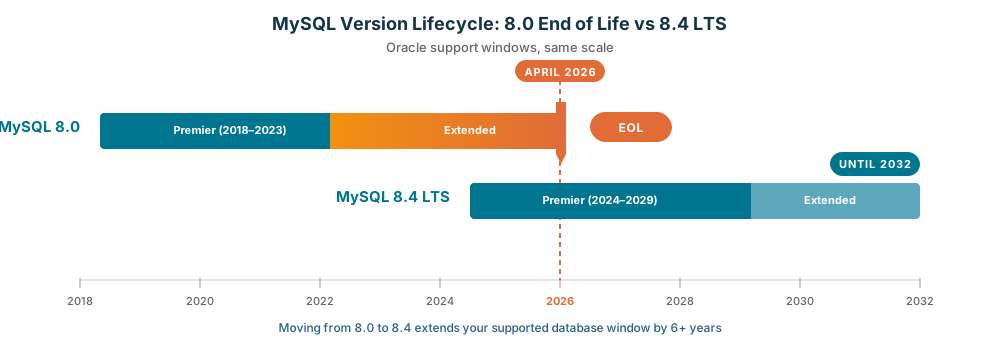
Oracle stops supporting MySQL 8.0 on April 30, 2026. That is nine days from now. Magento stores running version 2.4.7 or older still depend on it.
This guide shows which stores need to act, how to pick between MySQL 8.4 LTS and MariaDB 11.4, and what breaks after April 30.
Key Takeaways
- MySQL 8.0 reaches Oracle End of Life on April 30, 2026
- Magento 2.4.8 and 2.4.9 require MySQL 8.4 LTS or MariaDB 11.4
- Magento 2.4.4 through 2.4.7 users must upgrade the database before any Magento version jump
- PCI DSS 4.0.1 demands supported software for compliant stores
- MySQL 8.4 LTS has Oracle support through April 2032, MariaDB 11.4 through May 2029
- Managed hosting providers moved Magento customers to supported versions months ago
What MySQL 8.0 End of Life Means for Your Magento Store
MySQL 8.0 End of Life = Oracle stops releasing security patches and bug fixes after April 30, 2026. Magento stores on MySQL 8.0 lose compliance coverage and vendor patch support starting May 1.
Urgent for: Stores on Magento 2.4.4 through 2.4.7, stores under PCI DSS 4.0.1 audit, self-hosted stores without database DevOps coverage.
Not urgent for: Stores already on MySQL 8.4 or MariaDB 11.4, managed hosting customers whose provider upgraded them, pre-production dev environments.
What End of Life Means for MySQL 8.0
Oracle ends MySQL 8.0 extended support on April 30, 2026. After that date:
- No new security patches from Oracle
- No bug fixes for regressions or crashes
- No official technical support
- New CVEs stay unpatched for the community edition
- PCI DSS 4.0.1 auditors flag MySQL 8.0 as out of scope for compliant software inventory
The database keeps running after EOL. It does not stop. That is the trap. Your store works fine on April 30, May 1, and June 1. The risk compounds in the background.
Third party support exists. Percona offers Extended Lifecycle Support for MySQL 8.0 with patches for up to three years past Oracle's EOL. Costs vary by fleet size. For small merchants, the ELS subscription plus the eventual migration cost rarely beats a one-time upgrade to MySQL 8.4.
Magento Compatibility Matrix: Which Version Needs What
Adobe's supported database versions shift with each Magento release. Here is the current state as documented in the Magento 2.4.8 system requirements:
| Magento Version | MySQL Support | Action Needed |
|---|---|---|
| 2.4.4, 2.4.5 | MySQL 8.0.0 through 8.0.28 only | Double trouble: Magento EOL plus MySQL EOL. Upgrade both |
| 2.4.6 | MySQL 8.0 | Needs Magento and MySQL upgrade |
| 2.4.7 | MySQL 8.0 | Needs Magento and MySQL upgrade |
| 2.4.8 | MySQL 8.4 or MariaDB 11.4 | Safe. Confirm you are on 8.4, not 8.0 |
| 2.4.9 (beta) | MariaDB 11.4 (MySQL 8.4 expected at GA) | Safe, in beta testing |
Source: Adobe Commerce System Requirements
The worst spot is Magento 2.4.4. That version needs MySQL 8.0.0 through 8.0.28, a narrow window now out of support on both sides. Upgrading MySQL in place will not help because 2.4.4 does not know what to do with MySQL 8.4. You upgrade Magento first.
For the Magento path itself, our step-by-step Magento 2.4.8 upgrade guide covers the full process.
MySQL 8.4 LTS vs MariaDB 11.4: Decision Matrix for Magento
Both databases meet the Magento 2.4.8 requirement. Which one to pick depends on where you sit today. MariaDB 11.4 is the current LTS release from the MariaDB Foundation, supported through May 2029. MySQL 8.4 LTS runs on Oracle's eight-year support cycle.
| Decision Factor | MySQL 8.4 LTS | MariaDB 11.4 |
|---|---|---|
| Support window | Oracle through April 2032 | Foundation through May 2029 |
| Licensing | GPL with Oracle commercial option | GPL, open source |
| Cloud managed services | Amazon RDS, Cloud SQL, Azure Database for MySQL | Amazon RDS, managed MariaDB services |
| Migration from MySQL 8.0 | In-place minor upgrade possible | Requires dump plus import, config review |
| Replication topology | GTID based, well documented for MySQL fleets | Multi-source, parallel replication |
| Adobe testing coverage | Primary tested | Tested, less community coverage |
| Typical hosting support | Widespread | Widespread |
Pick MySQL 8.4 LTS when:
- You run MySQL 8.0 today (smoother upgrade path)
- You use Amazon RDS, Cloud SQL, or Azure Database for MySQL
- Your team has MySQL 8 tooling and monitoring in place
Pick MariaDB 11.4 when:
- You prefer a community-driven roadmap
- You want parallel replication for read-heavy stores
- You already run MariaDB on other properties
For a deeper performance look, see our database benchmark for Magento.
The MySQL 8.0 to 8.4 Upgrade Workflow for Magento
A safe upgrade runs through six stages. Skipping any of them is where stores lose data.
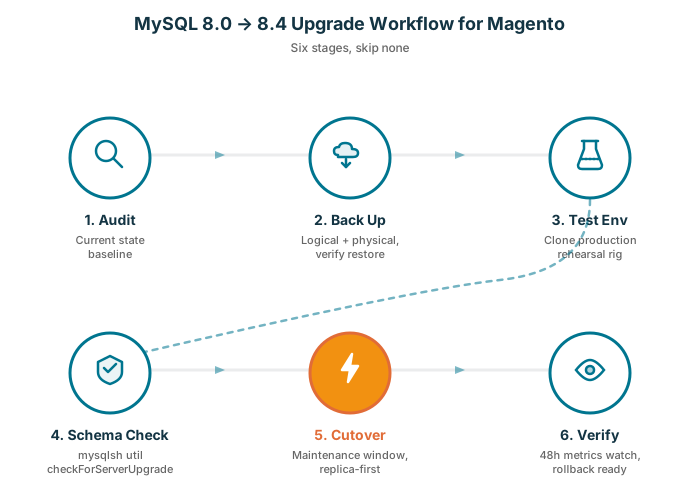
1. Audit Current State
Before touching anything, capture the baseline:
- MySQL version:
SELECT VERSION(); - Storage engine usage:
SELECT engine, COUNT(*) FROM information_schema.tables GROUP BY engine; - Stored procedures and triggers count
- User accounts and their authentication plugins
- Replication topology and lag
- Disk space, memory usage, queries per second baseline
Store this snapshot. It is your reference point for verification in step six.
2. Back Up Before Anything
Take two backups:
- Logical dump via
mysqldump --all-databases --single-transaction --routines --triggers - Physical backup via Percona XtraBackup or your cloud snapshot tool
Store both off the primary server. Verify restoration on a separate host before proceeding. A backup you have not tested is not a backup.
3. Build a Test Environment
Clone production to a non public host. Same Magento version, same MySQL 8.0 baseline. This is the rehearsal rig. You test the entire upgrade there before touching production.
4. Run Schema Compatibility Checks
MySQL ships a built-in upgrade checker. Run it on the test clone:
mysqlsh -- util checkForServerUpgrade root@localhost --targetVersion=8.4.0
The MySQL Shell upgrade checker flags reserved keyword collisions, removed features, and deprecated syntax. Fix each finding in your codebase and extension set before the production run.
5. Cutover in a Maintenance Window
With the test environment green, schedule the real cutover:
- Put Magento in maintenance mode:
bin/magento maintenance:enable - Take a final pre-upgrade backup
- Run the in-place upgrade to MySQL 8.4 on a standby replica first
- Fail over to the upgraded replica
- Upgrade the former primary as the new replica
- Run
bin/magento setup:upgradeif the Magento version also changed - Exit maintenance mode
6. Verify and Monitor
For 48 hours after cutover, watch:
- Error log volume on MySQL and PHP-FPM
- Magento 2 cron success rate
- Checkout completion rate (the canary metric)
- Replica lag
- Query latency for catalog search and cart operations
If any metric spikes, you have a rollback path because you kept the pre-upgrade backup from step two.
Common Gotchas When Upgrading Magento's MySQL
Four issues catch most Magento store operators off guard.
Authentication plugin change. MySQL 8.4 defaults to caching_sha2_password. Some older Magento connector configs expect mysql_native_password. Update app/etc/env.php or set the user auth plugin explicitly in the grant statement.
Collation defaults. MySQL 8.0 shipped utf8mb4_0900_ai_ci as the default. 8.4 adjusts subtle defaults for server variables. Run SHOW VARIABLES LIKE 'collation%' before and after, confirm no mismatch, and ensure app/etc/env.php specifies collation explicitly.
Reserved keywords. MySQL 8.4 reserved new keywords. If any Magento extension uses those as column or table names, queries fail. The mysql-shell upgrade checker catches this, but third party extension vendors can lag on updates.
Replication binlog format. GTID based replication from 8.0 to 8.4 works, but some master to replica configurations need the binary log format refreshed to ROW. Confirm with SHOW VARIABLES LIKE 'binlog_format' on both sides.
How Managed Magento Hosting Removes the Upgrade Pain
Here is the honest version: self-hosted stores own the MySQL 8.0 EOL problem. Every step above lands on the merchant's DevOps team, or an external consultant at $150 to $300 per hour.
Managed Magento hosting providers ran this upgrade across all customer stacks months ago. MGT Commerce moved customers to MySQL 8.4 LTS in 2025, aligned with the rollout of Magento 2.4.8 support. The upgrade was zero downtime, zero merchant effort, and zero emergency bills.
If you are reading this with nine days on the clock and a store on Magento 2.4.7 plus MySQL 8.0, there are two options. Either schedule an emergency upgrade sprint for your team, or move to managed Magento hosting that already handled the migration as part of stack maintenance.
For stores that want a managed database layer with automated patching, our Amazon RDS option abstracts the version mechanics away from your team entirely.
What Happens If You Wait Past April 30, 2026
Day 1: nothing visible. The store runs. MySQL 8.0 keeps serving queries. This is the silent period that fools most operators.
Week 2: the first post-EOL CVE disclosure lands. Community testers find issues. No patch from Oracle arrives.
Week 4: third party scanners flag your server as running out-of-support software. Payment processors begin sending compliance notices.
Month 3: a PCI DSS 4.0.1 audit in progress flags MySQL 8.0 as a finding. Remediation plan required within the audit cycle or your card processing status is at risk.
Month 6: extension vendors release updates compiled against MySQL 8.4 features. Some drop MySQL 8.0 compatibility. Your extension update cycle stalls.
Month 12: Magento 2.4.9 rolls to general availability. You cannot upgrade Magento without first upgrading MySQL. Your store freezes on the current version. Any future security patch demands a full database migration before it applies.
The risk curve bends up from month three onward.
FAQ
Is MySQL 8.0 safe to run after April 30, 2026?
It runs, but it is not safe in the compliance sense. No Oracle patches arrive for new CVEs. PCI DSS 4.0.1 flags unsupported databases. Third party extended support options exist via Percona, at a recurring cost.
Do I have to upgrade MySQL 8.0 if I am on Magento 2.4.7?
Yes, if you want to move to Magento 2.4.8 or 2.4.9. Both require MySQL 8.4 or MariaDB 11.4. You can stay on 2.4.7 with 8.0 for the remaining extended support window, but you then face Magento EOL and MySQL EOL pressure at the same time.
Can I upgrade MySQL 8.0 to 8.4 in place on Magento?
Yes, but only when the Magento version allows it. Magento 2.4.8 supports MySQL 8.4. For older Magento versions, you upgrade Magento first, then MySQL. Test in a non-production environment before the production cutover.
Is MariaDB 11.4 a drop-in replacement for MySQL 8.0 on Magento?
No. MariaDB 11.4 needs a dump-and-import migration from MySQL 8.0, plus a config review. The Magento code works with both, but the server-side switch requires planning around replication, user accounts, and authentication plugins.
What PHP version does Magento 2.4.8 require alongside MySQL 8.4?
Magento 2.4.8 supports PHP 8.3 and 8.4. Your upgrade plan coordinates PHP, MySQL, and Magento together, which is part of why the rollout takes longer than a MySQL-only upgrade.
What about MariaDB 10.6 users?
MariaDB 10.6 is dropped from Magento 2.4.8 support. Users on 10.6 move to MariaDB 11.4 on the same schedule as MySQL 8.0 to 8.4 users. The path is dump, review config, restore on 11.4.
Will Magento 2.4.9 support MySQL 8.4 at GA?
The 2.4.9 beta documentation lists MariaDB 11.4 in the system requirements. MySQL 8.4 support is expected at general availability. Adobe has not confirmed a specific GA date beyond "May 2026."
Is it cheaper to stay on MySQL 8.0 with Percona ELS than to migrate?
For small stores, rarely. Percona's Extended Lifecycle Support covers MySQL 8.0 past Oracle EOL, but the ongoing subscription plus the eventual migration cost (you still migrate one day) exceeds the one-time upgrade effort. ELS fits enterprise stores that need 12 plus months of extra runway for a complex migration window.
What is the downtime during a MySQL 8.0 to 8.4 upgrade?
With a replica-first cutover, downtime runs five to fifteen minutes on a mid-size Magento store. Without replicas, expect thirty to ninety minutes plus the full backup and restore window. Test the exact timing on your staging clone.
Does managed Magento hosting include MySQL version upgrades?
For providers that bundle server maintenance, yes. MGT Commerce handled MySQL 8.0 to 8.4 LTS for every customer as part of the 2.4.8 rollout cycle, at no extra charge and with no merchant action required.
Conclusion
MySQL 8.0 EOL on April 30, 2026 is a hard deadline, and most merchants discover it late. Stores on Magento 2.4.4 through 2.4.7 carry the biggest risk. Both MySQL 8.4 LTS and MariaDB 11.4 are valid targets, with the choice driven by cloud provider and team familiarity.
The upgrade itself is standard database work: audit, backup, test, cutover, verify. The failure mode is waiting, because the store keeps running even when it is no longer supported.
For stores that cannot absorb an emergency database upgrade sprint, managed Magento hosting already handled the transition. No merchant effort, no emergency consulting bills, no missed deadline.
