

Shopify To Magento 2 Migration: 7-Step Guide (2026)
[Updated: February 26, 2026]
Shopify caps your checkout, locks your code, and charges transaction fees on every sale. When your store outgrows those limits, a Shopify to Magento migration is the logical next step.
This guide covers 7 steps to migrate from Shopify to Magento, three migration methods, and what to watch out for. Updated for Magento 2.4.8 (stable until 2028) with current Shopify fees and plans.
Key Takeaways
- Transfer products, customers, orders, and content from Shopify to Magento 2.4.8 in 1 to 6 weeks (longer for complex stores).
- Choose between automated tools ($50 to $500), manual CSV migration (free), or agency-assisted ($3,000+).
- Plan 301 redirects for every URL before switching to preserve SEO rankings.
TL;DR
Shopify to Magento migration = transferring products, customers, orders, and content from a Shopify store to a new Magento 2 store. The process takes 1 to 6 weeks for most stores, up to several months for complex setups with custom features and theme rebuilds.
Perfect for: Growing stores hitting Shopify's customization limits, B2B sellers needing complex catalogs, multi-store operators, stores with 10,000+ SKUs.
Not ideal for: Small stores under 500 products with simple catalogs, teams without developer access, businesses happy with Shopify's built-in features.
Why Migrate from Shopify to Magento?
Shopify works well for small stores that need a quick launch. Once a store grows, the platform's limitations become blockers.
| Feature | Shopify | Magento 2 (2.4.8) |
|---|---|---|
| Custom Design | Limited template editing. Liquid templating restricts deep changes. | Full template control. Page Builder for drag-and-drop, custom themes for everything else. |
| Checkout | Locked. Shopify controls the checkout flow. Customization requires Shopify Plus ($2,000+/mo). | Open source. Full checkout customization without extra fees. |
| Third-Party Integration | App Store dependent. Limited API access on lower plans. | Extensive REST and GraphQL APIs. ERP, CRM, PIM integrations without restrictions. |
| Multi-Store | Requires separate Shopify subscriptions per store. | Run multiple stores, languages, and currencies from one installation. |
| Transaction Fees | 2.4% to 2.9% + $0.30 per transaction (Shopify Payments). Extra 0.5% to 2% on external gateways depending on plan. | Zero platform transaction fees. Pay only your payment processor. |
| B2B Features | Limited. Shopify Plus required for basic B2B. | Built-in B2B: custom pricing, quote management, company accounts, purchase orders. |
| Scalability | Shared infrastructure. Performance depends on Shopify's servers. | Dedicated infrastructure. Auto scaling on AWS handles traffic spikes. |
| Price | $29 to $399/mo (annual billing) + transaction fees + paid apps. | Open source (free). Managed Magento hosting from EUR 149/mo. |
Magento 2.4.8 (released April 2025) supports PHP 8.3 and 8.4, MySQL 8.4, and MariaDB 11.4. These updates make it the most stable and performant Magento release to date.
3 Ways to Migrate Shopify to Magento
1. Automated Migration Tools
Third-party migration tools handle the data transfer between platforms. They connect to both Shopify and Magento via API, map data fields, and run the migration.
Data transferred: Products, categories, customers, orders, reviews, CMS pages, blog posts (tool dependent).
Not transferred: Custom design, theme files, Shopify apps, shipping rules, tax configurations.
Cost: $50 to $500+ depending on data volume and entity types. Extra fees for blog posts, SEO URLs, and order history.
Best for: Stores with straightforward product catalogs and standard data structures.
2. Manual Migration
Export data from Shopify as CSV files and import into Magento using the built-in Data Import function.
Process:
- Export products, customers, and orders from Shopify Admin
- Download a Magento sample CSV from System > Data Transfer > Import
- Map Shopify fields to Magento format
- Import via Magento Admin or CLI
Cost: Free (your time only). Budget 20 to 40 hours for a medium store.
Best for: Small stores under 1,000 products with simple catalogs.
3. Agency-Assisted Migration
Hire a Magento development agency to handle the entire migration. They manage data transfer, design recreation, custom feature rebuilds, and SEO URL mapping.
Cost: $3,000 to $25,000+ depending on store complexity, custom features, and design requirements. Enterprise stores with 50,000+ SKUs and complex integrations can run $50,000+.
Timeline: 4 to 12 weeks for mid-size stores. Complex migrations with theme rebuilds and custom integrations can take 3 to 6 months.
Best for: Stores with custom Shopify apps, complex catalogs, or heavy customizations that need a 1:1 rebuild.
Shopify to Magento Migration: 7 Steps
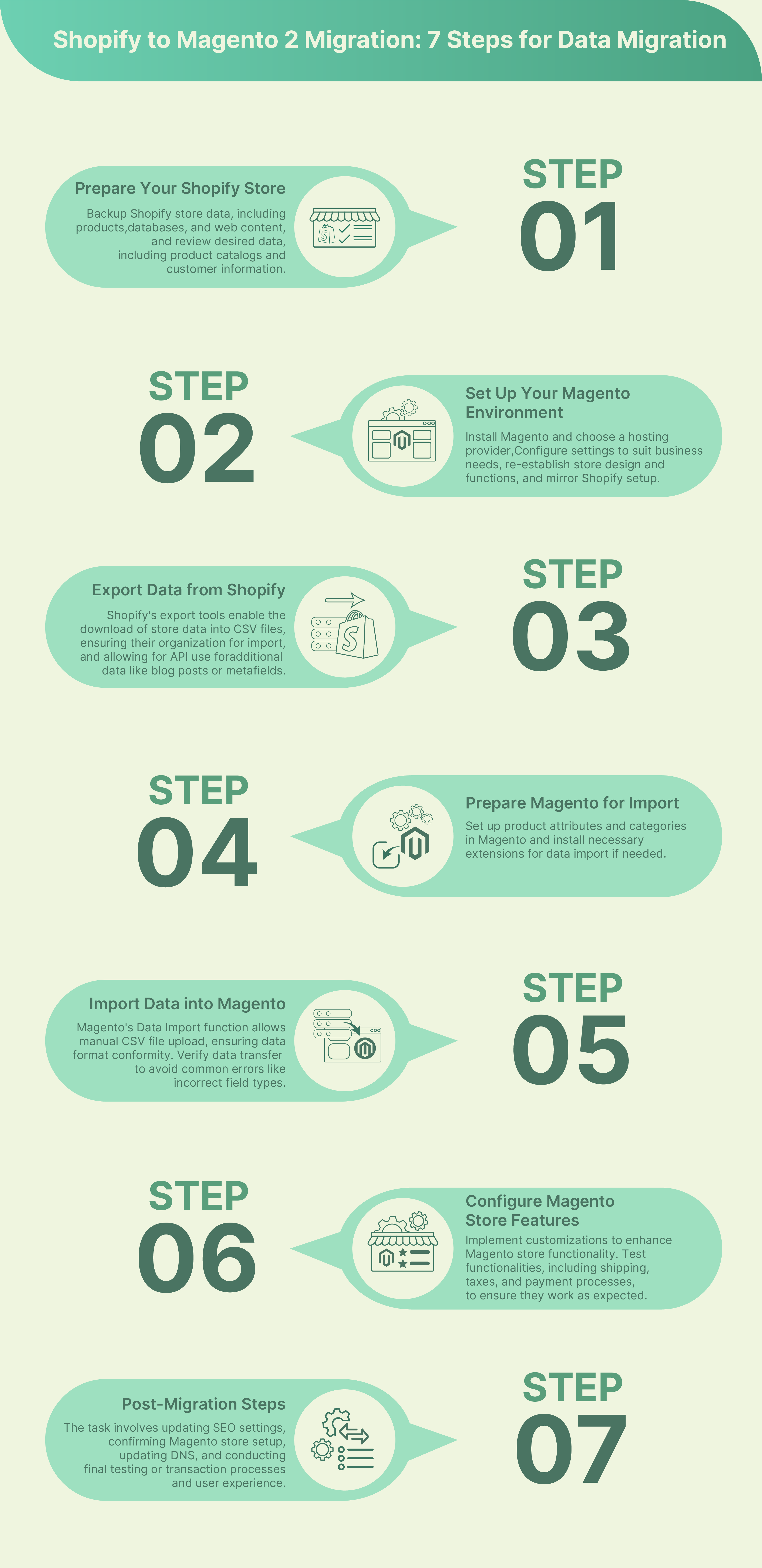
Step 1: Audit Your Shopify Store
Before migrating, document what you have:
- Products: Total count, variants, custom attributes, images
- Customers: Account count, addresses, order history
- Orders: Active orders, recurring subscriptions
- Content: Blog posts, CMS pages, FAQ pages
- Integrations: Payment gateways, shipping providers, ERP connections
- SEO data: URL structure, redirects, meta titles, canonical tags
Export a full backup from Shopify Admin > Settings > Data. Store this backup before making any changes.
Step 2: Set Up Your Magento Environment
Install Magento 2.4.8 on your server with PHP 8.3 or 8.4. Choose a hosting provider that matches your traffic needs.
Server requirements for Magento 2.4.8:
- PHP 8.3 or 8.4
- MySQL 8.4 or MariaDB 11.4
- Elasticsearch 8.x or OpenSearch 2.x
- Redis or Valkey for cache and sessions
- Minimum 4 GB RAM (16 GB+ recommended for production)
For a smooth migration, use managed Magento hosting (from EUR 149/mo) with pre-configured server stacks. This eliminates setup time and ensures Magento runs at peak performance from day one.
Configure basic store settings: base URLs, currency, locale, tax rules, and shipping methods.
Step 3: Export Data from Shopify
Use Shopify Admin to export your core data:
- Products: Settings > Export (CSV format)
- Customers: Customers > Export
- Orders: Orders > Export
For data not available through Shopify's export UI (blog posts, metafields, product reviews), use the Shopify Admin API. This requires a private app or API key with read access.
Organize all exported files in a single folder. Label each CSV with its content type and export date.
Step 4: Prepare Magento for Import
Before importing data, configure the receiving side:
- Attribute sets: Create product attributes that match your Shopify custom fields
- Categories: Build your category tree in Magento Admin > Catalog > Categories
- Customer groups: Set up customer groups if you use tiered pricing
- Tax classes: Configure tax rules for your regions
If using an automated migration tool, connect it to both platforms and run a test migration first. Most tools offer a free demo migration with a limited product count.
Step 5: Migrate Products and Customers
For automated tools:
- Select source (Shopify) and target (Magento)
- Choose entities to migrate (products, customers, orders)
- Map fields between platforms
- Run demo migration to verify
- Execute full migration
For manual CSV import:
- Open Magento Admin > System > Data Transfer > Import
- Select entity type (Products, Customers, etc.)
- Upload your mapped CSV file
- Click "Check Data" to validate
- Click "Import" to execute
Verify imported data: check product counts, image URLs, category assignments, and customer records. Fix any mapping errors before proceeding.
Step 6: Configure and Test Your Magento Store
After data migration, configure the operational side:
- Design: Install and configure your Magento theme
- Payment gateways: Set up Stripe, PayPal, or your preferred processor
- Shipping methods: Configure flat rate, table rates, or carrier-calculated shipping
- Email templates: Customize order confirmation, shipping notification, and account emails
- Extensions: Install required Magento extensions for features your store needs
Run a full test cycle:
- Place a test order from product page to confirmation email
- Test all payment methods
- Verify shipping calculations
- Check customer registration and login
- Test mobile responsiveness
Step 7: Go Live
The final steps before switching:
- SEO URL mapping: Create 301 redirects from old Shopify URLs to new Magento URLs. Map every product, category, and CMS page. Missing redirects lose SEO value and create 404 errors.
- DNS update: Point your domain to the new Magento server
- SSL certificate: Verify HTTPS works on all pages
- Monitoring: Set up uptime monitoring and error tracking
- Cache warming: Hit key pages to populate Full Page Cache before opening to traffic
Keep your Shopify store active for 48 to 72 hours after DNS switch. This covers DNS propagation delays and gives you a fallback.
What to Migrate: Complete Data Checklist
| Data Type | Shopify Export Method | Magento Import Method |
|---|---|---|
| Products (title, description, price, images, variants) | CSV export or API | Data Import or migration tool |
| Categories | API only | Manual setup or migration tool |
| Customers (name, email, addresses) | CSV export | Data Import |
| Orders (history, status) | API only | Migration tool or custom script |
| Blog posts | API only | Migration tool or manual |
| Product reviews | API (requires app) | Migration tool or extension |
| SEO URLs | Manual documentation | URL Rewrite module |
| Coupons and promotions | Manual documentation | Cart Price Rules |
Cannot be migrated: Shopify theme files, Shopify apps, Shopify-specific Liquid templates, Shopify Payments history, and any data stored in third-party Shopify apps.
Hosting for Your New Magento Store
Your Shopify store ran on Shopify's shared infrastructure. You had no control over server performance, caching, or scaling.
With Magento, you choose your own hosting. The right hosting provider makes the difference between a slow store and a fast one.
What to look for:
- PHP 8.3/8.4 support for Magento 2.4.8 compatibility
- Elasticsearch or OpenSearch pre-configured
- Redis or Valkey for cache and session storage
- Auto scaling for traffic spikes during sales events
- Full Page Cache with Varnish for sub-second page loads
- Automated backups to protect your data during and after migration
- 24/7 monitoring with proactive issue resolution
Managed Magento hosting on AWS handles all of this. Server setup, security patches, performance tuning, and scaling are included. You focus on your store, not your server.
Common Migration Mistakes
-
Skipping the demo migration. Run a test with 50 to 100 products before migrating everything. This catches field mapping errors early.
-
Forgetting SEO redirects. Every Shopify URL needs a 301 redirect to its Magento equivalent. Missing redirects tank your search rankings.
-
Ignoring password hashing. Shopify and Magento use different password hashing algorithms. Customers need to reset passwords after migration. Send a "set your new password" email before go-live. Offer an incentive (10% off the first order) to boost reset rates.
-
Migrating during peak traffic. Schedule your migration during low-traffic hours. Monday to Wednesday, early morning works best for most stores.
-
Not testing payment flows. Place real test orders with every payment method. A broken checkout on launch day costs sales and trust.
Real Migration Example
One e-commerce store with 8,000 SKUs and custom product configurators migrated from Shopify Plus to Magento Open Source in 5 weeks. The results after 90 days on Magento:
- +35% conversion rate from custom checkout flow (no longer locked behind Shopify Plus)
- $0 platform transaction fees (saved $4,200/month on a store doing $210k/month)
- Sub-2-second page loads on managed Magento hosting with Full Page Cache and auto scaling
The biggest challenge was the password reset. They offered a 10% welcome-back coupon and saw 72% of customers reset within the first week.
FAQ
How long does a Shopify to Magento migration take?
A small store (under 1,000 products) can migrate in 1 to 2 weeks. Medium stores (1,000 to 10,000 products) need 2 to 4 weeks. Large stores with custom features need 4 to 8 weeks. Enterprise stores with 50,000+ SKUs, custom integrations, and full theme rebuilds can take 3 to 6 months. Automated tools reduce the data transfer to hours, but configuration and testing add the most time.
How much does it cost to migrate from Shopify to Magento?
Manual migration is free but time-intensive. Automated tools cost $50 to $500. Agency-assisted migration runs $3,000 to $25,000+ depending on complexity. Budget an additional EUR 149 to 249/month for managed Magento hosting.
Will I lose my SEO rankings when migrating?
Not if you plan URL redirects before switching. Create 301 redirects from every Shopify URL to its Magento equivalent. Preserve meta titles, descriptions, and heading structures. Rankings can dip for 2 to 4 weeks during Google's re-crawl, then recover.
Can I migrate my Shopify blog posts to Magento?
Yes. Blog posts cannot be exported through Shopify's standard CSV export. Use the Shopify Admin API or a migration tool that supports blog content. Transfer titles, content, images, publication dates, and URL slugs.
Do customers need to create new accounts after migration?
Yes. Shopify's password hashing is incompatible with Magento. Customer email addresses and order history transfer, but passwords do not. Send a password reset email to all customers after migration. Most stores see 60% to 70% of customers reset their password within the first week.
What Shopify data cannot be migrated to Magento?
Shopify theme files, Liquid templates, Shopify-specific apps, and Shopify Payments transaction history cannot transfer to Magento. Gift card balances and loyalty points stored in Shopify apps also require manual recreation or a compatible Magento extension.
Is Magento 2.4.8 compatible with my current server?
Magento 2.4.8 requires PHP 8.3 or 8.4, MySQL 8.4 or MariaDB 11.4, and Elasticsearch 8.x or OpenSearch 2.x. Minimum 4 GB RAM for development, 16 GB+ for production. Managed hosting providers pre-configure all requirements.
Should I migrate to Magento Open Source or Adobe Commerce?
Magento Open Source is free and covers most B2C and small B2B use cases. Adobe Commerce adds B2B features (company accounts, shared catalogs, approval workflows), staging environments, and customer segmentation. Most Shopify migrations start with Open Source. Adobe Commerce makes sense at $500k+ annual revenue or complex B2B requirements with approval workflows and shared catalogs.
Can I run Shopify and Magento in parallel during migration?
Yes, and you should. Keep Shopify active until Magento is tested and DNS has propagated (48 to 72 hours). Set Shopify to maintenance mode or redirect traffic once Magento is confirmed stable.
How do I convert my Shopify store to Magento without downtime?
Build and test Magento on a staging domain while Shopify remains live. Migrate data during low-traffic hours. Switch DNS to the Magento server once testing is complete. The DNS change propagates in 4 to 48 hours. Use Shopify's redirect feature to forward early visitors during propagation.
Conclusion
Shopify to Magento migration opens up full control over your store's code, checkout, and infrastructure. The 7-step process (audit, setup, export, prepare, import, configure, go live) works for stores of any size.
Plan your URL redirects, run a demo migration, and test every payment flow before switching. The data transfer is the easy part. Getting the configuration right is what separates a smooth launch from a messy one.
Start your new Magento store on managed Magento hosting on AWS from EUR 149/mo. Server setup, auto scaling, security patches, and 24/7 monitoring included.
