

AWS Marketplace Magento: Deployment Options and Setup Guide
[Updated: March 20, 2026]
Deploying Magento on AWS through the Marketplace cuts setup time from days to minutes. Pick the wrong AMI or outdated stack, and you pay for it in performance and security.
This guide compares every active AWS Marketplace Magento offering in 2026, walks through deployment with the current 2.4.8 stack, and covers migration best practices.
Key Takeaways
- Bitnami ships Magento 2.4.8 with PHP 8.4 for free on AWS Marketplace
- aMiSTACX offers pre-optimized stacks at $0.049/hr with built-in performance modules
- Magento 2.4.8 requires PHP 8.3+, OpenSearch 2.19, and MySQL 8.4
- Graviton ARM instances cut AWS compute costs by 20 to 40 percent
- Managed hosting eliminates server overhead for teams without DevOps resources
What Is AWS Marketplace for Magento?
AWS Marketplace Magento = Pre-configured Magento server images and deployment stacks on the AWS Marketplace. Pick an offering, launch it, and get a running store in minutes instead of hours.
Perfect for: Store owners wanting fast AWS deployment, agencies managing multiple Magento instances, businesses migrating from shared hosting.
Not ideal for: Stores needing full managed support, teams with zero AWS experience, high-traffic stores requiring custom architecture from day one.
AWS Marketplace offers ready-to-deploy Magento images from multiple vendors. Each includes a pre-configured stack with the web server, database, PHP runtime, and caching layer installed.
The main advantage is speed. Instead of provisioning an EC2 instance, installing each component, and configuring Magento from scratch, you launch a single AMI and start building your store within minutes.
The trade-off: you own the server. Updates, security patches, scaling, and troubleshooting fall on your team. For stores that want this handled, managed Magento hosting removes that burden.
AWS Marketplace Magento Offerings Compared (2026)
Four main options exist on the AWS Marketplace for Magento deployments in 2026:
| Aspect | Bitnami Magento | aMiSTACX Magento | Flexa Serverless | BitStone Managed |
|---|---|---|---|---|
| Magento Version | 2.4.8 | 2.4.6-p3 | Custom (per scope) | 2.4.x (latest) |
| Pricing | Free (EC2 costs only) | $0.049/hr + EC2 costs | Custom quotes | Custom quotes |
| Stack | PHP 8.4, MariaDB, Apache | PHP 8.2, MySQL 8.0, Apache/Nginx | Aurora Serverless v2, ECS Fargate | EC2, RDS, ElastiCache, CloudFront |
| Deployment | 1-click AMI launch | CloudFormation stack (~28 min) | Serverless architecture | Managed provisioning |
| Key Modules | Standard Magento | StarFlare search, Ramjet FPC, S3 media | Auto-scaling, serverless | WAF, CI/CD, monitoring |
| Support | Community only | Email, chat, bot | 24/7 email, phone, chat | White-glove DevOps, Slack |
| Reviews | 3.4/5 (34 reviews) | 5/5 (1 review) | No reviews yet | No reviews yet |
| Best For | Dev/test, small stores | Mid-size stores needing performance | High-traffic, auto-scaling | Enterprise, hands-off management |
Source: AWS Marketplace, verified March 2026
Bitnami Magento
Bitnami ships the most current stack: Magento 2.4.8 on Debian 12 with PHP 8.4 and MariaDB. The package costs nothing beyond your EC2 instance. Setup takes under 10 minutes. SSL auto-configures through Let's Encrypt.
The downside: Bitnami images use a non-standard directory structure. Customizing the stack requires familiarity with their configuration paths. Mixed reviews (3.4 out of 5) reflect this learning curve.
aMiSTACX Magento
aMiSTACX provides CloudFormation-based deployments with proprietary performance modules. StarFlare handles catalog search. Ramjet accelerates full-page cache. The A51 dashboard adds AWS monitoring on top.
The stack runs Magento 2.4.6-p3 on PHP 8.2, which trails current 2.4.8 requirements. Upgrading to 2.4.8 requires manual effort after deployment. Pricing sits at $0.049 per hour plus EC2 infrastructure costs.
Flexa Serverless
Flexa takes a different approach. Instead of EC2 instances, it deploys Magento on Aurora Serverless v2 for the database and ECS Fargate for compute. This architecture handles hundreds of thousands of concurrent users without manual intervention.
No public pricing exists. All quotes are custom based on project scope.
BitStone Managed Hosting
BitStone wraps Magento in a managed AWS platform with automated provisioning, CI/CD pipelines, proactive monitoring, and 24/7 DevOps support through Slack channels.
This option suits enterprises that want AWS infrastructure without managing it. Custom pricing applies.
Magento 2.4.8 Tech Stack for AWS (2026)
Magento 2.4.8 (released April 2025) changed several stack components. Know these before choosing your deployment:
| Component | Required Version | Notes |
|---|---|---|
| PHP | 8.3 or 8.4 | PHP 8.1 and 8.2 no longer supported |
| MySQL | 8.4 | Or MariaDB 11.4 |
| OpenSearch | 2.19 | Elasticsearch 8.17 for existing setups only |
| Redis | 7.2 | Or Valkey 8 as alternative |
| Composer | 2.9.3+ | Required for installation |
| Nginx | 1.26 | Or Apache 2.4 |
| Varnish | 7.6 | Full-page cache |
| RabbitMQ | 4.1 | Message queue |
Source: Adobe Commerce System Requirements
PHP 8.1 and 8.2 support ended with this release. If your current stack runs PHP 8.2, upgrade before deploying 2.4.8.
10 Steps to Deploy Magento on AWS
Step 1: Create Your AWS Account
Sign up at the AWS website with a credit card for billing. New accounts qualify for the Free Tier with 12 months of select services at no charge.
Step 2: Select an EC2 Instance
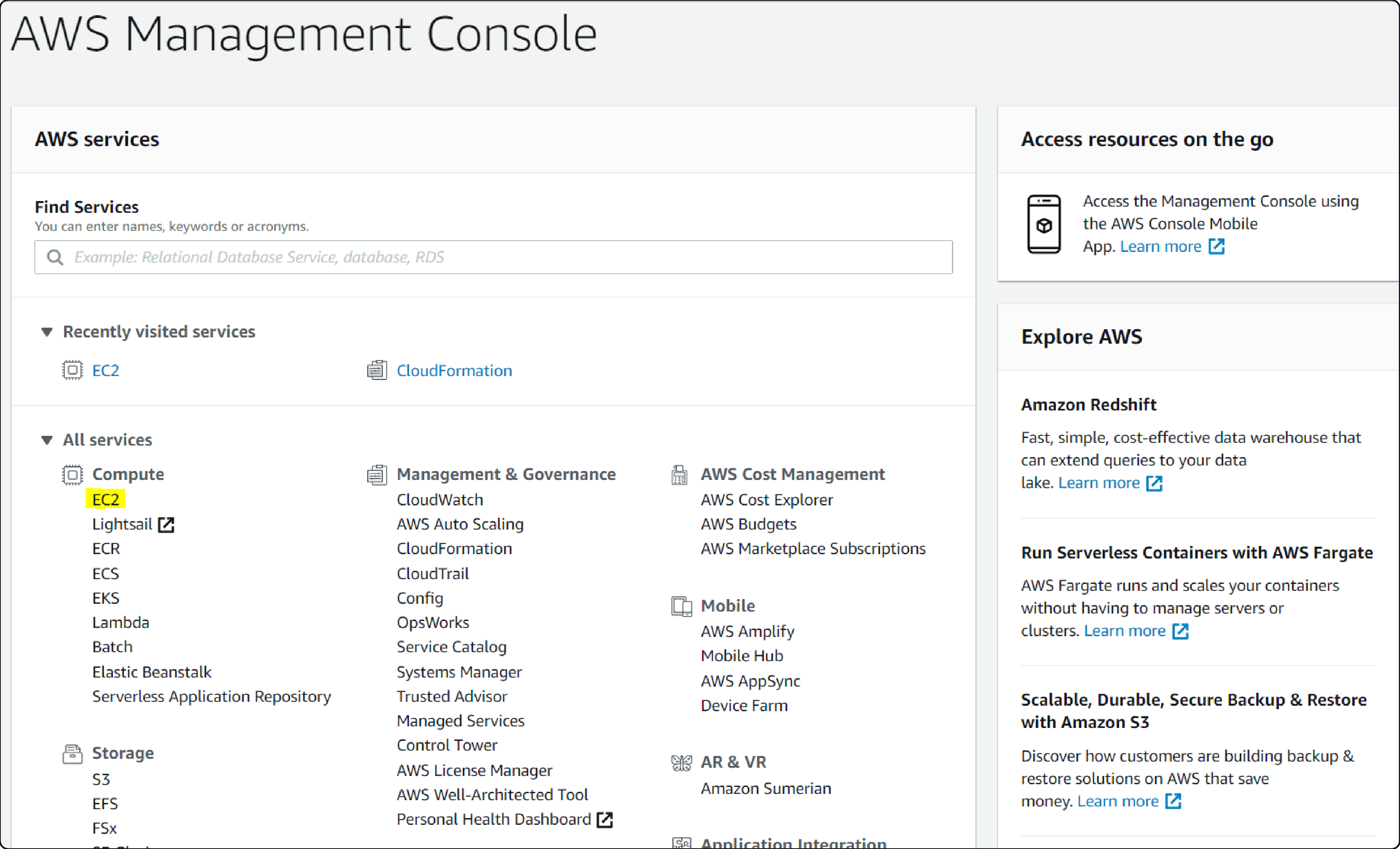
Navigate to the EC2 dashboard in the AWS Management Console.
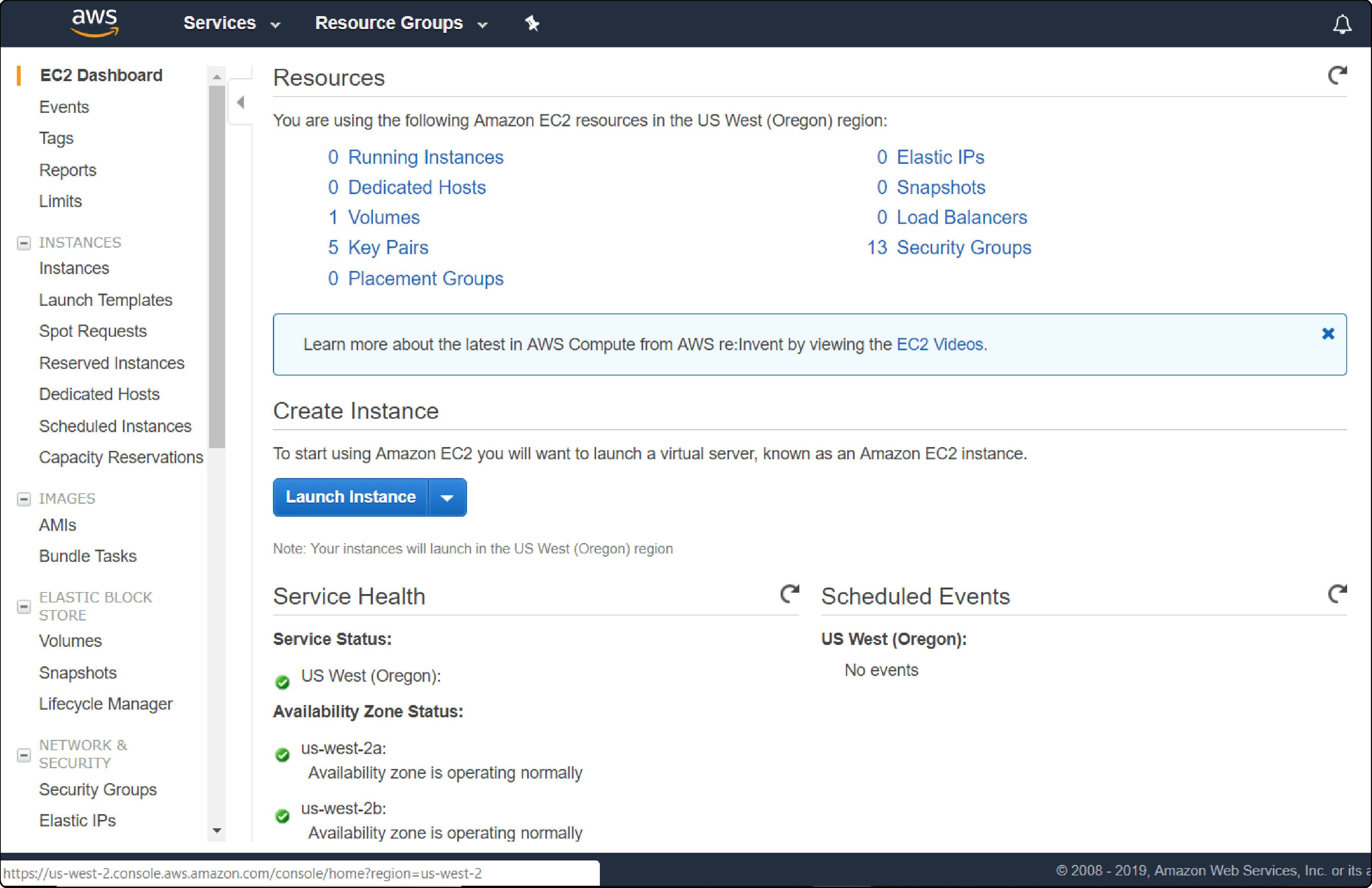
Click "Launch Instance" and select an Amazon Machine Image from the Marketplace offerings.
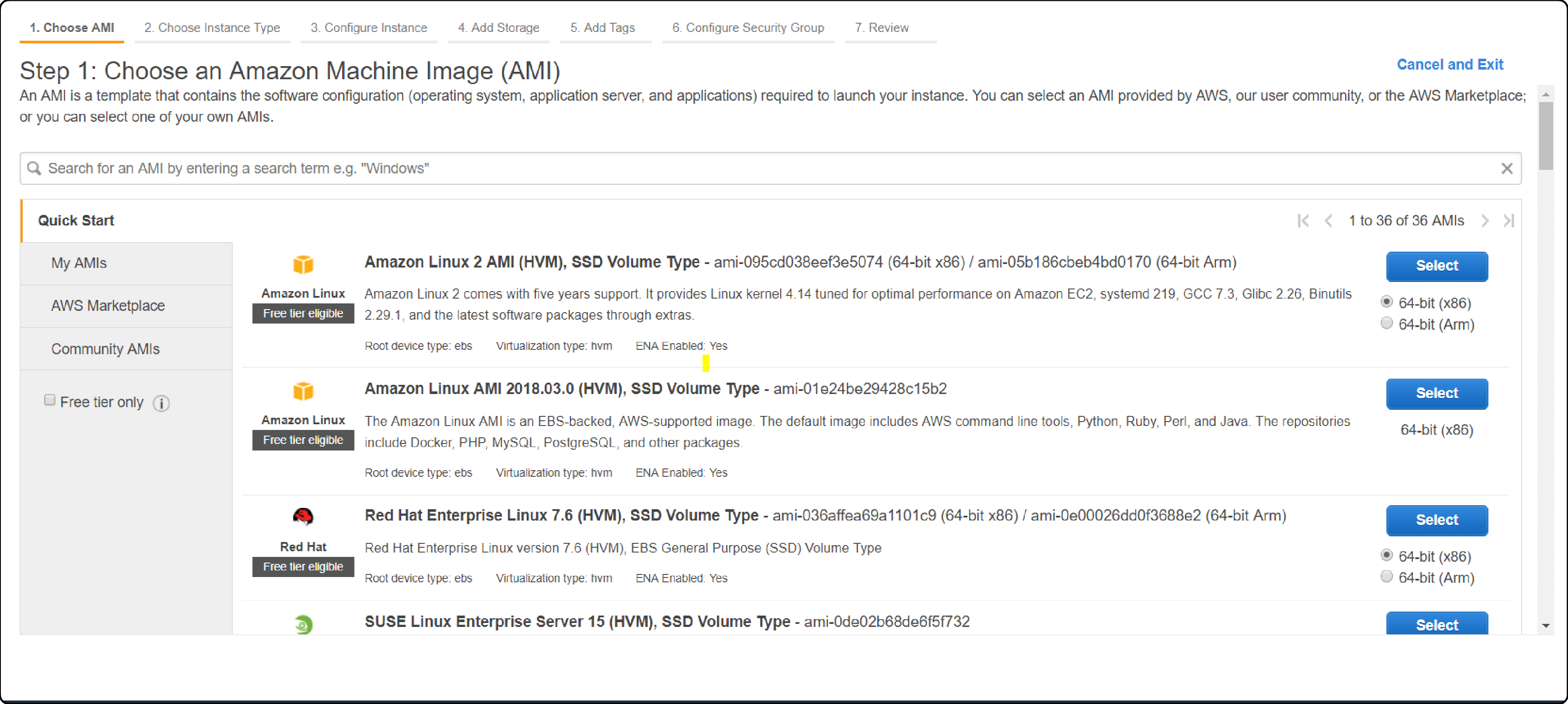
Choose Graviton (ARM) instances to cut costs by 20 to 40 percent:
| Store Size | Instance Type | vCPUs | RAM | Monthly Estimate |
|---|---|---|---|---|
| Development/test | t3.medium | 2 | 4 GB | ~$30 |
| Small store | c6g.xlarge (Graviton) | 4 | 8 GB | ~$95 |
| Mid-size store | c6g.2xlarge (Graviton) | 8 | 16 GB | ~$190 |
| Large store | c6g.4xlarge (Graviton) | 16 | 32 GB | ~$380 |
Step 3: Configure Security Groups
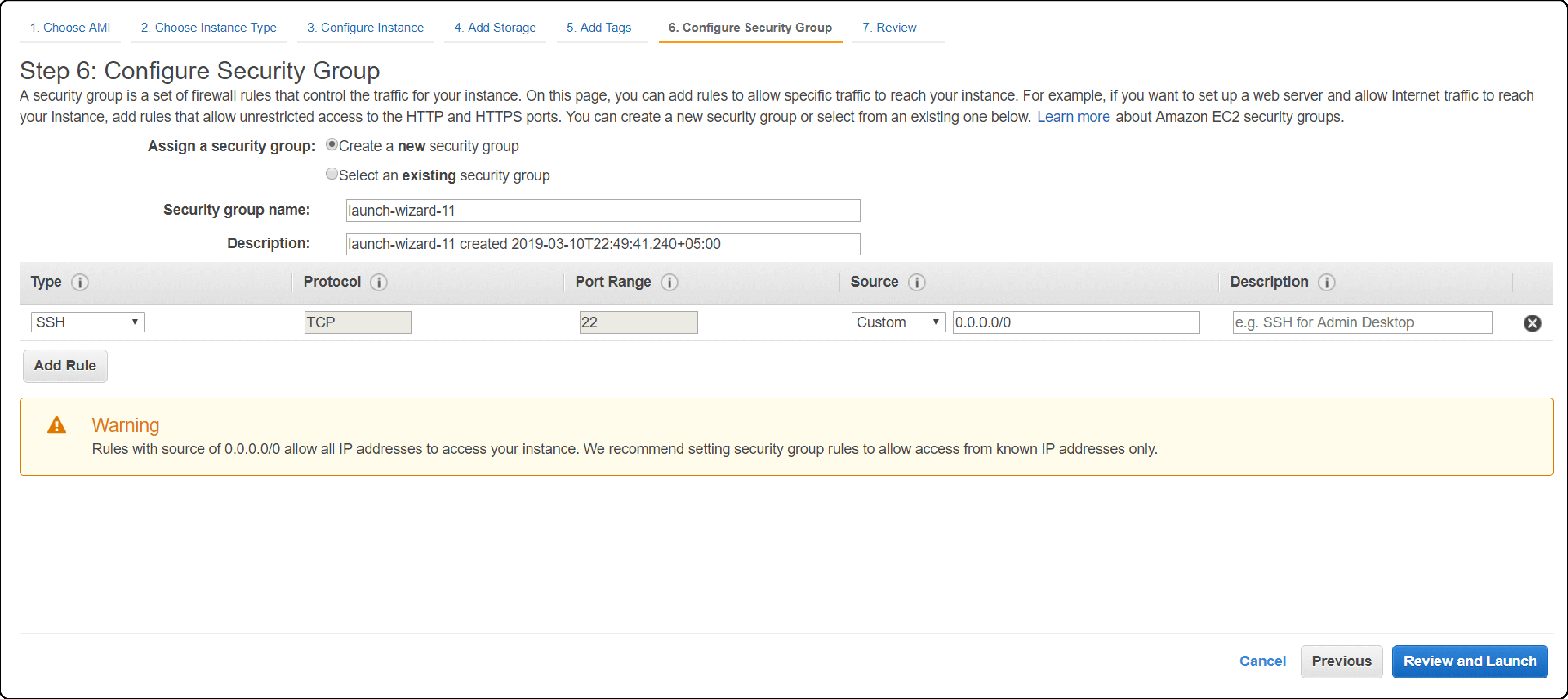
Set inbound rules:
- Port 22 (SSH): Restrict to your IP address
- Port 80 (HTTP): Open to all (redirects to HTTPS)
- Port 443 (HTTPS): Open to all
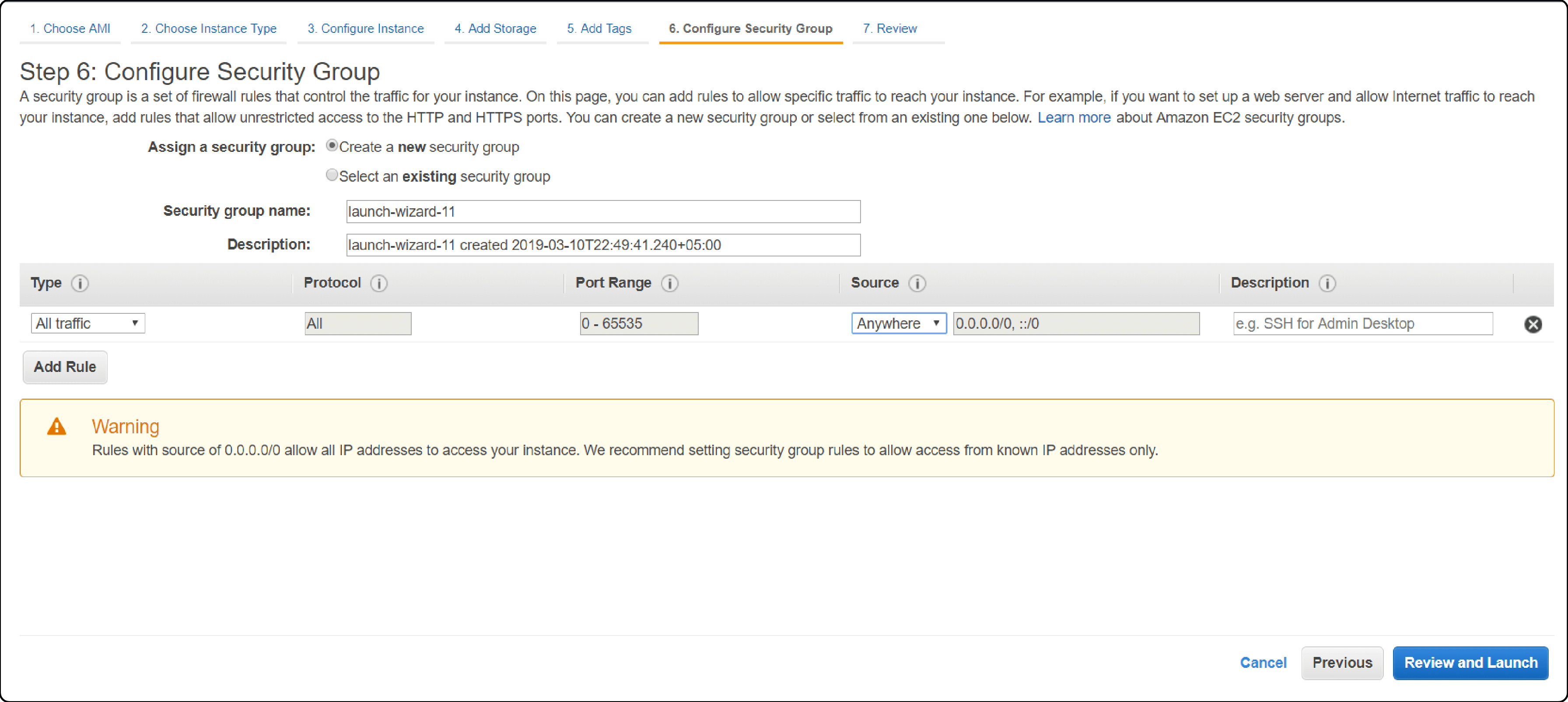
Create a separate security group for the Magento admin panel. Restrict admin access to authorized IP addresses. This prevents brute-force attacks on your admin login.
Step 4: Connect via SSH
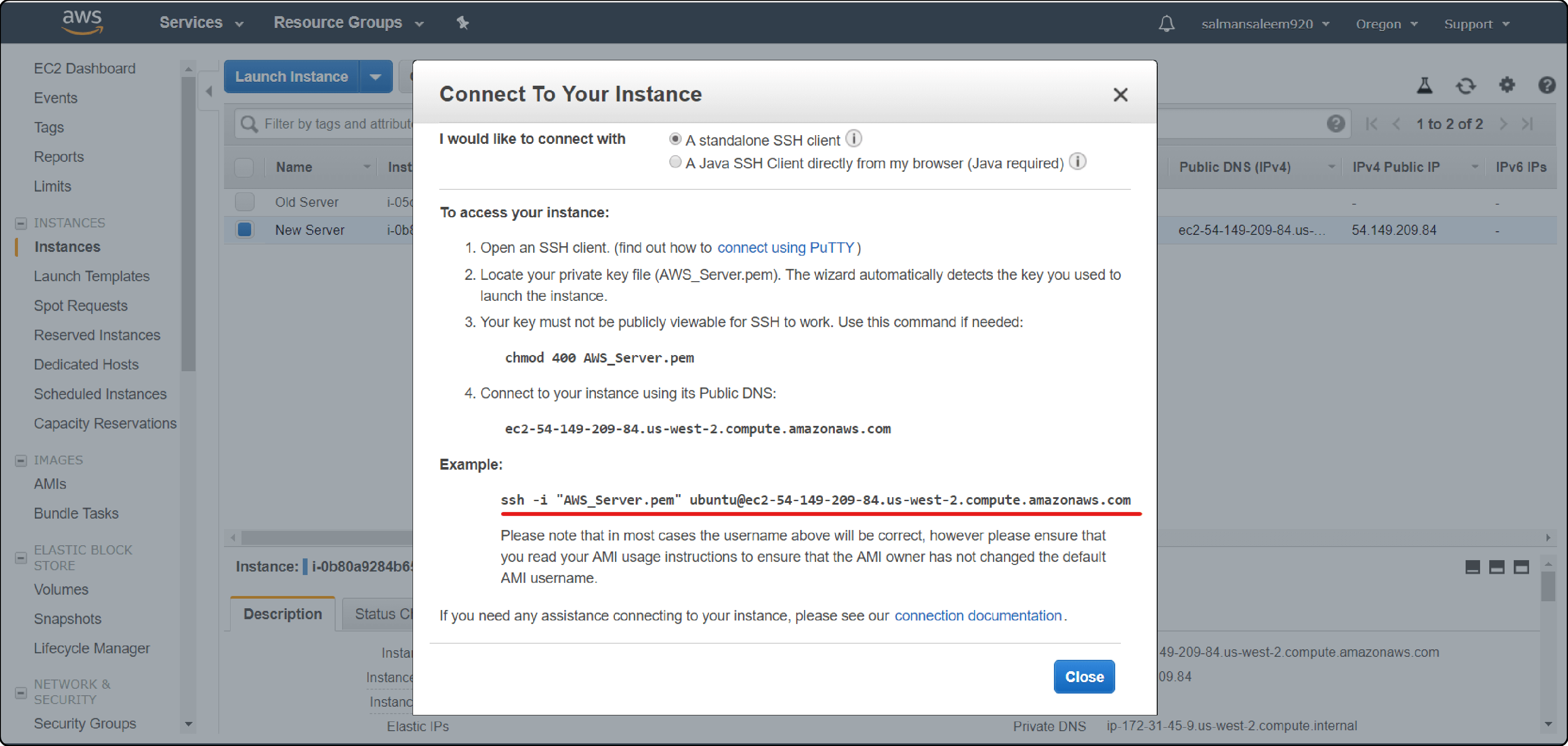
Once the instance runs, connect through SSH:
ssh -i your-key.pem ubuntu@your-instance-public-ip
AWS also offers browser-based SSH through the EC2 console.
Step 5: Install the Stack
If using a Bitnami AMI, this step is pre-configured and can be skipped. For manual installations, update packages and install the required components:
- Web server: Nginx 1.26 (recommended) or Apache 2.4
- PHP: 8.3 or 8.4 with required extensions
- Database: MySQL 8.4 or MariaDB 11.4
- Search: OpenSearch 2.19
- Cache: Redis 7.2 and Varnish 7.6
- Composer: 2.9.3+
Follow the official Adobe documentation for the full extension list and configuration details.
Step 6: Install Magento
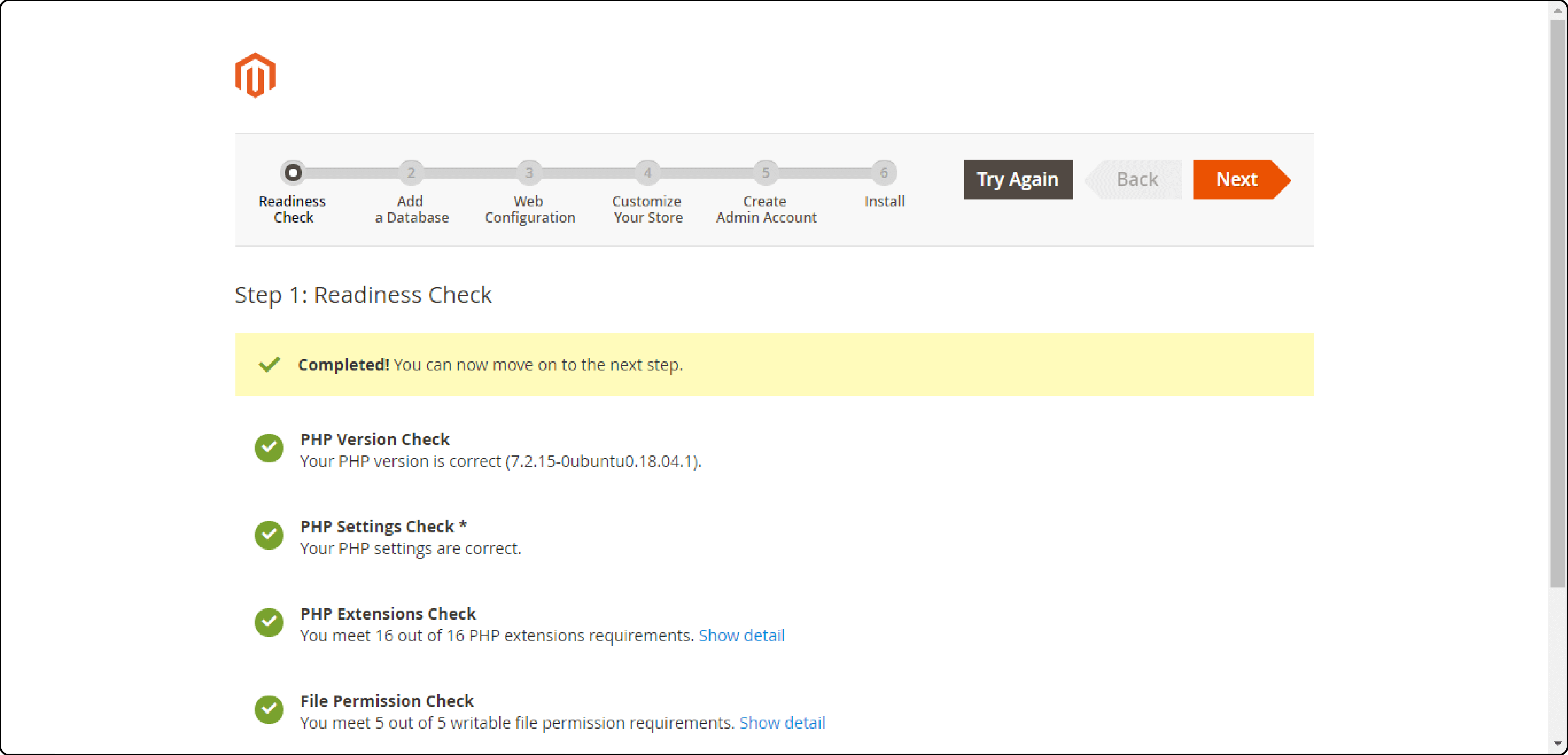
Download Magento 2.4.8 through Composer:
composer create-project --repository-url=https://repo.magento.com/ magento/project-community-edition=2.4.8
Run the setup wizard in your browser or use the CLI installer. Configure database credentials, admin user, and store URL during setup.
Step 7: Configure Your Store
Log into the admin panel and set up:
- Payment gateways (Stripe, PayPal, Braintree)
- Shipping methods and rates
- Tax rules for your selling regions
- Product catalog with categories and attributes
Step 8: Add CDN and SSL
Set up Amazon CloudFront as your CDN. Configure it to serve static assets (CSS, JS, images) from edge locations around the world.
Obtain a free SSL certificate through AWS Certificate Manager. Force HTTPS for all pages in Magento's store configuration.
Step 9: Optimize Performance
Configure the Magento performance stack:
- Varnish 7.6 for full-page caching
- Redis 7.2 for session storage and backend cache
- OpenSearch 2.19 for catalog and site search
- Fine-tune Nginx worker processes and PHP-FPM pool settings
Enable production mode before launch:
bin/magento deploy:mode:set production
Step 10: Launch and Monitor
Test every checkout flow, payment method, and user scenario before going live:
- Set up Amazon CloudWatch for CPU, memory, and disk monitoring
- Configure alarms for threshold breaches
- Schedule automated EBS snapshots for backups
- Set up Auto Scaling groups for traffic spikes during sales events
How to Migrate Your Magento Store to AWS
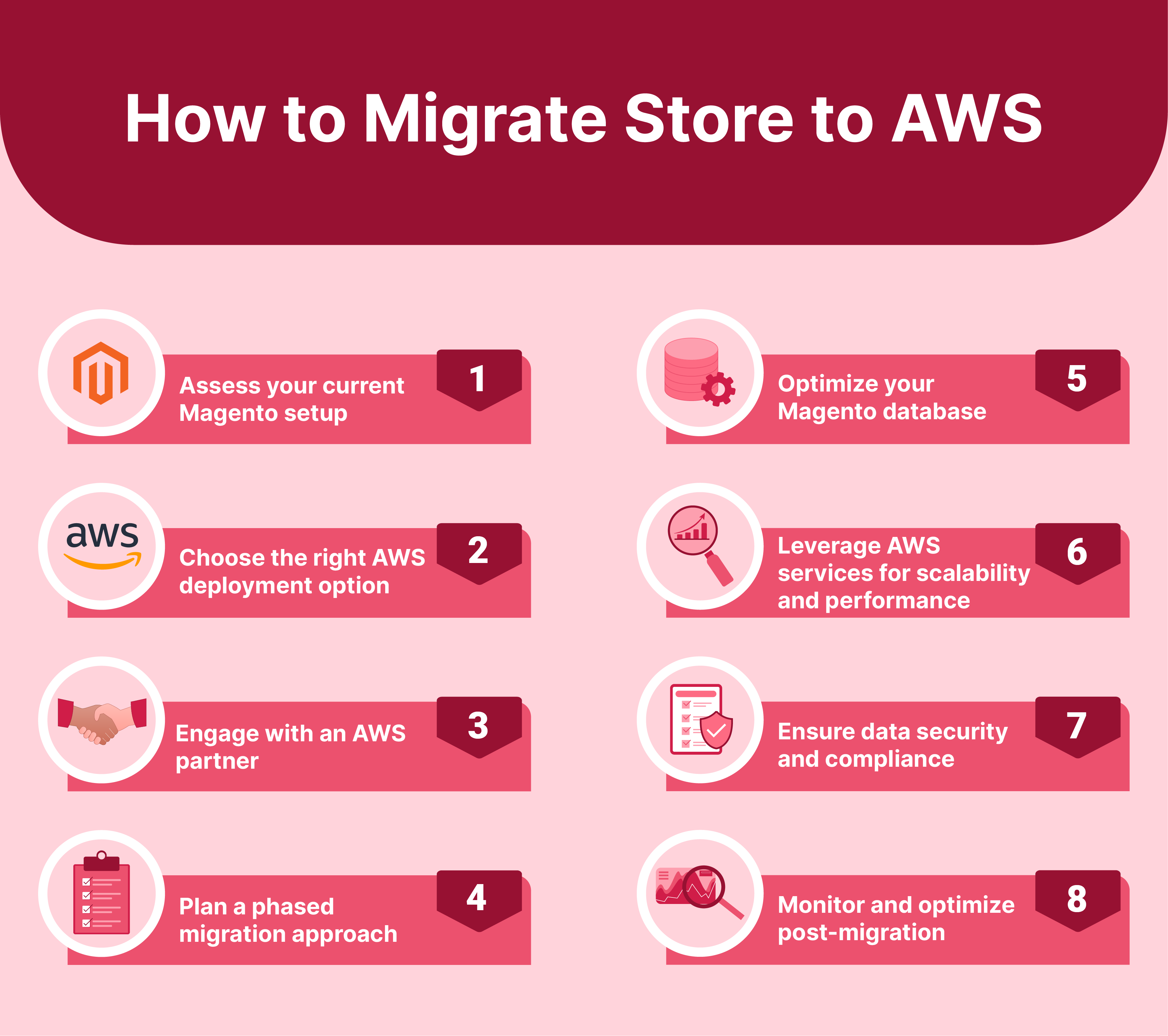
1. Audit Your Current Setup
Document your Magento version, installed extensions, custom modules, and integrations. Check your PHP and MySQL versions. This determines whether you can migrate as-is or need upgrades first.
2. Choose Your AWS Architecture
| Architecture | Best For | Complexity |
|---|---|---|
| Single EC2 + RDS | Small stores, tight budgets | Low |
| EC2 + RDS + ElastiCache + CloudFront | Mid-size stores | Medium |
| Multi-AZ with Auto Scaling | High-traffic stores | High |
| ECS Fargate + Aurora Serverless | Unpredictable traffic patterns | High |
For most stores, the mid-tier architecture (EC2 + RDS + ElastiCache + CloudFront) provides the right balance of performance and cost. For detailed architecture recommendations, see our full AWS hosting guide.
3. Plan a Phased Migration
Never switch production traffic in one step. Instead:
- Set up the full AWS environment
- Copy your database and media files
- Run the store in parallel on AWS
- Test every function against the AWS copy
- Switch DNS after full validation
4. Optimize Your Database
Use Amazon Aurora MySQL 8.0 or Amazon RDS for your Magento database. Aurora delivers up to 5x the throughput of standard MySQL with automatic failover.
Clean log tables, rebuild indexes, and remove orphaned data before migration.
5. Secure Your Deployment
Protect your AWS Magento store with:
- AWS WAF for application-level firewall rules
- AWS KMS for data encryption at rest and in transit
- Private subnets for database and cache servers
- Security groups restricting access per service
- PCI DSS compliance measures for payment processing
6. Monitor After Migration
Use CloudWatch to track response times, error rates, and resource usage. Compare against pre-migration baselines to confirm the migration succeeded.
Pros and Cons of AWS Marketplace Magento
| Pros | Cons |
|---|---|
| Launch a Magento store in minutes | You own all server maintenance and updates |
| Free options available (Bitnami) | Requires AWS and Linux administration skills |
| Full control over infrastructure and scaling | No vendor support for Magento application issues |
| Access to AWS ecosystem (CloudFront, Aurora, WAF) | Costs grow fast without proper monitoring |
| Multiple deployment architectures available | Some stacks lag behind official Magento releases |
FAQ
What does Magento on AWS Marketplace cost?
Costs depend on the offering. Bitnami is free (you pay for EC2 infrastructure). aMiSTACX charges $0.049 per hour plus EC2 costs. Flexa and BitStone use custom pricing. A small production store runs $100 to $300 per month in total AWS infrastructure costs.
Which AWS Marketplace Magento offering is best for beginners?
Bitnami provides the simplest path. It ships Magento 2.4.8 with PHP 8.4 pre-configured. One-click deployment gets a store running in under 10 minutes. SSL configures through Let's Encrypt without manual steps.
What PHP version does Magento 2.4.8 require?
Magento 2.4.8 requires PHP 8.3 or PHP 8.4. Support for PHP 8.1 and 8.2 ended with this release. The Bitnami AWS Marketplace package ships with PHP 8.4.
Does Magento 2.4.8 still support Elasticsearch?
Magento 2.4.8 supports both OpenSearch 2.19 and Elasticsearch 8.17. Adobe recommends OpenSearch as the primary search engine. Elasticsearch 8.17 is supported for existing setups only. New deployments should use OpenSearch.
Can I use Graviton instances for Magento on AWS?
Yes. Graviton (ARM-based) instances run Magento and reduce compute costs by 20 to 40 percent compared to x86. Use c6g, m6g, or r6g instance families. Most Magento extensions are architecture-agnostic and work on ARM without changes.
How do I migrate my existing Magento store to AWS?
Audit your current setup (version, extensions, customizations). Build the target AWS environment. Copy your database and media files. Test in parallel. Switch DNS after full validation. Use Amazon RDS or Aurora for the database and S3 for media storage. Plan 2 to 4 weeks for a production migration.
Is managed hosting better than AWS Marketplace for Magento?
For stores without dedicated DevOps teams, managed hosting saves time and reduces risk. The provider handles server updates, security patches, monitoring, and scaling. AWS Marketplace suits teams with AWS expertise who want full control over infrastructure.
What EC2 instance size do I need for Magento?
Development environments work on t3.medium (2 vCPUs, 4 GB RAM). Production stores need c6g.xlarge (4 vCPUs, 8 GB RAM) at minimum. High-traffic stores handling thousands of daily orders require c6g.2xlarge or larger with dedicated RDS and ElastiCache instances.
Can I run Adobe Commerce on AWS Marketplace?
Yes. BitStone offers managed Adobe Commerce hosting on the AWS Marketplace. You can also install Adobe Commerce on any EC2 instance with a valid license. System requirements match Magento Open Source.
What AWS services should I combine with Magento?
The recommended stack includes EC2 or ECS for compute, RDS or Aurora for the database, ElastiCache (Redis) for caching, CloudFront for CDN, S3 for media storage, and CloudWatch for monitoring. Add AWS WAF for security and Auto Scaling for traffic spikes.
Summary
AWS Marketplace provides multiple paths to deploy Magento in 2026. Bitnami offers the fastest free option with the current 2.4.8 stack. aMiSTACX adds performance modules for stores that need more speed. Flexa and BitStone serve enterprises with serverless or managed architectures.
The right choice depends on your team's AWS expertise and support needs. Stores with DevOps resources benefit from the control that AWS Marketplace provides. Stores that need infrastructure handled should consider managed Magento hosting instead.
Run the Magento 2.4.8 stack with PHP 8.3+, OpenSearch 2.19, Redis 7.2, and Graviton instances for the best performance per dollar on AWS.
