

Magento Reviews and Ratings: Configure, Manage, and Optimize
[Updated: March 16, 2026]
Customer reviews drive purchase decisions. Almost half of online shoppers trust product reviews as much as personal recommendations. Magento 2 includes a built-in review and rating system that turns customer feedback into social proof and SEO signals.
This guide covers the complete review workflow: enabling reviews, configuring star ratings, moderating submissions, implementing rich snippets, and collecting more feedback from real customers.
Key Takeaways
- Magento 2 ships with native review and rating support. No extensions required for basic functionality.
- All reviews require admin approval before appearing on the storefront.
- Three default rating types exist: Quality, Price, and Value. Custom ratings are supported.
- Review schema markup enables star ratings in Google search results.
- Post-purchase email sequences are the most effective strategy to collect reviews.
- Third-party extensions add features like photo reviews, automated reminders, and Google Shopping integration.
What Are Magento Reviews and Ratings?
Magento reviews and ratings = the built-in customer feedback system in Magento 2 and Adobe Commerce. Customers submit text reviews and star ratings on product pages. Admins moderate all submissions before they go live.
Perfect for: Online stores wanting social proof, businesses building customer trust, merchants who need user-generated content for SEO.
Not ideal for: Stores with restricted product catalogs, B2B-only merchants with no public product pages.
Magento stores product reviews in the database and links star ratings to each submission. The system supports multiple rating criteria per product and displays aggregate scores on product listing and detail pages.
Reviews serve three functions: they build trust with new visitors, provide actionable product feedback, and add keyword-rich content to your pages that search engines index.
Why Product Reviews Matter for Your Magento Store
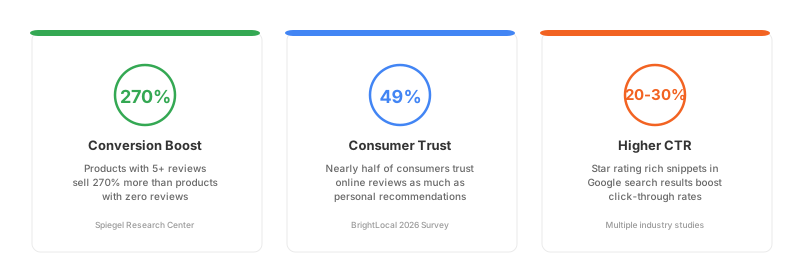
Product reviews are one of the strongest conversion drivers in e-commerce. According to the Spiegel Research Center, displaying reviews increases conversion rates by up to 270%. Products with five or more reviews are far more likely to sell than products with zero reviews.
Reviews also serve as free, keyword-rich content. Every customer submission adds unique text to your product pages. Search engines index this content and use it to understand product relevance. Stores with active reviews build topical depth without writing a single word of additional copy.
The trust factor is real. BrightLocal's 2025 consumer survey found that 49% of consumers trust online reviews as much as personal recommendations from friends and family. While this number has declined from earlier years, reviews remain the top trust signal for online purchases.
For Magento merchants, reviews also provide direct product feedback. Star ratings highlight quality issues. Text reviews reveal what customers value most. Negative reviews expose problems before they scale into support tickets and returns.
How to Enable Product Reviews in Magento 2
Magento 2 ships with product reviews enabled by default. To verify and configure the settings:
- Navigate to Stores > Settings > Configuration > Catalog > Catalog
- Expand the Product Reviews section
- Set Enabled to Yes
- Choose whether to Allow Guests to Write Reviews
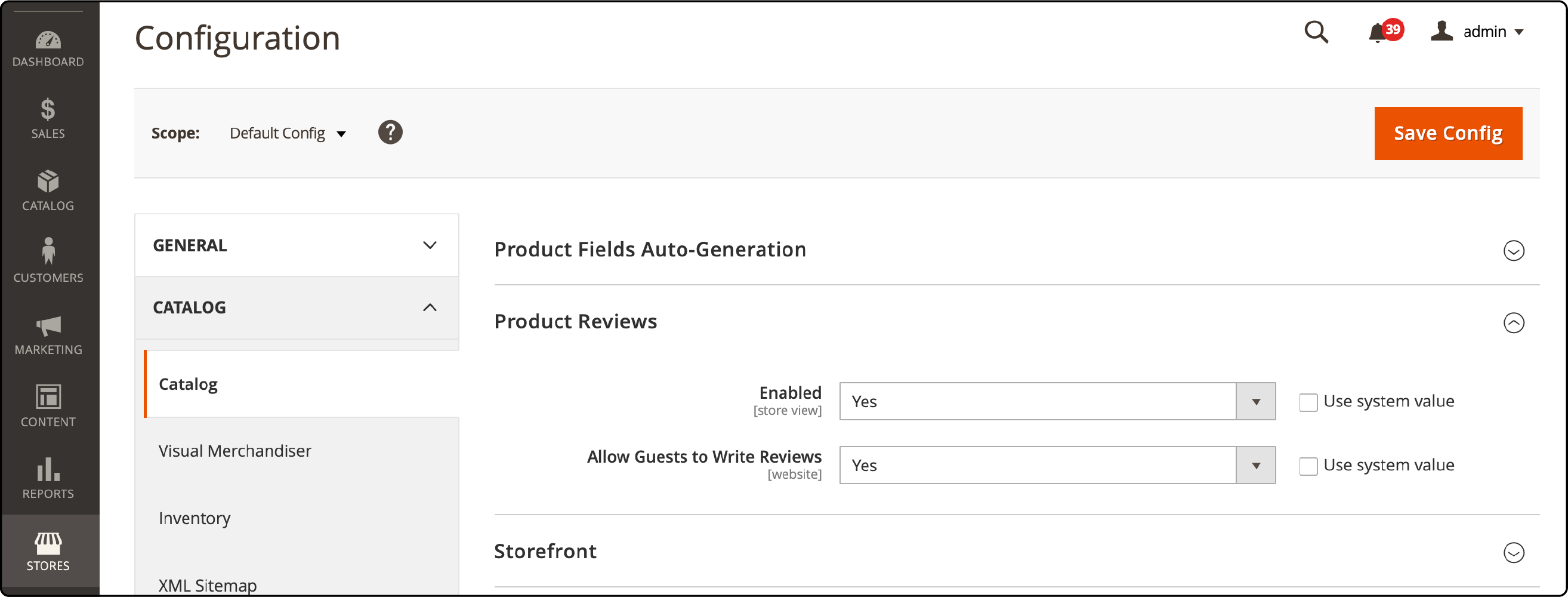
Enabling guest reviews removes the account creation barrier. More customers can leave feedback. The tradeoff is a higher risk of spam submissions. Most stores keep guest reviews enabled and rely on admin moderation to filter spam.
How to Configure Custom Ratings in Magento 2
Magento includes three default rating types: Quality, Price, and Value. Each displays as a 1 to 5 star rating on the product review form.
To add custom ratings:
- Go to Stores > Attributes > Rating
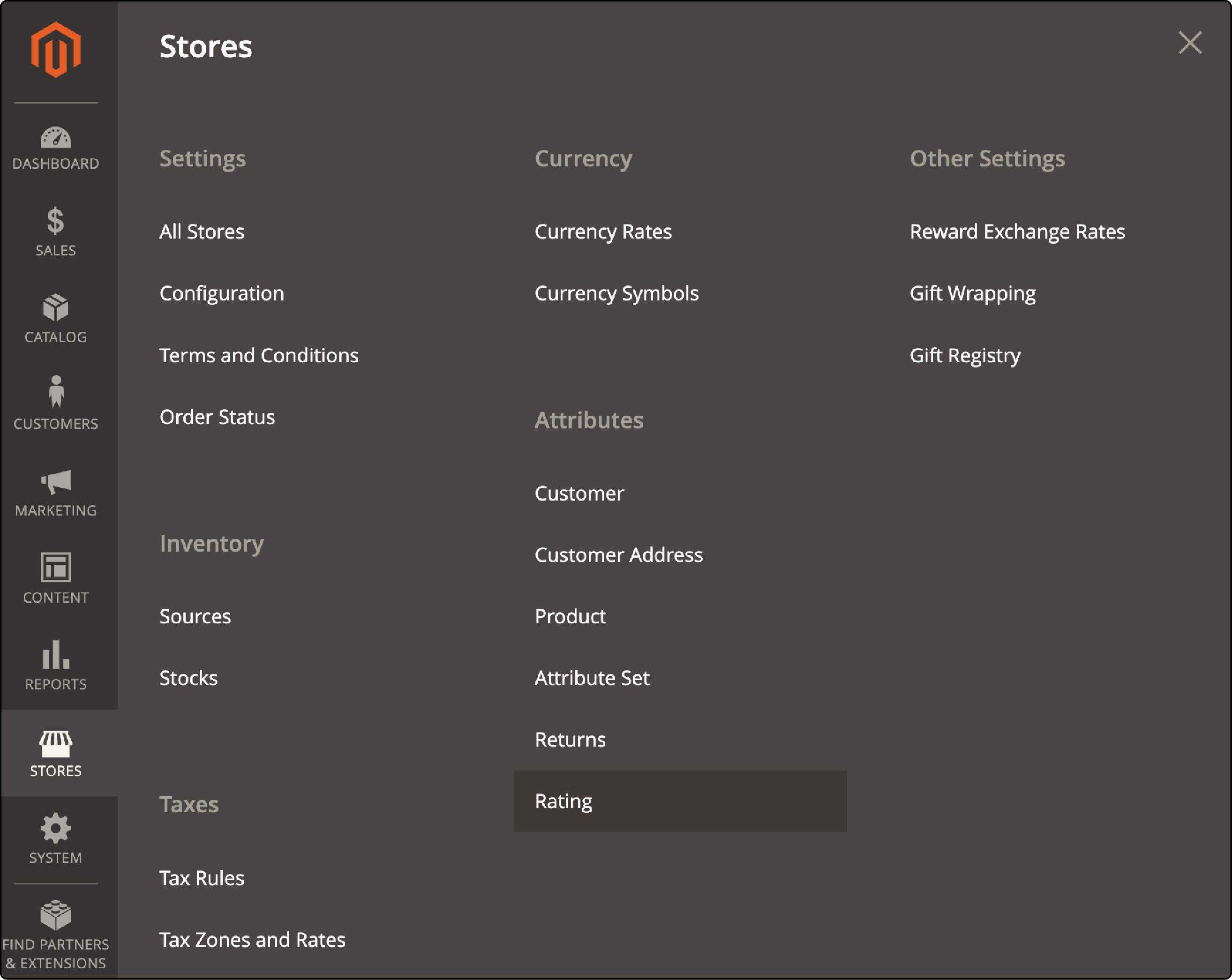
- Click Add New Rating
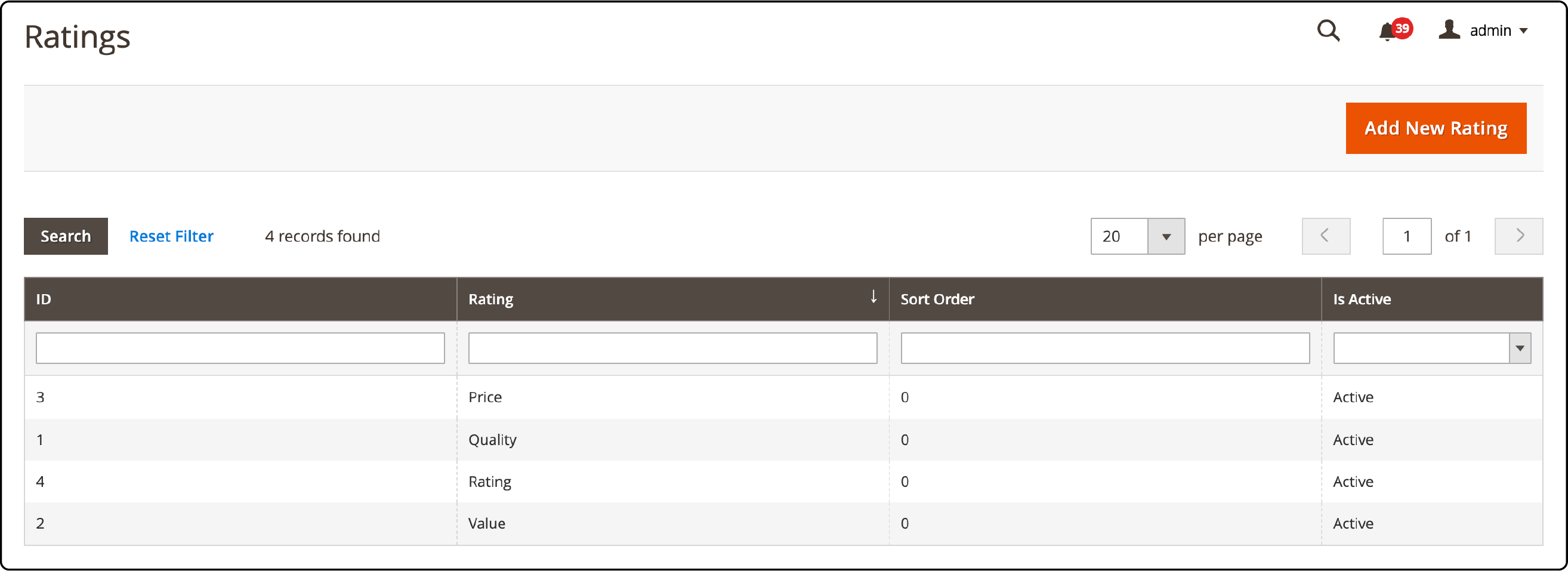
- Enter the Rating Title (Default Value and Store View labels)
- Select the Store Views where the rating will appear
- Check Is Active to enable it
- Set the Sort Order to control display position
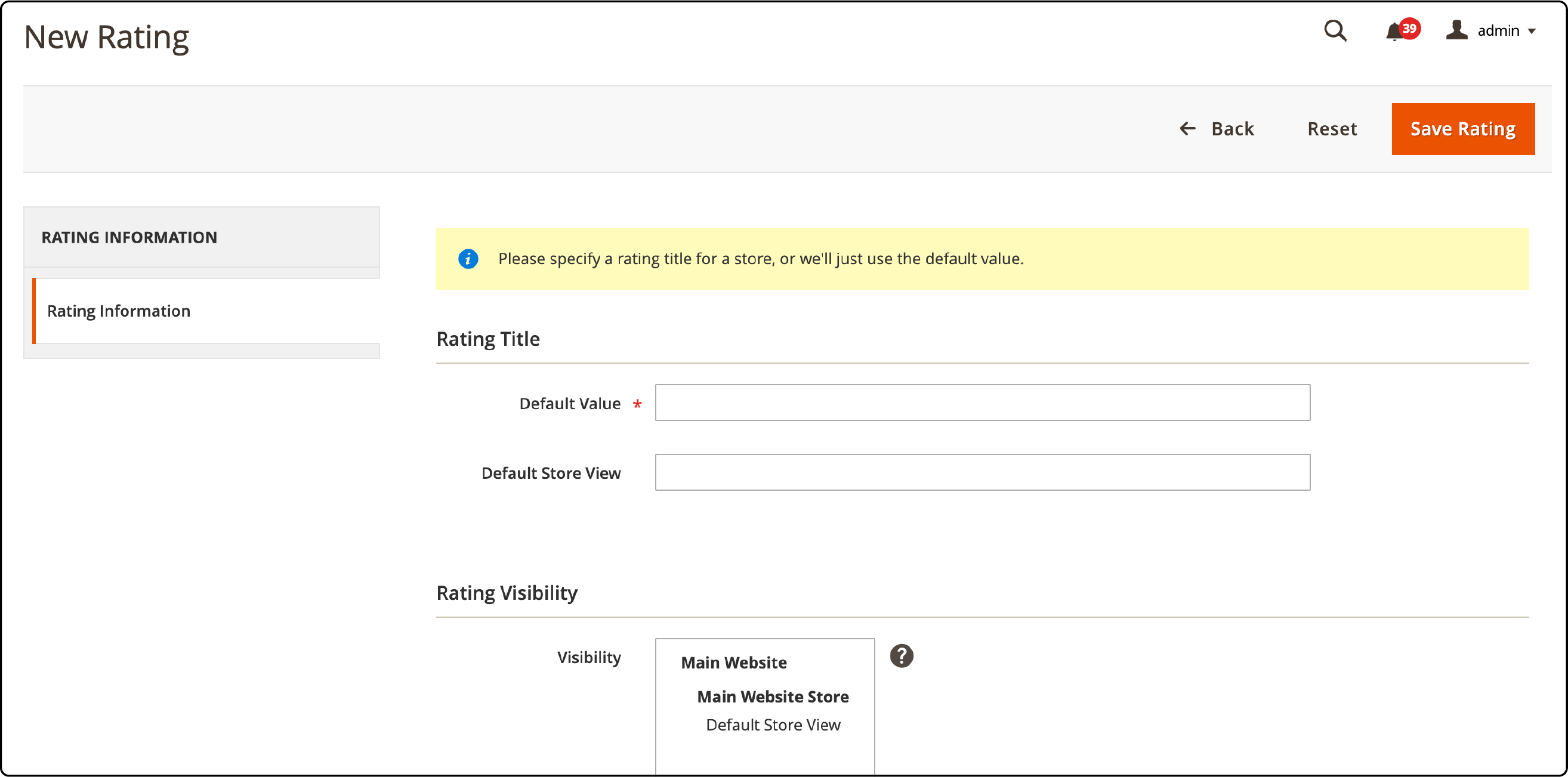
Click Save Rating when done.
Common custom ratings include Shipping Speed, Ease of Use, Durability, and Size Accuracy. Choose ratings relevant to your product category. A clothing store benefits from "Fit" and "Material Quality." An electronics store benefits from "Battery Life" and "Build Quality."
Even though default ratings show as Active in the admin, they may not appear on the frontend unless assigned to a specific store view. Verify the storefront display after making changes.
How to Manage and Moderate Reviews
All customer reviews enter a Pending status. No review goes live without admin approval.
Accessing the Review Queue
Navigate to Marketing > User Content > All Reviews.
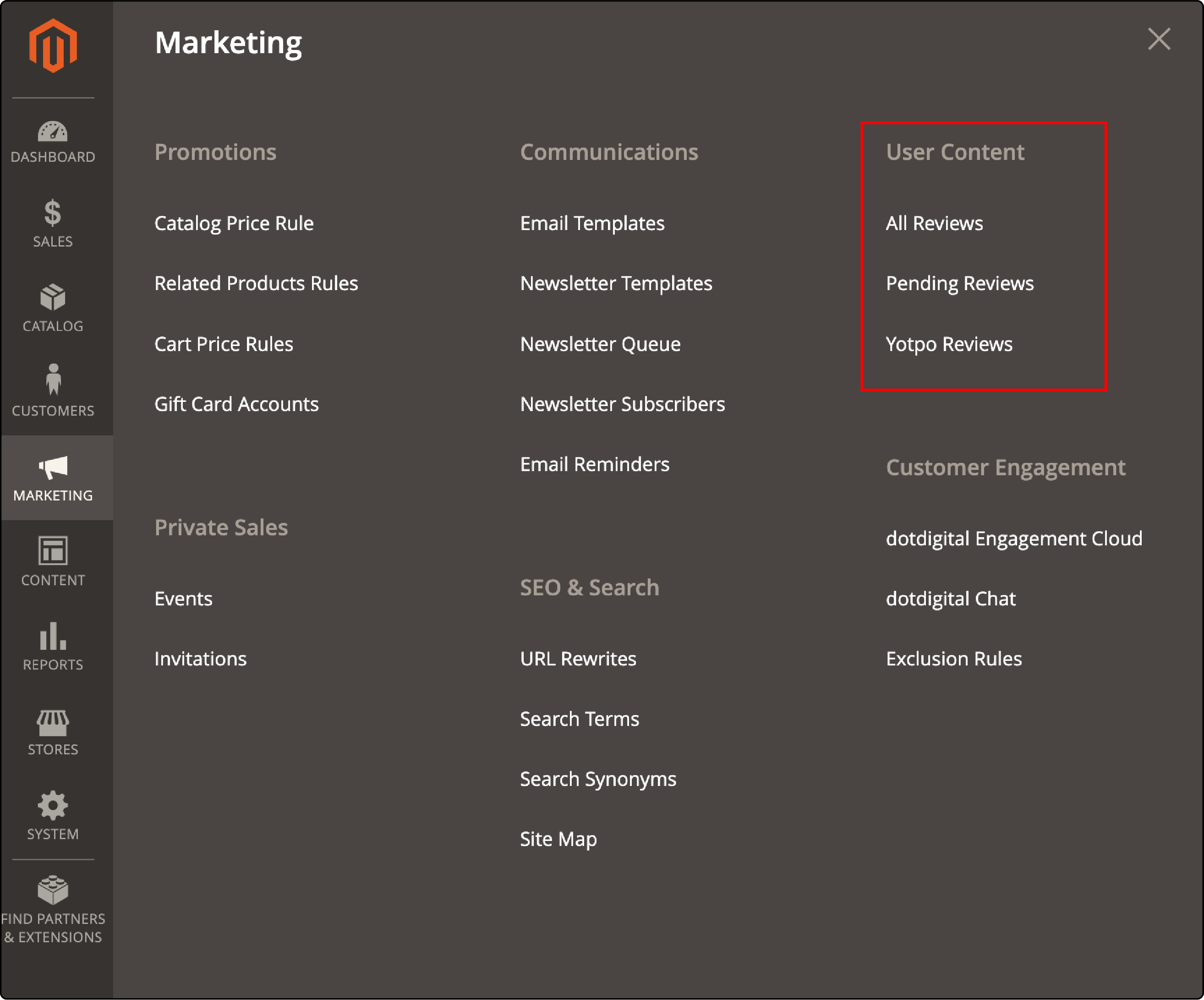
The review grid shows all submissions with their current status: Approved, Pending, or Not Approved.
Editing a Review
Click any review to open the edit form.
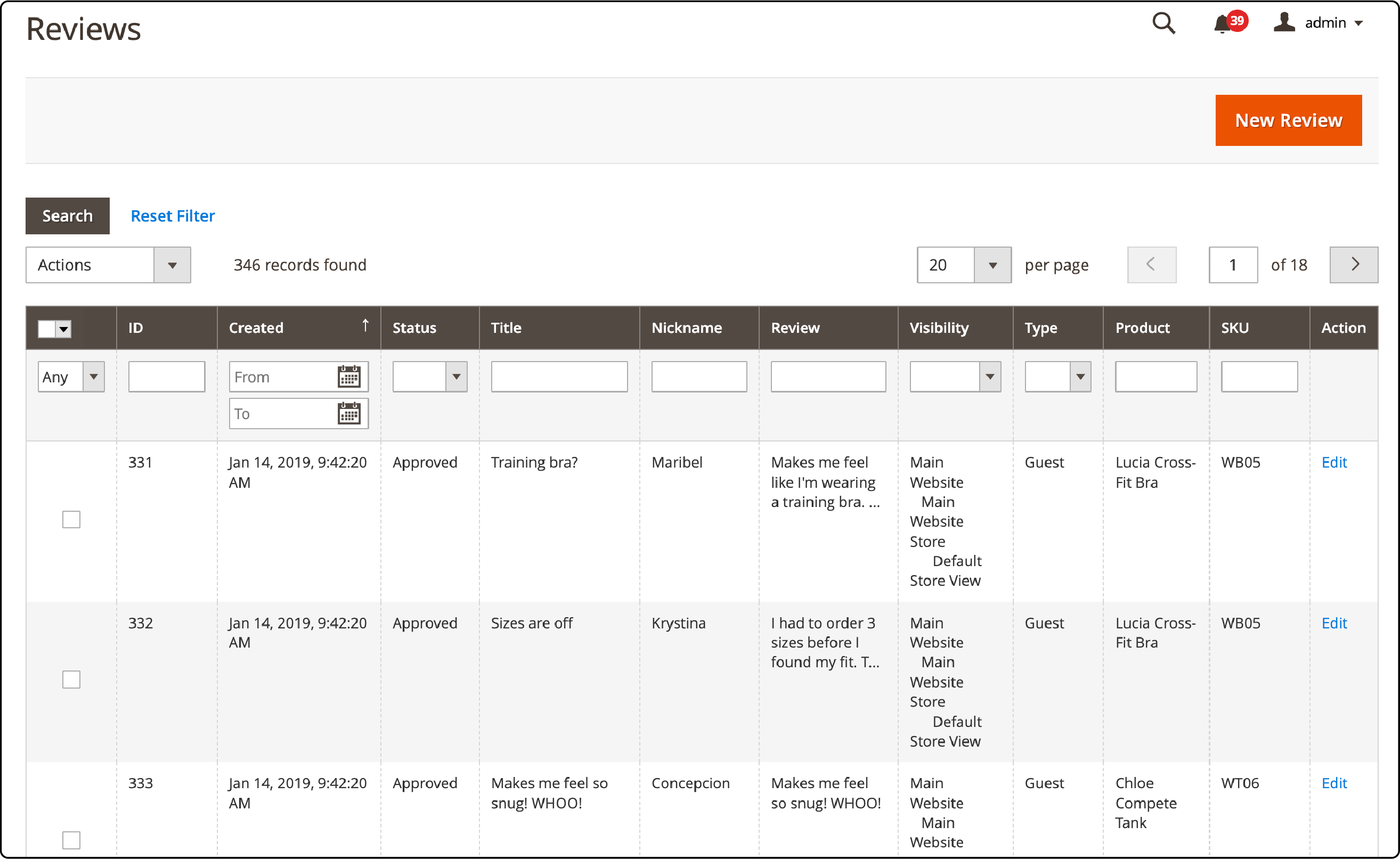
You can modify:
- Review Status: Approved, Pending, or Not Approved
- Nickname: The reviewer display name
- Summary: The review headline
- Review Text: The full review content
- Detailed Rating: Individual star ratings per category
Product and author information is read-only.
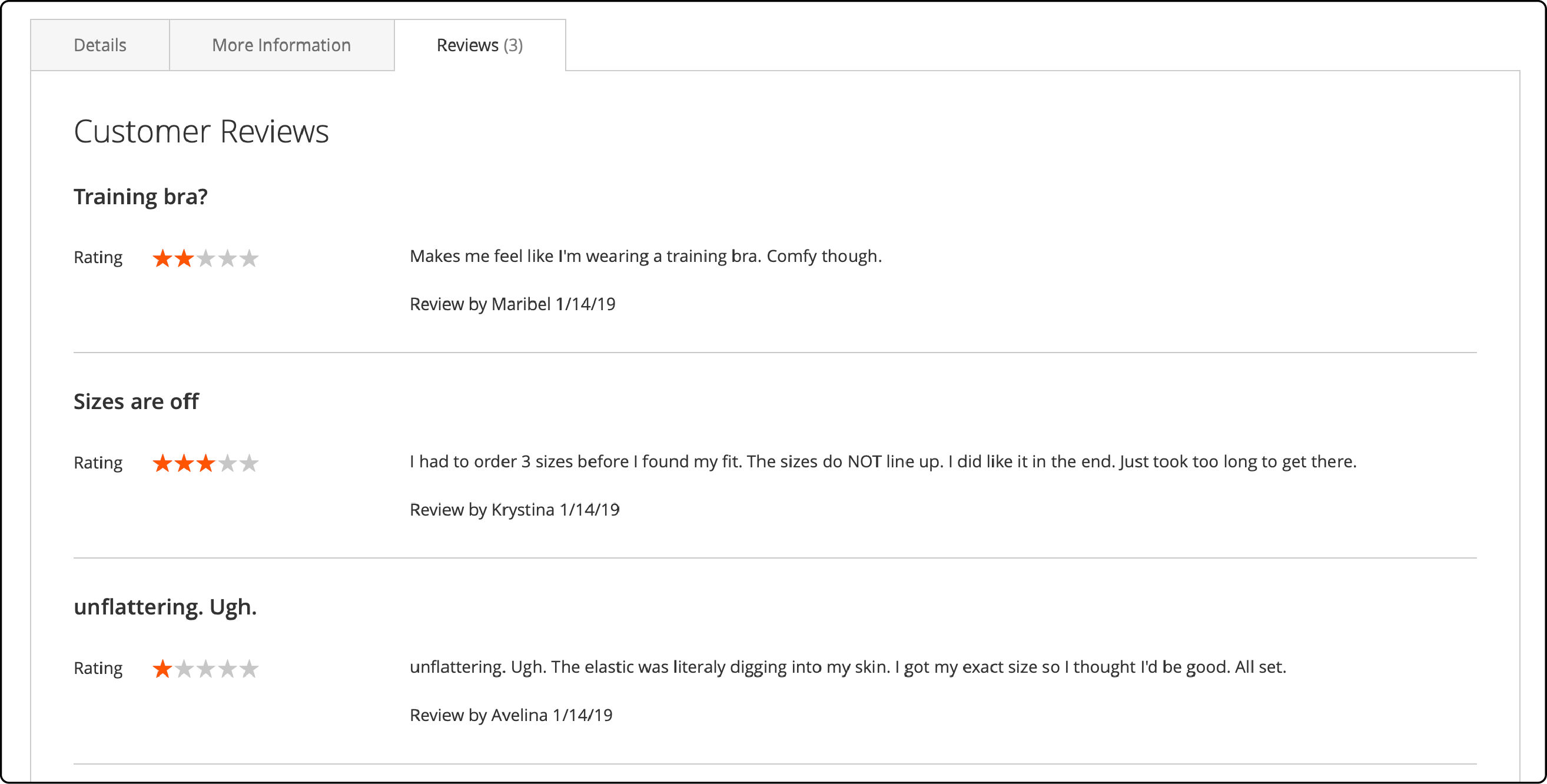
Click Save Review after editing. The updated review appears on the storefront:
Bulk Actions
Select multiple reviews using the checkboxes and apply bulk actions: Delete or Update Status to approve or reject multiple reviews at once. This speeds up moderation for stores receiving high review volumes.
Moderation Best Practices
- Approve honest negative reviews. Stores with only 5-star ratings look fake. A mix of 3, 4, and 5-star reviews builds more trust than a perfect score.
- Respond to negative reviews. A professional response shows potential customers that you care about feedback and resolve issues.
- Reject spam, not criticism. Only reject reviews that contain spam links, profanity, or are fake. Never reject a review because of a low star rating.
- Check for duplicate submissions. The same customer sometimes submits multiple reviews for one product. Keep the most detailed one.
Review Schema Markup for Rich Snippets
Product reviews enable aggregate rating rich snippets in Google search results. Star ratings displayed below your product listing in search results increase click-through rates by 20 to 30%.
How It Works
Google reads structured data (JSON-LD) on your product pages to display star ratings. Magento's native implementation includes basic product schema, but review aggregate data requires proper configuration.
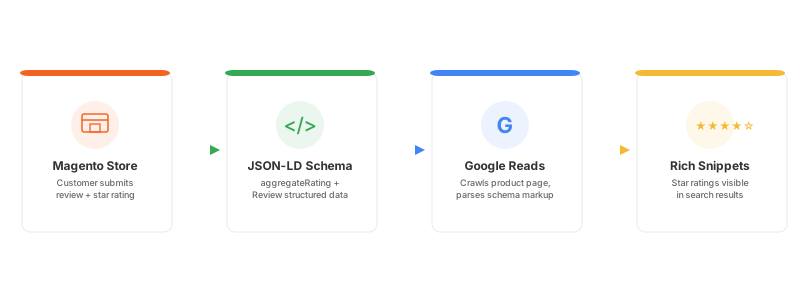
The key schema properties for reviews:
{
  "@type": "Product",
  "aggregateRating": {
    "@type": "AggregateRating",
    "ratingValue": "4.6",
    "reviewCount": "127",
    "bestRating": "5",
    "worstRating": "1"
  },
  "review": [{
    "@type": "Review",
    "author": { "@type": "Person", "name": "Customer Name" },
    "reviewRating": {
      "@type": "Rating",
      "ratingValue": "5"
    },
    "reviewBody": "Review text here"
  }]
}
Implementation Options
- Native Magento schema: Magento 2.4.x includes basic product structured data. Review aggregates are included when reviews exist on a product.
- Rich snippets extensions: Extensions from Magefan, Amasty, or MagModules add comprehensive schema markup including breadcrumbs, organization data, and FAQ schema alongside review data.
- Manual implementation: Add JSON-LD blocks in your theme's product page template for full control over structured data output.
Validate your implementation using Google's Rich Results Test. Enter any product URL with reviews and verify that the "Product" result shows valid aggregate rating data.
A solid Magento SEO strategy combined with proper review schema can increase organic click-through rates and product page visibility.
Strategies to Collect More Product Reviews
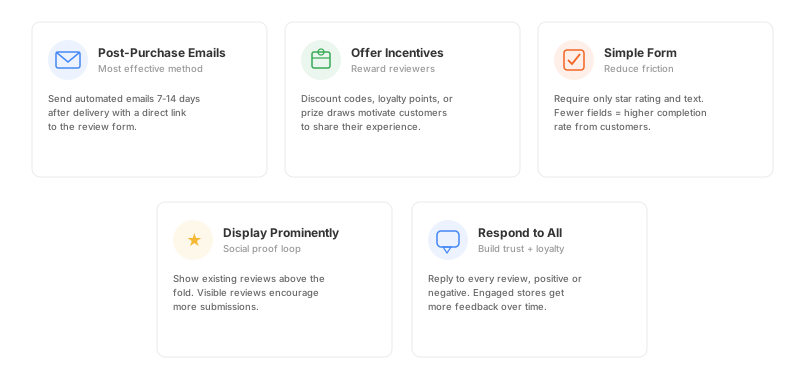
The biggest challenge with reviews is not configuration. It is getting customers to write them. Here are proven strategies:
1. Post-Purchase Email Sequences
Send an automated email 7 to 14 days after delivery. This gives the customer enough time to use the product. Include a direct link to the review form. Keep the email short with one clear call to action.
2. Offer Incentives
Discount codes, loyalty points, or entry into a prize draw motivate customers to leave reviews. Adobe Commerce supports reward points natively. Open Source stores can use extensions for this workflow.
3. Make the Review Form Simple
The fewer fields a customer fills, the higher the completion rate. Require only the star rating and a text field. Optional fields like a headline or reviewer name can remain, but do not make them mandatory.
4. Display Reviews Front and Center
Show existing reviews above the fold on product pages. When customers see that others have reviewed a product, they are more likely to add their own. Social proof generates more social proof.
5. Respond to Every Review
Customers who see that the store owner reads and responds to reviews feel heard. This encourages more submissions and builds loyalty.
Best Magento 2 Review Extensions
Native Magento reviews cover the basics. For advanced features, consider these Magento extensions and plugins:
| Extension | Key Features | Price Range |
|---|---|---|
| Amasty Advanced Reviews | Photo and video reviews, review reminders, admin replies, SEO config | $209+ |
| Magefan Product Reviews | Google Reviews integration, "Most Rated" category, email alerts | $99+ |
| Yotpo | AI review requests, Google Shopping integration, visual UGC, SMS | Free tier + paid plans |
| REVIEWS.io | Verified buyer badges, Google Seller Ratings, video reviews | Custom pricing |
Choose based on your priorities. Stores focused on Google visibility benefit from extensions with built-in schema markup and Google Shopping integration. Stores focused on conversion benefit from photo reviews and social proof widgets.
Pros and Cons of Magento Native Reviews
| Pros | Cons |
|---|---|
| Built-in, no extra cost or extensions needed | No photo or video review support |
| Full admin moderation control over all submissions | No automated review request emails |
| Custom rating types supported per store view | Basic schema markup without extensions |
| Guest reviews optional per configuration | No spam detection or CAPTCHA built in |
| Clean integration with product detail pages | No review import or export tools |
| Works across multi-store and multi-website setups | No analytics dashboard for review insights |
FAQ
1. How do I enable product reviews in Magento 2?
Go to Stores, then Settings, then Configuration, then Catalog. Find the Product Reviews section and set Enabled to Yes. You can also allow guest reviews in the same section.
2. Can guests leave reviews without creating an account?
Yes. Enable the "Allow Guests to Write Reviews" option in the Product Reviews configuration. Guest reviews still require admin approval before appearing on the storefront.
3. How do I add custom star ratings in Magento?
Navigate to Stores, then Attributes, then Rating. Click Add New Rating. Enter a title, select the store views, and check Is Active. Common custom ratings include Fit, Durability, and Ease of Use.
4. Why are my reviews not showing on the frontend?
Reviews require admin approval. Check Marketing, then User Content, then All Reviews. If reviews show as Pending, approve them. Also verify that the rating is assigned to the correct store view.
5. Do Magento reviews affect SEO?
Yes. Reviews add unique, keyword-rich content to product pages. With proper schema markup, reviews enable star rating rich snippets in Google search results. These rich snippets increase click-through rates.
6. How do I get more customers to leave reviews?
Send post-purchase emails 7 to 14 days after delivery. Offer incentives like discount codes. Make the review form simple with minimal required fields.
7. What is the best review extension for Magento 2?
It depends on your needs. Yotpo offers a free tier with photo reviews and automated reminders. Amasty and Magefan provide advanced features like admin replies and Google Reviews integration. REVIEWS.io adds verified buyer badges and Google Seller Ratings.
8. Can I import reviews from another platform into Magento?
Native Magento has no built-in import tool. Extensions like Yotpo and REVIEWS.io support importing reviews from other platforms. You can also import reviews through the Magento REST API.
9. How do I display star ratings in Google search results?
Implement Product schema with aggregateRating properties on your product pages. Use a rich snippets extension or add JSON-LD structured data in your theme template. Validate with Google's Rich Results Test tool.
10. Should I delete negative reviews?
No. Stores with a mix of ratings appear more authentic. Only reject reviews that contain spam, profanity, or fake content. Respond to negative reviews with a professional resolution to show potential customers you address concerns.
Summary
Magento's native review system covers the fundamentals: collecting, moderating, and displaying customer feedback. Configure custom ratings, approve reviews through the admin queue, and let customer voices build trust on your product pages.
For advanced features like photo reviews, automated email sequences, and Google Shopping integration, add a review extension that fits your workflow. Proper review schema markup turns customer feedback into rich snippets that increase organic click-through rates.
A fast, reliable store is the foundation for a great review experience. Pages that load quick encourage customers to browse, buy, and come back to share feedback. Consider managed Magento hosting to keep your store performing at its best.
