

AWS Auto Scaling Strategies: Always Prepared For Traffic Peaks
Your Magento store gets 10x the normal traffic. The page crashes. Customers leave.
Automatic scaling on AWS prevents this. It adds server capacity when demand spikes and removes it when traffic drops. No manual intervention, no overpaying for idle resources.
Here is how it works and which scaling strategy fits your store.
[Updated: February 27, 2026]
Key Takeaways
- Automatic scaling on AWS adjusts server capacity in real time based on traffic demand
- Two core strategies exist: Dynamic Scaling (reactive) and Predictive Scaling (proactive)
- Dynamic Scaling responds to live traffic changes but may lag during sudden spikes
- Predictive Scaling uses machine learning to forecast recurring traffic patterns and pre-provision resources
- Combining both strategies provides the most reliable protection for Magento
- The feature runs on cloud infrastructure and is best managed by an experienced hosting provider
TL;DR: AWS monitors your ecommerce store traffic and adjusts server resources automatically. Use Dynamic Scaling for unpredictable traffic and Predictive Scaling for recurring peak patterns. Both strategies combined give you the strongest protection. Cloud hosting on AWS is required.
What is Automatic Scaling on AWS?
This AWS service monitors your applications and adjusts compute capacity to maintain steady, predictable performance at the lowest possible cost. When traffic to your store increases, it adds instances. When traffic decreases, it removes them. You pay only for the resources you use.
AWS offers two main scaling services:
- EC2 instance scaling manages the number of virtual servers in your scaling group. This is the traditional approach for Magento running on virtual servers.
- Application scaling works with container services, DynamoDB tables, Aurora replicas, and other resources. Modern Magento setups that run on containers (ECS/Fargate) use this service instead.
EC2 vs. Container-Based Scaling
Traditional Magento deployments run on virtual servers. Instance scaling adds or removes entire servers based on demand.
Modern high-performance setups increasingly use ECS (Elastic Container Service) with Fargate. Container-based scaling offers faster startup times, more granular resource allocation, and simpler release pipelines. Instead of booting a full server, ECS spins up lightweight containers in seconds.
Both approaches support automatic scaling. The right choice depends on your architecture. Instance-based scaling remains the most common setup for Magento in 2026, but container-based deployments are growing fast.
Two Scaling Strategies for Magento
Choosing the right scaling strategy depends on your traffic patterns and business model.
Dynamic Scaling: React to Changing Demand
Dynamic Scaling adjusts capacity in response to real-time traffic changes. When CPU utilization, network traffic, or request counts cross a threshold you define, AWS adds or removes instances automatically.
Three types of Dynamic Scaling policies:
- Target Tracking sets a target metric (e.g., keep average CPU at 60%). AWS handles the rest.
- Step Scaling adds or removes different amounts of capacity based on how far the metric deviates from the threshold.
- Simple Scaling adds or removes a fixed number of instances when a CloudWatch alarm triggers.
Best for: Stores with unpredictable traffic patterns, viral product launches, or organic traffic fluctuations.
Limitation: Dynamic Scaling reacts after the traffic change happens. For sudden, massive spikes (flash sales, TV mentions), there is a lag while new instances boot and warm up. Standard boot time runs 2 to 5 minutes depending on your AMI size and application configuration. Warm Pools dramatically reduce this delay by keeping pre-initialized instances in a stopped or hibernated state. AWS launches the instance in seconds, but the full application warmup (Magento bootstrap, module loading, cache priming) may still take 1 to 2 minutes depending on your setup.
Predictive Scaling: Prepare Before Traffic Arrives
Predictive Scaling uses machine learning to analyze your historical load data and forecast future demand. It pre-provisions instances before the expected traffic arrives.
How it works:
- AWS analyzes your historical traffic patterns (daily and weekly cycles)
- Machine learning models generate a 48-hour rolling forecast
- Capacity is provisioned ahead of predicted demand
- The forecast updates regularly as new data comes in. You can review and adjust it in the AWS Console.
Best for: Stores with recurring traffic patterns (weekday vs weekend differences, lunch-hour peaks), planned promotions, or seasonal events like Black Friday and holiday shopping.
Key advantage: No lag time for predictable patterns. Resources are ready before customers arrive.
Important limitation: Predictive Scaling works best with recurring, established patterns. For one-time events without historical precedent (a first-ever viral campaign, an unexpected TV mention), the forecast has no data to learn from. In those cases, Dynamic Scaling remains your last line of defense. You can also set scheduled scaling actions manually to pre-provision capacity for planned events that fall outside normal patterns.
Combining Both Strategies
The most effective approach for Magento combines Predictive Scaling as the baseline with Dynamic Scaling as a safety net. Predictive handles recurring patterns. Dynamic catches unexpected surges that exceed the forecast.
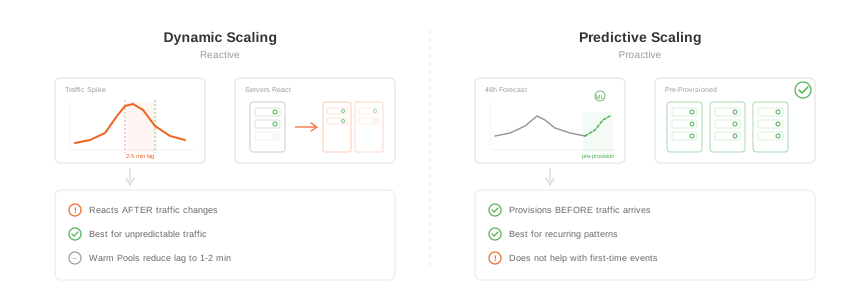
AWS recommends this combined approach for production workloads.
Cost Optimization
Scaling itself is free. You pay for the instances and other resources it provisions. Several strategies reduce these costs:
- Compute Savings Plans offer up to 66% discount on instance and Fargate usage. They apply automatically to your baseline capacity while scaling handles the variable portion at on-demand rates.
- Graviton4 instances (ARM-based processors from AWS) often deliver 25 to 40% better price-performance for PHP workloads compared to x86 instances. Switching instance types in your Auto Scaling group is a single configuration change.
- Varnish paired with Amazon CloudFront reduces the number of instances needed by serving pages from memory and edge locations, keeping your scaling group smaller.
Combining Savings Plans for your baseline with Graviton instances and Varnish can reduce infrastructure costs by 60% or more compared to a naive setup on standard instances.
What You Need for Professional Scaling
Automatic scaling on AWS requires four supporting components for a scalable Magento setup.
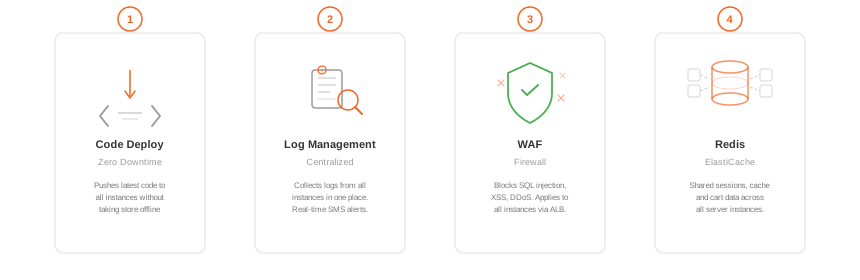
1. Code Delivery (Zero Downtime Releases)
When new instances spin up, they need your latest application code. Zero downtime deployment tools deploy code to all instances without taking your store offline.
Without automated code delivery, new instances would serve outdated or broken code.
2. Log Management (Centralized Monitoring)
With multiple instances scaling up and down, logs scatter across servers. Centralized log management collects all server, application, and error logs in one place.
This allows you to:
- Trace errors across all instances
- Get real-time alerts (SMS, email) when issues occur
- Review historical server activity after incidents
3. Web Application Firewall (WAF)
A WAF protects your store at the application layer. It monitors HTTP traffic, filters malicious requests, and blocks attacks like SQL injection, XSS, and DDoS attempts.
WAF rules must apply to every new EC2 instance automatically. AWS WAF integrates with your Application Load Balancer to cover all instances in your scaling group.
4. Session Management (ElastiCache)
When multiple instances serve your store, sessions and stored data must be shared across all of them. A single-server Magento setup stores sessions on disk. That breaks the moment a second instance enters the group.
Amazon ElastiCache (Redis) provides a central, in-memory store for:
- PHP sessions (so customers stay logged in across all instances)
- Magento full page and block data
- Shopping cart data
Without centralized session management, customers lose their cart or get logged out when traffic routes them to a different instance.
All four components plus Varnish are included in MGT Commerce managed Magento hosting plans.
Why Managed Hosting Makes Scaling Practical
Automatic scaling requires AWS cloud infrastructure. If your Magento site runs on a single dedicated server or self-hosted hardware, you cannot scale automatically.
You can configure scaling yourself on AWS. The tools are available to anyone with an AWS account. But getting it right demands deep expertise: scaling policies, cooldown periods, health checks, Warm Pool configuration, AMI management, Graviton compatibility, and cost optimization all need careful tuning.
Misconfigured policies either waste money (scaling too aggressively) or fail to protect your store (scaling too slowly). Managed hosting providers handle this complexity:
- Pre-configured scaling groups with tested policies
- AMIs optimized for Magento with Nginx on Graviton and x86 instances
- Monitoring dashboards showing scaling events in real time
- ElastiCache clusters for session management
- Ongoing optimization of thresholds and instance types
Frequently Asked Questions
What is automatic scaling on AWS?
It automatically adjusts the number of instances serving your site based on real-time demand. It adds capacity during traffic spikes and removes it during quiet periods.
How much does scaling on AWS cost?
The scaling service itself is free. You pay for the instances and other AWS resources it provisions. Combine Savings Plans with Graviton instances to reduce costs significantly.
What is the difference between Dynamic and Predictive Scaling?
Dynamic Scaling reacts to current traffic conditions in real time. Predictive Scaling uses machine learning to forecast recurring traffic patterns and pre-provision resources before demand arrives. Predictive does not help with one-time events that have no historical pattern.
Can I use both Dynamic and Predictive Scaling together?
Yes. AWS recommends combining both strategies. Predictive handles expected patterns while Dynamic catches unexpected traffic surges.
How fast are new instances added?
Standard instances take 2 to 5 minutes to launch and warm up. With Warm Pools, the instance launches in seconds but full Magento application warmup may still take 1 to 2 minutes. Container-based setups on Fargate can scale in seconds.
Does this work with Magento 2?
Yes. AWS scaling works with any application, including Magento 2 (Adobe Commerce) and Magento Open Source.
Do I need managed hosting?
Scaling requires AWS hosting. You can configure it yourself, but managed hosting providers handle the setup, monitoring, cost optimization, and ongoing maintenance of scaling policies.
What happens if instances are not added fast enough?
Your existing instances absorb the extra load, which may cause slower page loads until new capacity is ready. Warm Pools, Predictive Scaling, and Varnish all reduce this risk.
Why is centralized session management needed?
When multiple instances serve your store, PHP sessions and stored data must be shared. Amazon ElastiCache provides a central store so customers stay logged in and keep their cart across all instances.
What metrics should I monitor?
Key metrics include CPU utilization, network traffic, request count per target, and response latency. AWS CloudWatch provides all these metrics and triggers scaling actions based on thresholds you define.
