

Beginner's Guide to Magento Ecommerce Platform
[Updated: March 6, 2026] Starting an online store with Magento feels overwhelming. Three editions, complex hosting requirements, and a learning curve that scares most beginners away.
This guide cuts through the noise. You get a clear path from "should I use Magento?" to a running store.
Key Takeaways
- Magento fits stores that need deep customization and plan to scale past $1M in annual revenue.
- Open Source costs $0 for the software, but budget $200-500/month for proper managed hosting.
- Your first store setup takes 2-4 weeks with a developer, or 6-12 weeks if you learn it yourself.
- Choosing the wrong edition or hosting early creates expensive migration problems later.
What Makes This Guide Different
Magento = An open source ecommerce platform built for stores that need full control over their checkout, catalog, and infrastructure. Free software, but requires technical skills and proper hosting to run well.
Perfect for: Growing B2B and B2C stores, businesses with custom checkout needs, multi-store operations, stores planning to scale past $1M revenue.
Not ideal for: Solo entrepreneurs with no development budget, stores with fewer than 100 products, anyone wanting a drag-and-drop builder.
Is Magento Right for Your Business?
Magento powers between 100,000 and 250,000 stores worldwide, depending on how you count active installations. That number means nothing for your decision. What matters is whether your store needs what Magento offers and whether you can support it.
Choose Magento if:
- You sell 500+ products across multiple categories
- Your checkout needs custom logic (B2B pricing, tiered discounts, quote workflows)
- You plan to operate in multiple countries or languages
- You need full control over your server infrastructure
- Your annual revenue exceeds $500K or you expect it to within 2 years
Skip Magento if:
- You sell fewer than 50 products
- You have no development budget
- You need a store running within 48 hours
- Your total monthly budget for hosting, development, and maintenance is under $300
No platform fits everyone. Magento rewards businesses that invest in it, but punishes those who underestimate the operational commitment.
Three Editions Explained
Magento comes in three editions. Each targets a different business stage.
| Edition | Cost | Best For | Key Difference |
|---|---|---|---|
| Open Source | $0 (software) | Growing stores with dev resources | Full control, community support |
| Adobe Commerce | $22K-$300K+/year (GMV-based) | Enterprise with complex B2B needs | B2B features, Adobe support, SLA |
| Adobe Commerce Cloud | $40K-$300K+/year (GMV-based) | Enterprise wanting managed infrastructure | PaaS hosting included, auto-scaling |
Open Source handles the same traffic as the paid editions. The paid versions add B2B features (shared catalogs, company accounts, purchase orders), advanced content staging, and Adobe support. Pricing scales with your gross merchandise volume (GMV), so request a quote for accurate numbers.
For a deeper comparison, see our Magento Open Source vs Enterprise breakdown.
What You Need Before Starting
Every Magento store needs three things: proper hosting, the right PHP stack, and a search engine.
Server Requirements (Magento 2.4.8)
| Component | Minimum | Recommended |
|---|---|---|
| PHP | 8.3 | 8.4 (best performance and security) |
| Database | MySQL 8.0 | MySQL 8.4 or MariaDB 11.4 |
| Search | OpenSearch 2.5 | OpenSearch 2.12+ |
| RAM | 4 GB | 8-16 GB |
| Storage | 20 GB SSD | 50+ GB NVMe |
| Cache | File-based | Redis 7+ or Valkey 8 |

Magento 2.4.8 dropped Elasticsearch support. OpenSearch 2.x is the only supported search engine going forward. The upcoming 2.4.9 release adds full OpenSearch 3.x compatibility for improved performance and security. The full stack requirements are documented in the Adobe Commerce system requirements.
Running Magento on shared hosting causes problems from day one. The platform needs dedicated resources. Managed Magento hosting handles the server stack for you, so you focus on your store instead of PHP configurations.
For the full requirements breakdown, check our hosting requirements guide.
Setting Up Your First Store
Step 1: Choose Your Hosting
Your hosting choice affects everything that follows. Three options exist:
- Self-managed VPS ($20-80/month): You handle server setup, security patches, and PHP updates. Needs Linux administration skills.
- Managed Magento hosting ($150-500/month): The provider handles the server stack. You handle the store. Best balance of cost and convenience. Popular providers in 2026 include MGT-Commerce (AWS-based with CloudPanel), Nexcess (Magento-specialized), and Cloudways (flexible scaling).
- Adobe Commerce Cloud ($40K+/year): Adobe handles infrastructure. Overkill for most stores under $10M revenue.
Step 2: Install Magento
Composer is the standard installation method:
composer create-project --repository-url=https://repo.magento.com/ magento/project-community-edition .
You need Adobe Marketplace credentials (free account) to download packages.
Step 3: Configure the Basics
After installation, handle these first:
-
Admin URL: change the default
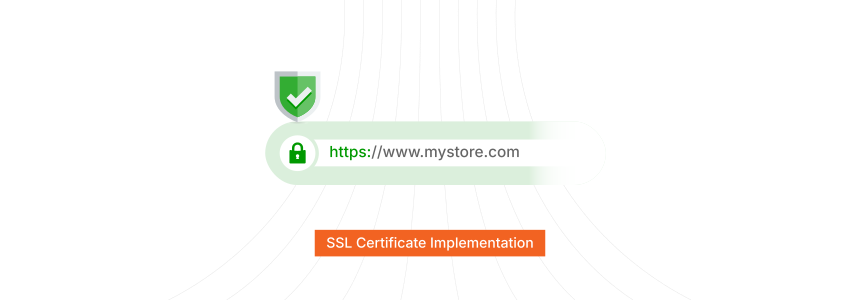
/adminpath to something unique - Base URLs: set your store URL and enable HTTPS
- Email: configure SMTP for transactional emails
- Tax rules: set up tax zones before adding products
- Payment methods: connect at least one payment gateway
Step 4: Add Your Products
Magento supports six product types. Most stores use two:
- Simple products: Single items with one SKU (a t-shirt in one size)
- Configurable products: Items with options (a t-shirt in multiple sizes and colors)
Start with 10-20 products. Get the catalog structure right before bulk importing.
Step 5: Choose Your Theme
Magento ships with the Luma theme. It works for testing, but no production store should use it.
Two paths forward:
- Hyvä (core theme free and open-source since November 2025, OSL 3.0 license): Modern frontend, 10x faster page loads, Tailwind CSS. Growing ecosystem. Hyvä Checkout is a separate add-on (~€1,000 one-time) worth the investment for conversion gains.
- Custom Luma child theme: Free, but slower frontend, harder to customize long-term.
The Hyvä open-source shift in late 2025 removed the biggest barrier for new stores. There is no reason to start a new project on Luma in 2026.
Five Mistakes That Cost Beginners Months
1. Starting on Shared Hosting
Magento needs 4 GB RAM minimum. Shared hosting gives you 512 MB. The store loads in 8-12 seconds instead of 2-3. Customers leave before the page renders.
2. Editing Core Files
Modifying files inside vendor/ breaks on the next update. Use plugins, preferences, and child themes instead. Every customization should live in app/code/ or app/design/.
3. Installing Too Many Extensions
Each extension adds load time and potential conflicts. Start with zero third-party extensions. Add them one at a time, test each in staging first. A store with 30 extensions is a store with 30 potential points of failure.
4. Skipping Staging Environments
Pushing changes direct to production breaks stores. Set up a staging server that mirrors production. Test every change there first.
5. Ignoring Performance from Day One
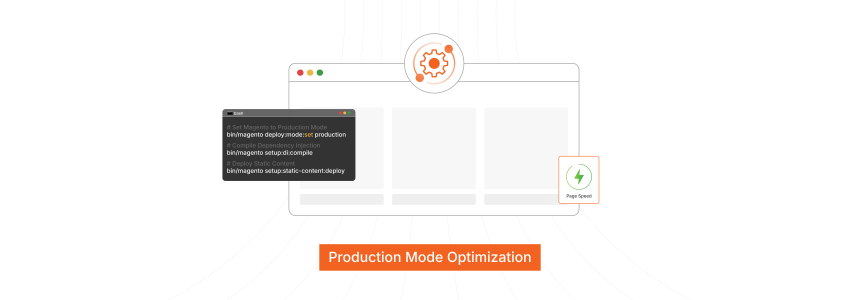
Enable Redis for cache and sessions. Enable Varnish for full-page cache. Optimize your store speed before launch, not after customers start complaining about load times.
Magento vs Other Platforms
| Factor | Magento Open Source | Shopify | WooCommerce |
|---|---|---|---|
| Software Cost | Free | $39-399/month | Free |
| Hosting | Self-managed | Included | Self-managed |
| Customization | Unlimited | Limited by Liquid | Moderate (PHP) |
| B2B Features | Via extensions | Shopify Plus only | Limited |
| Multi-store | Built-in | Separate accounts | Multisite possible |
| Learning Curve | Steep | Low | Moderate |
| Best For | Custom, scalable stores | Quick launch, simple stores | Content-heavy stores |
Magento wins when your store needs capabilities that SaaS platforms restrict. For a detailed comparison, read our Magento vs Shopify vs WooCommerce analysis.
What's New for Magento in 2026
Magento 2.4.8 is the current stable release (regular support until April 2028). Adobe targets a stable 2.4.9 for May 2026, focusing on improved security, OpenSearch 3.x compatibility, AI-powered personalization, and expanded headless commerce capabilities. Starting January 2026, Adobe ships monthly security patches for faster vulnerability fixes instead of quarterly bundles.
The shift toward composable commerce accelerates. More stores decouple their frontend from the Magento backend using PWA Studio or custom React/Vue storefronts connected through GraphQL. For beginners, this means planning your architecture with API flexibility in mind, even if you start with a traditional theme.
FAQ
What is the best hosting for a Magento beginner?
Managed Magento hosting gives beginners the server performance Magento needs without requiring Linux administration skills. Self-managed VPS works for developers comfortable with server configuration.
How much does it cost to run a Magento store?
Software is free for Open Source. Budget $200-500/month for managed hosting, $1,000-5,000 for initial theme and setup, and $500-2,000/month for ongoing development and maintenance. Total first-year cost for a small store: $10,000-30,000.
Can I build a Magento store without coding knowledge?
You can manage an existing Magento store through the admin panel without coding. Building and customizing the store requires PHP, XML, and JavaScript knowledge, or a development partner.
How long does it take to launch a Magento store?
With an experienced developer: 4-8 weeks for a standard store. Learning and building yourself: 3-6 months. Complex B2B stores with custom integrations: 3-12 months.
Is Magento 1 still supported?
No. Magento 1 reached end of life in June 2020. Running Magento 1 creates security vulnerabilities because no patches are released. Migrate to Magento 2. The current stable version is 2.4.8 (released April 2025, supported until 2028), with 2.4.9 planned for May 2026. If you run an older 2.4.x release (such as 2.4.6), note that its EOL is August 2026. Upgrade to 2.4.8 before support ends.
What PHP version does Magento 2.4.8 require?
Magento 2.4.8 requires PHP 8.3 (minimum) or PHP 8.4 for best performance and security. Earlier PHP versions are no longer supported. Confirm your hosting provider offers PHP 8.4 before upgrading.
Should I use Hyvä or Luma for my theme?
Hyvä. Since November 2025, the Hyvä core theme is free and open-source. It delivers faster page loads (0.15 MB JavaScript vs 0.9 MB for Luma) and uses modern Tailwind CSS. Hyvä Checkout (~€1,000 one-time) is the main paid add-on. Luma works for testing but underperforms in production.
Can Magento handle B2B and B2C on the same installation?
Yes. Magento supports multiple store views from one installation. You can run a B2C storefront and a B2B portal with different pricing, catalogs, and checkout flows from the same backend.
How do I keep my Magento store secure?
Change the admin URL, enable two-factor authentication, apply security patches within 72 hours of release, use a web application firewall, and restrict file permissions. Keep PHP and all extensions updated.
What is the difference between Magento and Adobe Commerce?
Magento Open Source is the free community edition. Adobe Commerce is the paid enterprise version that adds B2B features (shared catalogs, company accounts, purchase orders), content staging, customer segmentation, and Adobe support. Both share the same core codebase.
Getting Started
Starting with Magento comes down to three decisions: which edition, what hosting, and how to build your theme. Get these right and the rest follows.
For most new stores, the path is clear: Magento Open Source on managed Magento hosting with a Hyvä theme. This combination delivers enterprise performance without enterprise costs.
