

Magento Hyvä Theme: Complete 2026 Guide (Features, Install, Cost)
[Updated: April 16, 2026]
Magento Hyvä Theme replaces Luma's aging frontend with Tailwind CSS and Alpine.js, delivering pages 4 to 5 times lighter and Lighthouse scores above 90. Since November 2025 the core theme is free and open source under OSL 3.0 and AFL 3.0.
This 2026 guide covers what Hyvä is, how it compares against Luma, PWA Studio, and custom headless setups, the license and migration costs, a condensed install walkthrough, and the hosting stack Hyvä needs to actually deliver its performance promises.
Key Takeaways
- Hyvä Theme is a complete Magento 2 frontend replacement built on Tailwind CSS and Alpine.js, delivering pages 4 to 5 times lighter than Luma.
- The core theme is free and open source since November 10, 2025 (version 1.4.0), licensed under OSL 3.0 and AFL 3.0.
- Latest version 1.4.4 (March 2026) ships with Tailwind CSS v4 and the Oxide Rust engine for faster builds.
- Commercial add-ons remain paid: Hyvä UI (€250 per store), Hyvä Checkout, Hyvä Commerce, and Hyvä Enterprise.
- Typical Hyvä migration for mid market stores takes 4 to 8 weeks and costs between 15,000 and 70,000 USD.
- The frontend gain only translates to real page speed with proper hosting (Redis, Varnish 7.7, OpenSearch 3, PHP 8.4 FPM).
- Works on Magento 2.4.4 and later, compatible with both Magento Open Source and Adobe Commerce.
What Is Hyvä Theme?
Hyvä is a complete frontend replacement for Magento 2. It removes Knockout.js, RequireJS, jQuery, and LESS from the storefront. In their place: Tailwind CSS for styling and Alpine.js for interactivity. The result is a frontend that ships around 0.15 MB per product page. Luma ships around 0.9 MB for the same page.
The theme was created by Vinai Kopp and Willem Wigman in 2021 as a commercial alternative to Luma. It became free and open source on November 10, 2025 with version 1.4.0, under OSL 3.0 and AFL 3.0 licenses (the same dual license as Magento Open Source). The move removed the 1,000 USD per store fee that had been the main barrier to adoption.
The latest version is 1.4.4, released March 3, 2026. It ships with Tailwind CSS v4 and the new Oxide engine written in Rust for faster build times and CSS-first configuration through @theme directives. The full Hyvä changelog lists every release.
Hyvä is not a PWA and is not headless. It is a traditional server rendered Magento frontend, which makes it easier to adopt than Vue Storefront or PWA Studio for teams that already know Magento.
Why Hyvä: Performance Benefits
Real world benchmarks show clear differences between Hyvä and Luma.
| Metric | Hyvä | Luma |
|---|---|---|
| Product page size | 0.15 MB | 0.9 MB |
| Total frontend payload | 80 to 90% smaller | Baseline |
| Category page load (mobile throttled) | 1.6s | 8.0s |
| Search results load (mobile throttled) | 1.6s | 6.1s |
| JavaScript framework | Alpine.js (~15 KB) | Knockout.js + RequireJS (hundreds of KB) |
| CSS framework | Tailwind CSS (purged) | LESS (compiled, full) |
| Lighthouse Performance (2026) | 90+ achievable | 40 to 60 typical |
Page load numbers are from the original Hyvä benchmarks on throttled mobile (iPhone X baseline, comparable to Lighthouse default mobile throttling). Your real numbers vary based on catalog size, extension load, and hosting configuration.
These numbers translate directly to better Core Web Vitals. LCP, INP, and CLS all improve when pages weigh less and execute less JavaScript. Google uses Core Web Vitals as a direct ranking signal, so the performance gain compounds into SEO benefits.
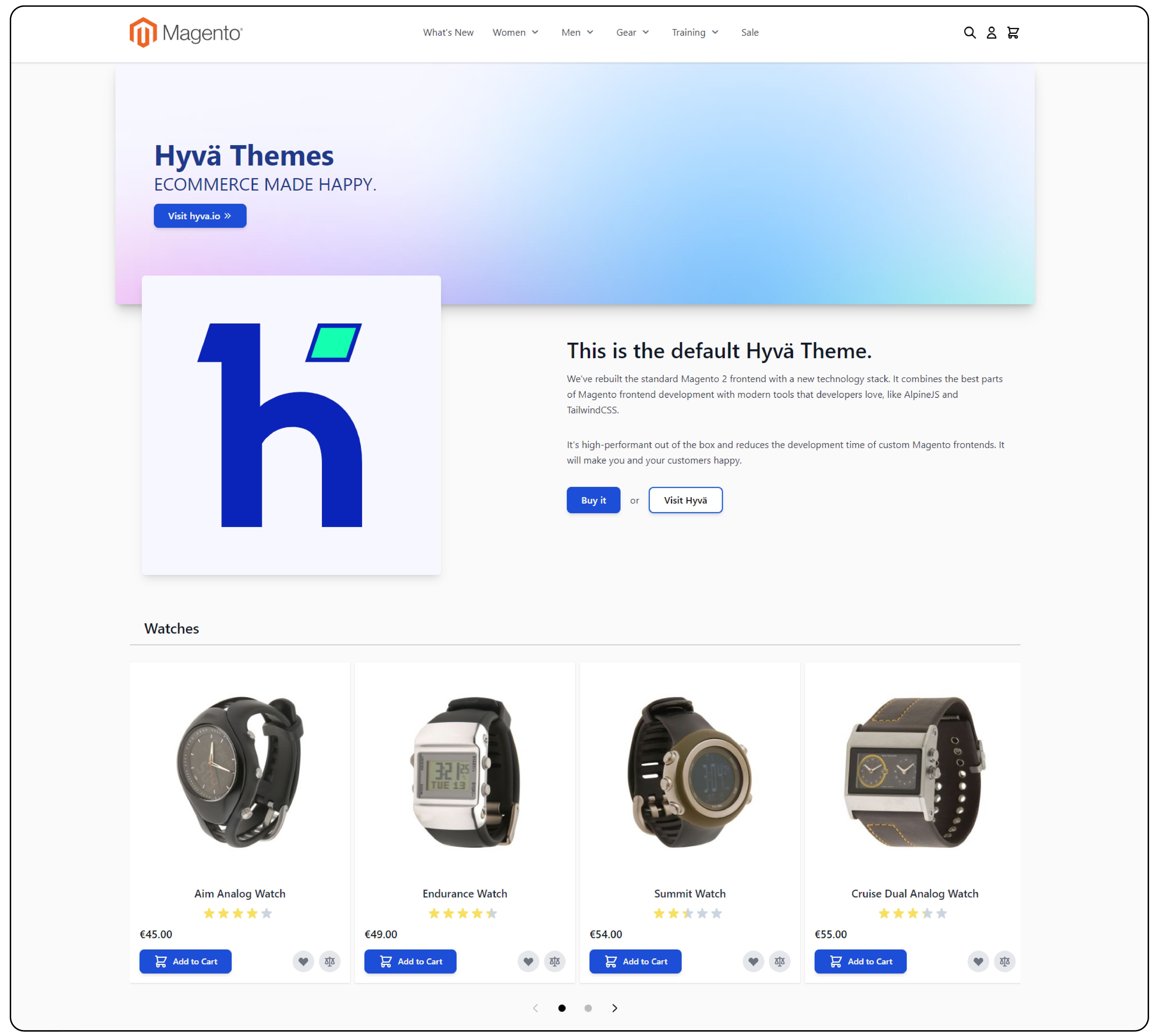
Test the Hyvä demo store to see live results in your own browser.
Hyvä vs Luma vs PWA Studio vs Headless
Magento teams have four modern frontend options in 2026. Each hits a different tradeoff.
| Option | Architecture | Best For | Complexity | Cost |
|---|---|---|---|---|
| Hyvä Theme | Server rendered, Tailwind + Alpine | Most Magento stores, especially mid market | Low | Free core + paid add-ons |
| Luma (default) | Server rendered, Knockout + jQuery | Legacy stores, minimal changes | Very low | Free |
| PWA Studio | Headless, React based | High traffic stores with React teams | High | Free + custom build |
| Headless (custom) | Decoupled, any framework | Unique UX, omnichannel, multi brand | Very high | Custom build cost |
Hyvä wins for most Magento stores in 2026. It delivers PWA level performance without the headless complexity. Your existing Magento team can work on it with minimal retraining.
Luma is fine for stores that do not care about Core Web Vitals and want zero migration work. Adobe continues to ship Luma with every Magento release.
PWA Studio fits stores with dedicated React teams and complex UI requirements. The learning curve is steep, but the payoff is a truly decoupled frontend. For a detailed side by side see our Hyvä vs PWA comparison.
Headless with custom frontends (Vue Storefront, Alokai, Next Commerce) is for brands with unique UX needs, multiple storefronts, or tight integration with other systems. The investment is the largest of the four options.
When to Use Hyvä (and When Not)
Hyvä is the right choice when any of these apply to your store:
- You need fast pages for mobile shoppers
- Your Luma store scores under 70 on Lighthouse
- You want Core Web Vitals in the green without rebuilding the stack
- Your team knows Magento and does not want to learn React
- You plan a fresh Magento store and want modern frontend from day one
- Your stack is Magento Open Source and budget matters
Hyvä is not the right choice when:
- You rely on more than 20 Luma dependent extensions without compatibility modules
- You want the PWA benefits of offline support and app install prompts (pick PWA Studio)
- You need React specific UI libraries or complex single page checkout flows
- Your store is extremely small and the migration cost outweighs the performance gain
For stores running older Magento versions, upgrade to 2.4.8 first. Hyvä works on 2.4.4+ but you get the full feature set and OpenSearch 3 compatibility only on the current release. Follow our Magento install guide if you are on a fresh install.
Hyvä License and Costs
The core Hyvä Theme is free since November 2025. That covers the default theme, theme module, all category, product, cart, and account pages, plus Alpine.js components.
The full Hyvä ecosystem is four tiers.
| Product | What It Is | Price (2026) |
|---|---|---|
| Hyvä Theme | Core frontend (default theme + module) | Free (OSL 3.0 + AFL 3.0) |
| Hyvä UI | Prebuilt UI components library | €250 per store |
| Hyvä Checkout | Replacement checkout flow | Paid (Hyvä Commerce) |
| Hyvä Enterprise | B2B features (company accounts, requisition lists) | Paid (Hyvä Commerce) |
Hyvä Commerce bundles UI, Checkout, and Enterprise in one subscription for stores that want the full stack. The bundle pricing is custom based on store size.
Beyond the license, plan for these implementation costs. The ranges below are typical industry estimates for mid market migrations. Enterprise projects and heavily customized stores run higher.
- Development: 15,000 to 70,000 USD for mid market migration (4 to 8 weeks)
- Extension compatibility modules: 50 to 300 USD each (not all extensions need one)
- Custom theme work: varies based on design complexity
Total first year cost for a mid market Magento 2 store migrating from Luma: typically 25,000 to 85,000 USD when you include development, extension compatibility checks, and design work. Get at least two agency quotes before committing. Rates vary significantly by region and agency experience with Hyvä specifically.
How to Install Hyvä Theme (2026)
The full install takes 8 steps and 15 to 30 minutes on a prepared server. The high level flow:
1. Get a Packagist key. Register at hyva.io, create a free Packagist key from your dashboard. Individuals get 5 keys, agency partners get 50.
2. Configure Composer authentication:
composer config --auth http-basic.hyva-themes.repo.packagist.com token YOUR_LICENSE_KEY
composer config repositories.private-packagist composer https://hyva-themes.repo.packagist.com/YOUR_PROJECT_NAME/
3. Install the theme package:
composer require hyva-themes/magento2-default-theme
bin/magento setup:upgrade
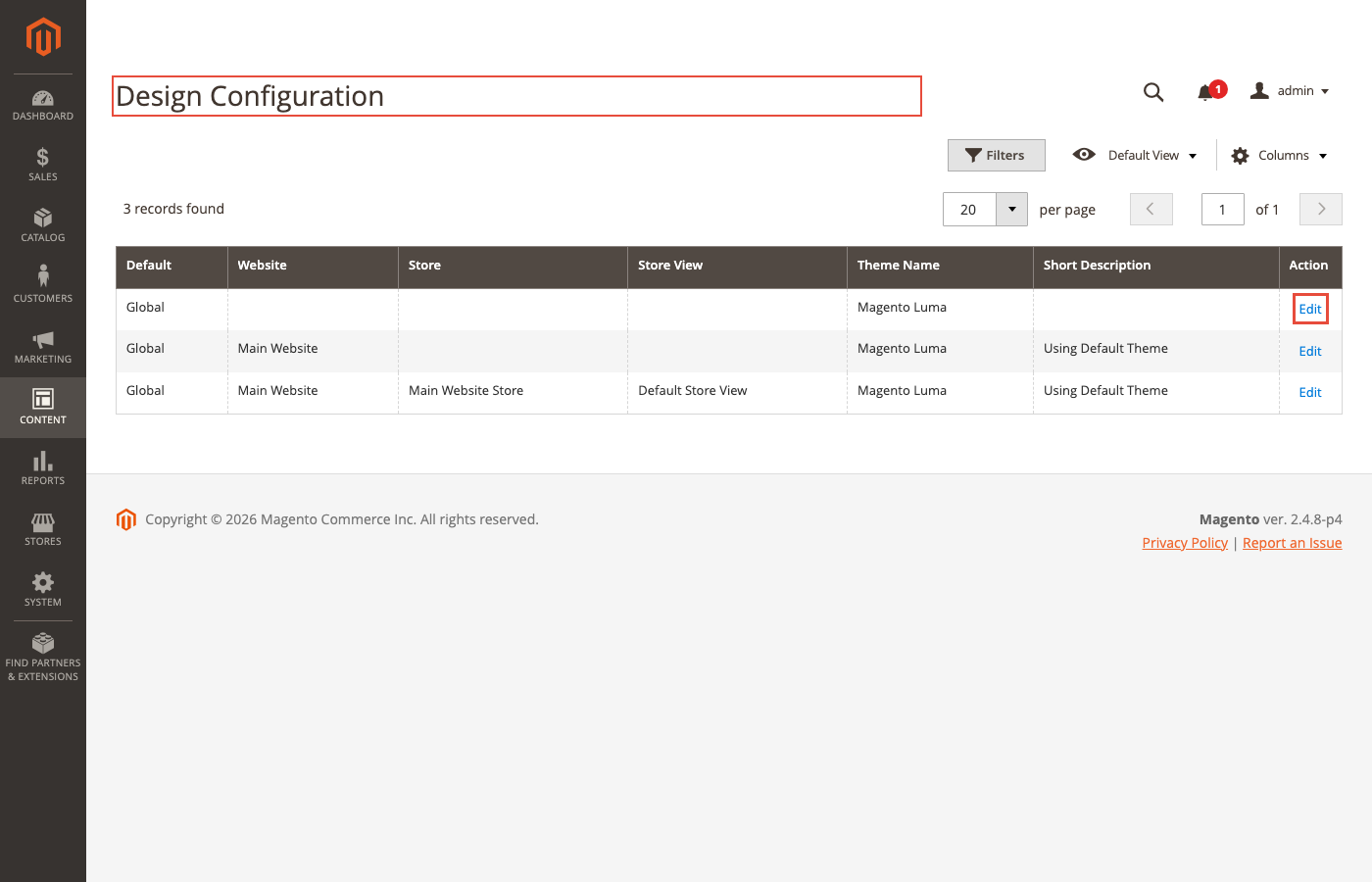
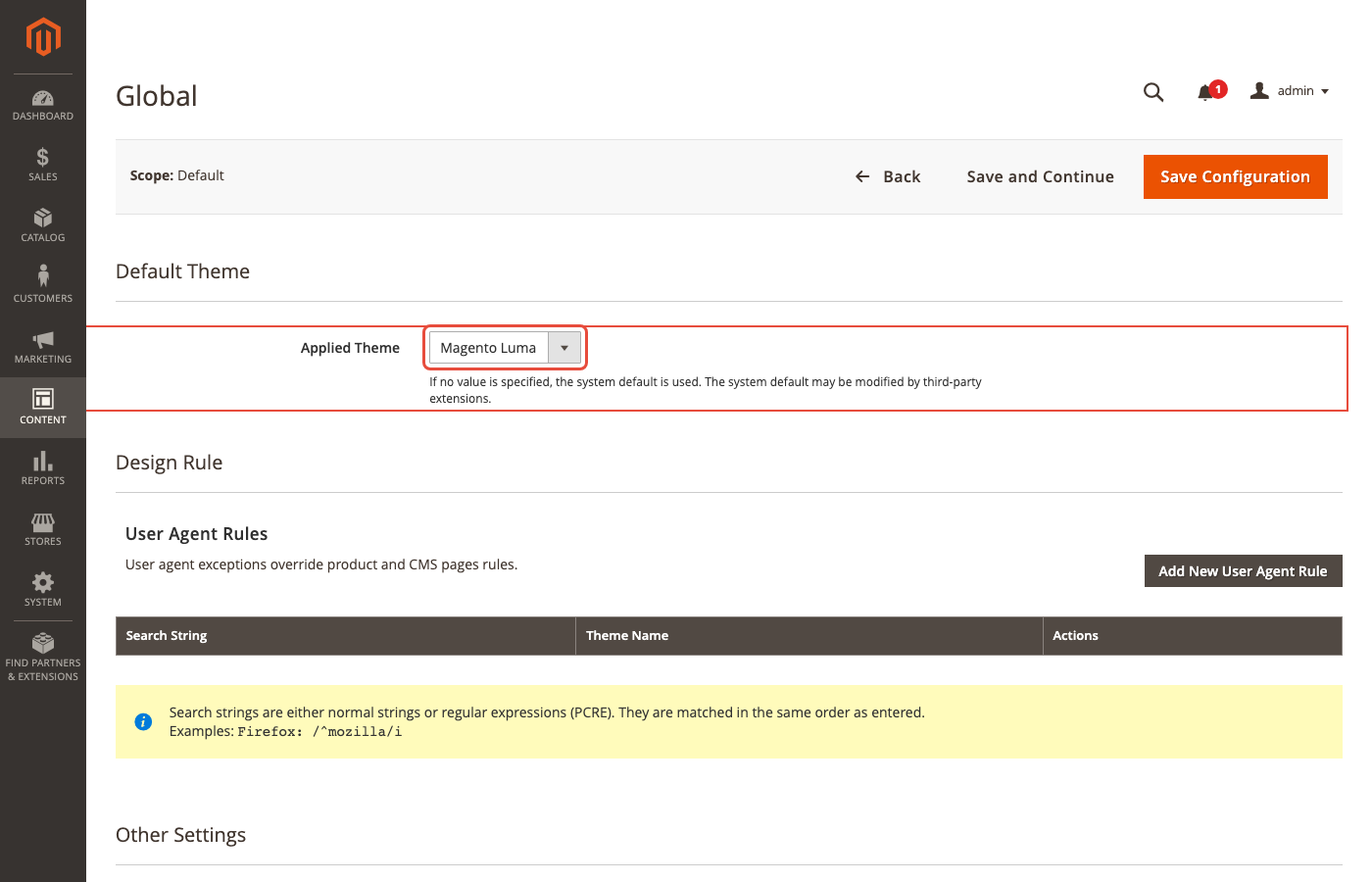
4. Activate the theme in admin. Go to Content > Design > Configuration, select your store scope, set Applied Theme to Hyvä default. Set it at the Website level, not just Store View.
5. Disable built-in minification and bundling. Magento's asset pipeline conflicts with Hyvä's own optimization:
bin/magento config:set dev/template/minify_html 0
bin/magento config:set dev/js/merge_files 0
bin/magento config:set dev/js/enable_js_bundling 0
bin/magento config:set dev/js/minify_files 0
bin/magento config:set dev/css/merge_css_files 0
bin/magento config:set dev/css/minify_files 0
6. Disable default Captcha. Hyvä does not support Magento's built-in Captcha module. Use Google reCAPTCHA v2 or v3 instead:
bin/magento config:set customer/captcha/enable 0
7. Enable GraphQL modules. Hyvä relies on GraphQL for data fetching. On Magento 2.4.7 and newer, most GraphQL modules ship enabled. Verify with:
bin/magento module:status | grep GraphQl
8. Deploy and flush cache:
bin/magento setup:static-content:deploy
bin/magento cache:flush
Open your storefront. The default theme should render with the new frontend.
For the complete step by step walkthrough including child theme creation and Tailwind build configuration, the official Hyvä getting started guide covers every detail.
Create a Child Theme
Never edit the default theme directly. Create a child theme for all customizations.
app/design/frontend/YourVendor/yourtheme/
├── registration.php
├── theme.xml
└── web/tailwind/
    ├── tailwind.config.js
    └── tailwind-source.css
The parent in theme.xml must be Hyva/default:
<theme xmlns:xsi="http://www.w3.org/2001/XMLSchema-instance"
       xsi:noNamespaceSchemaLocation="urn:magento:framework:Config/etc/theme.xsd">
    <title>Your Store Theme</title>
    <parent>Hyva/default</parent>
</theme>
Build Tailwind CSS from the child theme's web/tailwind/ directory:
npm install
npx tailwindcss -o ../css/styles.css --watch
For production, add --minify. With Tailwind v4, the Oxide engine builds are substantially faster than v3.
Migrating from Luma to Hyvä
Switching an existing Luma store takes planning. Template files, layout XML conventions, and JavaScript patterns differ from Luma.
Step 1: Audit extensions for compatibility. Check the official Hyvä compatibility list. Many popular extensions from Amasty, Mageplaza, and Mirasvit ship compatible versions. Luma dependent extensions without compatibility modules need custom work.
Step 2: Set up a staging environment. Never migrate directly on production. Stage, test, QA every page type, then swap.
Step 3: Port custom templates. .phtml files using Knockout.js bindings need rewriting to Alpine.js equivalents. The mental model shifts from observables and subscriptions to plain reactive state.
Here is a simple add to cart button in both patterns:
<!-- Luma (Knockout.js) -->
<button data-bind="click: addToCart, attr: { disabled: !inStock() }">
    <span data-bind="text: buttonLabel"></span>
</button>

<script>
define(['ko'], function(ko) {
    return {
        inStock: ko.observable(true),
        buttonLabel: ko.observable('Add to Cart'),
        addToCart: function() { /* logic */ }
    };
});
</script>
<!-- Hyvä (Alpine.js) -->
<div x-data="{ inStock: true, buttonLabel: 'Add to Cart' }">
    <button @click="addToCart()" :disabled="!inStock">
        <span x-text="buttonLabel"></span>
    </button>
</div>
Alpine keeps the state inline in the markup, which is easier to read but means you think about scope more carefully. Shared state lives in Alpine stores (Alpine.store('cart', ...)) or server rendered JSON that Alpine hydrates on page load.
Step 4: Rebuild checkout customizations. If you modified the default Magento checkout, that work does not carry over. Either port it to Alpine.js or use Hyvä Checkout if you need heavy customization.
Step 5: Test payment gateways. Payment method templates change between frontends. Every gateway needs a test transaction before go live.
Step 6: Test on production like hardware. Hyvä performance depends on the full stack. A 100 on Lighthouse in staging means nothing if production uses slow hosting. Test on hardware that matches production.
The Hyvä upgrade and migration guide walks through every step with example code.
Extension Compatibility
Not every Magento extension works with Hyvä out of the box. Extensions that render HTML via Knockout.js bindings or RequireJS modules need compatibility modules.
Three categories:
- Works unchanged — server side only extensions (admin grids, APIs, backend logic). These never touch the frontend so they work on both Luma and Hyvä.
-
Needs compatibility module — extensions that render frontend UI. The vendor usually ships a
hyva-compatpackage alongside the main module. - Will never work — extensions that deeply hook into Knockout.js checkout or UI components with no Hyvä equivalent. These need replacement.
Before committing to Hyvä, list every paid extension on your store and verify compatibility. Most popular extensions in 2026 ship with Hyvä compatibility modules. The Hyvä compatibility registry lists 250+ verified modules. Our Hyva checkout compatible extensions roundup covers the most popular checkout ones.
Hyvä and Hosting: Why the Stack Matters
Hyvä optimizes the frontend. Page speed also depends on the backend. A Hyvä store on slow hosting loses most of the performance gain before the first byte leaves the server.
For Hyvä to deliver the 4 to 5 times faster page loads, the stack underneath needs:
- PHP 8.4 FPM with enough workers. Hyvä runs on Magento, which runs on PHP. Slow PHP FPM equals slow TTFB regardless of frontend.
- Redis 7.2 or Valkey 8 for session and backend cache. File cache kills Magento admin and user session performance.
- Varnish 7.7 as full page cache in front of Magento. Hyvä still hits the Magento PHP layer for dynamic pages without Varnish.
- OpenSearch 3 for product search. Slow search means slow category and search results pages.
- CDN for static assets. Tailwind CSS and Alpine.js JavaScript should load from edge nodes.
- HTTP/2 or HTTP/3 enabled for the multiplexing that Hyvä's small asset graph benefits from.
Combined with Hyvä, this stack delivers sub 1 second LCP for anonymous traffic and Lighthouse scores above 90 on mid market catalogs. Without it, you get a fast frontend attached to a slow backend, which shows up as good Lighthouse staging scores but disappointing real user metrics.
Our managed Magento hosting ships every component preconfigured: PHP 8.4, Redis 7.2, Varnish 7.7, OpenSearch 3, and CloudFront CDN. Hyvä sites on this stack consistently hit the 90+ Lighthouse target. For deeper speed tuning see our Magento speed optimization guide and Magento system requirements for the full technical baseline.
Common Hyvä Issues and Fixes
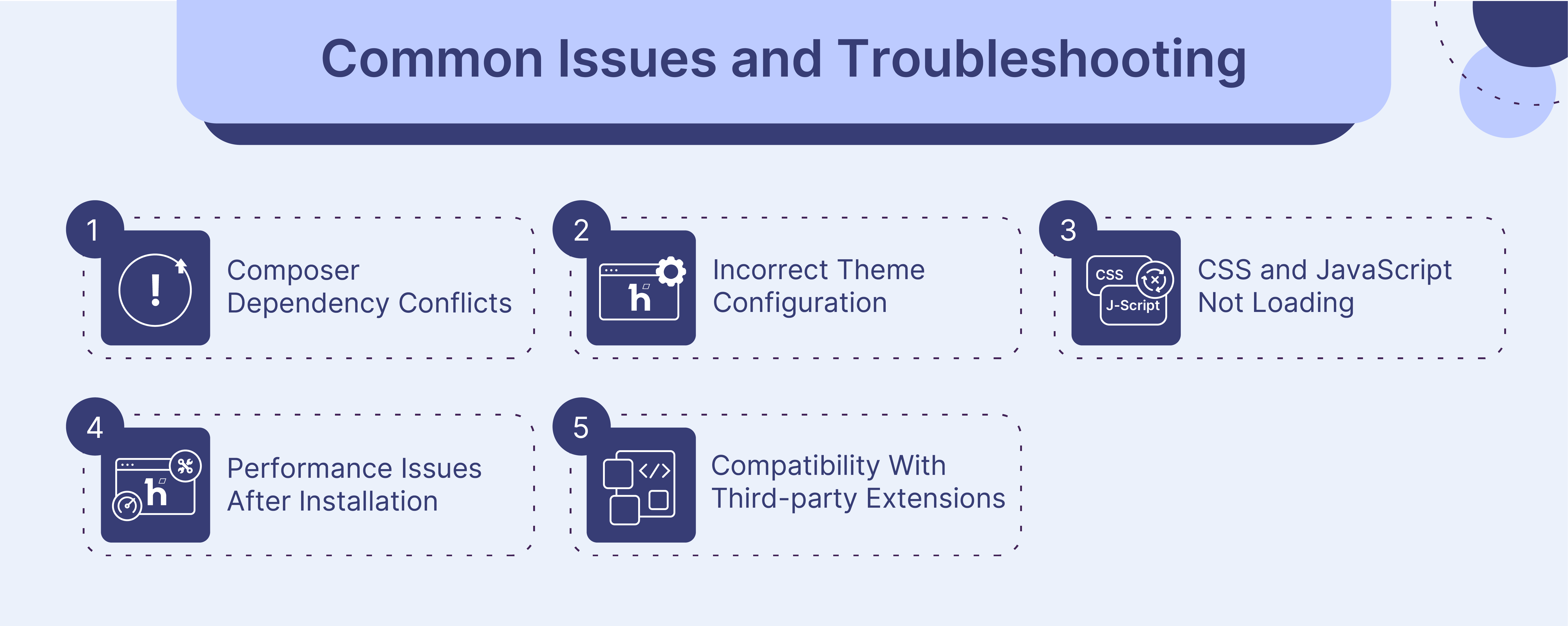
These are the errors Hyvä installs hit most often.
Styles not loading after install. Cache and static content out of sync. Flush everything and redeploy:
bin/magento cache:flush
rm -rf pub/static/frontend/*
bin/magento setup:static-content:deploy
If styles still break, verify the theme is set at the Website level in admin, not Store View only.
GraphQL errors on frontend. Missing GraphQL modules cause blank pages or JavaScript errors. Check module status:
bin/magento module:status | grep GraphQl
Enable any missing GraphQL modules and rerun setup:upgrade.
Tailwind CSS not compiling. Verify Node.js 20 or 22 LTS is installed:
node --version
Switch with nvm if needed: nvm use 20. Remove node_modules and reinstall.
Extension rendering as broken HTML. Extension needs a Hyvä compatibility module and it is not installed. Check the vendor docs or the Hyvä compatibility registry.
Checkout fails silently. Magento's default Captcha is incompatible. Disable it and install Google reCAPTCHA instead.
FAQ
What is Hyvä Theme? Hyvä is a modern frontend replacement for Magento 2. It uses Tailwind CSS and Alpine.js instead of Magento's default Knockout.js and RequireJS. Pages load 4 to 5 times faster and weigh 80 to 90% less than Luma equivalents.
Is Hyvä Theme free? Yes. The core theme is free and open source since November 10, 2025 (version 1.4.0), licensed under OSL 3.0 and AFL 3.0 (same as Magento Open Source). Commercial add-ons like Hyvä UI (€250 per store), Hyvä Checkout, and Hyvä Enterprise remain paid.
What Magento versions support Hyvä? Hyvä 1.4.4 supports Magento 2.4.4-p9, 2.4.5-p8, 2.4.6-p7, 2.4.7-p1, and 2.4.8+. The theme works on both Magento Open Source and Adobe Commerce.
How much does a Hyvä migration cost? Mid market stores typically spend 15,000 to 70,000 USD on the full migration over 4 to 8 weeks. Total first year cost including development, extension compatibility, and design work is usually 25,000 to 85,000 USD. The core theme is free.
How long does Hyvä installation take? On a clean Magento 2.4.8 install, the basic setup takes 15 to 30 minutes. A production ready child theme with custom styles adds several hours to a few days depending on design complexity.
Does Hyvä work with all Magento extensions? No. Extensions built for Luma's Knockout.js frontend need compatibility modules. Many popular extensions from Amasty, Mageplaza, and Mirasvit ship compatible versions. Over 250 extensions have verified Hyvä support.
Can I use Hyvä on Adobe Commerce? Yes. Both Magento Open Source and Adobe Commerce run Hyvä. For B2B features like company accounts and requisition lists, use the paid Hyvä Enterprise add-on.
Hyvä vs PWA Studio: which one should I pick? Hyvä for most stores: easier to adopt, runs on server rendered Magento, no React knowledge required. PWA Studio for stores with dedicated React teams and complex single page application needs. PWA Studio has a much steeper learning curve.
Does Hyvä improve SEO? Indirectly. Faster page loads improve Core Web Vitals, which Google uses as a ranking signal since 2021. Lighter pages reduce bounce rates on mobile. The SEO gain comes from better performance metrics, not from built in SEO features.
Can I switch back to Luma after installing Hyvä? Yes. Change the theme back in Content > Design > Configuration. Luma templates remain in the codebase. Custom templates built for Hyvä (Alpine.js, Tailwind) will not carry back to Luma.
Do I need Node.js on production servers? No. Node.js is needed on development machines to compile Tailwind CSS. Production servers serve the pre-compiled CSS. Your build pipeline handles compilation before deployment.
What is Hyvä Commerce? Hyvä Commerce is a commercial bundle that includes the Theme, UI, Checkout, and Enterprise features in one subscription. The core Theme is separate and always free.
Summary
Hyvä Theme is the practical modern frontend choice for Magento 2 in 2026. It delivers PWA level page speed without the headless complexity, runs on server rendered Magento, and costs nothing for the core theme since it went open source in November 2025.
The migration is not trivial. Plan 4 to 8 weeks for a mid market store, 15,000 to 70,000 USD in development costs, and a careful extension compatibility audit. The return is real: Lighthouse scores above 90, Core Web Vitals in the green, and the SEO and conversion gains that come with faster pages.
Hyvä on its own is only half the story. The frontend optimization only pays off on hosting that can match it. Redis, Varnish 7.7, OpenSearch 3, and PHP 8.4 FPM need to be in place or the gain disappears on the server side.
For Magento stores that want Hyvä with production ready hosting out of the box, our managed Magento hosting ships the complete stack preconfigured. Hyvä installs cleanly on our platform, and the performance numbers match the staging benchmarks.
