

How to Prevent Magento 2.4 Exploits: Complete CVE Security Guide
[Updated: March 18, 2026]
A single unpatched Magento vulnerability gives attackers full server access. Automated exploit scans start within 16 hours of each patch release.
This guide covers every critical Magento 2.4 exploit from 2022 through 2025, with verified CVE details, detection methods, server hardening, and recovery steps. Apply monthly security patches as soon as they are available.
Key Takeaways
-
Four critical Magento CVEs (CVSS 9.1 to 9.8) have been exploited in the wild since 2022.
-
CVE-2024-34102 (CosmicSting) led to 4,275 confirmed store compromises across seven attack groups.
-
CVE-2025-54236 (SessionReaper) remained unpatched on 62% of stores six weeks after the patch release (Sansec).
-
Attackers chain vulnerabilities to escalate from file read to full remote code execution.
-
Managed hosting with automatic patching and WAF protection blocks most exploit attempts.
What Is a Magento 2.4 Exploit?
A Magento 2.4 exploit = code or technique that targets security flaws in Magento 2.4.x for unauthorized server access. Exploits range from reading config files to executing arbitrary code on the server.
Most dangerous for: Stores on unpatched Magento versions, sites with unvetted extensions, self-managed servers without WAF.
Best protected by: Managed hosting with auto-patching, web application firewalls, regular security audits.
A vulnerability is a flaw in Magento's core code or installed extensions. An exploit is the method attackers use to trigger that flaw.
Magento vulnerabilities stem from:
- Improper input validation that accepts malicious data
- Insecure deserialization of user-controlled objects
- XML parsers that process external entities without restriction
- Outdated components with known security flaws
- Misconfigured file permissions or server settings
Once exploited, attackers steal customer payment data, install credit card skimmers, deploy web shells for persistent access, or hold store data for ransom.
Critical Magento 2.4 CVE Timeline (2022 to 2025)
Four critical vulnerabilities have targeted Magento 2.4 since 2022. Each one was exploited in the wild. This section covers the attack method, impact, and patch for every CVE.
Keeping Magento up to date with security patches is the single most effective defense against these exploits.
CVE-2022-24086: Template Injection RCE (CVSS 9.8)
This vulnerability allowed pre-authenticated remote code execution through improper input validation in the checkout process. Attackers injected malicious template directives via checkout fields, which Magento's template filter engine processed as executable PHP code.
The attack exploited two functions in the template engine: getTemplateFilter and addAfterFilterCallback. Combined, these allowed attackers to chain PHP function calls without authentication. The {{depend ...}} syntax enabled arbitrary code execution on the server.
Impact: Full server control, PII theft, payment card skimming, web shell installation.
Patch: Adobe released hotfix patches MDVA-43395 and MDVA-43443 in February 2022 (both required, as MDVA-43395 alone was incomplete). Later full releases 2.4.3-p2 and 2.3.7-p3 (April 2022, APSB22-13) incorporate this protection.
Source: Adobe Security Bulletin APSB22-12
CVE-2024-20720: XML Backdoor Injection (CVSS 9.1)
Discovered in February 2024, this OS command injection vulnerability allowed attackers to insert a persistent backdoor into the Magento database. The exploit targeted checkout cart price rules, embedding malicious XML that re-injected itself after removal.
What made this CVE dangerous: standard malware cleanup failed. The backdoor regenerated from the database entry on every page load. Complete remediation required database inspection beyond file-level scans.
Impact: Persistent remote code execution that survived standard security cleanups.
Patch: Adobe Commerce versions 2.4.6-p4, 2.4.5-p6, and 2.4.4-p7.
Source: Adobe Security Bulletin APSB24-03
CVE-2024-34102 CosmicSting: XXE Injection (CVSS 9.8)
This XML External Entity (XXE) injection flaw affected over 140,000 Magento deployments. Attackers sent crafted XML payloads that forced Magento's parser to read internal server files, including app/etc/env.php which contains encryption keys and database credentials.
The vulnerable endpoint (/rest/all/V1/guest-carts/) required no authentication. Attackers used the extracted encryption key to forge admin JWTs, gaining full administrative access.
When chained with CVE-2024-2961 (a PHP iconv buffer overflow), attackers escalated from file read to full remote code execution through PHP filter chains. By October 2024, seven attack groups had compromised 4,275 stores, affecting 5% of all Magento installations (Sansec, October 2024).
Impact: Encryption key theft, admin access via forged JWT, full RCE when chained.
Patch: Released June 11, 2024 via APSB24-40. Patched versions: 2.4.7-p1, 2.4.6-p6, 2.4.5-p8, 2.4.4-p9. An isolated patch (ACSD-60241) followed on June 27, 2024.
Source: Adobe Security Bulletin APSB24-40
CVE-2025-54236 SessionReaper: RCE Attack (CVSS 9.1)
The newest critical Magento vulnerability, disclosed in September 2025. SessionReaper targets session handling to achieve remote code execution without authentication.
Exploitation accelerated after October 22, 2025 when Sansec published proof-of-concept details. Six weeks after the patch release, 62% of Magento stores remained unpatched (Sansec). Automated exploit kits incorporated SessionReaper within days of the public advisory, following the same pattern as previous CVEs.
Impact: Remote code execution, session hijacking, data exfiltration.
Patch: Available as hotfix VULN-32437 for versions 2.4.4 through 2.4.7. Adobe Commerce 2.4.8-p3 and later include this fix. The current latest version is 2.4.8-p4 (released March 10, 2026).
Source: Adobe Security Bulletin APSB25-88
How Vulnerability Chains Escalate Attacks
Individual vulnerabilities are dangerous. Chained vulnerabilities are catastrophic.
The most documented chain targets CosmicSting (CVE-2024-34102). The attack progresses through three stages:
-
Stage 1 (XXE): Attacker sends crafted XML to the guest cart API endpoint. Magento's parser reads
app/etc/env.phpand returns the encryption key. -
Stage 2 (JWT Forgery): Using the encryption key, the attacker creates valid admin JSON Web Tokens. This grants full admin panel access without credentials.
-
Stage 3 (RCE via CVE-2024-2961): The attacker leverages a PHP iconv buffer overflow through filter chains to execute arbitrary code on the server.
Each stage alone is a serious breach. Combined, they give attackers unrestricted server access from a single unauthenticated HTTP request.
This pattern repeats across Magento CVEs. CVE-2022-24086 combined template injection with PHP function chaining. CVE-2024-20720 combined database manipulation with persistent code execution. Patching one vulnerability without addressing the full chain leaves stores exposed.
Third-Party Extension Vulnerabilities
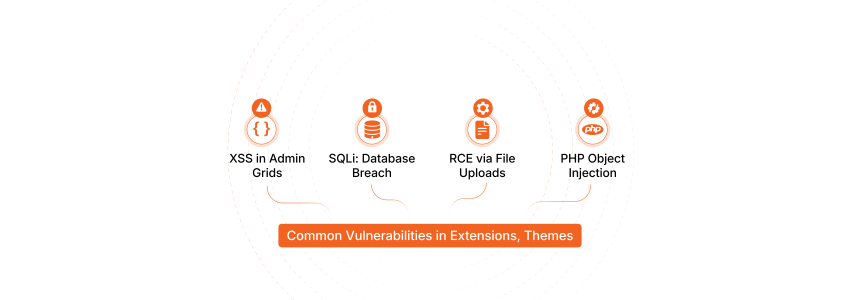
Extensions represent the largest attack surface in most Magento stores. Core Magento code receives direct security scrutiny from Adobe. Extensions vary in quality from well-audited to abandoned.
Common extension vulnerability types:
- Cross-Site Scripting (XSS): JavaScript injection through admin panel fields or frontend forms. Attackers steal admin session cookies for account takeover.
- SQL Injection: Unsafe database queries that expose customer records, payment data, or admin credentials.
- Remote Code Execution: Insecure file uploads or object injection that allow PHP execution on the server.
- PHP Object Injection: Crafted serialized objects that trigger code execution during deserialization.
Extension security practices:
- Choose extensions from vendors with documented security response histories
- Review Magento security extensions and verify compatibility with your current Magento version before installation
- Remove unused or abandoned extensions to reduce the attack surface
- Test all new extensions in staging environments before production deployment
- Marketplace approval does not guarantee security. Automated scans miss complex vulnerabilities. Merchants hold final responsibility for extension security.
How to Detect a Compromised Magento Store
Most breaches go undetected for weeks. Use this checklist to identify compromise indicators.
File system indicators:
- New or modified
.phpfiles inpub/media/,var/, orgenerated/directories - Unknown cron jobs added via the Magento admin or server crontab
- Modified
.htaccessornginx.conffiles with redirect rules - Web shells: small PHP files containing
eval(),base64_decode(), orsystem()calls
Database indicators:
- Unknown admin users in the
admin_usertable - JavaScript injected into CMS blocks, pages, or email templates
- Modified checkout cart price rules containing XML (CVE-2024-20720 pattern)
- Core config values with unexpected scripts or external URLs
Frontend indicators:
- Checkout page loading external JavaScript from unknown domains
- Customer reports of fraudulent card charges after purchasing from your store
- Browser console showing requests to unfamiliar endpoints during checkout
Log indicators:
- Unusual POST requests to REST API endpoints (CosmicSting indicator)
- Multiple failed admin login attempts followed by a successful login from a new IP
- PHP error logs showing XML parsing warnings or template filter exceptions
Use the Magento security scan tool for automated detection. Adobe offers a free Security Scan that checks for known malware signatures, vulnerable extensions, and missing patches.
Server Hardening Strategies

Patching alone does not prevent exploitation. Server hardening reduces the attack surface and limits damage when a vulnerability exists. Since January 2026, Adobe releases monthly security patches for all supported versions, making prompt updates even more critical.
PHP Configuration Security
Restrict dangerous PHP functions in php.ini:
-
disable_functions: Addexec,shell_exec,system,passthru,proc_open. Test Magento after each change. -
open_basedir: Restrict PHP file access to the Magento root directory. Prevents path traversal attacks. -
expose_php = Off: Hides PHP version from HTTP headers. Attackers scan for specific versions with known flaws. -
allow_url_fopen = Offandallow_url_include = Off: Prevents remote file inclusion attacks.
Follow our patch installation guide to ensure all patches are applied to your current Magento version (2.4.8-p4 as of March 2026).
Web Server Protection
- Disable directory listing (
Options -Indexesin Apache,autoindex offin Nginx) - Enforce TLS 1.2 and TLS 1.3 with strong cipher suites
- Block access to sensitive files:
.env,app/etc/env.php,composer.json,composer.lock - Implement Content Security Policy (CSP) headers to prevent XSS attacks
- Configure rate limiting on admin and API endpoints
Database Security
- Bind MySQL to localhost:
bind-address = 127.0.0.1 - Use strong, unique passwords for database accounts
- Grant the minimum required privileges to the Magento database user. Avoid
ALL PRIVILEGES. - Automate database backups with encryption. Store backups off-server.
File System Permissions and Containerization
- Set directories to
750and files to640 - Use a restrictive umask (
0027) for new files - Only
var/,pub/media/, andpub/static/should be writable by the web server - All other Magento directories should remain read-only for the web server user
For container-based deployments, use Docker to isolate Magento services. Containers limit the blast radius of any compromise to container-specific resources.
Magento Security Scanning Tools
Regular scanning detects vulnerabilities before attackers find them.
| Tool | Type | Cost | What It Checks |
|---|---|---|---|
| Adobe Security Scan | Cloud scanner | Free | Known malware, missing patches, vulnerable configs |
| MageReport | Online scanner | Free | Patches, admin exposure, content security |
| eComscan | Server-side | Paid | Deep malware detection, file integrity, IoC database |
| Sansec Watch | Monitoring | Paid | Real-time skimmer detection, backend tampering |
| Magento CLI | Command line | Free | Installed patch verification |
Run a quarterly security audit at minimum. Increase frequency after applying patches or installing new extensions.
Post-Compromise Recovery Steps
If indicators point to a breach, act fast. Every hour of delay increases data exposure.
-
Isolate the server. Take the store offline or restrict access to a maintenance page. Do not delete files before forensic analysis.
-
Capture evidence. Copy access logs, PHP error logs, and database dumps. Preserve the compromised file system state for investigation.
-
Identify the entry point. Check for the vulnerability patterns listed in the detection section. Determine which CVE or extension flaw was exploited.
-
Clean the infection. Remove web shells, unauthorized admin accounts, injected JavaScript, and modified database entries. For CVE-2024-20720, inspect cart price rules for malicious XML.
-
Rotate all credentials. Change database passwords, admin passwords, encryption keys in
app/etc/env.php, API keys, and SSH keys. Revoke all active admin sessions. -
Patch and update. Apply all pending security patches. Update to the latest Magento version (2.4.8-p4 as of March 2026).
-
Restore from clean backup. If cleanup is uncertain, restore from a verified clean state. Follow proper backup and restore procedures to avoid reintroducing the compromise.
-
Monitor for re-infection. Attackers often leave multiple backdoors. Monitor file changes, database modifications, and network traffic for 30 days after cleanup.
FAQ
What is the most dangerous Magento 2.4 exploit?
CVE-2024-34102 (CosmicSting) holds the highest risk based on its CVSS 9.8 score, unauthenticated attack vector, and ability to chain with CVE-2024-2961 for full remote code execution. Seven attack groups exploited it to compromise 4,275 stores (5% of all Magento installations) by October 2024.
How do I check if my Magento store has been exploited?
Look for unknown admin accounts in the database, unexpected PHP files in writable directories, JavaScript injected into CMS blocks, and unusual REST API POST requests in access logs. Adobe's free Security Scan tool automates many of these checks.
What is CosmicSting (CVE-2024-34102)?
CosmicSting is a critical XXE (XML External Entity) injection vulnerability in Adobe Commerce and Magento Open Source. It allows unauthenticated attackers to read server files, extract encryption keys, and forge admin sessions. When combined with a PHP filter chain exploit, it enables full remote code execution.
How fast are Magento vulnerabilities exploited after disclosure?
Automated scanning for new Magento vulnerabilities starts within hours of patch release. Sansec research documented automated mass scanning beginning just 16 hours after one critical patch was released. Exploit kits incorporate new CVEs within days of public advisories.
What Magento version fixes all known critical CVEs?
Adobe Commerce and Magento Open Source 2.4.8-p4 (released March 10, 2026) includes patches for all four critical CVEs covered in this guide: CVE-2022-24086, CVE-2024-20720, CVE-2024-34102, and CVE-2025-54236. Since January 2026, Adobe releases monthly security patches for all supported branches.
What is SessionReaper (CVE-2025-54236)?
SessionReaper is a critical RCE vulnerability (CVSS 9.1) disclosed in September 2025 that targets Magento's session handling. It allows unauthenticated remote code execution. Six weeks after the patch release, 62% of Magento stores remained unpatched (Sansec), making it a high-priority patching target.
Do third-party extensions introduce security risks?
Yes. Extensions are the largest attack surface in most Magento stores because they receive less security scrutiny than core code. Common extension vulnerabilities include XSS, SQL injection, and remote code execution through insecure file uploads. Always vet extensions, remove unused ones, and test in staging before production.
Does managed hosting prevent Magento exploits?
Managed hosting reduces exploit risk through automatic patch deployment, pre-configured web application firewalls (WAF), server-level hardening, and 24/7 security monitoring. While no hosting solution prevents all exploits, managed providers patch faster and detect breaches sooner than most self-managed environments.
Summary
Magento 2.4 has faced four critical exploits since 2022. CVE-2022-24086 exploited template injection. CVE-2024-20720 created persistent database backdoors. CVE-2024-34102 (CosmicSting) extracted encryption keys via XXE. CVE-2025-54236 (SessionReaper) targeted session handling for RCE.
Each exploit shares one common factor: unpatched stores were compromised within hours to days. The defense is clear. Patch fast, harden servers, scan often, and monitor for compromise indicators.
For stores that cannot maintain dedicated security teams, Managed Magento Hosting provides automatic patching, WAF protection, and 24/7 monitoring as built-in services.
