

Magento 2 Bundle Product Dynamic Price: Complete Setup Guide
[Updated: March 16, 2026]
Wrong pricing setup on bundle products can confuse customers and kill conversions. One misconfigured setting locks you into a pricing model you cannot change after saving.
This guide covers Magento 2 bundle product dynamic pricing from setup to troubleshooting, so you get it right the first time.
Key Takeaways
- Dynamic pricing calculates the bundle total from individual item prices selected by the customer.
- Fixed pricing sets one flat price for the entire bundle, regardless of selections.
- You cannot switch between dynamic and fixed pricing after saving the product.
- Dynamic pricing disables custom options and Minimum Advertised Price (MAP).
- Bundle products accept Simple and Virtual product types as child items.
- Four input types control how customers select bundle options: dropdown, radio buttons, checkbox, and multiselect.
What is Bundle Product Dynamic Pricing?
Bundle product dynamic pricing = Magento calculates the final price based on individual items the customer selects. The bundle has no fixed catalog price. Instead, the storefront displays a price range or "As Low As" value.
Perfect for: Stores selling customizable kits, build-your-own packages, computer systems with selectable components.
Not ideal for: Fixed-price gift sets, pre-built packages where the price never changes.
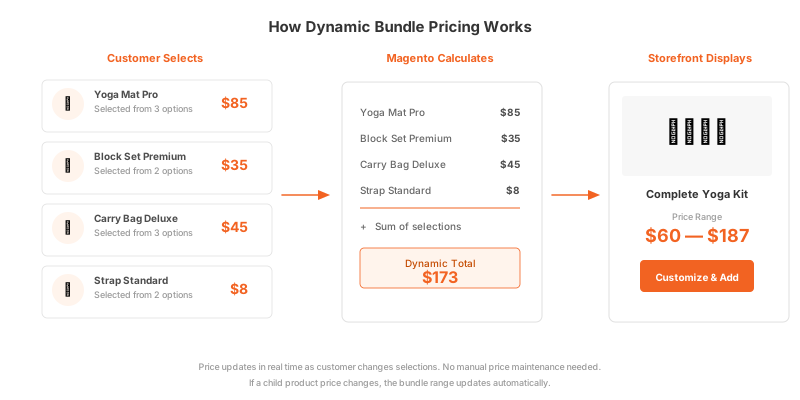
Bundle products in Magento 2 let customers build their own product combination from a set of options. Each option contains one or more Simple or Virtual products as selections.
When you enable dynamic pricing, the bundle product itself has no price. The final price is the sum of all selected child items. Magento displays this as a price range on the product page, showing the minimum and maximum possible totals based on available selections.
This differs from fixed pricing, where you set a base price for the bundle and assign additional costs (flat amount or percentage) to each option selection. For complete configuration details, see the official Adobe Commerce bundle product documentation.
Dynamic vs Fixed Pricing Comparison
Choosing the right pricing model before saving is critical. Magento does not allow switching between dynamic and fixed pricing after the initial save.
| Feature | Dynamic Pricing | Fixed Pricing |
|---|---|---|
| Price calculation | Sum of selected items | Base price + option adjustments |
| Catalog price field | Disabled (left blank) | Required (enter base price) |
| Storefront display | Price range or "As Low As" | Single price + add-ons |
| Custom options | Not available | Available |
| MAP (Minimum Advertised Price) | Not available | Available |
| Special Price / Tier Price | Discount percentage only | Discount percentage only |
| Tax calculation | Per individual item | Per entire bundle |
| Best for | Customizable kits | Pre-built packages |
When to choose dynamic pricing:
- Customers build their own kit from varying-price components.
- You want automatic price updates when child product prices change.
- Price transparency matters and customers see what each item costs.
When to choose fixed pricing:
- You sell pre-assembled bundles at a set discount.
- You need custom options (engraving, gift messages).
- You require MAP compliance.
How to Set Up Bundle Product Dynamic Pricing
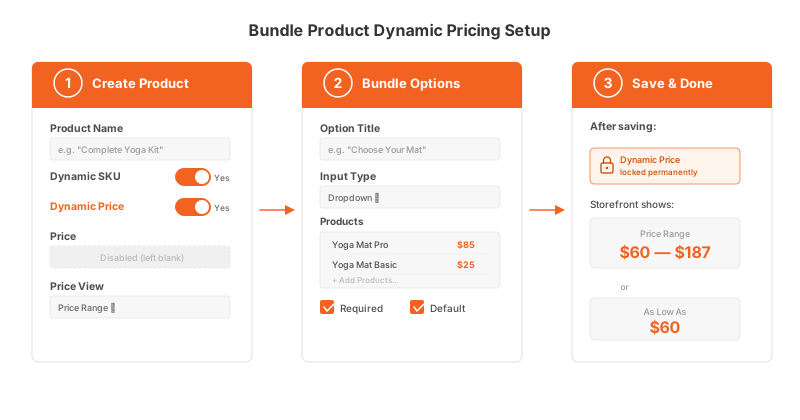
Step 1: Create the Bundle Product
Navigate to Catalog > Products > Add Product > Bundle Product in your Magento Admin. Select your attribute set and fill in the required fields:
- Product Name: Your bundle name (e.g., "Complete Yoga Kit").
- SKU: Accept the default or enter a custom value. With Dynamic SKU set to Yes (default), Magento appends a suffix based on selected child SKUs to create unique identifiers.
- Dynamic Price: Set to Yes.
- Leave the Price field blank. Magento disables it for dynamic pricing.
- Price View: Choose "Price Range" to display the full range (e.g., $60 to $187) or "As Low As" to show the lowest possible price.
Set Dynamic Weight to Yes if the bundle weight should calculate from selected items. The weight field stays blank in dynamic mode.
Step 2: Configure Bundle Options
Scroll to the Bundle Items section and click Add Option. For each bundle option:
- Option Title: Label visible to the customer (e.g., "Choose Your Mat").
- Input Type: Select from Dropdown, Radio Buttons, Checkbox, or Multiple Select.
- Required: Check if the customer must select from this option.
- Add Products to Option: Search and add Simple or Virtual products.
For each product within an option, set:
- Is Default: Pre-selected when the customer views the product.
- Default Quantity: How many units are pre-filled.
- User Defined: Allow the customer to change the quantity.
Step 3: Complete Product Settings and Save
Configure remaining sections:
- Images: Upload bundle product images (hero image appears on the product page).
- SEO: Set URL key, meta title, and meta description.
- Inventory: Stock status inherits from child products in dynamic mode.
- Shipping: Choose "Together" or "Separately" for bundle shipment type.
Click Save. After saving, the dynamic pricing setting is permanent for this product.
Dynamic Pricing Calculation Examples
Understanding how Magento calculates dynamic bundle prices helps you plan your product strategy.
Example: Build-Your-Own Computer
| Bundle Option | Selection | Price |
|---|---|---|
| Processor | Intel Core i7 | $350 |
| RAM | 32GB DDR5 | $120 |
| Storage | 1TB NVMe SSD | $90 |
| Graphics Card | RTX 4070 | $550 |
Dynamic bundle total: $1,110
The storefront shows "As Low As $680" (cheapest combination) and the customer sees the total update as they change selections.
If you later update the Intel Core i7 price to $380, the bundle price adjusts to $1,140 without touching the bundle product itself. This automatic synchronization is the core advantage of dynamic pricing.
Example: Yoga Starter Kit
| Bundle Option | Cheapest | Most Expensive |
|---|---|---|
| Yoga Mat | $25 | $85 |
| Block Set | $12 | $35 |
| Strap | $8 | $22 |
| Bag | $15 | $45 |
Price range displayed: $60 — $187
Limitations and Restrictions
Know these constraints before choosing dynamic pricing:
-
Irreversible after save. You cannot switch from dynamic to fixed (or vice versa) once the product is saved. Create a new bundle product if you need the other pricing model.
-
No custom options. Dynamic pricing disables custom product options (text fields, file uploads, date selectors). If you need custom options, use fixed pricing.
-
No Minimum Advertised Price. MAP functionality is unavailable for dynamic-priced bundles.
-
Simple and Virtual products only. Bundle child items must be Simple or Virtual product types without custom options. Configurable, Grouped, or Downloadable products cannot be added as bundle selections.
-
Special Price is percentage only. You cannot set a fixed-amount special price on bundles. Special Price and Tier Price apply as discount percentages.
-
Tax per item. Dynamic bundles calculate tax on each child item based on its tax class. Fixed bundles apply tax to the entire bundle as one unit.
Bundle vs Configurable vs Grouped Products
Magento offers three multi-product types. Each serves a different purpose.
| Feature | Bundle | Configurable | Grouped |
|---|---|---|---|
| Customer selects | Multiple options from categories | One variant (size, color) | Quantities of each item |
| Pricing | Dynamic or Fixed | From selected variant | Individual item prices |
| Cart behavior | One line item | One line item | Separate line items |
| Child product types | Simple, Virtual | Simple | Simple, Virtual, Downloadable |
| Inventory tracking | Per child item | Per variant | Per individual product |
| Best use case | Build-your-own kits | Products with variations | Related items sold together |
For a detailed breakdown of bundle and grouped products, see our guide to bundle vs grouped products in Magento. If you need to set up product variants instead, our configurable product tutorial walks through the process.
Best Practices for Bundle Product Performance
Bundle products with many options and child items increase database queries during catalog browsing and checkout. Each option selection triggers price recalculation, indexing updates, and stock checks.
Keep bundles performant:
- Limit bundle options to 5 to 7 per product. More than 10 options slow down the product page.
- Set all indexers to "Update on Schedule" mode, not "Update on Save." The
catalog_product_priceindexer is critical for bundle price accuracy. - Monitor Magento store performance after adding bundle products to your catalog.
- Configure inventory management to avoid stock calculation overhead on bundles with multi-source inventory.
Stores with large bundle catalogs benefit from managed hosting with dedicated resources. Shared hosting environments struggle with the additional indexing and price calculation load that complex bundles create.
Troubleshooting Common Issues
Price range not displaying on the storefront
Run a full reindex: bin/magento indexer:reindex. Bundle prices require the catalog_product_price indexer to be current. Switch to "Update on Schedule" mode for production stores.
Tax calculated wrong on bundle items
Verify each child product has the correct tax class assigned. With dynamic pricing, Magento applies tax per child item, not per bundle. Mixed tax classes in one bundle can produce unexpected totals.
"Out of Stock" despite available child items
Check that all required options have at least one in-stock selection. If any required option has zero available selections, the entire bundle shows as out of stock.
Bundle weight showing as zero
Ensure Dynamic Weight is set to Yes and each child product has a weight value. Virtual products have no weight, so bundles containing Virtual products must account for this in shipping calculations.
Catalog price rules not applying
Catalog price rules apply to bundle products, but with dynamic pricing the discount percentage applies to the calculated total, not a fixed base price. Reindex after creating new rules.
Pros and Cons of Dynamic Bundle Pricing
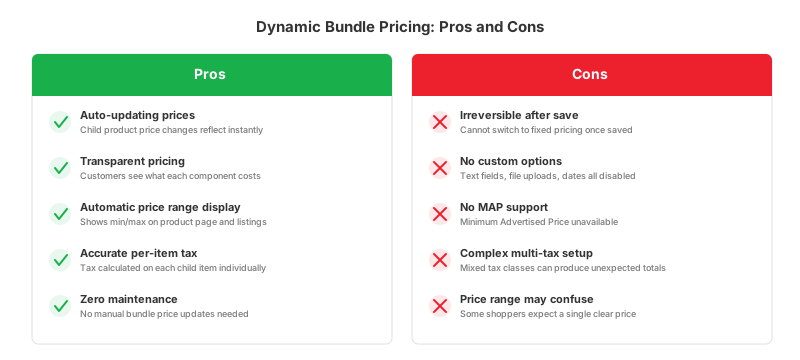
| Pros | Cons |
|---|---|
| Price updates when child items change | Cannot switch to fixed pricing after save |
| Transparent pricing for customers | No custom options available |
| Automatic price range display | No MAP support |
| Tax calculated per item for accuracy | Complex tax setup with mixed classes |
| No manual price maintenance needed | Price range display can confuse some shoppers |
FAQ
1. Can I change from dynamic to fixed pricing after saving?
No. The pricing type is locked after the first save. You must create a new bundle product to switch between dynamic and fixed pricing.
2. What product types can I add to a bundle?
Bundle products accept Simple and Virtual products without custom options as child items. Configurable, Grouped, and Downloadable products cannot be added to bundles.
3. How does Magento display the dynamic bundle price?
Magento shows a price range (e.g., "$60 to $187") or "As Low As $60" on the product listing and product page. The exact total updates as customers make their selections. You control which format appears via the Price View setting.
4. Can I use custom options with dynamic pricing?
No. Dynamic pricing disables custom options. Use fixed pricing if you need custom options like text fields, file uploads, or date selectors.
5. How are taxes calculated on dynamic bundles?
Tax applies to each child item based on its individual tax class. This differs from fixed pricing where tax applies to the entire bundle as one unit.
6. Do special prices work on bundle products?
Yes, but as discount percentages. You cannot set a fixed-amount special price. The percentage discount applies to the calculated dynamic total.
7. What happens if a child product goes out of stock?
If the out-of-stock item is in a required option with no other available selections, the entire bundle becomes unavailable. Optional items that go out of stock are hidden from the selection.
8. How do I import bundle products with dynamic pricing?
Set bundle_price_type to "dynamic" in your CSV import file. Define bundle items using the bundle_values attribute with pipe-separated parameters: name, type, required, SKU, price, default, and quantity.
9. Does dynamic pricing affect store performance?
Bundle products with many options increase database queries and indexing time. Stores with over 50 bundles should set indexers to "Update on Schedule" mode and ensure adequate server resources. Managed hosting environments handle the additional load with optimized database and caching configurations.
10. Can I offer quantity discounts on dynamic bundles?
Use tier pricing with percentage-based discounts. For example, set a 10% discount when customers buy 5 or more of the same bundle. The discount applies to the calculated dynamic total.
Summary
Magento 2 bundle product dynamic pricing gives customers control over what they buy and what they pay. The price calculates from individual selections, updates when child products change, and displays as a transparent range on the storefront.
Choose dynamic pricing for customizable kits where component prices vary. Choose fixed pricing for pre-built packages that need custom options or MAP compliance. Remember that this choice is permanent after saving.
For stores running complex bundle catalogs, reliable Magento hosting ensures the additional indexing and price calculations run smooth without affecting page load times.
