

Magento 2 Hardware Requirements: CPU, RAM, and Storage Guide
[Updated: March 18, 2026]
Wrong hardware specs cause slow page loads, 5XX errors during traffic spikes, and abandoned carts. Oversized servers waste budget. Both cost you money.
This guide covers the exact Magento 2 hardware requirements for version 2.4.8, with tiered recommendations for stores of every size.
Key Takeaways
- Magento 2.4.8 requires PHP 8.3 or 8.4, MySQL 8.4 or MariaDB 11.4, and OpenSearch 2.19
- Minimum production baseline: 4 vCPUs, 4 GB RAM, 25 GB SSD storage
- Use the CPU formula to calculate exact core needs: Cores = (Expected Requests / 2) + Cron Processes
- Redis and Varnish caching reduce hardware load by serving most requests from memory
- SSD storage is mandatory for production stores due to constant read/write operations
What Are Magento 2 Hardware Requirements?
Magento 2 hardware requirements = the minimum CPU, RAM, storage, and network specs your server needs to run a Magento store in production. Undersized hardware causes timeouts and lost sales. Oversized hardware wastes budget.
Perfect for: Store owners planning a new deployment, agencies sizing client infrastructure, DevOps teams upgrading to Magento 2.4.8
Not ideal for: Development or staging environments (lower specs work fine there)
Magento 2 is a resource intensive platform. Unlike lightweight CMS tools, it runs complex PHP processes, database queries, and search indexing operations on every page load. The hardware underneath your store determines whether customers experience fast load times or frustrating delays.
Adobe publishes official system requirements for each Magento release. These cover software dependencies (PHP, MySQL, search engines) and hardware guidelines (CPU, memory, storage). Meeting both matters for a stable, fast store.
Magento 2.4.8 Software Stack Requirements
Before sizing hardware, confirm your server runs the correct software versions. Magento 2.4.8 requires specific versions of PHP, database engines, and search services.
| Component | Supported Versions (2.4.8) |
|---|---|
| PHP | 8.3, 8.4 |
| MySQL | 8.4 |
| MariaDB | 11.4 |
| OpenSearch | 2.19 (recommended) |
| Elasticsearch | 8.17 (deprecated) |
| Redis | 7.2 |
| Valkey | 8 |
| RabbitMQ | 4.1 |
| Nginx | 1.26, 1.28 |
| Apache | 2.4 |
| Varnish | 7.6, 7.7 |
| Composer | 2.9.3+ |
Important change in 2.4.8: Adobe deprecated Elasticsearch and recommends OpenSearch 2.19 for all deployments. Elasticsearch 7 and 8 modules remain in the codebase but will be removed in future releases. Plan your migration to OpenSearch now.
Operating systems: Linux distributions (Ubuntu, Debian, RHEL, CentOS). Magento does not support Windows or macOS for production.
Sources: Adobe Commerce System Requirements | Magento 2.4.8 Release Notes
CPU Requirements
CPUs handle every request that misses the cache. With proper Varnish and Redis caching, most storefront page loads never touch the CPU. But admin operations, cron jobs, search indexing, and uncached requests all need processing power.
The CPU Core Formula
Adobe provides a formula to calculate the exact number of cores your store needs:
N[Cores] = (N[Expected Requests per Second] / 2) + N[Expected Cron Processes]
One CPU core handles about two to four Magento requests per second. The range depends on request complexity (simple category page vs. checkout with payment processing).
Real World Calculation Example
A mid-size store with 50 concurrent users during peak hours:
- Expected requests per second: ~25
- Active cron processes: 3 (indexer, email queue, sitemap)
- Required cores: (25 / 2) + 3 = 15.5 → 16 cores
This store needs 16 vCPUs during peak traffic. During off-peak hours, 4 to 8 cores handle the load.
Key insight: CPU needs fluctuate with traffic. Fixed server sizing leads to either wasted resources or performance problems during spikes. Auto-scaling infrastructure solves this by adding cores during peak periods and scaling down when traffic drops.
Signs of CPU Shortage
- Pages take 5+ seconds to load
- 502/503/504 gateway errors during traffic spikes
- Cron jobs back up and fail to complete
- Admin panel becomes unresponsive
Memory (RAM) Requirements
Memory allocation in Magento covers four distinct areas: PHP processes, database operations, caching servers, and search indexing. Each area has different requirements.
PHP Memory
| Scenario | RAM Required |
|---|---|
| Storefront page served by web node | 256 MB |
| Admin page with large catalog | 1 GB |
| Cron indexing a large catalog | 256 MB+ |
| Static asset compilation and deployment | 756 MB |
| Performance toolkit profile generation | 1 GB+ |
| Single server store (total PHP allocation) | 2 GB |
For pipeline deployments, allocate 2 GB on your build server and 1 GB on each web node.
Database Memory
MySQL and MariaDB performance depends on available memory for data and index storage. Adobe recommends allocating memory equal to at least half the size of your database (see Adobe Hardware Recommendations).
A store with a 10 GB database needs at minimum 5 GB of RAM dedicated to the database engine. Stores with 100,000+ SKUs and multiple store views see database sizes of 20 to 50 GB, requiring 10 to 25 GB of database RAM.
Caching Memory
Varnish (full page cache): Allocate enough memory to hold your most visited pages. A store with 500 popular URLs at 200 KB each needs about 100 MB for Varnish. Stores with 10,000+ pages need 1 GB or more.
Redis (session + block cache): Configure a separate Redis instance for sessions. Account for cart abandonment rates and session duration in memory allocation. Block cache size grows with the number of pages: SKUs multiplied by store views.
Total RAM by Store Size
| Store Size | Total RAM | Breakdown |
|---|---|---|
| Starter (1,000 SKUs, 1 store view) | 8 GB | 2 GB PHP + 2 GB MySQL + 2 GB Redis/Varnish + 2 GB OS |
| Growth (10,000 SKUs, 3 store views) | 16 to 32 GB | 4 GB PHP + 8 GB MySQL + 4 GB caching + 4 GB OS |
| Enterprise (100,000+ SKUs, 10+ store views) | 64 GB+ | Distributed across dedicated servers |
Storage Requirements
Magento 2 performs constant read and write operations: cache files, session data, log files, generated code, and media assets. SSD storage is mandatory for production stores. Traditional HDD drives create I/O bottlenecks that slow every request.
Storage Sizing
| Component | Typical Size |
|---|---|
| Magento codebase + vendor | 2 to 3 GB |
| Database | 5 to 50 GB (depends on catalog size) |
| Media files (product images) | 5 to 100 GB+ |
| Logs and generated files | 2 to 10 GB |
| Total minimum | 25 GB SSD |
NVMe SSDs deliver the best performance for Magento stores. Standard SATA SSDs work for starter stores, but NVMe provides 3 to 5x faster I/O for database heavy operations.
Storage growth planning: Product images are the largest growth factor. A store adding 1,000 products per month with 5 images each (average 500 KB) adds about 2.5 GB per month in media alone. Plan for 2x your current needs.
Network Bandwidth
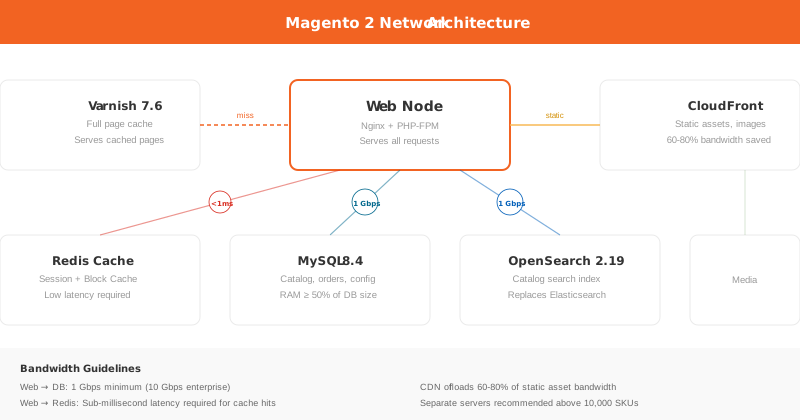
Network bandwidth connects your web nodes, database servers, caching servers, and search engines. Insufficient bandwidth creates bottlenecks between these components even when each server has adequate CPU and RAM.
Key Network Considerations
Web node to Redis: If Redis runs on a separate server (recommended for stores with more than 10,000 SKUs), ensure a low latency, high bandwidth connection. Every uncached page load queries Redis multiple times.
Web node to database: Database queries transfer large result sets for catalog pages, search results, and admin operations. A 1 Gbps connection is the minimum for production. 10 Gbps is standard for enterprise deployments.
CDN for static assets: Offload images, CSS, and JavaScript to a CDN. This reduces server bandwidth requirements by 60 to 80% and improves load times for international customers.
Tiered Hardware Recommendations
These recommendations cover common store profiles. Your exact needs depend on catalog size, traffic patterns, extension count, and customization complexity.
| Spec | Starter Store | Growth Store | Enterprise Store |
|---|---|---|---|
| SKUs | Up to 5,000 | 5,000 to 50,000 | 50,000+ |
| Monthly visits | Up to 50,000 | 50,000 to 500,000 | 500,000+ |
| vCPUs | 4 | 8 to 16 | 16 to 32+ |
| RAM | 8 GB | 16 to 32 GB | 64 GB+ |
| Storage | 50 GB SSD | 100 to 250 GB NVMe | 500 GB+ NVMe |
| Architecture | Single server | Web + DB separation | Multi-node cluster |
| Caching | Redis on same server | Dedicated Redis + Varnish | Distributed caching layer |
| Search | OpenSearch on same server | Dedicated OpenSearch node | OpenSearch cluster |
Enterprise stores benefit from a multi-node architecture: separate servers for web nodes, database, caching, and search. This allows independent scaling of each component based on actual bottlenecks.
Hosting Types for Magento 2
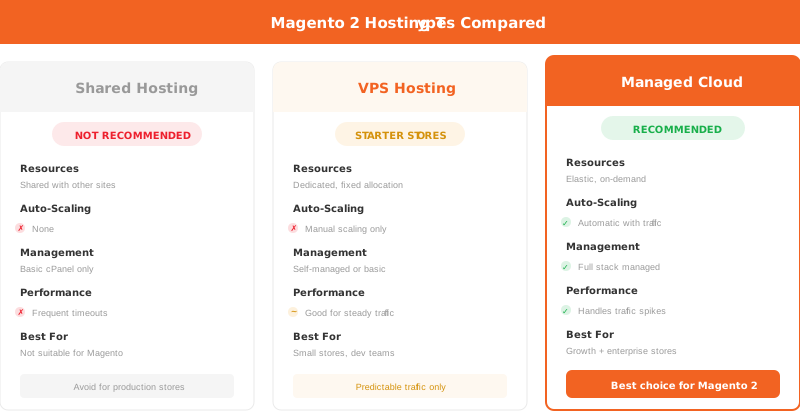
The hardware specs above mean nothing without the right hosting infrastructure to deliver them. Three main hosting types serve Magento stores.
Shared Hosting
Not recommended for Magento 2. Shared resources mean your store competes with other websites for CPU, RAM, and I/O. Traffic spikes on neighboring sites affect your store performance. No Magento agency or hosting expert recommends shared hosting for production stores.
VPS (Virtual Private Server)
Dedicated resources on a virtual machine. Works for starter stores with predictable traffic. Limitation: fixed resource allocation means no automatic scaling during traffic spikes.
Managed Cloud Hosting
Cloud infrastructure with managed services handles the full Magento stack. Benefits include auto-scaling during traffic peaks, managed security updates, automated backups, and expert support for Magento server configuration.
For stores that need both performance and operational simplicity, managed cloud hosting eliminates the need for in-house server management while delivering enterprise grade infrastructure.
AWS Cloud Infrastructure for Magento
Magento 2.4.8 includes native support for AWS services, making Amazon Web Services the most integrated cloud platform for Magento hosting.
| AWS Service | Magento Component | Benefit |
|---|---|---|
| Aurora MySQL 8.0 | Database | Auto-scaling storage, automated failover, read replicas |
| ElastiCache (Redis 7.1) | Session + block cache | Managed Redis with automatic patching |
| OpenSearch Service 2.19 | Catalog search | Managed search with zero-downtime upgrades |
| S3 | Media storage | Unlimited scalable storage for product images |
| CloudFront | CDN | Global edge locations for static assets |
AWS auto-scaling groups adjust web node capacity based on real time traffic. During a flash sale, the infrastructure adds servers within minutes. After the sale, it scales back down to reduce costs.
This infrastructure approach eliminates the guesswork from hardware sizing for Magento stores. Instead of predicting peak traffic months in advance, the infrastructure adapts in real time.
Common Hardware Mistakes
Mistake 1: Sizing for average traffic instead of peak. A store that handles 100 requests per second on normal days but sees 500 during sales events needs hardware (or auto-scaling) for 500, not 100.
Mistake 2: Ignoring caching architecture. Without Varnish and Redis, every request hits PHP and MySQL. This requires 5 to 10x more CPU and RAM than a proper cached setup.
Mistake 3: Using HDD storage. Magento generates thousands of small file operations per request. HDD latency adds 100 to 500ms per page load compared to SSD.
Mistake 4: Running everything on one server at scale. Stores above 50,000 monthly visits benefit from separating the database to its own server. Stores above 200,000 visits need dedicated caching and search nodes.
Mistake 5: Neglecting speed optimization before adding hardware. Code level optimizations, image compression, and extension audits often deliver bigger improvements than hardware upgrades.
FAQ
What is the minimum RAM for Magento 2?
Adobe requires 2 GB of RAM for upgrades and installations. For production stores, 4 GB is the absolute minimum and 8 GB is recommended for stores with moderate traffic and a standard extension stack.
How many CPU cores does Magento 2 need?
Use the formula: Cores = (Expected Requests per Second / 2) + Cron Processes. A small store with 10 requests per second and 2 cron processes needs 7 cores. A large store with 100 requests per second needs 50+ cores or auto-scaling infrastructure.
Does Magento 2 require SSD storage?
Yes. Adobe recommends SSD for all production deployments. Magento performs constant file read/write operations for caching, logging, and code generation. SSD delivers 10 to 100x faster I/O than HDD for these operations.
What PHP version does Magento 2.4.8 require?
Magento 2.4.8 supports PHP 8.3 and PHP 8.4. Earlier PHP versions (8.1, 8.2) are no longer supported in this release.
Is Elasticsearch still supported in Magento 2.4.8?
Elasticsearch 8.17 remains functional but is deprecated. Adobe recommends migrating to OpenSearch 2.19. Elasticsearch modules will be removed in a future Magento release.
Can I run Magento 2 on shared hosting?
No reputable Magento expert recommends shared hosting for production stores. Shared hosting lacks the dedicated CPU, RAM, and I/O that Magento requires. Expect frequent timeouts, slow admin operations, and poor customer experience.
How much storage does a Magento 2 store need?
Start with 25 GB SSD minimum. A store with 10,000 products and 5 images per product needs about 50 GB for media alone, plus 15 to 20 GB for the database, codebase, and logs. Plan for 2x your current needs to accommodate growth.
What database does Magento 2.4.8 support?
Magento 2.4.8 supports MySQL 8.4 and MariaDB 11.4. For AWS deployments, Aurora MySQL 8.0 is the recommended option with automatic storage scaling and failover capabilities.
How do I calculate the right server size for my Magento store?
Count your SKUs, estimate monthly visits, and check your current database size. Use the tiered recommendations table in this guide as a starting point. For accurate sizing, run load tests on a staging environment that mirrors your production catalog.
What is Valkey and should I use it with Magento?
Valkey 8 is a Redis compatible in-memory data store, now supported in Magento 2.4.8. It serves as a drop-in replacement for Redis with the same performance characteristics. Choose Valkey if your hosting provider offers it, otherwise Redis 7.2 remains the standard choice.
Conclusion
Getting Magento 2 hardware requirements right saves money and prevents performance problems. Start with the minimum production baseline of 4 vCPUs, 4 GB RAM, and 25 GB SSD. Scale up based on your catalog size, traffic volume, and growth projections using the tiered recommendations in this guide.
The software stack matters as much as the hardware. Magento 2.4.8 requires PHP 8.3 or 8.4, MySQL 8.4 or MariaDB 11.4, and OpenSearch 2.19. Running outdated software versions creates security risks and compatibility issues.
For stores that want enterprise grade hardware without the operational complexity, MGT Commerce managed Magento hosting provides auto-scaling AWS infrastructure pre-configured for Magento 2.4.8.
