Magento 2 Index Management: Update on Save vs Update on Schedule
[Updated: March 16, 2026]
Your Magento 2 store runs slower with every product update. Index management controls how fast those changes reach your storefront.
This guide covers both indexer modes, all CLI commands, parallel reindexing, and the critical changes in Magento 2.4.8 that affect every store.
Key Takeaways
- Magento 2.4.8 changed the default indexer mode to Update by Schedule for all new indexers.
- Update on Save processes changes in real time but increases server load. Update on Schedule batches changes through cron jobs.
- The Customer Grid indexer now supports both modes since Magento 2.4.8.
- Parallel reindexing with
MAGE_INDEXER_THREADS_COUNTcuts processing time for large catalogs. - CLI commands give full control over indexer configuration, status, and parallel processing.
Quick Answer
Magento 2 index management = A system that transforms raw store data into optimized lookup tables for faster frontend performance. Choose between real-time updates (Update on Save) or batched cron processing (Update on Schedule).
Perfect for: Store admins managing product catalogs, developers optimizing reindex performance, teams switching from Magento 1 workflows.
Not ideal for: Frontend-only developers, theme designers, marketing teams without admin access.
What Is Index Management in Magento 2?
Index management in Magento 2 converts scattered database records into structured lookup tables. The system uses three components:
- Dictionary: The original data (product tables, price records, category assignments).
- Index: Optimized flat tables built from the dictionary data.
- Indexer: The processing engine that reads the dictionary and writes the index.
When you change a product price, the price indexer rebuilds its index table. When you add a product to a category, the category products indexer updates. Each change triggers the relevant indexer based on the data type affected.
The Magento Admin Panel provides index management under System > Tools > Index Management. You can also manage indexers through the Magento CLI.
Complete List of Magento 2 Indexers
Magento 2 ships with 13 core indexers. Each handles a specific data domain:
| Indexer Name | CLI Identifier | Purpose |
|---|---|---|
| Category Products | catalog_category_product |
Maps products to categories |
| Product Categories | catalog_product_category |
Maps categories to products |
| Product EAV | catalog_product_attribute |
Indexes product attribute values |
| Product Price | catalog_product_price |
Calculates and stores product prices |
| Catalog Search | catalogsearch_fulltext |
Full-text search index for product discovery |
| Stock | cataloginventory_stock |
Tracks product stock status |
| Inventory | inventory |
Multi-source inventory data |
| Catalog Rule Product | catalogrule_rule |
Applies catalog price rules |
| Catalog Product Rule | catalogrule_product |
Links products to catalog rules |
| Customer Grid | customer_grid |
Customer data for admin grid display |
| Design Config Grid | design_config_grid |
Design configuration data |
| Sales Rule | salesrule_rule |
Shopping cart price rules |
| Target Rule (Adobe Commerce) | targetrule_product_rule |
Related product targeting rules |
Important change in Magento 2.4.8: The Customer Grid indexer now supports both Update on Save and Update on Schedule modes. Before 2.4.8, it supported Update on Save mode only.
Update on Save vs Update on Schedule
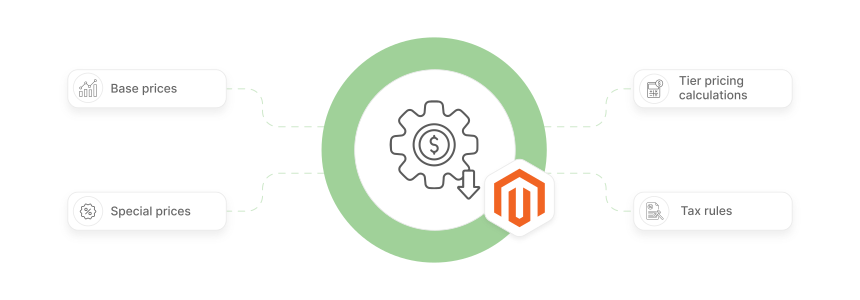
Magento 2 offers two indexer modes. Each serves different store sizes and traffic patterns.
| Aspect | Update on Save | Update on Schedule |
|---|---|---|
| Processing | Rebuilds index tables right after each data change | Batches changes and processes them through cron jobs |
| Server Load | Higher load during admin operations. Every save triggers reindexing | Lower load spread across scheduled intervals |
| Data Freshness | Changes appear on the storefront within seconds | Changes appear after the next cron run (default: every minute) |
| Best For | Small stores with fewer than 5,000 SKUs | Stores with large catalogs or multiple admin users |
| Admin Speed | Can slow down the admin panel during bulk operations | Minimal impact on admin performance |
| Setup | Works out of the box, no cron configuration needed | Requires proper cron job setup |
Default mode changed in Magento 2.4.8: All new indexers now default to Update by Schedule. Previous versions defaulted to Update on Save. The system also removes unused changelog tables when switching from schedule to save mode.
How Update on Schedule Works (MView)
Update on Schedule uses Materialized Views (MView) to track changes. When you modify a product, Magento writes the change to a changelog table (suffixed with _cl). The cron job reads these changelog entries, processes only the changed records, and clears the changelog.
This partial reindexing approach is more efficient than full reindexing. The system processes only what changed rather than rebuilding entire index tables.
How to Switch Indexer Modes in Magento 2
Method 1: Admin Panel
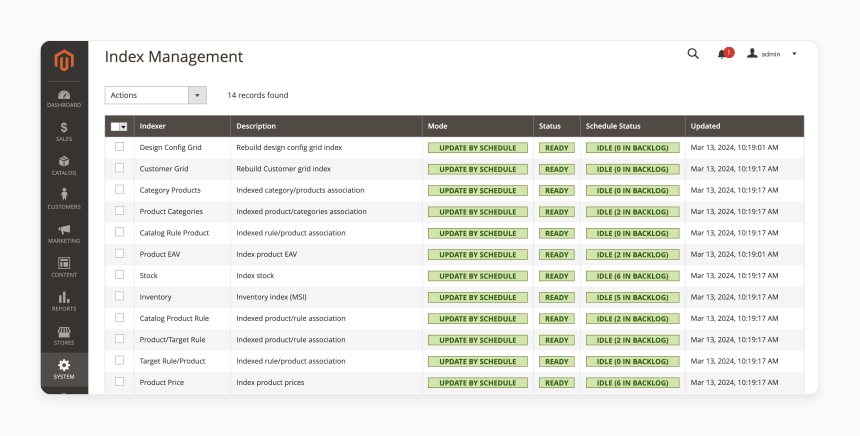
- Log in to your Magento 2 Admin Panel.
- Navigate to System > Tools > Index Management.
- Select the indexers you want to change.
- Choose Update by Schedule from the Actions dropdown.
- Click Submit to apply.
Method 2: Command Line (CLI)
The CLI provides more control and is the preferred method for production servers.
View current indexer modes:
bin/magento indexer:show-mode
Set all indexers to schedule mode:
bin/magento indexer:set-mode schedule
Set a specific indexer to realtime mode:
bin/magento indexer:set-mode realtime catalog_product_price
Run a manual reindex:
bin/magento indexer:reindex
Reindex a specific indexer:
bin/magento indexer:reindex catalogsearch_fulltext
Check indexer status:
bin/magento indexer:status
View all available indexers:
bin/magento indexer:info
Reset indexer to invalid state:
bin/magento indexer:reset
After switching to Update on Schedule, verify your cron jobs are running. Use bin/magento cron:run to test, or check your server crontab. For full cron configuration, see our cron job setup guide.
New in Magento 2.4.7+: Indexer Status Control
Magento 2.4.7 introduced the indexer:set-status command for fine-grained control:
bin/magento indexer:set-status {invalid|suspended|valid} [indexer]
| Status | Effect |
|---|---|
invalid |
Marks the indexer as outdated, triggers reindexing on next cron run |
suspended |
Pauses automatic reindexing (useful during large imports) |
valid |
Marks the indexer as current |
Use case: Suspend indexers before a bulk product import, then set them to invalid after the import completes. This prevents constant reindexing during the import process.
Parallel Reindexing in Magento 2
Large catalogs with 50,000+ products can take hours to reindex. Parallel reindexing splits the work across multiple threads.
Enable parallel reindexing:
MAGE_INDEXER_THREADS_COUNT=4 php bin/magento indexer:reindex
This processes multiple index chunks at the same time. Your server needs the PHP pcntl extension enabled for this to work.
Dimensions mode for price indexing:
The catalog product price indexer supports parallel processing by website and customer group:
bin/magento indexer:set-dimensions-mode catalog_product_price website_and_customer_group
Available dimension modes:
-
none(default, single thread) -
website -
customer_group -
website_and_customer_group
Parallel reindexing reduces processing time but increases peak server load. For stores running on shared hosting, consider scheduling parallel reindex during off-peak hours. For more tips, see our speed optimization guide.
Troubleshooting Common Indexing Problems
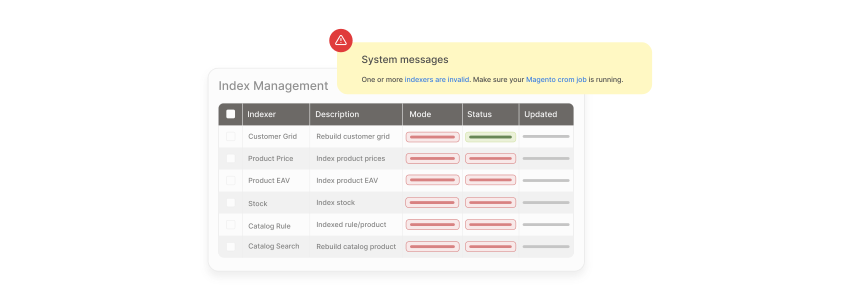
1. Indexer Shows "Reindex Required"
Cause: Data changed but the index table was not updated.
Fix:
bin/magento indexer:reindex [indexer_name]
If the reindex fails, clear stale locks first:
rm -rf var/locks/
Then run the reindex command again.
2. Reindexing Hangs or Times Out
Cause: Large datasets exceed PHP memory limits or execution time.
Fix: Increase PHP memory for the reindex process:
php -d memory_limit=4G bin/magento indexer:reindex
For persistent issues, reindex specific indexers one at a time instead of all at once.
3. Cron Jobs Not Processing Scheduled Indexes
Cause: Cron is not configured or the index cron group is not active.
Fix: Verify cron is running:
bin/magento cron:run
Check your server crontab includes the Magento cron entry:
* * * * * cd /path/to/magento && php bin/magento cron:run >> var/log/magento-cron.log
4. Third-Party Extension Conflicts
Cause: Extensions can override native indexer behavior and cause errors.
Fix: Disable suspected extensions and test:
bin/magento module:disable Vendor_ModuleName
Run bin/magento indexer:reindex to confirm the issue resolves. Re-enable extensions one at a time to isolate the conflict.
5. High Server Load During Reindexing
Cause: Full reindex during peak traffic hours overloads server resources.
Fix: Switch to Update on Schedule mode and configure cron to run during low-traffic periods. For immediate relief, use the suspended status:
bin/magento indexer:set-status suspended
Resume after traffic subsides:
bin/magento indexer:set-status invalid
For stores with heavy database load, review MySQL optimization strategies to reduce reindex bottlenecks.
Best Practices for Index Management
| Store Size | Recommended Mode | Reindex Strategy |
|---|---|---|
| Small (< 5K SKUs) | Update on Save | Default settings, manual reindex when needed |
| Medium (5K-50K SKUs) | Update on Schedule | Cron every minute, monitor changelog table size |
| Large (50K+ SKUs) | Update on Schedule | Parallel reindexing, dimensions mode for price index |
| Multi-admin | Update on Schedule | Prevents admin slowdown from concurrent saves |
General guidelines:
- Use Update on Schedule for production. Magento 2.4.8 made this the default for good reason.
-
Monitor indexer status. Run
bin/magento indexer:statusas part of your deployment checks. -
Reindex after deployments. Run
bin/magento indexer:reindexafter every code or configuration change. - Separate cron groups. Configure the index cron group to run at different intervals than default cron tasks.
- Back up before large reindexes. Database corruption during reindexing can cause data loss.
FAQ
What is the difference between Update on Save and Update on Schedule in Magento 2?
Update on Save rebuilds index tables right after you change data in the admin panel. Update on Schedule batches those changes and processes them through cron jobs at set intervals. Schedule mode reduces server load and is the default in Magento 2.4.8.
How do I perform a full reindex in Magento 2?
Navigate to your Magento root directory and run bin/magento indexer:reindex from the command line. This rebuilds all index tables. You can also reindex a specific indexer by adding its name: bin/magento indexer:reindex catalog_product_price.
Why is my Magento 2 indexer stuck on "Processing"?
A stuck indexer indicates an incomplete previous reindex. Clear the lock files with rm -rf var/locks/ and run bin/magento indexer:reindex again. If the problem persists, increase PHP memory with php -d memory_limit=4G bin/magento indexer:reindex.
Can I run parallel reindexing in Magento 2?
Yes. Set the MAGE_INDEXER_THREADS_COUNT environment variable before running the reindex command. For example: MAGE_INDEXER_THREADS_COUNT=4 php bin/magento indexer:reindex. Your server needs the PHP pcntl extension enabled.
What changed with indexers in Magento 2.4.8?
Magento 2.4.8 (released February 2026) made three changes: all new indexers default to Update by Schedule, the Customer Grid indexer now supports both modes, and unused changelog tables are cleaned up when switching from schedule to save mode.
How do I check which indexers need reindexing?
Run bin/magento indexer:status from the command line. Indexers showing "Reindex required" need processing. You can also check indexer status in the admin panel under System > Tools > Index Management.
Should I use Update on Save or Update on Schedule for a small store?
For stores with fewer than 5,000 products and a single admin user, Update on Save works fine. The real-time updates keep your storefront current without cron configuration. Switch to Update on Schedule when you notice admin panel slowdowns during product edits.
How do I suspend indexers during a bulk import?
Use bin/magento indexer:set-status suspended before starting the import. This pauses all automatic reindexing. After the import completes, run bin/magento indexer:set-status invalid to trigger a full reindex on the next cron run. This command is available in Magento 2.4.7 and later.
What happens if cron jobs stop running with Update on Schedule mode?
Your storefront data becomes stale. Product changes, price updates, and inventory adjustments will not appear until cron resumes. Monitor your cron with bin/magento cron:run and check var/log/magento-cron.log for errors.
How long does a full reindex take in Magento 2?
Reindex time depends on catalog size and server resources. A store with 10,000 products on adequate hardware finishes in about 5 to 15 minutes. Stores with 100,000+ products can take about 1 to 4 hours. Parallel reindexing reduces these times based on available CPU cores.
Summary
Magento 2 index management determines how fast data changes reach your storefront. Update on Save provides real-time updates for small stores. Update on Schedule reduces server load through batched cron processing and is now the default in Magento 2.4.8.
Key points from this guide:
- All new indexers in Magento 2.4.8 default to Update by Schedule. Previous versions used Update on Save.
- The Customer Grid indexer supports both modes since 2.4.8.
- Parallel reindexing with
MAGE_INDEXER_THREADS_COUNTcuts processing time for large catalogs. - The
indexer:set-status suspendedcommand (2.4.7+) prevents constant reindexing during bulk imports. - Monitor indexer status as part of every deployment with
bin/magento indexer:status.
For stores where indexing performance matters, managed Magento hosting provides optimized server configurations, proper cron management, and expert support for reindexing at scale.