

Magento 2 Load Balancing: Architecture, Tools, and Implementation
[Updated: March 23, 2026]
Your Magento store handles 500 concurrent users fine. Then a flash sale hits 5,000 and the server crashes. Load balancing prevents that single point of failure.
This guide covers the complete Magento 2 load balancing stack: tool selection, session management, shared storage, database replication, and implementation patterns that keep stores online under pressure.
Key Takeaways
- Load balancing distributes traffic across multiple servers to prevent downtime during traffic spikes
- NGINX, HAProxy, and AWS ELB handle both Layer 4 (TCP) and Layer 7 (HTTP) traffic distribution
- Session persistence through Redis or database storage is the most critical Magento-specific challenge in multi-node setups
- Shared filesystem (NFS/EFS) solves the pub/media sync problem across application nodes
- Adobe's reference architecture recommends a two-tier Varnish setup with SSL-terminating load balancer for high availability
What Is Magento 2 Load Balancing?
Magento 2 load balancing = distributing incoming web traffic across multiple application servers so no single server handles all requests. You trade simple single-server setups for redundancy, speed, and the ability to survive traffic spikes.
Perfect for: High-traffic stores, businesses with seasonal peaks, stores requiring 99.9%+ uptime, multi-region deployments
Not ideal for: Small stores under 1,000 daily visitors, development environments, stores with minimal traffic variation
A load balancer sits between your visitors and your Magento application servers. It receives every incoming request and routes it to the server best equipped to handle it. If one server goes down, the load balancer redirects traffic to the remaining healthy servers without visitors noticing.
This architecture eliminates the single point of failure problem. A single Magento server handling everything (web requests, cron jobs, database queries) becomes the bottleneck. Load balancing separates these concerns across dedicated servers.
Adobe's Reference Architecture for High Availability
Adobe publishes an official reference architecture for high-availability Magento deployments. This architecture forms the foundation for production load balancing.
The recommended stack includes:
1. SSL-terminating load balancer at the entry point, handling HTTPS encryption before passing requests to backend servers
2. Two-tier Varnish cache layer behind the load balancer, with a Varnish Master node coordinating cache invalidation across all Varnish instances
3. Multiple web/application nodes running NGINX + PHP-FPM, each serving identical Magento code
4. Centralized Redis instances (separate for sessions and cache) shared across all application nodes
5. Database layer with master-slave replication for read scaling, or split database architecture for orders, catalog, and checkout on separate database servers
6. Shared filesystem (NFS or AWS EFS) for pub/media and pub/static directories
This architecture handles stores processing thousands of orders per day with millions of monthly visitors. The key principle: every layer has redundancy, and no single component failure takes the store offline.
Load Balancing Tools Compared
AWS Elastic Load Balancer (ELB)
AWS provides three load balancer types within the ELB family:
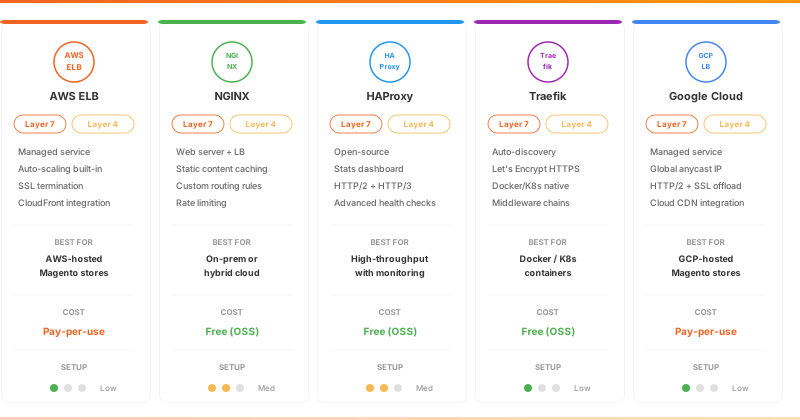
Application Load Balancer (ALB) operates at Layer 7 (HTTP/HTTPS). It routes traffic based on URL paths, hostnames, HTTP headers, and query strings. ALB supports content-based routing, WebSocket connections, and HTTP/2. Best for Magento stores that need path-based routing (e.g., sending /api/ requests to different servers than /checkout/).
Network Load Balancer (NLB) operates at Layer 4 (TCP/UDP). It handles millions of requests per second with ultra-low latency. NLB preserves the client's source IP address without modification. Best for raw TCP performance and non-HTTP protocols like database connections.
Both types include health checks, SSL termination, and session stickiness. ALB uses cookie-based stickiness while NLB uses source IP affinity.
Best for: Magento stores on AWS infrastructure. Integrates with Auto Scaling groups, CloudFront CDN, and AWS Certificate Manager.
NGINX
NGINX functions as both a web server and a load balancer. It supports Layer 4 (TCP/UDP via the stream module) and Layer 7 (HTTP via the http module) load balancing.
NGINX excels at static content caching, reducing load on Magento application servers. Its configuration-driven approach allows custom routing rules, upstream health checks, and weighted distribution. NGINX handles SSL termination, rate limiting, and request buffering.
Best for: On-premises or cloud-hosted Magento setups where you need a combined web server and load balancer. Requires configuration expertise but delivers high performance with minimal resource overhead.
HAProxy
HAProxy is an open-source, high-performance load balancer and proxy server. It supports both Layer 4 (TCP mode) and Layer 7 (HTTP mode) with content switching based on URL paths, HTTP headers, and cookies.
HAProxy provides detailed connection logging, real-time statistics dashboard, and advanced health checking. It handles SSL/TLS termination, HTTP/2, and HTTP/3 protocols.
Best for: Magento stores that need a dedicated, open-source load balancer with deep monitoring capabilities. HAProxy handles millions of concurrent connections with low CPU usage.
Traefik
Traefik is a reverse proxy and load balancer built for containerized environments. It auto-discovers services through Docker labels and Kubernetes ingress rules, updating routing without manual configuration changes.
Traefik supports automatic HTTPS via Let's Encrypt, middleware chains (rate limiting, circuit breakers, authentication), and WebAssembly plugins. It handles both Layer 4 and Layer 7 traffic.
Best for: Magento deployments using Docker Compose, Docker Swarm, or Kubernetes. Traefik eliminates manual load balancer reconfiguration when containers scale up or down.
Google Cloud Load Balancer
Google Cloud offers a managed load balancing service with global reach. The External Application Load Balancer provides Layer 7 routing with HTTP/2 support, SSL offloading, and integration with Google Cloud CDN.
The Network Load Balancer handles Layer 4 traffic with optional SSL offload for high-throughput scenarios.
Best for: Magento stores hosted on Google Cloud Platform. Provides global load balancing with a single anycast IP address.
Tool Decision Matrix
| Factor | AWS ELB | NGINX | HAProxy | Traefik | Google Cloud LB |
|---|---|---|---|---|---|
| Infrastructure | AWS only | Any | Any | Containers | GCP only |
| Setup complexity | Low (managed) | Medium | Medium | Low (auto-config) | Low (managed) |
| Cost | Pay-per-use | Free (OSS) | Free (OSS) | Free (OSS) | Pay-per-use |
| L4 + L7 | Yes (ALB+NLB) | Yes | Yes | Yes | Yes |
| Auto-scaling | Built-in | Manual | Manual | Auto-discovery | Built-in |
| Best scenario | AWS Magento hosting | On-prem / hybrid | High-throughput | Docker / K8s | GCP Magento hosting |
Decision shortcut: If you run Magento on AWS, use ALB. On bare metal or VPS, use NGINX or HAProxy. In containers, use Traefik. On Google Cloud, use their managed LB.
Load Balancing Techniques
| Technique | How It Works | Best For |
|---|---|---|
| Round-Robin | Distributes requests to each server in sequence | Equal-capacity servers, predictable traffic |
| Least Connections | Sends traffic to the server with fewest active connections | Variable request durations, checkout-heavy stores |
| Weighted Round-Robin | Assigns weights based on server capacity; higher weight = more traffic | Mixed server sizes (e.g., 8-core + 16-core nodes) |
| IP Hash | Routes requests from the same IP to the same server | Session persistence without external session storage |
| Geo-Based | Routes users to the nearest server based on location | Multi-region Magento deployments |
| Layer 7 (Application) | Routes based on HTTP data: URL path, headers, cookies | Path-based routing (/api/ vs /checkout/) |
For Magento stores, Least Connections combined with centralized session storage (Redis) delivers the best balance. It accounts for varying request complexity (browsing vs. checkout) while maintaining session data across all nodes.
Session Management in Multi-Node Setups
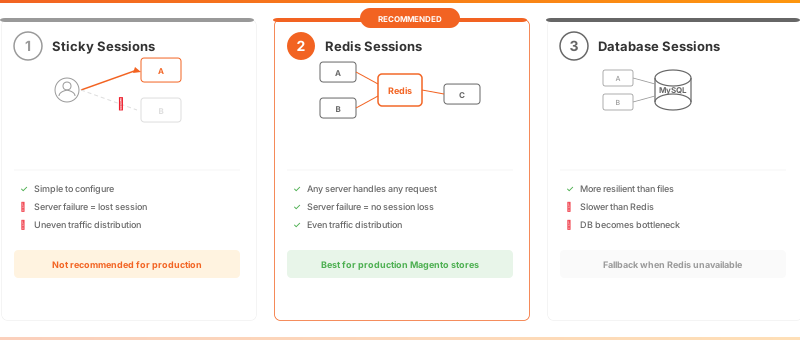
Session persistence is the most critical challenge in Magento load balancing. A customer adds items to their cart on Server A, but the next request routes to Server B. Without shared session data, the cart appears empty.
Three Approaches
1. Sticky Sessions (IP Hash / Cookie-Based)
The load balancer routes all requests from the same user to the same server. Simple to configure but creates problems: if that server fails, the user loses their session. Traffic distribution becomes uneven when many users are "stuck" to one server.
2. Centralized Session Storage with Redis
All application nodes connect to a shared Redis instance for session storage. Any server can serve any request because session data lives in Redis, not on individual servers. This is the recommended approach for Magento.
Configure in env.php:
'session' => [
    'save' => 'redis',
    'redis' => [
        'host' => 'redis-session.internal',
        'port' => '6379',
        'database' => '2',
        'log_level' => '1'
    ]
]
3. Database Session Storage
Sessions stored in the MySQL database. More resilient than file-based sessions but slower than Redis. Use this only when Redis is not available.
Recommendation: Use Redis for sessions with a dedicated Redis instance separate from your cache Redis instance. This prevents cache flushes from destroying user sessions.
Shared Filesystem: Solving the Media Sync Problem
When Magento runs on multiple application nodes, uploaded product images, generated static content, and media files must be accessible from every node. A customer uploads an image on Server A, but Server B serves the next request and cannot find the file.
Solutions
AWS EFS (Elastic File System): Managed NFS service that mounts as a shared directory across all EC2 instances. No server maintenance required. Pay for storage used.
NFS Server: A dedicated server exports directories that all application nodes mount. Requires manual setup and monitoring but works in any environment.
GlusterFS: Distributed filesystem that replicates data across multiple storage nodes. Provides redundancy at the storage layer but adds complexity.
What to Share and What Not To
| Share via NFS/EFS | Keep Local |
|---|---|
pub/media/ (product images, uploads) |
var/cache/ (use Redis instead) |
pub/static/ (generated static files) |
var/session/ (use Redis instead) |
var/export/ and var/import/ |
generated/ (generate per node) |
Important: Never share the app/ directory. Each node should have its own copy of the application code, deployed via a build pipeline or rsync.
Database Layer High Availability
The database is the final single point of failure in a load-balanced setup. Magento's database handles product catalog reads, order writes, customer sessions, and indexer operations.
MySQL Master-Slave Replication
The master database handles all write operations. One or more slave databases replicate data from the master and handle read queries. Magento 2 supports split database connections through env.php configuration for read/write separation.
This setup scales read operations (catalog browsing, search) while keeping write operations (order placement, cart updates) on the master.
AWS RDS Multi-AZ
For AWS deployments, RDS Multi-AZ provides automatic failover. If the primary database instance fails, RDS promotes the standby replica within minutes. No manual intervention required.
MySQL Galera Cluster
Galera provides true multi-master replication where every node accepts both reads and writes. This eliminates the single-master bottleneck but requires careful configuration with Magento. Some Magento operations assume a single-write-point architecture.
How Load Balancers Handle Server Failures
Health Checks
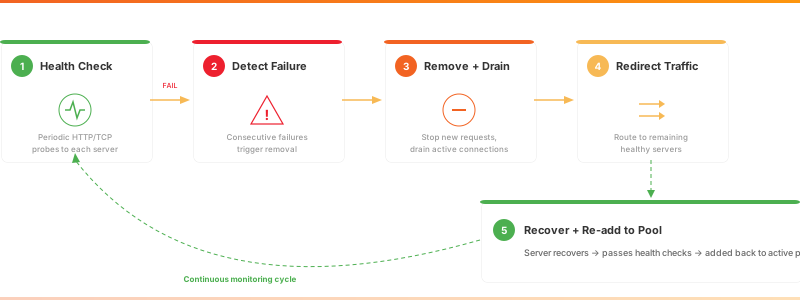
Load balancers send periodic requests (HTTP GET, TCP connect, or custom scripts) to each backend server. A server that fails consecutive health checks gets removed from the active pool. When it recovers, the load balancer adds it back.
Configure health checks to test Magento's actual functionality, not just TCP connectivity. A Magento health endpoint (e.g., /health_check.php) that verifies database connectivity, Redis availability, and filesystem access provides accurate server status.
Graceful Failover
When a server fails, in-progress requests may be lost. Advanced load balancers support connection draining: they stop sending new requests to the failing server while allowing current requests to complete. This prevents interrupted checkouts and lost orders.
Auto-Scaling Integration
In cloud environments, load balancers integrate with auto-scaling services that add new servers when traffic increases or existing servers fail. AWS ALB works with EC2 Auto Scaling groups to launch replacement instances and register them with the load balancer.
This combination means your Magento store adapts to traffic patterns: scaling out during peak hours and scaling in during quiet periods.
Implementation Best Practices
1. Terminate SSL at the Load Balancer
Handle HTTPS encryption at the load balancer instead of on each application server. This reduces CPU load on your Magento nodes and centralizes certificate management. Backend traffic between the load balancer and application servers runs on private networks over HTTP.
2. Deploy Identical Code Across All Nodes
Every application node must run the same Magento version, extensions, and configuration. Use a CI/CD pipeline (GitHub Actions, GitLab CI, or Jenkins) to deploy code to all nodes at the same time. Manual deployments to individual servers create version mismatches that cause errors.
3. Centralize Cron Execution
Magento cron jobs (indexing, email sending, order processing) must run on one node only. Running cron on multiple nodes causes duplicate emails, race conditions in indexing, and inventory conflicts. Designate a single node or a dedicated cron server for scheduled tasks.
4. Use Varnish as a Caching Layer
Place Varnish between the load balancer and your Magento application servers. Varnish caches full pages and serves them without touching PHP, reducing response times from seconds to milliseconds. Magento includes built-in Varnish VCL configuration files.
5. Monitor Upstream Response Times
Track the response time of each backend server through your load balancer's metrics. In NGINX, the $upstream_response_time variable logs how long each backend takes to respond. Consistent slow responses from one server indicate resource exhaustion or misconfiguration.
6. Plan for Zero-Downtime Deployments
Load balancing enables zero-downtime deployments. Remove one server from the load balancer pool, deploy new code, verify the deployment, then add it back. Repeat for each server. Customers experience no interruption.
Common Pitfalls in Multi-Node Setups
Running cron on multiple nodes. This creates duplicate order confirmation emails, double-counted inventory, and conflicting index operations. Run cron on one designated server.
Forgetting var/cache when using NFS. Sharing var/cache/ over NFS is slow and causes lock contention. Use Redis for cache storage instead of filesystem cache.
Ignoring static content deployment. Each node needs pub/static/ content either via shared filesystem or by running bin/magento setup:static-content:deploy on every node during deployment.
Using file-based sessions. Sessions stored in var/session/ on individual servers break when the load balancer routes to a different node. Switch to Redis or database session storage before enabling load balancing.
Pros and Cons of Load Balancing
FAQ
What is Magento 2 load balancing?
Magento 2 load balancing distributes incoming web traffic across multiple application servers. A load balancer sits in front of your Magento servers and routes each visitor request to an available server. This prevents any single server from becoming overwhelmed and keeps your store online during traffic spikes.
Which load balancer is best for Magento 2?
The best choice depends on your infrastructure. AWS ELB (Application Load Balancer) is ideal for Magento stores hosted on AWS. NGINX works well for on-premises and hybrid cloud setups. HAProxy suits high-throughput scenarios requiring detailed monitoring. Traefik fits containerized Magento deployments on Docker or Kubernetes.
How do I handle Magento sessions with load balancing?
Use centralized session storage with Redis. Configure all Magento application nodes to connect to a shared Redis instance for session data. This ensures that customer carts, login states, and checkout progress remain consistent regardless of which server handles each request.
Does Magento 2 support multiple web servers?
Yes. Magento 2 supports multi-node deployments with shared session storage (Redis), shared filesystem (NFS/EFS) for media files, and database replication for read scaling. Adobe publishes a reference architecture for high-availability setups with multiple web nodes.
What is the difference between Layer 4 and Layer 7 load balancing?
Layer 4 (transport layer) routes traffic based on IP address and TCP/UDP port without inspecting packet contents. Layer 7 (application layer) routes traffic based on HTTP data like URL paths, headers, and cookies. Magento stores benefit from Layer 7 load balancing for content-based routing, such as sending API requests to dedicated backend servers.
How do I share media files across multiple Magento nodes?
Mount a shared filesystem (AWS EFS, NFS server, or GlusterFS) on all application nodes at the pub/media directory. This ensures product images, category images, and customer uploads are accessible from every server. Avoid sharing var/cache or var/session directories. Use Redis for those instead.
Can load balancing improve Magento page speed?
Load balancing reduces response times by distributing requests across multiple servers, preventing any single server from bottlenecking. Combined with Varnish caching, Redis for sessions and cache, and a CDN for static assets, load balancing is one component of a complete performance optimization strategy.
How does auto-scaling work with Magento load balancing?
Cloud providers like AWS offer auto-scaling groups that launch new server instances when traffic exceeds thresholds and terminate them when traffic drops. The load balancer detects new instances through health checks and starts routing traffic to them. This pattern handles seasonal peaks (Black Friday, holiday sales) without manual intervention.
Summary
Magento 2 load balancing distributes traffic across multiple servers to deliver high availability, faster response times, and resilience during traffic spikes. The complete stack includes a load balancer (AWS ELB, NGINX, or HAProxy), centralized session storage (Redis), shared filesystem (NFS/EFS), and database replication.
Start with Adobe's reference architecture as your blueprint. Choose your load balancer based on your infrastructure. Solve session persistence with Redis before adding nodes. Share media files through NFS or EFS. Centralize cron execution on one node. Monitor backend response times to catch problems before customers notice them.
For production Magento stores that need load balancing without the operational burden, managed Magento hosting handles the infrastructure so you can focus on your business.
