

Magento 2 Plugins: Interceptors, Extensions, and Modules Explained
[Updated: March 12, 2026]
Magento 2 gives you three ways to customize store behavior: plugins, extensions, and modules. Each serves a different purpose, and picking the wrong one wastes time and creates technical debt.
This guide breaks down what each does, when to use it, and how they work together in Adobe Commerce 2.4.8.
Key Takeaways
- Magento 2 plugins (interceptors) modify existing class methods without changing core code using before, after, and around methods
- Extensions are complete code packages that add new features like payment gateways or shipping methods
- Modules are the foundation of all Magento functionality, containing controllers, models, views, and configuration files
- Plugins offer precise, low-conflict customization while extensions provide broader capabilities
- Plugin execution order depends on sortOrder values defined in di.xml configuration
What is a Magento 2 Plugin?
Magento 2 plugin (interceptor) = A class that modifies the behavior of public methods by intercepting function calls. Plugins run code before, after, or around the original method without editing the class itself.
Perfect for: Developers modifying checkout logic, adjusting pricing calculations, adding validation to form submissions
Not ideal for: Adding entire new features, modifying private methods, changing database schema, intercepting
__sleepor__wakeup
A Magento 2 plugin works through the interceptor design pattern. Instead of overwriting a class (which causes upgrade conflicts), you declare a plugin in di.xml that hooks into specific method calls.
The object manager detects plugin declarations and generates interceptor classes at compile time. These interceptor classes wrap the original methods with your custom logic.
Every plugin has three components:
- Type name: The class or interface the plugin observes
-
Plugin name: A unique identifier used in
di.xml - Plugin type: The class containing your custom before, after, or around methods
Three Types of Magento 2 Plugins
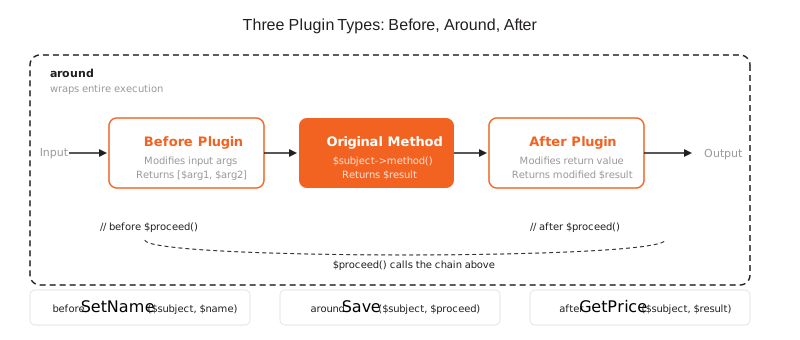
Before Plugins
Before plugins execute before the observed method runs. They can modify the input arguments passed to the original method.
public function beforeSetName(
    \Magento\Catalog\Model\Product $subject,
    string $name
): array {
    $name = ucwords($name);
    return [$name];
}
Rules:
- Method name must start with
before+ original method name - Return an array of modified arguments, or
nullto keep originals - Cannot prevent the original method from executing
After Plugins
After plugins execute after the observed method completes. They can modify the return value.
public function afterGetPrice(
    \Magento\Catalog\Model\Product $subject,
    float $result
): float {
    // Apply 10% loyalty discount
    return $result * 0.9;
}
Rules:
- Method name must start with
after+ original method name - First parameter after
$subjectreceives the original method's return value - Must return a value (modified or original)
Learn more about after plugin execution and method signatures in our after plugin guide.
Around Plugins
Around plugins wrap the entire method execution. They control whether the original method runs at all.
public function aroundSave(
    \Magento\Catalog\Model\Product $subject,
    callable $proceed
): \Magento\Catalog\Model\Product {
    // Validate before save
    if ($subject->getPrice() <= 0) {
        throw new \Magento\Framework\Exception\LocalizedException(
            __('Price must be greater than zero.')
        );
    }

    $result = $proceed();

    // Invalidate full-page cache for updated product
    $this->cacheManager->clean(['catalog_product_' . $subject->getId()]);

    return $result;
}
Rules:
- Method name must start with
around+ original method name - Second parameter
$proceedis a callable that runs the original method - Calling
$proceed()is optional, but skipping it prevents the original method and all subsequent plugins from executing - Use around plugins with caution as they add stack traces and can affect performance
How to Configure Plugins in di.xml
Declare plugins in your module's di.xml file:
<config xmlns:xsi="http://www.w3.org/2001/XMLSchema-instance"
        xsi:noNamespaceSchemaLocation="urn:magento:framework:ObjectManager/etc/config.xsd">
    <type name="Magento\Catalog\Model\Product">
        <plugin name="vendor_module_product_plugin"
                type="Vendor\Module\Plugin\ProductPlugin"
                sortOrder="10"
                disabled="false" />
    </type>
</config>
| Attribute | Required | Purpose |
|---|---|---|
name |
Yes | Unique plugin identifier |
type |
Yes | Plugin class containing your methods |
sortOrder |
No | Execution priority (lower runs first) |
disabled |
No | Set to true to disable the plugin |
Place di.xml in etc/ for global scope, etc/frontend/ for frontend only, or etc/adminhtml/ for admin only.
Plugin Execution Order
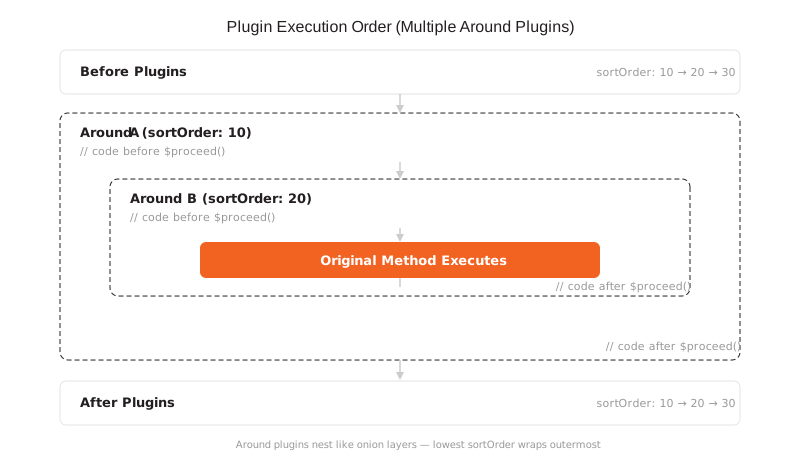
When multiple plugins target the same method, Magento uses sortOrder to determine execution sequence:
- Before plugins execute from lowest to highest sortOrder
-
Around plugin (first half, before
$proceed()) executes - Original method executes
-
Around plugin (second half, after
$proceed()) executes - After plugins execute from lowest to highest sortOrder
When multiple around plugins target the same method, they wrap like onion layers. The around plugin with the lowest sortOrder starts first (code before $proceed()), then calls the next around plugin, and so on until the original method executes. After that, execution returns in reverse order: the around plugin with the highest sortOrder completes its after-$proceed() code first, unwinding back to the lowest sortOrder. This stacking behavior is a frequent source of confusion when debugging plugin chains.
For complex customizations involving both plugins and event observers, test execution order in a staging environment. Magento does not guarantee the sequence between different extension types.
What is a Magento 2 Extension?
A Magento 2 extension is a complete code package that adds new functionality to a store. Extensions contain PHP classes, XML configuration, templates, JavaScript, and CSS files organized into a self-contained unit.
Extensions go beyond method modification. They introduce entire features like payment gateways, shipping methods, marketing automation, or inventory management systems.
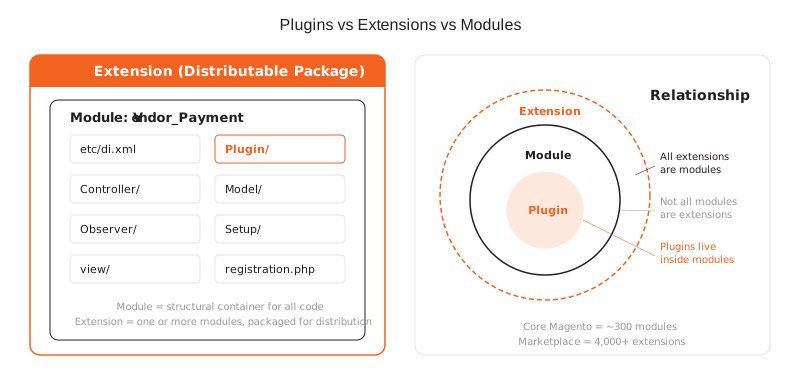
All extensions are modules (or bundles of multiple modules), but not all modules are extensions. Core Magento features are also modules, but they ship with the platform rather than being installed separately.
Types of Extensions
Marketplace Extensions: Third-party extensions available on the Adobe Commerce Marketplace. Adobe reviews each submission through its Extension Quality Program to verify code quality, security, and compatibility.
Bundled Extensions: Pre-packaged with Adobe Commerce installations. These vendor-bundled extensions undergo testing before inclusion with supported Magento versions.
Custom Extensions: Built for specific business requirements. Custom extension development requires experienced developers who understand Magento's architecture, dependency injection system, and coding standards.
What is a Magento 2 Module?
A module is the fundamental unit of Magento's architecture. Every piece of functionality in Magento exists within a module, including the core platform itself.
Modules contain:
- Controllers handling HTTP requests
- Models managing data and business logic
- Views rendering templates and layouts
- Configuration files (di.xml, routes.xml, module.xml)
- Plugins modifying other modules' behavior
- Observers reacting to system events
The distinction matters: a module is the structural container. An extension is a distributable module (or set of modules) packaged for installation via Marketplace, Composer, or custom delivery. A plugin is a specific customization mechanism within a module.
Magento Plugins vs Extensions vs Modules
| Aspect | Plugin | Extension | Module |
|---|---|---|---|
| Scope | Single method modification | Complete feature addition | Structural code unit |
| Complexity | Low (one class + di.xml) | Medium to high | Varies |
| Conflict risk | Low (interceptor pattern) | Medium (class rewrites possible) | Low (if isolated) |
| Database changes | No | Yes (setup scripts) | Yes |
| Requires compilation | Yes (setup:di:compile) |
Yes | Yes |
| Distribution | Part of a module | Marketplace, Composer, or custom (one or more modules) | Core or custom |
| Use case | Modify price calculation | Add payment gateway | Organize any code |
When to Use Each Approach
Use a plugin when:
- You need to modify an existing public method's input or output
- You want to add logging, validation, or conditional logic to existing behavior
- You must avoid editing core or third-party code
- Multiple modules need to modify the same method without conflicts
Use an extension when:
- You need to add an entire new feature (payment, shipping, marketing)
- The functionality requires new database tables
- You want a distributable, installable package
- The feature needs its own admin configuration panel
Use a module when:
- You're organizing any custom code within Magento
- You need controllers, models, observers, or API endpoints
- You're building the structure that contains your plugins
Since Magento 2.0, class preferences (rewrites) have become near-obsolete for customization. Plugins and event observers handle most use cases without the upgrade conflicts and single-inheritance limitations that class rewrites cause.
Plugin Limitations
Plugins cannot modify:
| Cannot Plugin | Reason |
|---|---|
| Final methods and classes | PHP prevents interception of final declarations |
| Non-public methods | Interceptors work on public methods only |
| Static methods | Object manager cannot intercept class-level methods |
__construct and __destruct |
Called before the interception framework initializes |
__sleep and __wakeup |
Magic methods not interceptable by the framework |
| Virtual types | No concrete class exists to intercept |
Objects before Interception bootstrap |
Framework not yet loaded |
NoninterceptableInterface |
Opted out of interception |
When plugins cannot solve your problem, use event observers, class preferences (rewrites), or custom modules as alternatives.
Performance Impact on Hosting
Every active plugin adds overhead to method execution. The interceptor framework generates wrapper classes during compilation, and each plugin adds to the call stack at runtime.
Performance considerations:
-
Compilation time increases with plugin count. Stores with 50+ active extensions can see
setup:di:compiletake 5 minutes or more - Around plugins carry the highest cost because they add full stack frames. Use before or after plugins when possible
- Memory usage grows as generated interceptor classes load into PHP's memory pool
-
OpCache tuning becomes critical. Set
opcache.memory_consumptionhigh enough to cache all generated classes
With PHP 8.4 and proper OpCache settings (opcache.memory_consumption at 512M or higher), plugin overhead drops. Enterprise stores run 100+ active plugins without performance issues when Varnish, Redis, and full-page cache are configured and tuned for the workload.
For production Magento stores running many plugins and extensions, managed hosting with proper PHP OpCache configuration, Varnish caching, and adequate memory allocation prevents plugin overhead from affecting page load times.
Best practices for plugin performance:
- Audit installed extensions quarterly and remove unused ones
- Prefer before/after plugins over around plugins
- Keep plugin logic minimal and move heavy processing to queues
- Run
setup:di:compilein production mode for optimized class generation - Monitor server performance after adding new extensions
Pros and Cons of Magento 2 Plugins
| Pros | Cons |
|---|---|
| Modify behavior without editing core code | Limited to public methods only |
| Low conflict risk between multiple plugins | Around plugins add performance overhead |
| sortOrder gives precise execution control | Cannot modify database schema |
| Works with any class managed by ObjectManager | Requires setup:di:compile after changes |
| Clean upgrade path for Adobe Commerce updates | Debugging plugin chains can be complex |
FAQ
What is the difference between a Magento 2 plugin and an extension?
A plugin modifies the behavior of a single public method through the interceptor pattern. An extension is a complete code package that adds new features, database tables, admin panels, and frontend components. Plugins handle surgical changes while extensions handle feature additions.
Can I use a plugin to override a private method in Magento 2?
No. Magento 2 plugins work on public methods only. For private or protected methods, use class preferences (rewrites) in di.xml or refactor the approach to hook into a public method that calls the private one.
How does plugin sortOrder work?
The sortOrder attribute in di.xml determines execution priority. Lower values execute first. If two plugins have the same sortOrder, Magento uses the plugin name alphabetically. Set sortOrder values with gaps (10, 20, 30) to allow future plugins to insert between them.
Do plugins affect Magento performance?
Each active plugin adds minimal overhead for before and after types. Around plugins carry higher cost because they create additional stack frames. Stores with many extensions should audit plugin usage and prefer before/after methods where possible.
What is the difference between a Magento module and an extension?
A module is the structural container for code in Magento. An extension is a distributable module (or group of modules) packaged for installation via Composer. All extensions are modules, but not all modules are extensions. Core Magento functionality also exists as modules.
When should I use an event observer instead of a plugin?
Use observers when you need to react to system events like order placement, customer registration, or product saves. Use plugins when you need to modify method inputs or outputs. Observers decouple your code from specific classes, while plugins provide tighter integration with specific methods.
How do I disable a plugin in Magento 2?
Add disabled="true" to the plugin declaration in your module's di.xml. You can also create a new di.xml in a custom module that references the same plugin name with the disabled attribute to override third-party plugins.
What happens if I skip calling $proceed() in an around plugin?
The original method and all subsequent plugins in the chain will not execute. This prevents the intended behavior and can break other extensions that depend on that method. Only skip $proceed() when you intentionally want to replace the original method's logic.
Can multiple plugins modify the same method?
Yes. This is a core advantage of the interceptor pattern over class rewrites. Multiple plugins can target the same method, and Magento executes them in sortOrder sequence. Each plugin receives the output of the previous one, creating a modification chain.
What Magento version supports plugins?
Plugins have been available since Magento 2.0. The current version, Adobe Commerce 2.4.8 (released April 2025, latest patch 2.4.8-p4 March 2026), supports PHP 8.4, OpenSearch 2.19, and MariaDB 11.4 LTS. The plugin system remains unchanged across all 2.x versions.
Conclusion
Magento 2 plugins, extensions, and modules serve distinct roles in store customization. Plugins modify existing behavior through interceptors. Extensions add complete features. Modules provide the structural foundation for all code.
Choose plugins for targeted method modifications with low conflict risk. Choose extensions for new features that need database changes and admin interfaces. Structure everything within well-organized modules that follow Magento's coding standards.
For stores running multiple extensions and plugins, proper hosting infrastructure with tuned PHP OpCache, adequate memory, and Varnish caching keeps performance consistent as customization complexity grows.
