

How to Configure Magento 2 Search Results with OpenSearch
[Updated: March 16, 2026]
Your store's search bar handles more than queries. It shapes how customers find products and whether they convert or bounce.
This guide covers search configuration for Magento 2.4.7 and 2.4.8, including the switch from Elasticsearch to OpenSearch, Adobe Live Search, and practical settings that improve result accuracy.
Key Takeaways
- OpenSearch replaced Elasticsearch as the default search engine in Magento 2.4.8 (released April 2025).
- Search weights on product attributes control which results rank higher for each query.
- Adobe Live Search provides AI-powered search with dynamic faceting for Adobe Commerce stores.
- Managing search terms, synonyms, and redirects reduces zero-result rates.
- Server resources and indexing frequency affect search speed across your catalog.
What Are Magento 2 Search Results?
Magento 2 search results = The product listings returned when a customer uses your store's search bar. Result quality depends on your search engine, attribute weights, and catalog indexing.
Perfect for: Store owners optimizing conversion, developers configuring search, merchants reducing zero-result queries
Not ideal for: Headless implementations using external search APIs (consider Algolia or Searchspring instead)
Magento 2 search results pull data from indexed product attributes and return matches based on relevance scoring. The search engine processes each query against your catalog, ranks results by configured weights, and displays them in your storefront layout.
Three factors determine result quality:
- Search engine (OpenSearch, Elasticsearch, or Live Search)
- Attribute weights (which product fields matter most)
- Index freshness (how current your catalog data is)
Getting these three right transforms search from a basic lookup tool into a conversion driver.
Search Engine Options in Magento 2.4.8
Magento 2.4.8, released April 8, 2025, changed the search landscape. Elasticsearch 7 and 8 are now deprecated. OpenSearch is the recommended engine.
| Search Engine | Status (2.4.8) | Best For | Cost |
|---|---|---|---|
| OpenSearch 2.19 | Default, recommended | All Magento stores | Free (self-hosted) |
| Elasticsearch 8.17 | Deprecated | Legacy stores not yet migrated | Free (self-hosted) |
| Adobe Live Search | SaaS add-on | Adobe Commerce stores with AI needs | Included with Adobe Commerce |
| Third-party (Algolia, Searchspring) | Extension-based | Stores needing advanced merchandising | Varies by plan and usage |
OpenSearch (Recommended)
OpenSearch 2.19 is the standard search engine for Magento 2.4.8. It handles full-text search, faceted navigation, and autocomplete. OpenSearch runs as a separate service on your server, offloading search processing from your database.
Key advantages over the deprecated Elasticsearch:
- Active open-source development (no licensing concerns)
- Full compatibility with existing Elasticsearch indexes
- Drop-in replacement requiring minimal configuration changes
Elasticsearch (Deprecated)
Elasticsearch 7 and 8 still function in Magento 2.4.8, but the admin panel labels both options as "Deprecated." Adobe recommends transitioning to OpenSearch for all on-premises and cloud deployments. If your store runs Elasticsearch, plan your OpenSearch migration now.
Adobe Live Search
Adobe Live Search is a SaaS search service for Adobe Commerce. It replaces the default catalog search with AI-powered features: dynamic faceting, real-time re-ranking based on shopper behavior, and intelligent autocomplete. Live Search processes queries on Adobe's infrastructure, reducing load on your server.
Live Search requires Adobe Commerce (not available for Magento Open Source).
How to Configure Catalog Search Settings
Access search configuration through Stores > Configuration > Catalog > Catalog Search. For the complete field reference, see the official Adobe search engine configuration guide.
Step 1: Select Your Search Engine
From the Search Engine dropdown, select OpenSearch (recommended). For existing Elasticsearch setups, the options appear with a "(Deprecated)" label.
Configure the connection:
-
Server Hostname:
localhost(or your OpenSearch server IP) -
Server Port:
9200(default) -
Index Prefix:
magento2(identifies your store's index) - HTTP Auth: Enable if your OpenSearch instance requires authentication
Step 2: Configure Search Parameters
| Setting | Recommended Value | Purpose |
|---|---|---|
| Minimum Query Length | 2 characters | Prevents single-character searches |
| Maximum Query Length | 128 characters | Limits processing for extreme queries |
| Number of Results | 20-40 per page | Balances discovery with page load |
| Enable Search Suggestions | Yes | Shows autocomplete dropdown |
| Search Suggestion Count | 5-8 | Keeps suggestions focused |
Step 3: Apply and Reindex
After saving your configuration, reindex the catalog search:
php bin/magento indexer:reindex catalogsearch_fulltext
php bin/magento cache:flush
For a complete walkthrough, review our catalog search guide.
Setting Up Search Weights and Attributes
Search weights tell OpenSearch which product fields matter most when ranking results. A customer searching for "blue cotton shirt" should see products where that phrase appears in the product name before products where it appears in the description.
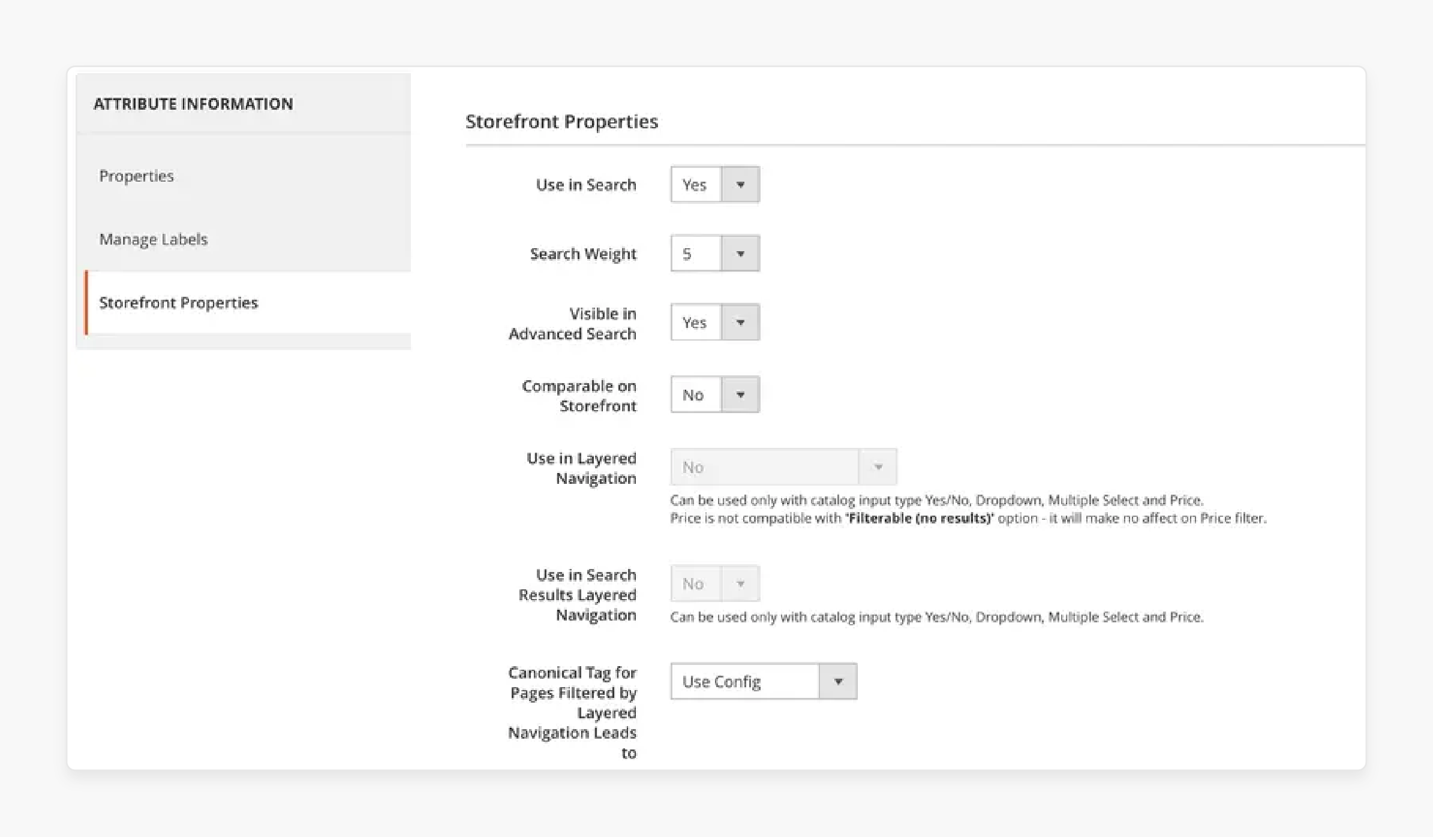
Configuring Attribute Weights
Navigate to Stores > Attributes > Product, select an attribute, then open Storefront Properties. For the full attribute reference, see the Adobe product attributes documentation.
- Use in Search: Set to "Yes" for attributes customers search by
- Search Weight: Scale of 1-10 (higher = more influence on ranking)
Recommended weight distribution:
| Attribute | Weight | Rationale |
|---|---|---|
| Product Name | 10 | Primary search target |
| SKU | 9 | Exact product lookups |
| Short Description | 7 | Key selling points |
| Description | 5 | Detailed content matches |
| Meta Keywords | 3 | Supplementary terms |
After changing weights, reindex:
php bin/magento indexer:reindex catalogsearch_fulltext
Managing Search Terms and Synonyms
Navigate to Marketing > SEO & Search > Search Terms to view every query customers have entered. This data reveals what your shoppers look for and where your catalog falls short.
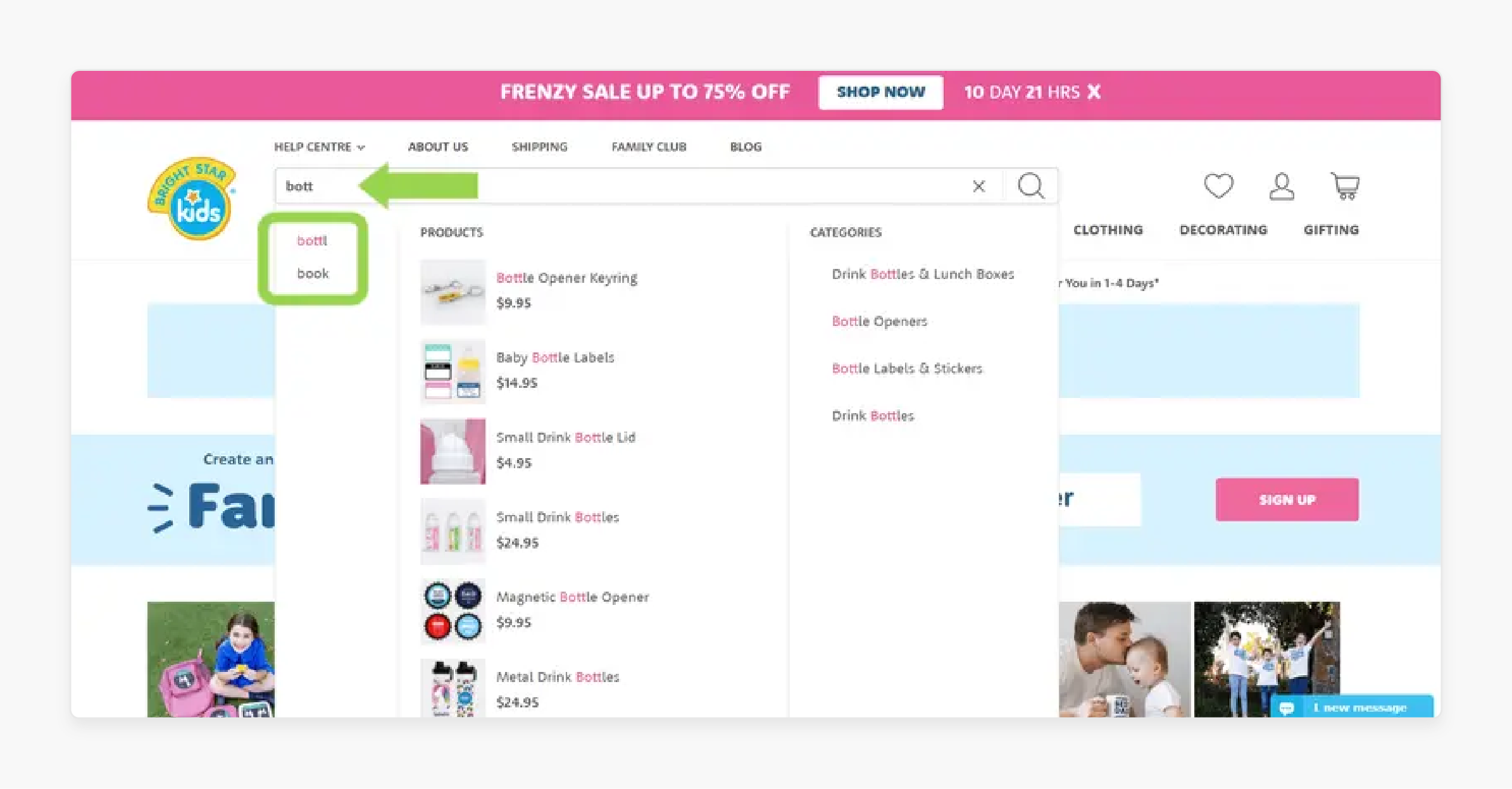
Search Term Actions
| Action | How | When to Use |
|---|---|---|
| Add Synonym | Link related terms (e.g., "phone case" = "mobile cover") | Customers use different words for the same product |
| Create Redirect | Send a search term to a specific URL | Branded searches, promotional campaigns |
| Delete Term | Remove irrelevant logged queries | Cleaning up noise in analytics |
Reducing Zero-Result Searches
Zero-result searches kill conversions. Monitor your search terms report for queries that return no products, then:
- Add synonyms for common alternative terms
- Create redirects for misspelled brand names
- Expand searchable attributes to include SKU variants
- Update product data if products exist but aren't indexed
Adding layered navigation gives customers filter options when broad searches return too many results.
Optimizing Search Performance
Search speed depends on two factors: your search engine configuration and your server infrastructure.
Server Resources for OpenSearch
OpenSearch runs in memory. Insufficient RAM causes slow queries and timeouts. For production stores:
| Catalog Size | Minimum OpenSearch RAM | Recommended |
|---|---|---|
| < 10,000 products | 2 GB | 4 GB |
| 10,000-50,000 products | 4 GB | 8 GB |
| 50,000+ products | 8 GB | 16 GB+ |
Dedicated search nodes separate OpenSearch from your web server, preventing resource contention during traffic spikes. This is where managed Magento hosting makes a difference: providers that understand Magento allocate dedicated resources for search services.
Indexing Strategy
| Setting | Impact |
|---|---|
| Update on Save | Real-time index updates. Good for small catalogs. Adds overhead to product saves. |
| Update on Schedule | Batch processing via cron. Better for large catalogs. Brief delay between changes and searchability. |
For stores with over 10,000 products, "Update on Schedule" reduces server load during bulk imports and price updates.
Caching Search Results
Enable Redis for caching search result pages. Redis stores frequent queries in memory, serving results without hitting OpenSearch for repeated searches. Combined with full-page caching, this can reduce search response times to under 200ms for cached queries.
Troubleshooting Common Search Issues
| Issue | Cause | Solution |
|---|---|---|
| No search results | Invalid index or OpenSearch down | Run php bin/magento indexer:reindex catalogsearch_fulltext and verify OpenSearch with curl localhost:9200 |
| Irrelevant results | Wrong attribute weights | Adjust search weights in Storefront Properties (increase product name weight) |
| Slow search response | Insufficient OpenSearch memory | Allocate more RAM to OpenSearch JVM heap (set to 50% of available RAM, max 32 GB) |
| Missing products | Product not set to "Visible in Search" | Check Catalog > Products > Visibility for affected items |
| Stale results | Index not refreshed | Switch to "Update on Schedule" and verify cron is running: php bin/magento cron:run |
| Autocomplete not working | Search suggestions disabled | Enable under Stores > Configuration > Catalog > Catalog Search > Search Suggestions |
| Elasticsearch deprecation warning | Running ES on Magento 2.4.8 | Migrate to OpenSearch 2.19, see our guide |
Pros and Cons of OpenSearch vs Live Search
| OpenSearch | Live Search |
|---|---|
| Free, self-hosted | Included with Adobe Commerce license |
| Full control over configuration | AI-powered ranking and faceting |
| Works with Magento Open Source | Adobe Commerce only |
| Requires server resources and maintenance | Offloads processing to Adobe's cloud |
| Manual synonym and relevance tuning | Dynamic, behavior-based re-ranking |
| No additional licensing costs | Requires Commerce Services Connector |
FAQ
1. What search engine does Magento 2.4.8 use by default?
Magento 2.4.8 uses OpenSearch 2.19 as the default search engine. Elasticsearch 7 and 8 still work but are labeled "Deprecated" in the admin panel. Adobe recommends migrating to OpenSearch for continued support.
2. How do I migrate from Elasticsearch to OpenSearch?
Install OpenSearch 2.19, configure it with the same settings as your Elasticsearch instance, then update Stores > Configuration > Catalog > Catalog Search > Search Engine to OpenSearch. Reindex with php bin/magento indexer:reindex catalogsearch_fulltext and flush the cache.
3. What is the difference between OpenSearch and Adobe Live Search?
OpenSearch runs on your server and handles standard full-text search. Adobe Live Search is a SaaS service that uses AI for dynamic faceting, real-time re-ranking, and intelligent autocomplete. Live Search requires Adobe Commerce. OpenSearch works with both Open Source and Commerce editions.
4. How do search weights affect result ranking?
Search weights (1-10) determine how much each product attribute influences result ranking. A product name with weight 10 has double the influence of a description with weight 5. Adjust weights under Stores > Attributes > Product > Storefront Properties.
5. Why does my Magento store return zero search results?
Common causes include invalid search indexes, OpenSearch service not running, products set to "Not Visible Individually," or minimum query length set too high. Start with reindexing: php bin/magento indexer:reindex catalogsearch_fulltext.
6. How much RAM does OpenSearch need for Magento?
Allocate at least 2 GB for stores under 10,000 products, 4-8 GB for mid-size catalogs, and 16 GB+ for 50,000+ product stores. Set the JVM heap size to 50% of available OpenSearch memory, never exceeding 32 GB.
7. Can I use Magento search with a headless frontend?
Yes. OpenSearch and Live Search both expose APIs that headless frontends can query. Live Search provides a GraphQL API, while OpenSearch responds to REST queries. Both integrate with PWA Studio and custom React or Vue storefronts.
8. How often should I reindex catalog search?
For "Update on Schedule" mode, Magento's cron handles reindexing at configured intervals (default: every minute). For bulk imports, trigger a manual reindex after the import completes. Avoid "Update on Save" mode for stores with frequent product changes and large catalogs.
9. What third-party search alternatives exist for Magento?
Algolia, Searchspring, and Klevu offer advanced search features including AI-powered relevance, visual merchandising, and analytics dashboards. These run as SaaS services and connect through Magento extensions. Pricing varies from pay-as-you-go tiers to enterprise contracts.
10. How do I add search synonyms in Magento?
Navigate to Marketing > SEO & Search > Search Synonyms, click "New Synonym Group," and enter comma-separated terms that should return the same results (e.g., "phone case, mobile cover, cell case"). Assign to the correct store view and save.
Summary
Configuring Magento 2 search results starts with choosing the right engine. OpenSearch 2.19 is the standard for Magento 2.4.8. Adobe Live Search adds AI-powered features for Commerce stores. The combination of proper search weights, synonym management, and adequate server resources transforms search from a basic feature into a conversion tool.
Invest in search configuration now. The return shows up in lower bounce rates and higher conversion on every product query your customers make.
