How to Set Up Google reCAPTCHA in Magento 2
[Updated: March 10, 2026]
Bots target Magento stores through login forms, fake registrations, and spam submissions. Google reCAPTCHA blocks automated attacks at the application level before they hit your database.
This guide covers reCAPTCHA setup for Magento 2.4.7 and 2.4.8 with a version comparison, all 16 protectable forms, and fixes for common CSP issues.
Key Takeaways
- Google reCAPTCHA v3 Invisible is the recommended option for Magento 2. It runs in the background without user interaction.
- Magento 2.4.7 and 2.4.8 support three reCAPTCHA types: v2 Checkbox, v2 Invisible, and v3 Invisible.
- Admin Panel and Storefront reCAPTCHA use separate configuration sections but share the same API keys.
- Magento protects 16 forms total: 2 admin forms and 14 storefront forms including login, registration, checkout, and contact.
- Content Security Policy restrictions in Magento 2.4.7+ can block reCAPTCHA scripts. Whitelist Google domains in your CSP configuration to fix this.
What is Google reCAPTCHA?
Google reCAPTCHA = A free Google service that separates humans from bots through behavioral analysis and risk scoring. It shields web forms from spam, credential stuffing, and automated abuse.
Perfect for: Ecommerce stores, sites with login forms, businesses handling sensitive customer data.
Not ideal for: Static sites with no forms, internal tools behind VPN.
Google reCAPTCHA replaced traditional image-based CAPTCHAs. Version 3 scores each visitor from 0.0 (bot) to 1.0 (human) without any user interaction. Version 2 uses either a checkbox ("I am not a robot") or an invisible challenge.
Magento 2 includes native reCAPTCHA support through its security package. No third-party extensions needed for basic bot protection. For full configuration details, see the official Adobe Commerce reCAPTCHA documentation.
reCAPTCHA v2 vs v3: Which Type to Choose
| Feature | v2 Checkbox | v2 Invisible | v3 Invisible |
|---|---|---|---|
| User interaction | Click required | None | None |
| Risk scoring | No | No | Yes (0.0 to 1.0) |
| Friction | High | Low | None |
| Best for | High-risk forms | General protection | All forms |
| Recommended by Adobe | No | No | Yes |
v3 Invisible is the best choice for most Magento stores. It assigns a risk score to each visitor in the background and blocks suspicious traffic without adding friction to checkout or registration. Use v2 Checkbox for forms that demand visible verification.
Stores running on managed Magento hosting get server-level protection (WAF, DDoS mitigation) that works alongside reCAPTCHA at the application level. Both layers together cover the full attack surface.
Step-by-Step: Configure Google reCAPTCHA in Magento 2
Step 1: Register Your Site with Google
- Open the Google reCAPTCHA Admin Console
- Click the + button to register a new site
- Enter a label (e.g., "My Magento Store")
- Select the reCAPTCHA type:
- Score based (v3) for invisible risk scoring
- Challenge (v2) for checkbox or invisible verification
- Add your store domains under "Domains"
- Accept the Terms of Service and click Submit
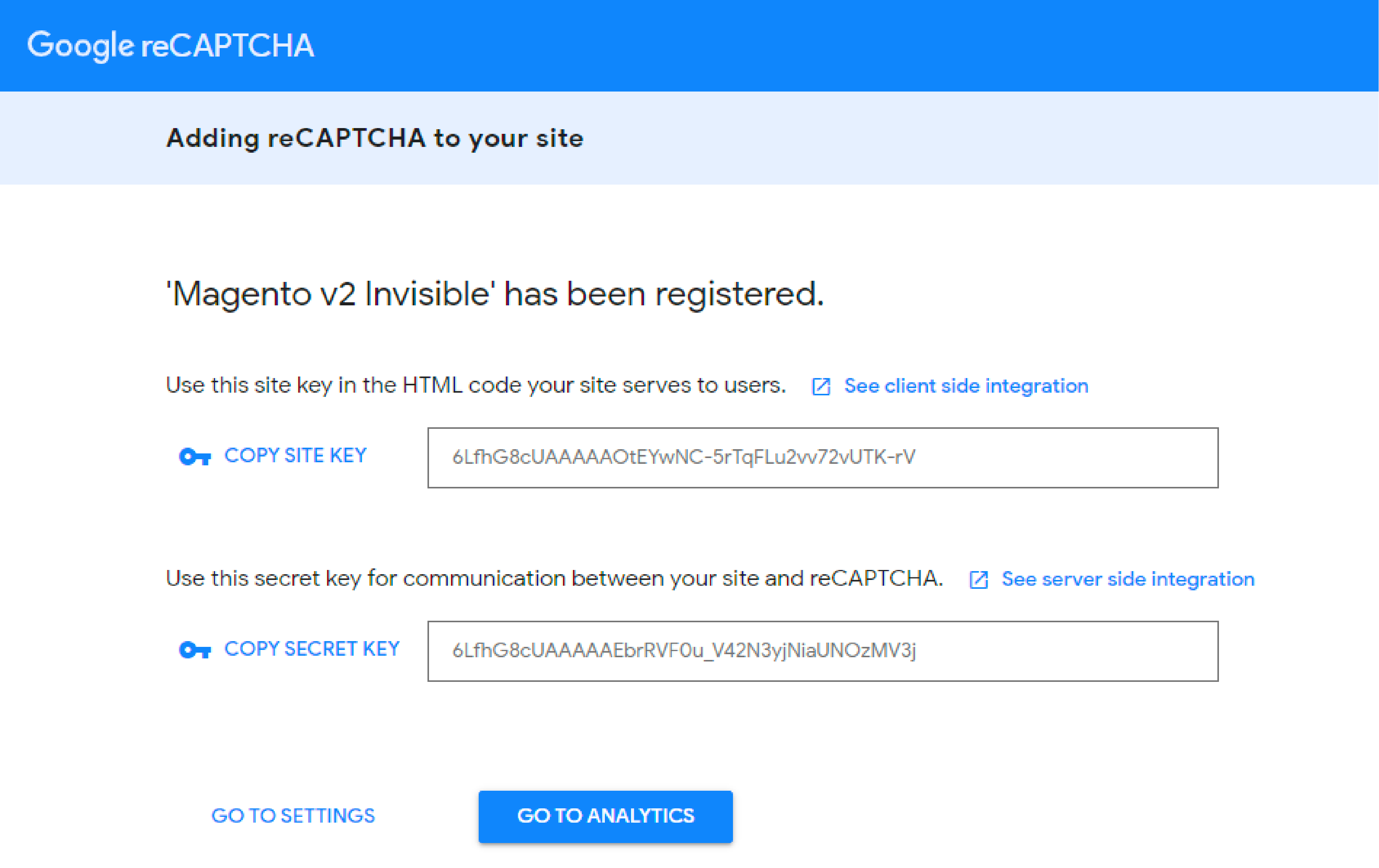
- Copy your Site Key and Secret Key
Step 2: Set Up Admin Panel reCAPTCHA
Admin reCAPTCHA protects two forms: Sign In and Forgot Password.
- Log in to your Magento Admin Panel
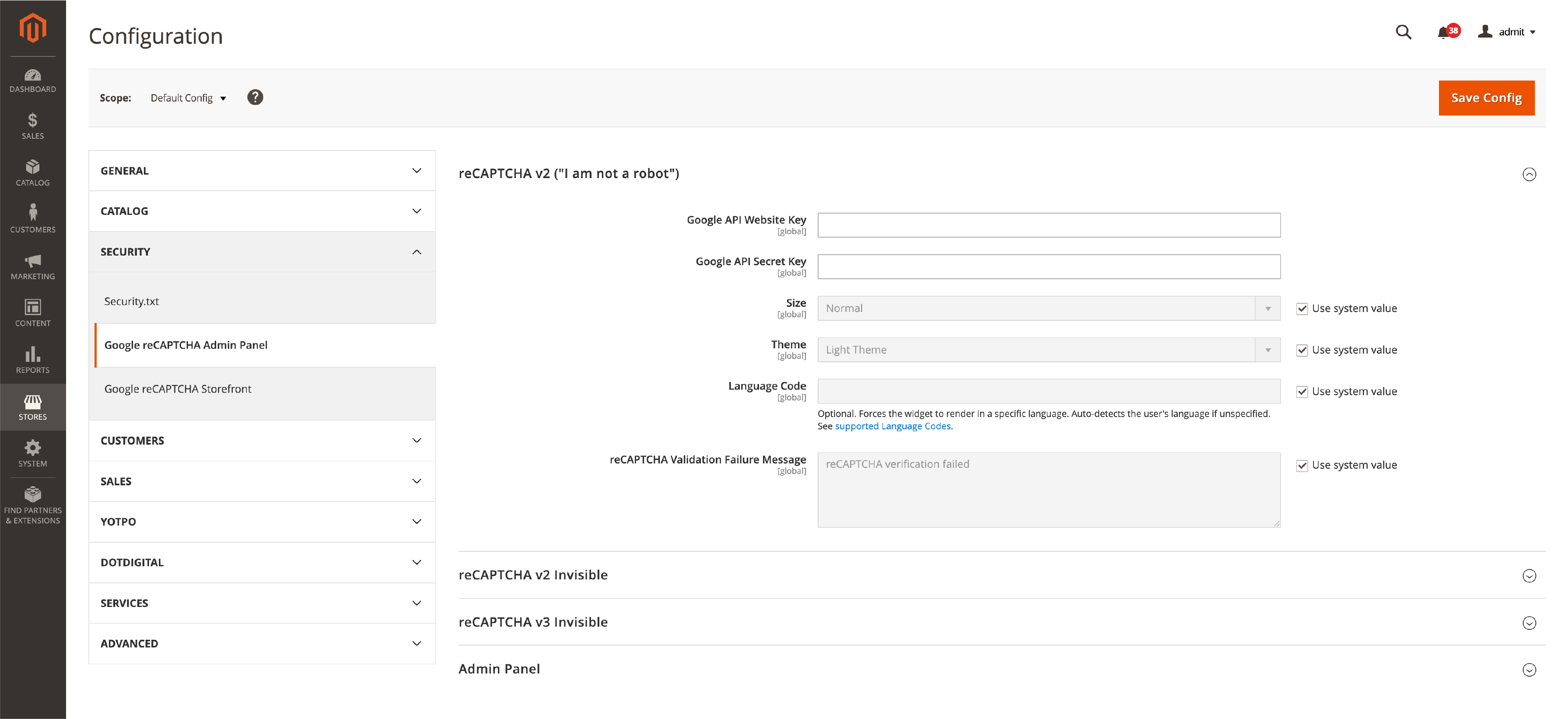
- Go to Stores > Settings > Configuration > Security > Google reCAPTCHA Admin Panel
- Under reCAPTCHA v3 Invisible, enter your Google API Website Key and Google API Secret Key
- Set the Minimum Score Threshold (default: 0.5, lower values are more permissive)
- Scroll down to the Admin Panel section
- Set reCAPTCHA type used for Admin Sign In to "Invisible reCAPTCHA v3"
- Set reCAPTCHA type used for Admin Forgot Password to "Invisible reCAPTCHA v3"
- Click Save Config
For additional admin security, consider restricting admin panel access to trusted IP addresses.
Step 3: Set Up Storefront reCAPTCHA
Storefront reCAPTCHA covers 14 customer-facing forms.
- Go to Stores > Settings > Configuration > Security > Google reCAPTCHA Storefront
- Enter the same Google API Website Key and Secret Key
- Configure each form. Recommended settings:
| Form | Recommended Type |
|---|---|
| Customer Login | Invisible reCAPTCHA v3 |
| Forgot Password | Invisible reCAPTCHA v3 |
| Create New Customer Account | Invisible reCAPTCHA v3 |
| Edit Customer Account | Invisible reCAPTCHA v3 |
| Contact Us | Invisible reCAPTCHA v3 |
| Product Review | Invisible reCAPTCHA v3 |
| Newsletter Subscription | Invisible reCAPTCHA v3 |
| Coupon Codes | Invisible reCAPTCHA v3 |
| Checkout / Placing Order | Invisible reCAPTCHA v3 |
- Click Save Config
- Flush cache: System > Cache Management > Flush Magento Cache
Step 4: Verify reCAPTCHA Is Working
After configuration, test each protected form:
- Open your storefront in an incognito browser window
- Submit the login, registration, and contact forms
- Check the browser console (F12 > Console) for reCAPTCHA errors
- Confirm the reCAPTCHA badge appears in the bottom-right corner (v3) or the checkbox renders (v2)
If forms fail to submit, check the Troubleshooting section below.
All Protectable Forms in Magento 2.4.7 and 2.4.8
Magento supports reCAPTCHA on 16 forms across two areas.
Admin Panel (2 Forms)
| Form | Purpose |
|---|---|
| Admin Sign In | Prevents brute force attacks on admin login |
| Admin Forgot Password | Blocks automated password reset requests |
Storefront (14 Forms)
| Form | Purpose | Notes |
|---|---|---|
| Customer Login | Stops credential stuffing attacks | High priority |
| Forgot Password | Blocks password reset spam | High priority |
| Create New Customer Account | Prevents fake registrations | High priority |
| Edit Customer Account | Protects account modifications | |
| Create New Company Account | B2B registration protection | Adobe Commerce only |
| Contact Us | Blocks contact form spam | High priority |
| Product Review | Prevents review spam | |
| Newsletter Subscription | Stops fake signups | |
| Gift Card | Protects gift card forms | Adobe Commerce only |
| Invitation Create Account | Invitation signup protection | Adobe Commerce only |
| Send to Friend | Email sharing protection | |
| Wishlist Sharing | Wishlist email protection | |
| Coupon Codes | Prevents coupon brute forcing | |
| PayPal Payflow Pro | Payment form protection | Adobe Commerce Cloud / legacy setups |
Start with the four high-priority forms: Customer Login, Forgot Password, Create New Account, and Contact Us. Enable additional forms based on your store's spam patterns.
Run periodic security audits to identify which forms receive the most bot traffic and adjust protection levels.
Troubleshooting Common reCAPTCHA Issues
reCAPTCHA Not Loading (CSP Block)
Magento 2.4.7 introduced stricter Content Security Policy enforcement on payment pages for PCI 4.0 compliance. This blocks external scripts that are not whitelisted.
Symptoms: reCAPTCHA badge missing, console errors about "Content Security Policy", form submissions failing on checkout.
Fix: Add Google domains to your csp_whitelist.xml in a custom module:
<config xmlns:xsi="http://www.w3.org/2001/XMLSchema-instance"
        xsi:noNamespaceSchemaLocation="urn:magento:module:Magento_Csp:etc/csp_whitelist.xsd">
    <policies>
        <policy id="script-src">
            <values>
                <value id="google-recaptcha" type="host">https://www.google.com/recaptcha/</value>
                <value id="gstatic" type="host">https://www.gstatic.com</value>
            </values>
        </policy>
        <policy id="frame-src">
            <values>
                <value id="google-recaptcha-frame" type="host">https://www.google.com/recaptcha/</value>
                <value id="gstatic-recaptcha" type="host">https://www.gstatic.com/recaptcha/</value>
            </values>
        </policy>
    </policies>
</config>
For stricter CSP modes you may also need to whitelist style-src and img-src for Google domains if the reCAPTCHA widget loads inline styles or images. See the Adobe Developer Guide on Content Security Policies for full troubleshooting and whitelisting examples.
Flush the cache after adding the whitelist entry.
Invisible reCAPTCHA Fails During Checkout
A known bug (ACSD-54656) caused invisible reCAPTCHA to fail during checkout, preventing order placement. This fix is included since Magento 2.4.6, so stores running 2.4.7 or 2.4.8 should not encounter this issue. If you run an older version, install the patch through the Quality Patches Tool.
reCAPTCHA Blocks Real Customers
If legitimate customers get blocked:
- Lower the Minimum Score Threshold from 0.5 to 0.3
- Switch the affected form from v3 Invisible to v2 Invisible
- Check the reCAPTCHA Admin Console for your site's score distribution
- Add dedicated security extensions for more granular bot detection rules
Locked Out of Admin Panel
If reCAPTCHA prevents admin login, disable it through the CLI:
bin/magento security:recaptcha:disable-for-user-login
bin/magento security:recaptcha:disable-for-user-forgot-password
bin/magento cache:flush
These commands bypass reCAPTCHA on admin forms without needing database access.
FAQ
What reCAPTCHA version should I use for my Magento 2 store?
reCAPTCHA v3 Invisible. It scores visitors in the background without adding friction. v2 Checkbox requires a click that can reduce conversion rates on checkout and registration forms.
Can I use different reCAPTCHA types for admin and storefront?
Yes. Admin Panel and Storefront have separate configuration sections under Stores > Settings > Configuration > Security. You can use v3 for the storefront and v2 for admin, or any combination.
Does Magento support reCAPTCHA Enterprise?
reCAPTCHA Enterprise is available for Adobe Commerce as a Cloud Service (SaaS) only. Magento Open Source and on-premise Adobe Commerce use the free reCAPTCHA v2 and v3 versions. The standard reCAPTCHA v3 covers most store security needs.
How do I disable reCAPTCHA if I am locked out of admin?
Run bin/magento security:recaptcha:disable-for-user-login from the command line. Then flush cache with bin/magento cache:flush. This disables reCAPTCHA on the admin login form without database access.
Why is reCAPTCHA not loading on my checkout page?
Content Security Policy restrictions in Magento 2.4.7+ block external scripts on payment pages. Add Google reCAPTCHA domains (www.google.com/recaptcha/ and www.gstatic.com) to your csp_whitelist.xml file and flush the cache.
Can I hide the reCAPTCHA badge on my storefront?
Yes. Hide the v3 badge with CSS (display: none on .grecaptcha-badge). Google requires you to add reCAPTCHA attribution text ("This site is protected by reCAPTCHA...") to your footer when hiding the badge.
Summary
Google reCAPTCHA is a baseline security measure for every Magento 2 store. Configure v3 Invisible on all high-traffic forms, test each form after setup, and monitor scores through the Google Admin Console.
For Magento 2.4.7 and 2.4.8, watch for CSP script blocking on checkout pages. The csp_whitelist.xml fix takes minutes and prevents order placement failures.
Combine application-level reCAPTCHA with regular security patches and proper hosting infrastructure for complete store protection.