

Magento 2.4.9 GA Upgrade Readiness: Hosting Checklist
Magento 2.4.9 goes GA on May 12, 2026. Stores that hit GA day with an untested stack or no rollback plan spend the week firefighting instead of selling.
This Magento 2.4.9 upgrade checklist is dated to the 30 days before GA, the 7 days before, and GA day itself.
Key Takeaways
- Magento 2.4.9 GA ships May 12, 2026 with companion patches 2.4.8-p4, 2.4.7-p9, and 2.4.6-p14.
- The mandatory stack: PHP 8.3 to 8.5, MySQL 8.4 LTS or MariaDB 11.4, OpenSearch 3.x, Valkey 8, RabbitMQ 4.1, Composer 2.9.3+.
- PHP 8.2, MySQL 8.0, MariaDB 10.6, and OpenSearch 2.x are all dropped. No exceptions.
- Framework shifts break extensions: Laminas MVC removed, TinyMCE replaced by HugeRTE, Zend_Cache replaced by Symfony Cache.
- The upgrade command changed from
composer requiretocomposer require-commerce. - Upgrade path differs by current version: 2.4.6 and 2.4.7 need a two-step jump via 2.4.8 first. 2.4.8 stores go direct.
- Most stores should wait for 2.4.9-p1 (around 30-45 days after GA) to let extension vendors catch up.
- A working rollback plan needs a DB snapshot, code tag, and traffic switch tested before GA day, not after.
- Extension compatibility testing in staging takes 7 to 14 days and cannot be skipped for custom or legacy extensions.
- Managed hosting reduces the upgrade to a scheduled event. DB migrations, stack swaps, and rollbacks are handled for you.
What Changes at GA
May 12, 2026 brings four things at once: Magento 2.4.9 GA plus three companion patches on older lines. Each targets a different merchant segment.
| Version | Released May 12, 2026 | Who it is for |
|---|---|---|
| 2.4.9 GA | New feature baseline | Stores ready for PHP 8.5 + modern stack |
| 2.4.8-p4 | Security patch | Stores on 2.4.8 not ready for GA yet |
| 2.4.7-p9 | Security patch | Stores on 2.4.7 (final patch before EOL) |
| 2.4.6-p14 | Security patch | Stores on 2.4.6 (final patch before EOL) |
The 2.4.9 release is the biggest architectural shift since 2.4.4. Three foundational components are replaced at once:
- Laminas MVC → native PHP MVC. Any extension that extends Laminas controllers, routers, or request handlers breaks.
- TinyMCE → HugeRTE. The admin WYSIWYG editor is swapped. Extensions that customize TinyMCE need updates.
- Zend_Cache → Symfony Cache. Cache backends are migrated. Custom cache plugins need review.
For the full feature list, see our Magento 2.4.9 feature overview. This article focuses on getting there safely.
The 30-Day Pre-Flight Checklist
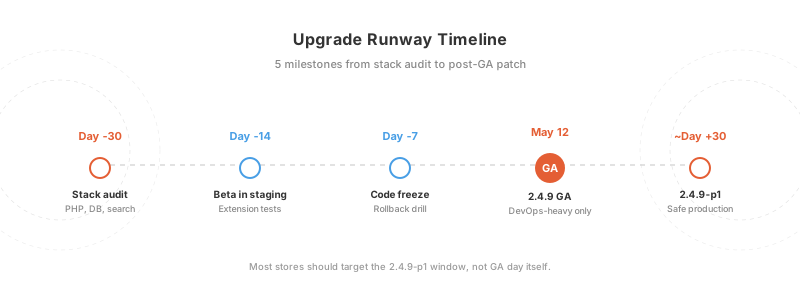
Start these 30 days before GA. Not on GA day. Not the week before.
Stack Audit
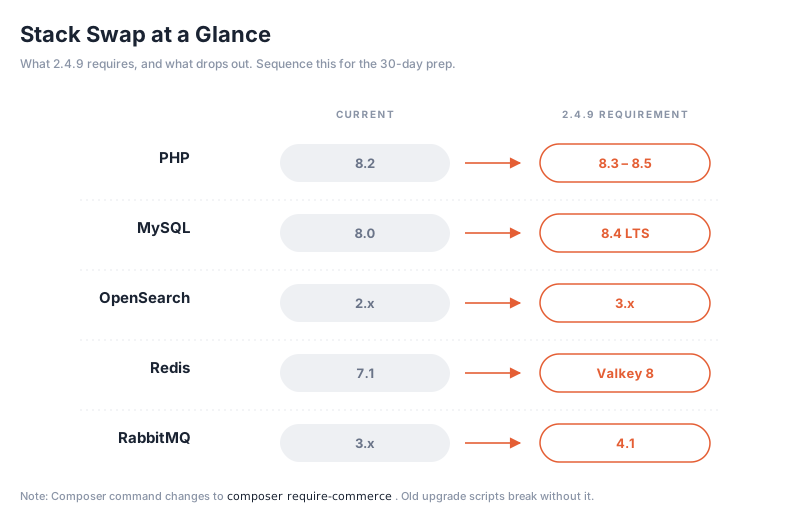
Document what you run today. Compare against 2.4.9 requirements.
| Component | Current | 2.4.9 Requires | Action if mismatched |
|---|---|---|---|
| PHP | 8.2 or lower | 8.3, 8.4, or 8.5 | Upgrade PHP, retest all extensions |
| MySQL | 8.0 or lower | 8.4 LTS | Full DB migration. Plan 1-2 days. |
| MariaDB | 10.6 or lower | 11.4 | Full DB migration. Plan 1-2 days. |
| OpenSearch | 2.x or lower | 3.x | Reindex catalog. Plan 2-4 hours. |
| Redis | 7.1 or lower | Valkey 8 (Redis 7.2 wire-compatible) | Swap to Valkey or confirm Redis 7.2 |
| RabbitMQ | 3.x | 4.1 | Minor version bump |
| Composer | 2.8 or lower | 2.9.3+ | Global composer update |
Database Migration First
If you are on MySQL 8.0, this is your biggest task. Oracle's MySQL 8.0 End of Life is April 30, 2026, two weeks before GA. Both events force the same migration. Do it once, in the 30-day window, before the Magento upgrade itself. Our MySQL 8.0 EOL migration guide covers the DB steps.
Cache Layer Swap
Redis 7.x still works wire-compatible, but Valkey 8 is what Adobe tests against for 2.4.9. New deployments should ship on Valkey. Existing Redis stores can stay on 7.2 for now, or plan a swap. The Redis to Valkey migration is a small bin swap, not a DB migration.
Extension Inventory
Run this in your staging Magento root:
bin/magento module:status --enabled | grep -v Magento_
composer show | grep -v magento/
List every non-core extension and custom module. For each, record:
- Vendor name
- Version installed
- Last update date
- Whether it extends Laminas MVC, TinyMCE, or Zend_Cache
Extensions untouched in 12+ months are high-risk. Reach out to vendors now for 2.4.9 compatibility timelines.
Staging Environment
Clone production into staging if you do not have one. Run 2.4.9 beta in staging to shake out issues before GA. Beta1 shipped March 10, 2026 and is safe for staging, not production.
The 7-Day Pre-Flight Sprint
One week out, the plan tightens.
- Freeze code. No new features into main. Only critical fixes.
- Run full backup drill. DB dump + code tag + media backup. Time the restore. A backup that takes 6 hours to restore is a problem.
- Test the rollback. Deploy to staging, break something, roll back. Measure.
- Confirm extension vendors. Final compatibility check. Any vendor still silent = blocker for the go decision.
- Load test 2.4.9 beta in staging with your real catalog size. Watch PHP memory, DB query count, OpenSearch reindex time.
- Communicate timeline to the team. Who is on call? When does the maintenance window start? When is the go/no-go call?
- Pre-schedule monitoring alerts for TTFB, error rate, and 500 responses so post-upgrade issues surface fast.
GA Day Execution Plan
May 12, 2026. Here is the sequence.
T-24 hours: Freeze
- Lock admin changes
- Confirm backup completed overnight
- Notify customers of maintenance window if downtime expected
T-0: Upgrade Window
# 1. Enter maintenance mode
bin/magento maintenance:enable

# 2. Backup composer.json
cp composer.json composer.json.bak

# 3. Update Magento package version (new syntax in 2.4.9)
composer require-commerce magento/product-community-edition 2.4.9 --no-update
composer update

# 4. Remove generated code
rm -rf var/di var/generation

# 5. Run setup
bin/magento setup:upgrade
bin/magento setup:di:compile
bin/magento setup:static-content:deploy -f
bin/magento indexer:reindex
bin/magento cache:flush

# 6. Exit maintenance mode
bin/magento maintenance:disable
Note: The command syntax changed from composer require magento/... to composer require-commerce magento/... starting in 2.4.9. Older Composer scripts will fail.
T+30 minutes: Verify
- Homepage loads
- Product page loads
- Category page with layered navigation loads
- Add to cart works
- Checkout completes with a test order
- Admin login works
- Admin grids load
T+2 hours: Monitor
Watch error logs, TTFB, and add-to-cart success rate. If any metric is off by 30%+ from baseline, trigger rollback.
Upgrade Path by Your Current Version
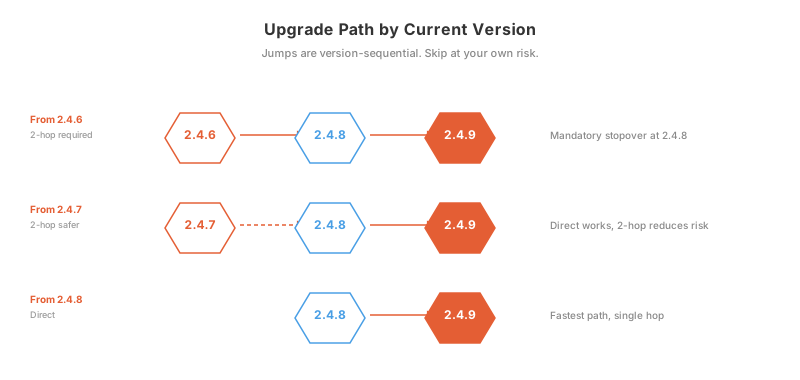
Your current version determines whether the upgrade is one hop or two.
From 2.4.8 → 2.4.9
Direct upgrade. If your extensions support 2.4.9, run the upgrade commands above.
From 2.4.7 → 2.4.9
Adobe supports direct 2.4.7 to 2.4.9 jumps, but two hops are safer. Go 2.4.7 → 2.4.8 → 2.4.9. Takes 2-3 days instead of 1, but reduces the "what broke?" surface area.
From 2.4.6 → 2.4.9
Two-hop mandatory. 2.4.6 → 2.4.8 → 2.4.9. DB migration scripts are tested for single-version jumps. Three-version jumps skip intermediate migrations and risk corruption.
From 2.4.5 or Older
Stop. You are past EOL. Upgrade urgency is security, not features. Plan a full 2.4.5 → 2.4.8 first (4 to 6 weeks), then 2.4.8 → 2.4.9 later.
Full Magento 2.4.9 system requirements reference has the compatibility matrix.
Extension and Theme Compatibility Testing
Extensions break upgrades. Plan 7 to 14 days of staging work.
Vendor-Tracked Checklist
For each extension, confirm before GA:
- Vendor has released a 2.4.9-compatible version
- Release has 1+ weeks of production use by other stores
- Your version of the extension is supported (not just latest)
- Composer-installable, not a manual file drop
- No deprecated Laminas MVC code in changelog
Custom Modules
Custom modules you own are your problem. Check for:
-
Zend\Mvcimports → replace with native PHP MVC -
tinymcereferences → migrate to HugeRTE API -
Zend_Cachereferences → migrate to Symfony Cache - PHP 8.5 compatibility (readonly class changes, nullable type edge cases)
Theme Layer
Hyvä themes tend to update fast (often day-of). Luma forks lag. Custom Luma themes need manual testing on all template overrides.
Rollback Plan
Every upgrade needs a rollback plan tested before GA, not after.
What a Working Rollback Needs
- DB snapshot taken within 15 minutes of T-0. File-level snapshot, not a logical dump.
-
Code tag of the last known-good commit. Git tag
pre-2.4.9on main. - Traffic switch at the DNS or load-balancer level. Swap to a parked page or a read-only mirror.
- Rollback script tested on staging. Manual steps fail under pressure.
Trigger Conditions
Pull the trigger if:
- Any core flow (homepage, PDP, checkout) fails for 10+ minutes
- Error rate is 5x baseline for 15+ minutes
- Admin grids do not load at all
- Payment callbacks fail on 3+ test orders
Rollback Time Budget
A clean rollback takes 10 to 30 minutes. If your plan says 2+ hours, it is not a rollback plan. It is a disaster recovery plan. Fix it before GA.
Should You Upgrade on Day 1 or Wait for 2.4.9-p1?
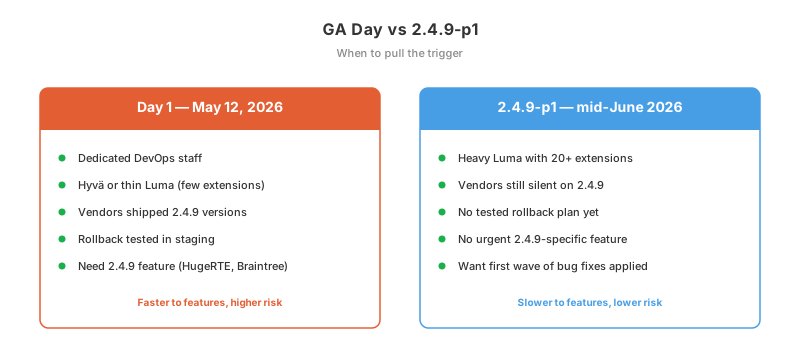
Short answer: wait for 2.4.9-p1 unless you are a DevOps-heavy store with a tested fallback.
Day 1 (May 12, 2026)
Upgrade this day if:
- You have dedicated DevOps staff
- You run Hyvä or a thin Luma (few extensions)
- Your extension vendors have already shipped 2.4.9 versions
- You need a 2.4.9-specific feature (like HugeRTE or the new Braintree integration)
- You have a tested rollback
2.4.9-p1 (expected mid-June 2026)
Wait for the first patch if:
- You run heavy Luma with 20+ extensions
- Some extension vendors are still silent on 2.4.9
- You do not have a tested rollback
- No specific 2.4.9 feature is urgent
Most stores should wait. 2.4.9-p1 fixes the day-1 bugs that always ship with a major release. The gap is around 30 to 45 days. The 2026 patch schedule has expected dates.
Never: Upgrade Without Staging
Going straight to production without a staging dry run is how stores lose a weekend. Staging catches 90% of issues. The other 10% come from production-scale data, which is where your rollback plan earns its budget.
Hosting-Level Considerations
The upgrade is as much a hosting problem as a code problem.
Stack Swaps the Host Owns
- PHP version bump (8.2 → 8.4): requires PHP-FPM restart, extension recompilation (Redis PHP, amqp, intl)
- MySQL migration (8.0 → 8.4): data dump, schema migration, replica rebuild if replicated
- OpenSearch migration (2.x → 3.x): index rebuild, cluster upgrade, index template review
- Valkey migration (optional): bin swap or keep Redis 7.2
On a self-managed VPS, that list is your weekend. On managed Magento hosting, the host runs it for you. Stack swaps happen in a blue-green deployment, rollback is one command, and you get the staging environment pre-cloned.
Timing the Maintenance Window
- Low-traffic store (under 100 orders/day): 2 to 4 hour window, off-peak
- Medium-traffic (100 to 1000 orders/day): 1 to 2 hour window with blue-green deploy
- High-traffic (1000+ orders/day): zero-downtime blue-green, no customer-visible window
Post-Upgrade Monitoring
Watch TTFB, cache hit rate, OpenSearch query latency, and checkout completion rate for 72 hours after upgrade. Cache-hit rate is the leading indicator: if it drops 20%+ after upgrade, you have a cache config issue that will blow up TTFB under load.
FAQ
When is Magento 2.4.9 GA released?
Magento 2.4.9 reaches General Availability on May 12, 2026. Beta1 shipped March 10, 2026 and is safe for staging use.
Can I upgrade to 2.4.9 from 2.4.6 direct?
No. The supported path is 2.4.6 → 2.4.8 → 2.4.9. Three-version jumps skip intermediate DB migrations.
What happens to MySQL 8.0 stores?
MySQL 8.0 is dropped in 2.4.9. Also, Oracle's MySQL 8.0 End of Life is April 30, 2026, two weeks before Magento 2.4.9 GA. You need to migrate to MySQL 8.4 LTS or MariaDB 11.4 before either date.
Will my extensions break?
Extensions that extend Laminas MVC, customize TinyMCE, or hook into Zend_Cache will break. Other extensions depend on vendor-side updates. Plan 7 to 14 days of staging testing and reach out to vendors for their 2.4.9 timeline.
Should I upgrade on GA day?
For most stores, no. Wait for 2.4.9-p1, expected mid-June 2026. Day-1 upgrades work for stores with dedicated DevOps, thin extension stacks, and a tested rollback. Everyone else gets more stability with the first patch.
Is the upgrade command different in 2.4.9?
Yes. The Composer command changed from composer require magento/... to composer require-commerce magento/... for 2.4.9+. Older upgrade scripts will fail without this change.
What is HugeRTE?
HugeRTE is an open-source WYSIWYG editor that replaces TinyMCE in the Magento 2.4.9 admin. The data model is backward-compatible, but extensions that script against TinyMCE's API need updates.
How long does the 2.4.9 upgrade take?
For a 2.4.8 store with compatible extensions: 1 to 2 hours for the upgrade itself. Plus 7 to 14 days of staging testing, plus 30 days of stack migration prep if on PHP 8.2 or MySQL 8.0. Total runway: 4 to 6 weeks from a clean 2.4.8.
What is a realistic rollback time?
A clean rollback from 2.4.9 to the last known-good state takes 10 to 30 minutes with a prepared plan. Anything longer is not a rollback, it is disaster recovery. Test the rollback in staging before GA day.
Will 2.4.9 be the last Magento release?
No. Adobe Commerce has annual major releases and quarterly patches through at least 2027. 2.4.9 is part of the 2.x line. No 3.x release date is public.
Conclusion
Magento 2.4.9 is the cleanest major release since 2.4.4, and also the most breaking. The stack requirements are non-negotiable. The extension surface area is large. The rollback plan is the difference between a 30-minute event and a weekend-long incident.
Your runway today (April 22, 2026):
- 30-day pre-flight starts this week. Stack audit first.
- 7-day sprint mid-May.
- GA day May 12. Most stores should skip it.
- 2.4.9-p1 in mid-June is the safe production target.
Upgrades scale with preparation, not with heroics. A week of staging testing beats a weekend of firefighting.
Need a Magento host that treats upgrades as scheduled events, not weekend incidents? MGT Commerce runs blue-green deploys, pre-cloned staging, and tested rollbacks on AWS.
