

Redis to Valkey Migration for Magento: A 2.4.9-Ready Guide
Magento 2.4.9 makes Valkey the default cache in its CLI. Redis changed its license again in 2025. Your cache backend is a decision, not a default.
This guide walks the migration paths, configuration, and hosting choices for Magento 2.4.7 through 2.4.9. Real commands, rollback, license clarity.
Key Takeaways
- Adobe Commerce supports Valkey since Magento 2.4.5-p12, with full native support from 2.4.8 onward.
- Magento 2.4.9 adds a native
Backend\Valkeyclass and--cache-backend=valkeyCLI flags. Redis stays backward compatible but drops to alternative status. - Valkey is BSD-3-Clause licensed. Redis since May 2025 carries three licenses (RSALv2, SSPLv1, AGPLv3). Hosting providers face restrictions under two of them.
- Valkey 8.1 shows 37% higher SET throughput and 60%+ lower GET p99 latency versus Redis 8.0 on AWS c8g.2xlarge (Momento benchmark).
- phpredis and colinmollenhour session libraries work with Valkey unchanged. No code changes are needed for standard cache and session backends.
- Redis 7.4 RDB files cannot load into Valkey. If your current Redis is 7.4 or later, use replication for the migration, not file copy.
What is Valkey for Magento?
Valkey = a BSD-licensed fork of Redis 7.2.4, run by the Linux Foundation since April 2024. Adobe supports it in Magento since 2.4.5-p12.
Perfect for: Magento 2.4.8+ stores, hosts avoiding Redis license risk, teams wanting 37% higher SET throughput.
Not ideal for: Stores on older Magento, teams using Redis Stack modules like RediSearch or RedisJSON.
Why Magento Moved to Valkey: The License Story
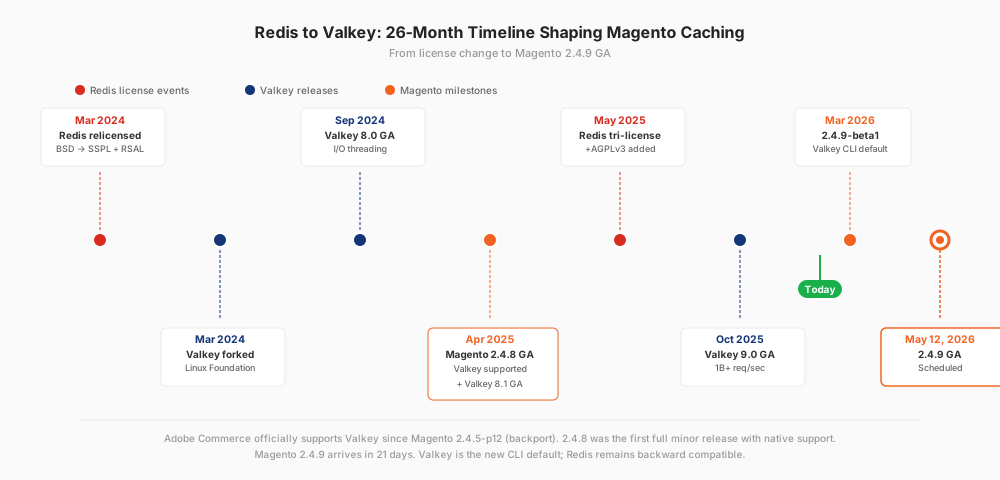
Redis Ltd relicensed its core product in March 2024 from BSD to a dual license covering RSALv2 and SSPLv1. Neither is approved by the Open Source Initiative. Within days, the Linux Foundation forked Redis 7.2.4 (the last BSD version) into a new project called Valkey. Founding backers include AWS, Google Cloud, Oracle, Ericsson, and Snap.
Valkey 8.0 shipped in September 2024 with async I/O threading and dual-channel replication. Valkey 8.1 landed April 2025 with a memory-optimized hash table and 47% less fork copy-on-write overhead. Valkey 9.0 arrived October 2025 with hash field expiration and pipeline memory prefetching, adding 40% more throughput. The current stable release is 9.0.3.
Magento's response was direct. Adobe added Valkey 8 to the system requirements matrix for patch releases 2.4.5-p12, 2.4.6-p10, and 2.4.7-p5. Magento 2.4.8 shipped with full Valkey 8 support in April 2025. Magento 2.4.9-beta1 went further: it made --session-save=valkey the canonical CLI parameter and added a dedicated Magento\Framework\Cache\Backend\Valkey class. Redis support remains, but the defaults have changed.
The question for store operators is no longer whether Valkey works with Magento. It is which version you are on, and what the migration costs. For a broader context on how Magento uses Redis, the flow of cache types, session storage, and FPC has not changed.
Magento Version Compatibility: 2.4.5 to 2.4.9
Adobe tracks Valkey support per patch release. The matrix below reflects the state as of April 2026, based on the Adobe Commerce 2.4.9-beta1 release notes and system requirements page.
| Magento Version | Valkey 8 Support | Redis Support | Native CLI Flags |
|---|---|---|---|
| 2.4.4 and earlier | Not supported | Redis 6.x | redis only |
| 2.4.5-p1 to p11 | Not supported | Redis 6.2 | redis only |
| 2.4.5-p12 to p16 | Supported | Redis 7.2 | redis only |
| 2.4.6-p1 to p9 | Not supported | Redis 7.0 | redis only |
| 2.4.6-p10 to p14 | Supported | Redis 7.2 | redis only |
| 2.4.7-p1 to p4 | Not supported | Redis 7.2 | redis only |
| 2.4.7-p5 to p9 | Supported | Redis 7.2 | redis only |
| 2.4.8 (GA Apr 2025) | Supported | Redis 7.2 | redis only |
| 2.4.9-beta1 | Supported | Redis 7.2 | redis and valkey |
| 2.4.9 GA (May 12, 2026) | Supported | Redis 7.2 | redis and valkey |
Two versions carry caveats. On 2.4.7 patches before p5, setting REMOTE_SYNCHRONIZED_CACHE with a Valkey backend throws a deployment error: "Magento version '2.4.7.0-patch5' does not support Valkey backend model." The fix ships in 2.4.7-p5 and later. On any patched release using L2 cache features, verify ece-tools is on its latest version before deploying.
For the full stack context, see Magento 2.4.9 system requirements.
Pre-Migration Checklist
Before swapping anything, verify what you have and where the data lives.
# 1. Current Redis version
redis-cli INFO server | grep redis_version

# 2. Confirm Magento is using Redis
grep -A3 '"save"' app/etc/env.php
grep -A3 '"cache"' app/etc/env.php

# 3. Active Redis databases and key counts
redis-cli INFO keyspace

# 4. Backup env.php with a timestamp
cp app/etc/env.php app/etc/env.php.bak-$(date +%Y%m%d)

# 5. Snapshot Redis data (RDB)
redis-cli BGSAVE
redis-cli LASTSAVE

# 6. Copy RDB to a safe location
sudo cp /var/lib/redis/dump.rdb /var/backups/redis-dump-$(date +%Y%m%d).rdb
Critical version check. If redis_version returns 7.4 or higher, skip the drop-in migration path. Redis 7.4 uses RDB format version 12, which Valkey 8.x and 9.x cannot parse. The Valkey migration documentation confirms this: use replication with REPLICAOF instead.
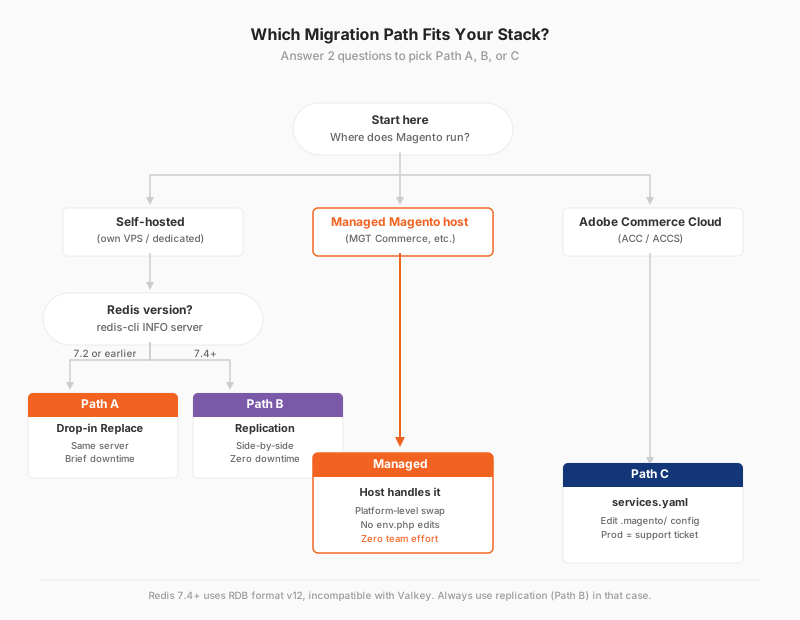
Three Migration Paths: Which One Fits You
Pick the path that matches your infrastructure and risk tolerance.
Path A: Drop-in Replace (Same Server, Brief Downtime)
Use this when Redis is self-hosted on the same server and you are on Redis 7.2 or earlier. Downtime is minutes, not hours.
# 1. Maintenance mode
bin/magento maintenance:enable
bin/magento cache:flush

# 2. Final snapshot
redis-cli BGSAVE
sleep 5
sudo cp /var/lib/redis/dump.rdb /var/backups/redis-final-$(date +%Y%m%d-%H%M).rdb

# 3. Stop Redis
sudo systemctl stop redis-server

# 4. Install Valkey (Ubuntu 24.04)
sudo apt update && sudo apt install -y valkey

# 5. Move data file to Valkey directory
sudo cp /var/lib/redis/dump.rdb /var/lib/valkey/dump.rdb
sudo chown valkey:valkey /var/lib/valkey/dump.rdb

# 6. Start Valkey on the same port
sudo systemctl enable valkey
sudo systemctl start valkey

# 7. Verify
valkey-cli INFO server | grep valkey_version
valkey-cli INFO keyspace

# 8. Magento config stays the same (Redis protocol compatible)
bin/magento maintenance:disable
bin/magento cache:clean
Path B: Side-by-Side with Replication (Recommended for Production)
Zero cut-over downtime. Works even if current Redis is 7.4 or later, because replication transfers keys live, not via RDB file.
# 1. Install Valkey on a different port
sudo apt install -y valkey
# Edit /etc/valkey/valkey.conf, set: port 6380
sudo systemctl start valkey
valkey-cli -p 6380 PING   # PONG expected

# 2. Replicate from Redis
valkey-cli -p 6380 REPLICAOF 127.0.0.1 6379

# 3. Wait until sync completes
valkey-cli -p 6380 INFO replication | grep master_link_status
# master_link_status:up

# 4. Verify key counts match
redis-cli INFO keyspace
valkey-cli -p 6380 INFO keyspace

# 5. Cut over
bin/magento maintenance:enable
valkey-cli -p 6380 REPLICAOF NO ONE

# 6. Point Magento at Valkey port
bin/magento setup:config:set \
  --cache-backend=redis \
  --cache-backend-redis-server=127.0.0.1 \
  --cache-backend-redis-port=6380 \
  --cache-backend-redis-db=0

bin/magento setup:config:set \
  --session-save=redis \
  --session-save-redis-port=6380

bin/magento maintenance:disable
bin/magento cache:clean
Once the store is stable for 24 to 48 hours on Valkey, stop Redis. For a deeper dive into env.php Redis configuration, the CLI flags you already know keep working without rename.
Path C: Adobe Commerce Cloud
Cloud environments use a YAML change instead of shell commands. Edit .magento/services.yaml:
# Before
redis:
    type: redis:7.2
    disk: 512

# After
valkey:
    type: valkey:8.0
    disk: 512
Then update .magento.app.yaml to reference the new service name under relationships. Adobe handles data migration and restart. Production and Staging changes require a support ticket. Dev environments deploy self-serve. For the complete list of managed service changes in the release, see the full Magento 2.4.9 release notes.
Valkey Configuration: env.php and CLI Reference
Magento uses Redis or Valkey in three scopes: default cache, page cache, and session storage. The config locations changed in 2.4.9, but the structure did not.
Cache Backend (default and page_cache)
Before (Magento 2.4.8 and earlier, still valid in 2.4.9):
'cache' => [
    'frontend' => [
        'default' => [
            'backend' => 'Magento\\Framework\\Cache\\Backend\\Redis',
            'backend_options' => [
                'server'   => '127.0.0.1',
                'port'     => '6379',
                'database' => '0',
            ],
        ],
    ],
],
After (Magento 2.4.9 native Valkey class, recommended):
'cache' => [
    'frontend' => [
        'default' => [
            'backend' => 'Magento\\Framework\\Cache\\Backend\\Valkey',
            'backend_options' => [
                'server'   => '127.0.0.1',
                'port'     => '6379',
                'database' => '0',
            ],
        ],
    ],
],
Session Storage: The Backward Compat Quirk
The session block in 2.4.9 has a surprise. The outer key changes to valkey, but the inner array keeps redis. This is by design. The colinmollenhour session library has not been renamed, so its config block stays under redis for compatibility.
'session' => [
    'save' => 'valkey',    // new in 2.4.9
    'redis' => [            // inner key unchanged
        'host'            => '127.0.0.1',
        'port'            => '6379',
        'database'        => '2',
        'disable_locking' => '1',
        'min_lifetime'    => '3600',
        // remaining fields identical to Redis setup
    ],
],
If you see 'save' => 'valkey' with a 'redis' sub-array, you are running Valkey. The visible text does not change that. For the broader architecture and interplay of default cache, page cache, and FPC, see Magento caching strategies.
CLI Equivalents in 2.4.9
# Cache backend
bin/magento setup:config:set \
  --cache-backend=valkey \
  --cache-backend-valkey-server=127.0.0.1 \
  --cache-backend-valkey-db=0

# Page cache
bin/magento setup:config:set \
  --page-cache=valkey \
  --page-cache-valkey-server=127.0.0.1 \
  --page-cache-valkey-db=1

# Session
bin/magento setup:config:set \
  --session-save=valkey \
  --session-save-valkey-host=127.0.0.1 \
  --session-save-valkey-db=2
The old --cache-backend=redis flags still work in 2.4.9 for backward compatibility, pointing at a Valkey server without issue. Use the new valkey flags for new deployments.
Valkey 8.1 vs Redis 8.0: Performance Benchmarks
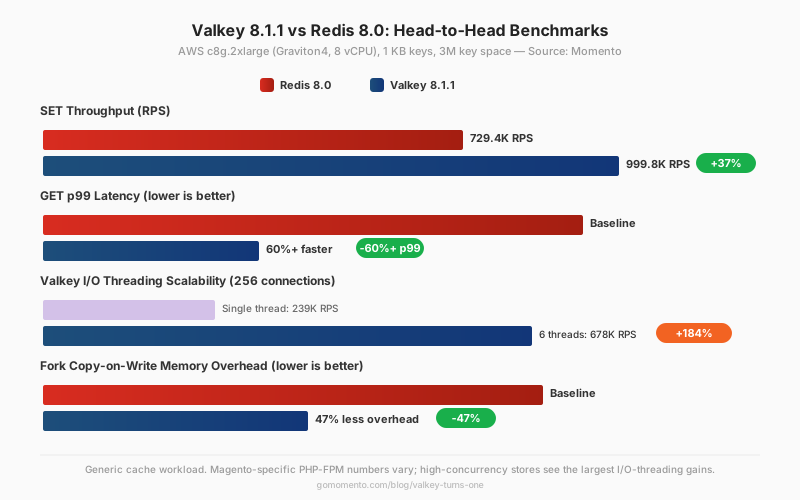
The Momento engineering team ran a head-to-head on AWS c8g.2xlarge (Graviton4, 8 vCPU) with 1 KB keys across a 3M key space. Valkey 8.1.1 vs Redis 8.0. Numbers come from the Valkey turns one benchmark.
| Metric | Redis 8.0 | Valkey 8.1.1 | Delta |
|---|---|---|---|
| SET throughput | 729.4K RPS | 999.8K RPS | +37% |
| GET throughput | baseline | +16% | +16% |
| SET p99 latency | 0.99 ms | 0.80 ms | -19% |
| GET p99 latency | baseline | 60%+ faster | -60%+ |
| Single-threaded baseline | 239K RPS | 239K RPS | same |
| 6 I/O threads, 256 connections | n/a | 678K RPS | +184% vs single |
| Fork CoW memory overhead | baseline | -47% | Valkey 8.1 improvement |
These are generic cache workload numbers. No published Magento-specific benchmark exists as of April 2026. PHP-FPM worker patterns differ from synthetic cache tests. High-traffic stores with many concurrent FPM workers see the largest gains, because Valkey's I/O threading handles connection concurrency that single-threaded Redis cannot.
For checkout-heavy stores with hundreds of concurrent sessions, the GET p99 improvement is the number that matters most. Faster cache reads translate to faster add-to-cart and checkout steps.
Rollback Plan
If something breaks after the switch, revert in six steps.
# 1. Maintenance mode
bin/magento maintenance:enable

# 2. Stop Valkey
sudo systemctl stop valkey

# 3. Restore Redis data
sudo cp /var/backups/redis-final-YYYYMMDD-HHMM.rdb /var/lib/redis/dump.rdb
sudo chown redis:redis /var/lib/redis/dump.rdb
sudo systemctl start redis-server

# 4. Restore env.php backup
cp app/etc/env.php.bak-YYYYMMDD app/etc/env.php

# 5. Clear generated config
bin/magento cache:flush

# 6. Disable maintenance
bin/magento maintenance:disable
Total recovery time runs five to ten minutes on a healthy server. Faster if the env.php backup sits on disk, not only in a Git commit.
Troubleshooting: Common Errors and Fixes
| Error | Cause | Fix |
|---|---|---|
Connection refused (127.0.0.1:6379) |
Valkey not started or on wrong port | sudo systemctl start valkey; confirm port 6379 in valkey.conf |
NOAUTH Authentication required |
Valkey has requirepass set but env.php password is empty |
Add 'password' => 'yourpass' to backend_options and session block |
Can't handle RDB format version 12 |
Redis 7.4 RDB file loaded into Valkey | Use Path B (replication) instead of RDB file copy |
Class 'Magento\Framework\Cache\Backend\Valkey' not found |
2.4.9 config running on 2.4.8 install | Keep Backend\\Redis class on 2.4.8; Valkey class exists only in 2.4.9+ |
| Sessions expire after 60 seconds | Cookie Lifetime is 0 and min_lifetime defaults to 60 |
Set min_lifetime to 3600 in env.php session block |
WRONGTYPE Operation against a key holding the wrong kind of value |
Stale Redis keys of incompatible type in Valkey DB | bin/magento cache:flush then valkey-cli FLUSHDB on cache DBs (0,1) |
| MULTI block aborts without warning | Valkey aborts all queued commands on any error; Redis continued | Rewrite transaction with explicit per-command error handling. Documented in Valkey issue #1629 |
does not support Valkey backend model RemoteSynchronizedCache |
L2 cache config on Magento 2.4.7 patch below p5 | Upgrade to 2.4.7-p5 or later, or disable L2 cache on the current patch |
The MULTI block change surfaced in January 2025 during a community debugging thread. Most Magento cache and session calls do not use MULTI blocks, so standard stores are not affected. Custom extensions that use transactions should run integration tests against a Valkey dev instance before production cutover.
What Managed Magento Hosting Changes for Your Migration
A managed host removes most of the decisions above. The infrastructure swap happens at the platform layer. You edit env.php or run a few CLI commands, and the host has already moved your data, scheduled the downtime, and tested the rollback.
This matters because the Magento hosting market is split on Valkey as of April 2026. Most Magento-focused hosts disclose neither Redis version numbers nor a Valkey roadmap. Two exceptions exist: one European Magento host announced opt-in Valkey 8.x in October 2025, and Adobe Commerce Cloud published Valkey configuration docs last updated April 16, 2026.
"Over fifteen years of running Magento stores, the caching layer has changed more than the PHP engine underneath it," says Raphael Thiel, CEO of MGT Commerce and Magento hosting architect since 2011. "Valkey is the first major shift since Redis arrived. It is not a rebrand."
Managed Magento hosting with a transparent stack means three things for this migration. First, your host runs a specific, verifiable Valkey version instead of "some Redis." Second, the license risk under SSPL and AGPL Redis falls on your host, not your business. Third, performance becomes a property of the platform you buy, not a configuration you tune.
For the companion architecture piece on how caching layers stack together, see how to configure Full Page Cache on a Magento 2 setup.
FAQ
Do I need to change any PHP code or Composer packages when switching to Valkey?
No. Valkey uses the same RESP protocol as Redis. Magento's phpredis extension and colinmollenhour session library connect to Valkey without modification. Only env.php (hostname, port, or backend class) changes.
What is the 'save' => 'valkey' but 'redis' => [...] thing in env.php?
It is intentional backward compatibility. The outer key tells Magento which session adapter to load. The inner key is still named redis because the underlying library has not been renamed. Both are correct. You are running Valkey.
My sessions expire after 60 seconds after the switch. What broke?
If Admin Cookie Lifetime is 0, Valkey falls back to min_lifetime, which defaults to 60 seconds. Set min_lifetime to 3600 or higher in the env.php session block. This is a pre-existing Redis behavior that carries over to Valkey.
Can I migrate if I am running Redis 7.4 or later?
Yes, but not by copying RDB files. Redis 7.4 uses RDB format version 12, which Valkey cannot read. Use the side-by-side replication path (Path B). The REPLICAOF command transfers keys over the wire, not via file.
Is Valkey officially supported by Magento, or does it just work by accident?
Supported. Adobe lists Valkey 8 in the system requirements matrix for Magento 2.4.5-p12 and later. Magento 2.4.8 was the first full release with native support. 2.4.9 makes Valkey the default CLI parameter.
I am on Magento 2.4.7. Can I use Valkey?
On 2.4.7-p5 and later, yes. Earlier 2.4.7 patches throw a RemoteSynchronizedCache error with Valkey because the L2 cache backend was not backported. Upgrade to p5 minimum, or disable L2 cache if you cannot upgrade.
Do Redis modules like RediSearch and RedisJSON work on Valkey?
Core Magento caching does not use Redis modules. If a custom extension depends on RedisJSON or RediSearch, verify compatibility separately. Valkey has its own module ecosystem. It does not ship JSON or Search as native types the way Redis 8 Stack does.
What is the difference between --session-save=redis and --session-save=valkey?
In 2.4.8, both flags produce functionally identical env.php. In 2.4.9, --session-save=redis is deprecated in favor of --session-save=valkey. Use the new flag for any new install.
Does Valkey change Magento's internal locking behavior?
For standard cache and session operations, no. For custom extensions using MULTI blocks, yes: Valkey aborts the entire transaction on any queued error, while Redis continued executing. Test custom extension code against a Valkey dev instance before cutover.
Will my AWS ElastiCache Redis instance become Valkey automatically?
No. AWS offers explicit in-place upgrades from ElastiCache for Redis 7.x to Valkey 7.2 or 8.0. The DNS endpoint stays the same. Your Magento config does not change. Start the upgrade from the AWS console.
Conclusion
Magento 2.4.9 arrives May 12, 2026. Adobe has made Valkey the CLI default. Redis keeps working, but the direction is set.
For self-hosted stores, the migration costs 15 minutes of careful work and one env.php backup. For Adobe Commerce Cloud, a services.yaml edit and a support ticket. For managed Magento hosts, the migration happens at the platform layer.
MGT Commerce runs Valkey 8.x on the managed Magento fleet. The license question, the version question, and the rollback plan sit with the host. Your team ships code.
Ready for a 2.4.9-ready stack? Compare hosting plans or request a stack audit.
