Magento 2 Checkout Performance: 12 Optimization Strategies
[Updated: March 20, 2026]
A default Magento 2 checkout loads over 270 JavaScript files totaling 2.8 MB. That translates to 10 to 20 seconds of load time on slower connections. With 70.22% of online shopping carts abandoned before purchase, checkout speed determines whether visitors become customers or leave.
This guide covers 12 server, frontend, and configuration optimizations that reduce Magento 2 checkout load times.
Key Takeaways
- A default Magento 2 checkout loads 270+ JS files (2.8 MB), causing load times of 10 to 20 seconds
- Redis session storage, Varnish full page caching, and PHP 8.4 deliver the highest impact server optimizations
- Disabling unused price rules, shipping methods, and payment methods eliminates unnecessary calculations at checkout
- Better checkout UX can increase conversion rates by 35.26% (Baymard Institute)
- Core Web Vitals scores affect both user experience and Google search rankings
What Causes Slow Magento 2 Checkouts?
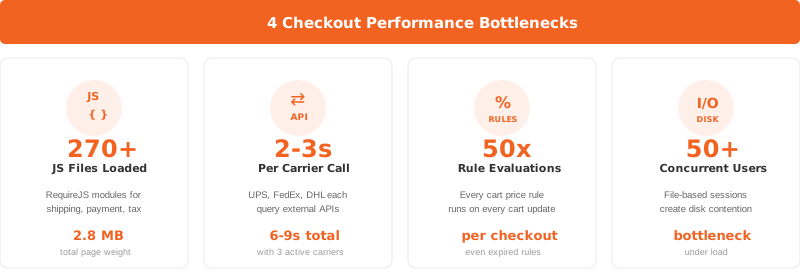
Magento 2 checkout pages load more JavaScript than any other page in the store. A standard checkout pulls in 270+ JS files weighing 2.8 MB before a customer can enter their shipping address.
Three factors compound this problem:
JavaScript overhead. The checkout page loads RequireJS modules for shipping calculations, payment processing, address validation, and tax computation. Each module triggers additional HTTP requests.
Real-time API calls. Shipping carriers like UPS, FedEx, and DHL query external APIs during checkout. Each carrier adds 2 to 3 seconds of wait time. Stores with multiple active carriers stack these delays.
Price rule calculations. Every enabled cart price rule runs against the cart contents at checkout. Stores with dozens of active promotions force Magento to evaluate each rule, even those that don't apply to the current order.
Session storage bottlenecks. File-based session storage (the Magento default) creates I/O contention under load. When 50+ concurrent users hit checkout, the server struggles to read and write session files fast enough.
The result: abandoned carts and lost revenue. Baymard Institute calculates that $260 billion in recoverable sales are lost in the US and EU each year due to poor checkout UX.
Server-Side Optimizations
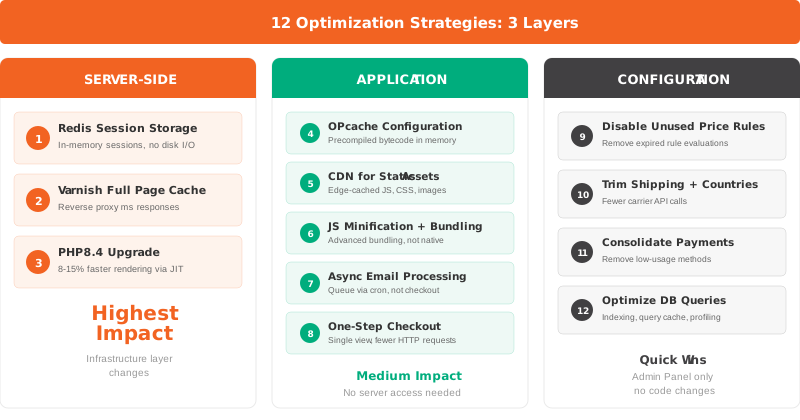
Server configuration changes deliver the largest performance gains with the least code modification. These three optimizations target the infrastructure layer.
1. Switch to Redis for Session Storage
File-based sessions become a bottleneck the moment traffic increases. Redis stores sessions in RAM, eliminating disk I/O and supporting thousands of concurrent connections.
Configure Redis for sessions in env.php:
'session' => [
    'save' => 'redis',
    'redis' => [
        'host' => '127.0.0.1',
        'port' => '6379',
        'database' => '2',
        'max_concurrency' => '20',
        'break_after_frontend' => '5',
        'disable_locking' => '0'
    ]
]
Use a dedicated Redis instance for sessions, separate from your cache instance. This prevents cache flushes from destroying active user sessions.
2. Enable Full Page Caching with Varnish
Full page caching stores complete HTML responses and serves them without PHP execution. Varnish 7.6 (required for Magento 2.4.8) handles this at the reverse proxy level, responding in milliseconds instead of seconds.
Enable Varnish in Magento Admin:
- Navigate to Stores > Configuration > Advanced > System > Full Page Cache
- Set Caching Application to Varnish Cache
- Export the VCL configuration file
- Deploy the VCL to your Varnish server
Varnish reduces checkout-adjacent page loads (cart page, product pages) to under 100ms. The checkout page itself contains dynamic content that bypasses full page cache, but reduced load on surrounding pages frees server resources for checkout processing.
3. Upgrade to PHP 8.4
Magento 2.4.8 supports PHP 8.3 and 8.4. Benchmarks show PHP 8.3 renders pages 8 to 15% faster than PHP 8.1 through JIT compilation improvements and optimized internal functions. PHP 8.4 extends these gains further.
Verify your current PHP version:
php -v
Before upgrading, confirm all installed extensions support PHP 8.4. Test in a staging environment first.
Application-Level Optimizations
These five changes target the Magento application layer. Most require no direct server access and deliver measurable checkout speed improvements.
4. Configure OPcache for Production
OPcache stores precompiled PHP bytecode in shared memory. Without it, PHP recompiles every script on every request.
Recommended production settings in php.ini:
opcache.enable=1
opcache.memory_consumption=512
opcache.max_accelerated_files=60000
opcache.validate_timestamps=0
opcache.save_comments=1
opcache.enable_cli=1
Setting validate_timestamps=0 prevents OPcache from checking file modification times. This means you must clear OPcache after deployments, but it eliminates stat() calls during runtime.
5. Set Up a CDN for Static Assets
A content delivery network caches JavaScript, CSS, and images at edge locations close to your customers. This reduces latency for the 270+ JS files the checkout page loads.
Configure the CDN in Magento Admin:
- Navigate to Stores > Configuration > General > Web
- Set Base URL for Static View Files to your CDN domain
- Set Base URL for User Media Files to your CDN domain
Amazon CloudFront, Cloudflare, and Fastly all integrate with Magento 2. Choose based on your primary customer geography.
6. Optimize JavaScript Loading
Native Magento JS bundling combines all JavaScript into large packages (5 to 10 MB). This blocks the main thread and damages your Interaction to Next Paint (INP) score.
Instead of native bundling, use Advanced JavaScript Bundling with critical path analysis:
- Enable JS minification: Stores > Configuration > Advanced > Developer > JavaScript Settings > Minify JavaScript Files > Yes
- Enable JS merging for checkout-critical files
- Defer non-critical scripts using
deferorasyncattributes - Consider a module bundler like Webpack for granular control over checkout page assets
Do not enable native JS bundling. It creates oversized bundles that hurt performance more than they help.
7. Enable Async Email Processing
Magento sends order confirmation emails during the checkout request by default. This synchronous process adds 1 to 3 seconds to every order submission.
Enable asynchronous email sending:
- Navigate to Stores > Configuration > Sales > Sales Emails
- Set Asynchronous Sending to Yes
Emails queue in the database and process via cron. The customer completes checkout without waiting for SMTP delivery. This single change delivers one of the best cost-to-benefit ratios of any checkout optimization.
8. Implement One-Step Checkout
The default Magento checkout splits the process across multiple steps: shipping address, shipping method, and payment. Each step triggers page loads and API calls.
A one-page checkout consolidates all fields into a single view. This reduces HTTP requests and eliminates step transition delays.
Baymard Institute research shows that 18% of shoppers abandon carts because the checkout process is too long or complex. Reducing checkout steps addresses this head-on.
Configuration Cleanup
These four changes remove unnecessary processing from the checkout flow. No new tools or extensions needed.
9. Disable Unused Price Rules
Every active cart price rule and catalog price rule evaluates against the cart at checkout. A store with 50 active rules forces 50 evaluation cycles per cart update.
Audit and disable rules that are expired or unused:
- Navigate to Marketing > Promotions > Cart Price Rules
- Set expired or inactive rules to Inactive
- Repeat for Catalog Price Rules
Archive rules you might reuse rather than deleting them. The performance gain scales with the number of rules disabled.
10. Remove Unused Shipping Methods and Countries
Each active shipping carrier triggers an API call during checkout to fetch rates. Three active carriers add 6 to 9 seconds of latency.
Disable carriers you don't use:
- Navigate to Stores > Configuration > Sales > Shipping Methods
- Set unused carriers to No under Enabled
Also limit active countries:
- Navigate to Stores > Configuration > General > Country Options
- Remove countries you don't ship to from the Allow Countries list
Fewer countries means fewer address validation checks and faster form rendering.
11. Consolidate Payment Methods
Each payment method loads its own JavaScript and may call external APIs. Payment methods like PayPal load additional iframes and scripts that increase page weight.
Review active payment methods:
- Navigate to Stores > Configuration > Sales > Payment Methods
- Disable methods with low or zero usage
- Keep the minimum number of methods that cover your customer preferences
If a payment method contributes less than 2% of transactions, the server overhead it adds to every checkout page load is not worth keeping.
12. Optimize Database Queries
Checkout triggers dozens of database queries: inventory checks, price lookups, tax calculations, customer data retrieval. Slow queries compound under load.
Key optimizations:
- Enable MySQL query cache for repeated read queries
- Add indexes on common join tables (quote, quote_item, sales_order)
- Use a dedicated database server separate from the web server to eliminate resource contention
- Monitor slow queries using the Magento Profiler or MySQL slow query log
For Magento 2.4.8, ensure you run MySQL 8.4 or MariaDB 11.4 for optimal query planner performance.
Checkout Performance and Core Web Vitals
Google uses Core Web Vitals as a ranking signal. Two metrics matter most for checkout pages:
Interaction to Next Paint (INP) measures how fast the page responds to user input. A checkout page that takes 500ms+ to respond when a customer clicks "Place Order" fails INP thresholds. Reducing JavaScript execution time and eliminating render-blocking resources improves INP.
Largest Contentful Paint (LCP) measures when the main content becomes visible. For checkout pages, this means the shipping form or payment form. Server-side optimizations (Redis, Varnish, PHP 8.4) reduce Time to First Byte, which feeds into better LCP scores.
Target scores:
| Metric | Good | Needs Improvement | Poor |
|---|---|---|---|
| INP | < 200ms | 200-500ms | > 500ms |
| LCP | < 2.5s | 2.5-4.0s | > 4.0s |
Measure your checkout performance using Google Lighthouse, PageSpeed Insights, or Chrome DevTools Performance panel. Test with real products in the cart, active shipping methods, and a logged-in customer session for accurate results.
For a broader view of Magento speed factors beyond checkout, see our complete speed optimization guide.
The Role of Hosting Infrastructure
Checkout performance starts at the server level. No amount of code optimization compensates for inadequate hardware or misconfigured infrastructure.
A production Magento store running checkout for concurrent users needs:
| Component | Minimum | Recommended |
|---|---|---|
| RAM | 8 GB | 16 to 32 GB |
| CPU cores | 2 | 4 to 8 |
| Storage | SSD | NVMe SSD |
| PHP workers | 4 | 8 to 16 |
| Redis | Shared | Dedicated instance |
| Database | Same server | Dedicated server |
Managed Magento hosting handles Redis configuration, Varnish tuning, PHP optimization, and CDN setup as part of the service. This eliminates the need for in-house DevOps expertise and ensures the infrastructure stack stays current as Magento releases new versions.
The Magento 2.4.8 technology stack requires:
| Technology | Version |
|---|---|
| PHP | 8.3 or 8.4 |
| MySQL | 8.4 |
| MariaDB | 11.4 |
| OpenSearch | 2.19 |
| Redis | 7.2 |
| Varnish | 7.6 |
| Composer | 2.9.3+ |
| nginx | 1.26 |
Running outdated versions of any component reduces checkout performance and creates security vulnerabilities.
Common Checkout Issues and Solutions
| Issue | Cause | Solution |
|---|---|---|
| Checkout loads for 10+ seconds | Too many JS files, no CDN | Enable CDN, minify JS, defer non-critical scripts |
| "Place Order" button hangs | Synchronous email sending, slow payment API | Enable async emails, check payment gateway response times |
| Shipping rates take too long | Multiple active carriers making API calls | Disable unused carriers, implement rate caching |
| Checkout breaks after update | Extension incompatibility | Test extensions in staging before production updates |
| Cart totals recalculate on every change | Too many active price rules | Disable expired rules, limit active promotions |
| Mobile checkout is slow | Unoptimized JS bundles, large images | Use critical CSS, lazy load images, avoid native JS bundling |
Pros and Cons of Magento 2 Checkout Optimization
| Pros | Cons |
|---|---|
| Reduces cart abandonment and increases revenue | Requires server access for infrastructure changes |
| Improves Core Web Vitals and SEO rankings | Testing needed in staging before production |
| Scales performance for high-traffic events | Some optimizations require ongoing monitoring |
| Faster checkout increases customer satisfaction | Extension conflicts can undo performance gains |
| Lower server costs through reduced processing load | Initial configuration has a learning curve |
FAQ
What is a good checkout page load time for Magento 2?
A fast Magento 2 checkout loads in under 3 seconds on desktop and under 4 seconds on mobile. Top-performing stores achieve sub-2-second load times with Redis session storage, Varnish caching, and optimized JavaScript. Measure with real products in the cart, not an empty test scenario.
Why does my Magento 2 checkout page load so many JavaScript files?
Magento 2 uses RequireJS to load JavaScript modules on demand. The checkout page requires modules for shipping calculations, payment processing, address validation, tax computation, and UI components. A standard installation loads 270+ JS files totaling about 2.8 MB. Minification and selective bundling reduce this footprint.
Does native Magento JS bundling help checkout performance?
No. Native Magento JS bundling combines all JavaScript into large packages of 5 to 10 MB. This blocks the browser's main thread and worsens Interaction to Next Paint scores. Use Advanced JavaScript Bundling or a custom Webpack configuration instead. These approaches create smaller, targeted bundles for each page type.
How much does Redis improve Magento 2 checkout speed?
Redis reduces session read/write operations from milliseconds (file-based) to microseconds (in-memory). For stores with 50+ concurrent checkout sessions, this eliminates the disk I/O bottleneck that causes checkout slowdowns. Redis also prevents session locking issues that cause checkout hangs under load.
Can hosting affect Magento 2 checkout performance?
Server infrastructure has the biggest impact on checkout performance. Inadequate RAM, slow storage, or misconfigured PHP settings create bottlenecks that no code optimization can fix. Managed Magento hosting providers configure Redis, Varnish, PHP OPcache, and CDN as part of the service, ensuring fast checkout performance without in-house DevOps effort.
What is the current cart abandonment rate for ecommerce stores?
The average cart abandonment rate is 70.22% based on 50 studies compiled by Baymard Institute. Among shoppers who abandon with purchase intent, 18% cite a checkout process that is too long or complex. Better checkout design can recover up to 35.26% in lost conversions.
How do I test Magento 2 checkout performance?
Use Google Lighthouse to audit checkout page performance. Test with a populated cart (3 to 5 items), an active shipping method, and a logged-in customer account. Check INP (under 200ms), LCP (under 2.5s), and Time to First Byte (under 600ms). Run tests from both desktop and mobile device profiles.
What Magento 2.4.8 features improve checkout performance?
Magento 2.4.8 (released April 2025) adds PHP 8.4 support for faster execution, over 500 quality fixes including checkout-related patches, and improved GraphQL API performance for headless checkout implementations. The release also supports Redis 7.2 and Varnish 7.6 for the latest caching capabilities.
Summary
Magento 2 checkout performance depends on the full stack: server infrastructure, application configuration, and frontend optimization. The 12 strategies in this guide address each layer.
Start with the three highest impact changes: Redis for session storage, Varnish for full page caching, and async email processing. These require minimal code changes and deliver measurable improvements.
Then work through configuration cleanup: disable unused price rules, shipping methods, and payment methods. Each removed component reduces processing time at checkout.
Monitor Core Web Vitals after each change to track progress. A fast checkout reduces cart abandonment, improves search rankings, and increases revenue.