

Magento Caching Strategies: Full Page Cache, Redis, Varnish Configuration
[Updated: March 31, 2026]
A 3-second page load costs you 32% of visitors before they see a single product. Magento stores without proper caching hit the database on every request, and that bottleneck compounds under traffic.
This guide covers all 18 Magento cache types, four cache backends (file system, database, Redis, Varnish), and the production configurations that cut response times from seconds to milliseconds.
Key Takeaways
- Magento 2.4.8 supports 18 distinct cache types, each targeting a different performance bottleneck
- Varnish serves cached pages 3x faster than Redis FPC and 4x faster than file-based caching
- Valkey 8 is the new open-source alternative to Redis in Magento 2.4.8, with identical configuration
- Production stores need separate Redis/Valkey instances for backend cache (db 0), page cache (db 1), and sessions (db 2)
- The
cacheable="false"attribute on a single block makes the entire page uncacheable
What Are Magento Caching Strategies?
Magento caching strategies = techniques that store processed data in memory or on disk so the server skips redundant database queries and PHP execution. The right caching stack reduces page load times from 3-5 seconds to under 500 milliseconds.
Perfect for: Store owners handling 1,000+ daily visitors, developers optimizing checkout performance, agencies managing multiple Magento installations
Not ideal for: Development environments where you need real-time code changes reflected on every page load
Magento 2.4.8 ships with a layered caching architecture. Each layer targets a different bottleneck: configuration parsing, layout compilation, block rendering, and full-page delivery. Understanding which cache type handles which operation is the foundation of every performance optimization.
All 18 Magento Cache Types Explained
Magento 2.4.8 includes 18 cache types. Each stores a different category of processed data. Disabling any one of them forces Magento to regenerate that data on every request.
| Cache Type | Tag | What It Stores |
|---|---|---|
| Configuration | CONFIG |
Merged XML configuration from all modules |
| Layouts | LAYOUT_GENERAL_CACHE_TAG |
Compiled page layout instructions |
| Blocks HTML Output | BLOCK_HTML |
Rendered HTML fragments per block |
| Collections Data | COLLECTION_DATA |
Database query results for product/category collections |
| Reflection | REFLECTION |
API interface reflection data |
| Database DDL | DB_DDL |
Database schema definitions |
| Compiled Config | COMPILED_CONFIG |
Compiled configuration from code generation |
| EAV Types and Attributes | EAV |
Entity attribute metadata |
| Customer Notification | CUSTOMER_NOTIFICATION |
UI notification data |
| Integrations Configuration | INTEGRATION |
Third-party integration config |
| Integrations API Configuration | INTEGRATION_API_CONFIG |
Integration API definitions |
| Full Page Cache | FPC |
Complete rendered HTML pages |
| Translations | TRANSLATE |
Translation string lookups |
| Web Services Configuration | WEBSERVICE |
REST and SOAP API schemas |
| Target Rule | TARGET_RULE |
Product relation rules (Adobe Commerce) |
| Admin UI SDK | ADMIN_UI_SDK |
Admin interface extension data |
| GraphQL Query Resolver Results | GRAPHQL_QUERY_RESOLVER_RESULT |
Cached GraphQL responses |
| Webhooks Response Cache | WEBHOOKS_RESPONSE |
Webhook request/response data |
The Full Page Cache (FPC) has the biggest performance impact. It stores the entire HTML output of a page after the first request. Every subsequent visitor receives pre-built HTML without triggering PHP execution or database queries. See Adobe's cache management documentation for the full reference.
Four Cache Backends Compared
Magento supports four backends for storing cached data. Each has distinct performance characteristics and production tradeoffs.
File System (Default)
The file system backend stores cache entries as files in var/cache/ and var/page_cache/. Magento uses this by default because it requires zero additional software.
When to use: Development environments and small stores with under 500 daily visitors.
Limitations: Performance depends on disk I/O speed. The backend creates thousands of small files that slow down cleanup operations. On shared hosting, file system caching can degrade under concurrent traffic.
Database
This backend stores cache in MySQL tables (cache and cache_tag). It works for multi-server setups where all nodes need access to the same cached data.
When to use: Multi-server environments without Redis infrastructure.
Limitations: Cache tables grow fast and add load to the database server. This defeats the purpose of caching since the database is the primary bottleneck you are trying to offload.
Redis / Valkey
Redis stores cache data in server RAM, making read and write operations orders of magnitude faster than disk-based backends. Magento 2.4.8 also supports Valkey 8, an open-source Redis fork that Adobe now lists as an official alternative.
When to use: Every production store. Redis 7.0 or Valkey 8 is the recommended backend for both default cache and session storage.
Configuration in app/etc/env.php:
'cache' => [
    'frontend' => [
        'default' => [
            'backend' => 'Magento\\Framework\\Cache\\Backend\\Redis',
            'backend_options' => [
                'server' => '127.0.0.1',
                'port' => '6379',
                'database' => '0',
                'compress_data' => '1'
            ]
        ],
        'page_cache' => [
            'backend' => 'Magento\\Framework\\Cache\\Backend\\Redis',
            'backend_options' => [
                'server' => '127.0.0.1',
                'port' => '6379',
                'database' => '1',
                'compress_data' => '0'
            ]
        ]
    ]
]
Production rule: Use separate Redis databases: db 0 for default cache, db 1 for page cache, db 2 for sessions. A single shared instance risks data loss when a cache flush wipes active sessions.
Varnish
Varnish is a reverse proxy that sits in front of Magento and serves cached pages without ever reaching PHP. Adobe recommends Varnish 7.6 as the production full-page cache solution.
Performance: Varnish serves cached pages 3x faster than Redis FPC and 4x faster than file-based caching in typical benchmarks. The speed gain comes from zero PHP overhead. Varnish handles the entire HTTP request/response cycle in C.
Generate VCL configuration:
bin/magento varnish:vcl:generate --export-version=6 > /etc/varnish/default.vcl
Limitations: Varnish does not support HTTPS natively. You need Nginx or HAProxy as an SSL termination proxy in front of Varnish. This adds one more component to your infrastructure stack.
| Backend | Speed | Setup Complexity | Best For |
|---|---|---|---|
| File System | Slow | None | Development |
| Database | Slow | Low | Multi-server without Redis |
| Redis/Valkey | Fast | Medium | Backend cache + sessions |
| Varnish | Fastest | High | Full-page cache in production |
Cache Management via CLI
The Magento CLI provides direct cache control without accessing the admin panel. These commands are essential for deployments and automated workflows.
# Check status of all cache types
bin/magento cache:status

# Enable all caches
bin/magento cache:enable

# Disable specific cache types
bin/magento cache:disable full_page layout

# Clean invalid cache entries (recommended)
bin/magento cache:clean

# Flush entire cache storage (nuclear option)
bin/magento cache:flush
cache:clean vs cache:flush: Clean removes only invalidated cache entries. Flush wipes everything, including entries that other applications sharing the same storage may depend on. Use clean for routine maintenance. Reserve flush for deployments and troubleshooting.
For stores running on managed Magento hosting, cache operations integrate with deployment pipelines. Zero-downtime deployments flush cache as part of the release process, so visitors never see stale content.
Private vs Public Content
Magento separates cached content into two categories based on who can see it.
Public content includes headers, footers, navigation menus, category pages, and product detail pages. This content is identical for all visitors and gets cached server-side by Varnish or Redis FPC.
Private content includes shopping carts, wishlists, recently viewed products, and customer-specific pricing. This data is unique per visitor and gets cached client-side in the browser using JavaScript.
Magento uses the X-Magento-Vary cookie and X-Magento-Cache-Id header to create cache variations. Different customer groups, currencies, and tax classes generate separate cache entries for the same URL. This ensures a B2B customer with negotiated pricing never sees cached pages meant for retail visitors.
Developer rule: Keep private content minimal. Every private block adds a JavaScript callback that fires after page load. Overloading pages with private content negates the performance gains from full-page caching.
The cacheable="false" Problem
Adding cacheable="false" to any block in a layout XML file makes the entire page uncacheable. This is the most common source of unexpected performance degradation in Magento stores.
<!-- This makes the ENTIRE page uncacheable -->
<block class="Vendor\Module\Block\Dynamic" cacheable="false" />
Magento applies this attribute to checkout and cart pages by default because those pages contain session-specific data that must not be served from cache to the wrong visitor.
How to check for problematic blocks:
grep -r 'cacheable="false"' app/design/ app/code/ vendor/
If you find cacheable="false" on blocks outside checkout and cart, evaluate whether the dynamic content can be loaded via AJAX (private content) instead. Converting a non-cacheable block to an AJAX-loaded widget restores full-page caching for that entire page.
Cache Warming Strategies
After a cache flush, the first visitor to each page experiences the full uncached load time. Cache warming pre-generates cached versions of high-traffic pages before real visitors arrive.
Priority pages to warm first:
- Homepage and main category pages
- Top 100 product pages by traffic
- CMS pages (about, contact, shipping info)
- Landing pages from active marketing campaigns
CLI-based warming:
# Crawl sitemap to warm all pages
curl -s https://your-store.com/sitemap.xml | \
  grep -oP '<loc>\K[^<]+' | \
  xargs -I {} -P 4 curl -s -o /dev/null {}
Schedule cache warming after every deployment and during off-peak hours. For stores with 10,000+ pages, use a dedicated crawler with rate limiting to avoid overwhelming the origin server during the warming phase.
Magento 2.4.8 Caching Stack for Production
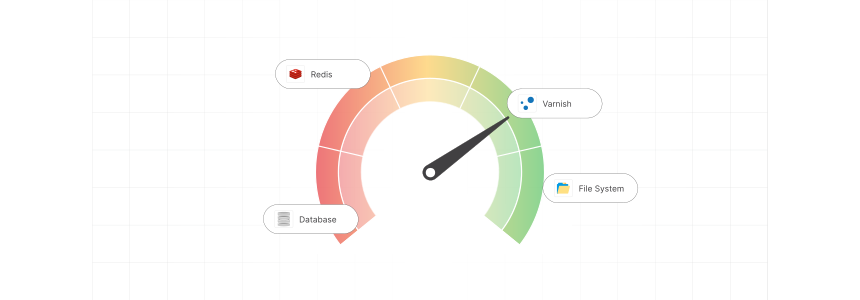
The recommended production stack for Magento 2.4.8 combines multiple caching layers:
| Layer | Technology | Version | Role |
|---|---|---|---|
| Reverse Proxy | Varnish | 7.6 | Full-page cache, serves 80%+ of requests |
| Backend Cache | Redis or Valkey | 7.0 / 8 | Config, layout, block, collection caches |
| Session Storage | Redis or Valkey | 7.0 / 8 | Customer sessions (separate instance) |
| Search | OpenSearch | 2.19 | Product search and filtering |
| CDN | CloudFront / Fastly | - | Static assets + edge caching |
| SSL Termination | Nginx | 1.26 | HTTPS handling in front of Varnish |
Valkey 8 replaces Redis in new installations. Adobe added Valkey as an official option in Magento 2.4.8 after Redis changed its open-source license in 2024. The configuration is identical. Replace the Docker image or package, and everything works without code changes.
Target cache hit rate: 80% or higher. Monitor your hit rate through Varnish logs (varnishstat) or your CDN dashboard. If the rate drops below 80%, investigate cache invalidation patterns and TTL settings.
For stores on Adobe Commerce Cloud, Fastly replaces Varnish as the CDN and caching layer. Fastly provides edge caching at 80+ global points of presence, reducing latency for international visitors.
7 Best Practices for Magento Cache Performance
1. Separate Redis Instances
Never share a single Redis instance between cache, page cache, and sessions. A FLUSHALL on the cache instance would destroy active customer sessions. Use three separate Redis databases at minimum, or three separate Redis processes for large stores.
2. Set Proper TTL Values
Static content (configuration, translations) can cache for 24+ hours. Product pages need shorter TTLs (2-4 hours) if prices or stock levels change throughout the day. Category pages with sorting and filtering benefit from 1-2 hour TTLs.
3. Enable Compression for Default Cache
Set compress_data to 1 for the default cache backend in env.php. This reduces Redis memory usage by 40-60% with minimal CPU overhead. Disable compression for page cache since FPC entries are already optimized.
4. Monitor Cache Size
Redis running out of memory triggers eviction of cache entries, causing cache misses and performance spikes. Set maxmemory in Redis configuration and configure maxmemory-policy to allkeys-lru for graceful degradation.
5. Use Cache Tags for Targeted Invalidation
Magento assigns cache tags to every cached entry. When a product updates, only cache entries tagged with that product ID get invalidated. Avoid manual cache:flush in production because it wipes all entries, including valid ones that don't need refreshing.
6. Audit Third-Party Extensions
Extensions that add cacheable="false" to layout files silently disable full-page cache for affected pages. After installing any extension, run the grep command from the section above and verify your cache hit rate stays above 80%.
7. Warm Cache After Every Deployment
Integrate cache warming into your CI/CD pipeline. A 5-minute warming script that crawls your top 500 URLs prevents the first wave of post-deployment visitors from hitting uncached pages.
Pros and Cons of Full-Page Caching

FAQ
What is the difference between cache:clean and cache:flush?
cache:clean removes only cache entries that Magento has marked as invalid. cache:flush deletes everything in the cache storage, including entries from other applications sharing the same backend. Use clean for daily operations and flush only during deployments or when troubleshooting persistent issues.
Which cache backend should I use in production?
Use Redis 7.0 or Valkey 8 for backend cache and session storage. Use Varnish 7.6 for full-page caching. The file system backend is adequate for development but too slow for production traffic. Database caching adds load to the exact component you are trying to protect.
What is Valkey and should I switch from Redis?
Valkey 8 is an open-source fork of Redis that Adobe added as an official Magento 2.4.8 cache backend. The fork happened after Redis changed its open-source license in 2024. Valkey uses the same protocol and configuration format. New installations should use Valkey. Existing Redis setups work fine and can migrate when convenient.
How do I check if full-page cache is working?
Send a request with curl and inspect response headers: curl -I https://your-store.com/. Look for X-Magento-Cache-Control: HIT. A MISS means the page was not in cache. Check X-Magento-Cache-Debug: HIT/MISS if you have debug headers enabled in Varnish VCL.
Why does cacheable="false" slow down my entire page?
Magento treats any page containing a block with cacheable="false" as non-cacheable. One dynamic block disables full-page caching for the entire URL. The fix is converting dynamic blocks to AJAX-loaded private content so the rest of the page remains cacheable.
How much RAM does Redis need for Magento caching?
A typical store with 10,000 products needs 2-4 GB of RAM for Redis across all three databases (default cache, page cache, sessions). Large catalogs with 100,000+ products may need 8-16 GB. Enable compress_data for the default cache to reduce memory usage by 40-60%.
What cache hit rate should I target?
Aim for 80% or higher. Below 80% indicates excessive cache invalidation, misconfigured TTL values, or too many cache variations from customer groups and currencies. Monitor through varnishstat or your CDN analytics dashboard.
How do I warm cache after deployment?
Parse your sitemap XML to extract all URLs, then crawl them with curl in parallel. Limit concurrent connections to 4-8 to avoid overloading the server. Prioritize homepage, category pages, and top product pages. Most stores complete warming in under 10 minutes.
Does Magento cache work with headless/PWA storefronts?
GraphQL responses are cacheable in Magento 2.4.8 through the GraphQL Query Resolver Results cache type. For PWA storefronts, this cache type stores resolved query data so repeated GraphQL requests return cached results without hitting the application layer.
Can I use Fastly instead of Varnish?
Adobe Commerce Cloud uses Fastly as its built-in CDN and caching layer. Fastly is a cloud-based Varnish derivative with edge caching at 80+ global locations. For on-premises Magento, use Varnish 7.6 directly. Both support the same VCL configuration format.
Summary
Magento caching transforms store performance when configured with the right stack. Use Redis or Valkey for backend and session cache, Varnish for full-page delivery, and a CDN for static assets. Monitor your cache hit rate, keep it above 80%, and warm cache after every deployment.
The move from Redis to Valkey 8 in Magento 2.4.8 reflects the open-source ecosystem shift, but the technical configuration stays identical. Focus on proper instance separation, TTL tuning, and eliminating cacheable="false" from non-checkout pages to get the most from your caching infrastructure.
Explore MGT Commerce Magento hosting for a production-ready caching stack with Redis, Varnish, and CDN pre-configured.
