

Magento Cluster Hosting for High-Traffic E-Commerce Stores
[Updated: March 3, 2026]
One server. 500 concurrent shoppers. Black Friday morning. CPU hits 100%, pages time out, customers leave with full carts. A single Magento server has a hard traffic ceiling.
This guide breaks down cluster hosting architecture, the components behind 99.9% uptime, and clear signals your store has outgrown one machine.
Key Takeaways
- Magento cluster hosting distributes workload across multiple servers for high availability and fault tolerance
- Move to a cluster when your single server hits CPU limits, your store needs 99.9%+ uptime, or you handle seasonal traffic spikes
- Core components: load balancer, web servers, Varnish cache, Redis, OpenSearch, database replication, shared storage
- Cluster hosting costs more than a single server but prevents revenue loss from downtime and slow page loads
- Auto-scaling clusters on AWS adjust resources on demand, so you pay for what you use
What is Magento Cluster Hosting?
Magento cluster hosting = multiple servers working together as one system to run your Magento store. Each server handles a specific role. If one server fails, the others keep your store running.
Perfect for: High-traffic stores, businesses that can not afford downtime, seasonal e-commerce with traffic spikes
Not ideal for: Small stores under 1,000 monthly visitors, hobby projects, development environments
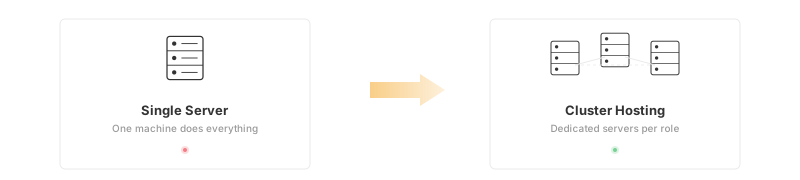
A single-server setup puts everything on one machine: web server, database, cache, search engine. That works fine for smaller stores. But when traffic grows, that single machine becomes a bottleneck and a single point of failure.
Cluster hosting splits these roles across dedicated servers. Your web server handles HTTP requests. Your database server manages data. Your cache server accelerates page loads. Each component scales on its own.
The result: faster page loads, zero downtime during server failures, and the ability to handle traffic spikes without manual intervention.
When Does Your Magento Store Need Cluster Hosting?
Not every Magento store needs a cluster. A well-configured single server handles moderate traffic fine. Here are clear signals that your current hosting environment has reached its limits.
Move to a cluster when:
- CPU usage stays above 70% during normal traffic
- Page load times exceed 3 seconds under load
- Your store generates $50K+ monthly revenue (downtime costs real money)
- You run flash sales, Black Friday campaigns, or seasonal promotions
- You need 99.9%+ uptime for SLA commitments
- Database queries slow down during peak hours
A single server still works when:
- Monthly visitors stay under 10,000
- Traffic patterns are stable and predictable
- Your catalog has fewer than 5,000 SKUs
- Brief downtime of 15 to 30 minutes per month is acceptable
| Signal | Single Server | Cluster Needed |
|---|---|---|
| Monthly visitors | Under 10,000 | Over 10,000 |
| Peak concurrent users | Under 100 | Over 100 |
| Revenue at risk per hour downtime | Under $500 | Over $500 |
| Traffic spikes | Rare, predictable | Frequent, seasonal |
| Required uptime | 99% (7h downtime/year) | 99.9%+ (under 9h/year) |
Free Checklist: Is Your Store Cluster-Ready? Walk through our 5-phase assessment covering readiness signals, current setup verification, architecture components, migration steps, and post go-live checks. Download the Magento Cluster Hosting Checklist 2026 (PDF)
Cluster Architecture: How the Layers Work
A Magento cluster follows a tiered architecture. Each tier handles one job and scales on its own.
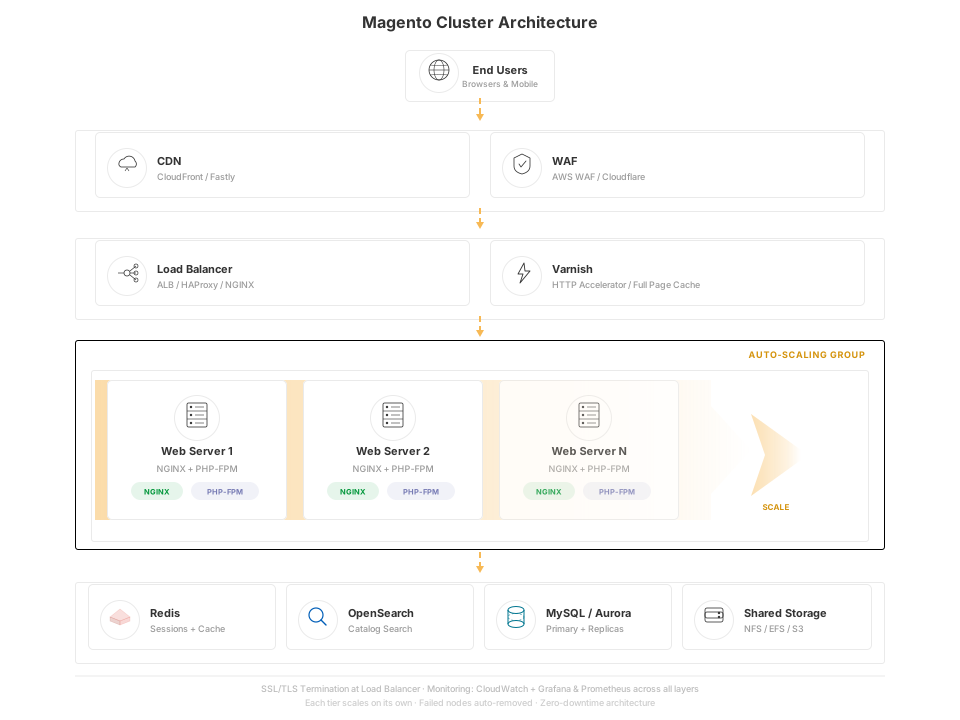
Traffic flows top to bottom:
-
CDN caches static assets (images, CSS, JS) at edge locations close to your customers. This alone cuts page load times by 40 to 60% for returning visitors.
-
Load Balancer distributes incoming requests across your web servers. If one web server fails, the load balancer routes traffic to healthy nodes within seconds.
-
Varnish Cache sits between the load balancer and your web servers as an HTTP accelerator. A warm Varnish cache serves full pages in 1 to 5 milliseconds, handling thousands of requests per second without touching PHP.
-
Web Servers (NGINX + PHP-FPM) process dynamic requests that pass through Varnish. Running 2 or more web servers in an auto-scaling group eliminates the single point of failure.
-
Redis stores session data and Magento cache tags in memory. Shared Redis lets all web server nodes access the same sessions, so customers stay logged in regardless of which server handles their request.
-
OpenSearch powers catalog search and layered navigation. Magento 2.4.6+ uses OpenSearch as its default search engine, replacing the deprecated Elasticsearch. A dedicated search node keeps queries fast even during heavy traffic.
-
Database Cluster uses MySQL or MariaDB with replication. The primary node handles writes. One or more replica nodes handle reads. This distributes database load and provides automatic failover.
-
Shared Storage (NFS, Amazon EFS, or S3) stores media files, generated assets, and import/export data. All web server nodes access the same files.
For stores with 100,000+ monthly visitors, container-based deployments using Docker and Kubernetes add zero-downtime deployments and granular auto-scaling per component on top of this architecture.
Core Components in Detail
Load Balancer
The load balancer is the entry point for all traffic. AWS Application Load Balancer (ALB), HAProxy, and NGINX all work well for Magento clusters.
Health checks monitor each web server. Failed nodes get removed from rotation within seconds. Sticky sessions ensure a user's requests go to the same backend during their visit, though Redis-based session storage makes this less critical.
Web Servers (NGINX + PHP-FPM)
NGINX handles static files and reverse proxying. PHP-FPM processes Magento's PHP code. Running multiple web server instances gives you horizontal scaling: add more servers when traffic grows.
For managed Magento hosting on AWS, web server instances can auto-scale based on CPU or request count metrics.
Varnish Cache (HTTP Accelerator)
Varnish caches full HTML pages in memory. Cached page delivery takes 1 to 5 milliseconds compared to 200 to 500 milliseconds for a full PHP render. Magento 2 ships with Varnish support built in.
Configure Varnish for Magento with proper cache tags. When a product price changes, Magento purges only the affected cache entries, not the entire cache.
Redis (Cache and Session Storage)
Redis stores Magento's object cache, full page cache tags, and session data in memory. In a cluster, Redis must be shared across all web server nodes.
A dedicated Redis instance or AWS ElastiCache cluster handles this. Configure Magento to use Redis for both cache backend and session storage following this setup guide.
OpenSearch (Search Engine)
Magento 2.4.6+ uses OpenSearch as its default search engine. OpenSearch is a community-driven fork of Elasticsearch and the recommended choice for all new Magento deployments. Many hosting providers have migrated their search infrastructure to OpenSearch.
A dedicated search node prevents search indexing from competing with web server resources. For large catalogs (50,000+ products), consider an OpenSearch cluster with multiple data nodes. Reindexing runs faster and search queries stay responsive during peak traffic.
Database Cluster
MySQL or MariaDB with replication separates read and write operations. The primary node handles all writes (orders, cart updates, admin changes). Replica nodes handle reads (product pages, category browsing, search).
For high availability setups, Galera Cluster provides synchronous multi-master replication. Every node stays in sync. If the primary fails, any replica can take over with zero data loss.
Amazon Aurora for MySQL is the preferred managed database solution on AWS. It offers automatic failover, up to 15 read replicas, and storage that scales to 128 TB without manual intervention.
Content Delivery Network (CDN)
CloudFront, Fastly, or Cloudflare cache static assets at edge locations around the world. This reduces latency for international customers and offloads bandwidth from your origin servers.
Fastly integrates with Magento's built-in full page cache for dynamic content caching at the edge. This makes Fastly the top CDN choice for Magento stores that need both static and dynamic caching.
Web Application Firewall (WAF)
A WAF protects your Magento store from SQL injection, cross-site scripting (XSS), and other attacks. In a cluster hosting environment, the WAF sits in front of the load balancer and filters malicious requests before they reach your application servers.
AWS WAF, Cloudflare WAF, or dedicated solutions like ModSecurity are common choices for e-commerce hosting.
Monitoring and Alerting
Monitoring is non-negotiable in a cluster. You need visibility into every layer of the hosting platform:
- Application Performance: New Relic, Datadog
- Infrastructure: CloudWatch (AWS), Grafana + Prometheus
- Uptime: Pingdom, UptimeRobot
- Log Management: ELK Stack, CloudWatch Logs
Set alerts for CPU usage above 80%, memory usage above 85%, disk I/O spikes, and response times above 2 seconds. On AWS, CloudWatch combined with Grafana and Prometheus has become the standard monitoring stack for Magento clusters.
Cluster Hosting vs Single Server vs VPS
| Feature | Single Server | VPS | Managed Cluster |
|---|---|---|---|
| Fault tolerance | None | None | Built-in failover |
| Scalability | Vertical only | Vertical only | Horizontal + vertical |
| Uptime SLA | 99% typical | 99.5% typical | 99.9%+ |
| Setup complexity | Low | Low | High (managed by hosting provider) |
| Dedicated resources | Full server | Guaranteed allocation | Per-component scaling |
| Best for | Dev, small stores | Medium Magento stores | High-traffic production |
| Monthly cost | $50 to $200 | $100 to $500 | $500 to $2,000+ |
A detailed hosting comparison helps you pick the right hosting plan for your traffic level and budget.
Auto-Scaling: Pay for What You Use
Static clusters waste money during low-traffic hours and struggle during spikes. Auto-scaling on AWS solves both problems.
How auto-scaling works:
- You define scaling policies (e.g., add a web server when CPU exceeds 70%)
- AWS monitors your metrics in real time
- New instances launch within minutes when demand increases
- Instances terminate when demand drops
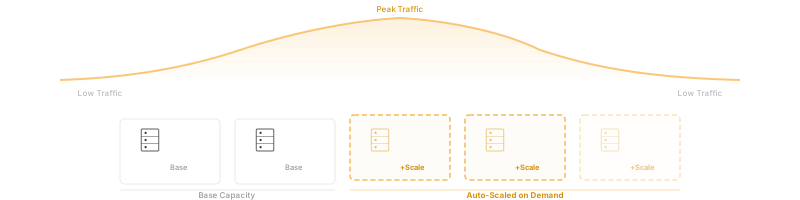
Cost benefit: Instead of paying for peak capacity around the clock, you pay base cost during normal hours and scale up only when needed. This can reduce cloud hosting costs by 30 to 50% compared to a fixed cluster sized for peak traffic.
This makes auto-scaling a strong choice for Magento stores with seasonal traffic patterns, flash sales, or marketing campaigns that drive unpredictable visitor spikes.
Explore Magento cloud hosting with auto-scaling for AWS-based cluster setups that scale on demand.
What Cluster Hosting Costs
Cluster hosting costs more than a single server hosting plan. But the cost of downtime for a high-traffic Magento store is higher.
| Hosting Type | Monthly Cost (2026) | Best For |
|---|---|---|
| Single Server | $50 to $200 | Development, small Magento stores |
| Managed VPS | $100 to $500 | Medium stores, stable traffic |
| Managed Cluster (Auto-Scaling) | $500 to $2,000+ | High-traffic open source stores |
| Enterprise Cluster | $3,000 to $5,000+ | Mission-critical, multi-region |
| Adobe Commerce Cloud | $3,300+/month ($40,000+/year) | Enterprise with full Adobe stack |
Actual costs depend on traffic volume, catalog size, geographic requirements, and support level. Adobe Commerce Cloud pricing scales with Gross Merchandise Value (GMV) and can reach $100,000+/year for large-scale stores. Request quotes from hosting providers for accurate pricing.
A managed Magento hosting provider handles server setup, monitoring, security patches, backups, and scaling. Self-managed clusters cost less in hosting fees but require dedicated DevOps expertise.
How to Choose a Magento Cluster Hosting Provider
Infrastructure:
- Does the hosting provider use enterprise-grade hardware (NVMe SSDs, recent CPUs)?
- Which cloud platform powers the hosting environment (AWS, GCP, Azure)?
- Where are data centers located relative to your customers?
Magento expertise:
- Is the hosting solution optimized for Magento 2.4+?
- Does the stack include Varnish, Redis, OpenSearch out of the box?
- Can the provider assist with Magento migration from your current hosting?
Support and SLA:
- What is the guaranteed uptime SLA?
- Is 24/7 support for your Magento website included?
- What is the average response time for critical issues?
Scaling:
- Does the cluster support auto-scaling?
- How fast can new resources come online?
- Is there a clear upgrade path from single server to cluster?
Explore our guide on dedicated server hosting.
FAQ
What is Magento cluster hosting?
Magento cluster hosting uses multiple servers working together to run your store. Each server handles a specific role (web serving, caching, database, search). This hosting solution provides high availability, fault tolerance, and better performance than a single server.
How many servers do I need for a Magento cluster?
A basic production cluster needs at minimum 3 to 4 servers: a load balancer, web server, database server, and a combined cache/search server. High-traffic Magento stores run 6 to 10+ servers with dedicated nodes for each component.
When should I switch from a single server to cluster hosting?
Switch when your single server CPU stays above 70% during normal traffic, page loads exceed 3 seconds, or your Magento store generates enough revenue that downtime causes real financial impact. Stores with seasonal traffic spikes benefit from cluster hosting with auto-scaling.
Is cluster hosting the same as cloud hosting?
No. Cloud hosting means your servers run in a cloud environment (AWS, GCP, Azure). Cluster hosting means multiple servers work together as one system. You can have a cluster on cloud infrastructure, dedicated hardware, or a mix of both.
What is the difference between cluster hosting and shared hosting?
Shared hosting puts multiple websites on one server, sharing CPU, RAM, and storage. Cluster hosting dedicates multiple servers to your Magento store alone. Shared hosting can not provide the performance, security, or reliability that e-commerce stores need at scale.
Does Magento 2 support clustering out of the box?
Yes. Magento 2 supports external Redis, Varnish, OpenSearch, and MySQL replication as part of its core architecture. The application is designed for multi-server deployments with shared sessions and distributed caching.
How does auto-scaling work with Magento clusters?
Auto-scaling monitors server metrics (CPU, memory, request count) and adds or removes web server instances based on demand. On AWS, Auto Scaling Groups handle this process. New instances launch with the same Magento configuration and join the cluster within minutes.
Can I migrate my existing Magento store to a cluster?
Yes. Most managed Magento hosting providers offer migration assistance. The process involves setting up the cluster infrastructure, copying your codebase and database, configuring shared sessions and storage, then switching DNS to the new hosting environment.
What uptime can I expect from cluster hosting?
Properly configured cluster hosting delivers 99.9% to 99.99% uptime. That translates to less than 9 hours of downtime per year (99.9%) or less than 53 minutes per year (99.99%). This is a major improvement over single server hosting.
How much does Magento cluster hosting cost?
Managed Magento cluster hosting with auto-scaling starts around $500 per month. Enterprise clusters with multi-region failover and dedicated support range from $3,000 to $5,000+ per month. Adobe Commerce Cloud starts at $40,000+ per year and scales with your store's GMV.
Summary
Magento cluster hosting is the right hosting solution for stores that have outgrown a single server. Multiple dedicated servers eliminate single points of failure, improve page load speeds, and handle traffic spikes without manual intervention.
Start with a clear assessment of your current server load and traffic patterns. If your Magento store hits the signals listed above, a managed cluster hosting provider can handle the infrastructure so you focus on growing your e-commerce business.
Explore managed Magento hosting plans or auto-scaling cloud hosting to find the right cluster setup for your store.
