Magento Zero Downtime Deployment: 4 Strategies That Work
[Updated: March 23, 2026]
Your Magento store goes offline every time you deploy code. Customers see error pages. Transactions fail. Google crawls a broken site.
This guide covers four deployment strategies, the full command sequence, and how to choose the right approach for your hosting architecture.
Key Takeaways
- Zero downtime deployment keeps your Magento store live during code updates, database migrations, and security patches
- Four strategies exist: symlink switching, blue-green deployment, pipeline deployment, and canary releases
- Magento 2.4.4+ includes native blue-green support via the
deployment.blue_green.enabledconfig flag - The deployment command sequence matters: wrong order causes extended maintenance windows
- Your hosting architecture (single-server vs multi-server vs auto-scaling) determines which strategy works
What is Zero Downtime Deployment?
Zero downtime deployment = Updating your Magento store's code, database, and static assets without taking the site offline. The tradeoff: more complex infrastructure setup, but zero revenue loss during updates.
Perfect for: Production stores with active traffic, stores processing transactions 24/7, businesses that deploy frequent updates.
Not ideal for: Development or staging environments, stores with zero traffic during deployment windows.
Traditional Magento deployments require maintenance mode. The store displays a 503 page while setup:upgrade runs database migrations and setup:di:compile rebuilds dependency injection. For large catalogs, this process takes 5 to 30 minutes. Zero downtime deployment restructures this process so customers never see an interruption.
Why Standard Magento Deployments Cause Downtime
Three Magento commands create the bottleneck:
-
bin/magento setup:upgraderuns database schema and data migrations. If any migration modifies a large table, it locks that table for the duration. -
bin/magento setup:di:compileregenerates all dependency injection configuration. Thegenerated/directory becomes invalid during this process. -
bin/magento setup:static-content:deploygenerates CSS, JavaScript, and template files for every theme and locale combination.

Running these commands on a live server forces Magento into maintenance mode. Without it, customers encounter fatal errors from missing generated classes or incomplete database schemas.
The cost of this downtime is real. ITIC's 2024 survey reports that 91% of mid-size and large enterprises estimate downtime costs exceed $300,000 per hour. Even a 10-minute maintenance window during peak traffic means lost sales, abandoned carts, and negative SEO signals from Google encountering 503 responses.
Four Zero Downtime Strategies for Magento
1. Symlink Switching
The most common approach. Each deployment creates a new release directory with compiled code and static assets. A symlink (current/) points to the active release. Once the new release is built and tested, the symlink switches to the new directory. This atomic operation takes milliseconds.
How it works:
- Clone the repository into
releases/2026_03_23_10_00_00/ - Run
composer install,setup:di:compile, andsetup:static-content:deployin the new directory - Switch the
current/symlink from the old release to the new one - Clear cache and warm critical pages
Tools like Deployer (PHP) and Capistrano (Ruby) automate this process. Deployer 7.x includes a built-in Magento 2 recipe with enable_zerodowntime set to true by default.
2. Blue-Green Deployment
Two identical environments (blue and green) run behind a load balancer. One serves live traffic while the other receives the update. After testing, the load balancer switches traffic to the updated environment.
Since Magento 2.4.4, a native configuration flag supports this:
// app/etc/env.php
'deployment' => [
    'blue_green' => [
        'enabled' => true
    ]
]
This flag disables the ConfigChangeDetector and DbStatusValidator plugins that force maintenance mode when database changes are pending. Your code must handle missing database structures with proper exception handling during the brief transition period.
3. Pipeline Deployment
Introduced in Magento 2.2, pipeline deployment separates the build system from the production system. Code compilation happens on a dedicated build server. The resulting artifact (a pre-compiled package) deploys to production without running any compilation commands.
This approach eliminates the need for setup:di:compile and setup:static-content:deploy on production servers. Configuration management uses app/etc/config.php (shared, in source control) and app/etc/env.php (system-specific, excluded from source control).
4. Canary Releases
A subset of production servers receives the update first. If monitoring confirms stable performance, the remaining servers update. If errors appear, the canary servers roll back without affecting the majority of traffic.
This strategy requires AWS auto scaling infrastructure with multiple instances and a load balancer capable of weighted routing.
The Full Deployment Command Sequence
Order matters. Running commands in the wrong sequence extends downtime or corrupts generated files.
Build phase (on build server or new release directory):
# 1. Install dependencies (no dev packages)
composer install --no-dev --optimize-autoloader

# 2. Compile dependency injection
bin/magento setup:di:compile

# 3. Optimize autoloader with APCu
composer dump-autoload -o --apcu

# 4. Deploy static content for all themes and locales
bin/magento setup:static-content:deploy en_US de_DE --jobs=4
Deploy phase (on production):
# 5. Switch symlink to new release
ln -sfn /var/www/releases/NEW_RELEASE /var/www/current

# 6. Run database migrations (with keep-generated flag)
bin/magento setup:upgrade --keep-generated

# 7. Clear and rebuild cache
bin/magento cache:flush
bin/magento indexer:reindex

# 8. Warm cache for critical pages
curl -s https://your-store.com/ > /dev/null
curl -s https://your-store.com/catalog/category/view/ > /dev/null
The --keep-generated flag on setup:upgrade preserves compiled files during database migration. This reduces the maintenance window to seconds instead of minutes. For more details, see our static content deployment tutorial.
How MGT Code Deploy Works
MGT Code Deploy automates the entire zero downtime process for stores on MGT Commerce hosting. The deployment runs through five stages:
| Stage | What Happens |
|---|---|
| 1. Select Environment | Choose the target environment and Git branch or tag |
| 2. Build Package | Clones the repository, validates code, runs setup:upgrade, setup:di:compile, and setup:static-content:deploy |
| 3. Distribute | Deploys the compiled package to all connected instances in parallel |
| 4. Switch Release | Atomic symlink switch across all instances at the same time |
| 5. Post-Deploy | Clears Magento cache, flushes Redis, purges Varnish, executes custom commands |

The tool supports parallel deployment to thousands of instances and integrates with GitHub, GitLab, and Bitbucket. Setup costs EUR 199.90 with a monthly fee of EUR 99.90. Every deployment is logged with full change documentation for audit trails and troubleshooting.
Choosing a Strategy Based on Your Hosting Architecture
Your server setup determines which zero downtime strategy fits.
| Architecture | Best Strategy | Why |
|---|---|---|
| Single server | Symlink switching | No load balancer available for blue-green. Deployer or Capistrano handle the symlink swap. |
| Multi-server (fixed) | Blue-green deployment | Two server groups with load balancer switching. Clean separation between active and standby. |
| Auto-scaling (AWS) | Pipeline + canary | Build artifact once, deploy to scaling group. Canary releases catch issues before full rollout. |
| Adobe Commerce Cloud | Built-in pipeline | Cloud infrastructure uses ece-tools (2002.0.13+) with connection queuing during deploy. |
For stores running on Magento hosting with auto-scaling, the pipeline approach combined with MGT Code Deploy provides the most reliable path to zero downtime.
Best Practices
| Practice | Details |
|---|---|
| Build away from production | Never run composer install or setup:di:compile on live servers. Use a build server or CI/CD pipeline. |
| Test database migrations | Run setup:upgrade in staging before production. Check system requirements for version compatibility. |
| Automate cache warming | Pre-warm critical category and product pages after every deployment. Cold caches cause slow first requests. |
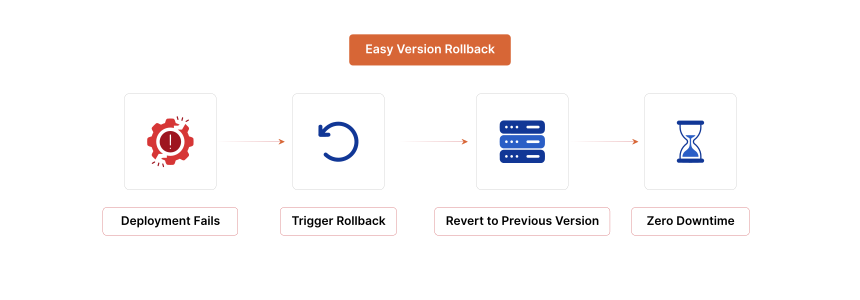
| Keep rollback ready | Maintain the previous 3 to 5 releases. Rolling back means switching one symlink. Plan your database and file backups before every deployment. |
| Monitor after deploy | Track error rates, response times, and transaction success for 15 minutes post-deploy. Use New Relic or server-level monitoring. |
| Separate config from code | Store environment config in env.php, never in version control. This prevents accidental overwrites during deployment. |
| Use --keep-generated | Adding this flag to setup:upgrade preserves compiled files and reduces the maintenance window. |
| Schedule around traffic | Even zero downtime deployments consume server resources during the build phase. Deploy during low-traffic hours when possible. |
Pros and Cons of Zero Downtime Deployment
| Pros | Cons |
|---|---|
| Store stays live during every update | Requires more complex server infrastructure |
| No lost revenue from maintenance windows | Initial setup takes 2 to 8 hours depending on strategy |
| Rollback takes seconds via symlink switching | Database rollbacks remain difficult with data migrations |
| Parallel deployment scales to hundreds of servers | Developers need deployment training and discipline |
| Google never crawls 503 maintenance pages | Disk space increases with multiple release directories |
FAQ
What is zero downtime deployment in Magento?
Zero downtime deployment updates your Magento store's code, database, and static files without taking the site offline. Customers continue browsing and completing transactions during the entire process. This works through techniques like symlink switching, blue-green environments, or pipeline deployment.
How long does a standard Magento deployment take?
A standard deployment with maintenance mode takes 5 to 30 minutes depending on catalog size, number of extensions, and static content themes. The main bottleneck is setup:upgrade for database migrations and setup:static-content:deploy for generating theme assets.
Does Magento support zero downtime deployment out of the box?
Yes. Since Magento 2.4.4, a native deployment.blue_green.enabled configuration flag exists in app/etc/env.php. Pipeline deployment has been available since Magento 2.2. Adobe Commerce Cloud uses built-in connection queuing through ece-tools 2002.0.13+.
What is the difference between blue-green and canary deployment?
Blue-green deployment uses two identical environments and switches all traffic at once. Canary deployment routes a small percentage of traffic to updated servers first, then rolls out to all servers after confirming stability. Canary is safer for large-scale infrastructure but requires more sophisticated load balancing.
What causes the most downtime during Magento deployments?
The setup:upgrade command is the primary cause. It runs database schema and data migrations that can lock tables for extended periods. Large product catalogs with millions of rows amplify this problem. Running compilation commands on the live server instead of a build server is the second most common cause.
Can I achieve zero downtime on a single server?
Yes. Symlink switching works on single servers. Tools like Deployer create a new release directory, build the code there, then switch the symlink. The brief moment during setup:upgrade is the only potential interruption, which the --keep-generated flag minimizes to seconds.
What is pipeline deployment in Magento?
Pipeline deployment separates the build phase from the deploy phase across different systems. Code compilation, dependency installation, and static content generation happen on a build server. The resulting artifact transfers to production, where only database migrations and cache clearing run. This approach was introduced in Magento 2.2.
What tools support zero downtime Magento deployment?
Common tools include Deployer (PHP, built-in Magento 2 recipe), Capistrano (Ruby), Envoyer (SaaS), and MGT Code Deploy (managed hosting add-on). CI/CD platforms like GitHub Actions, GitLab CI, and Bitbucket Pipelines can orchestrate these tools. Adobe Commerce Cloud has built-in deployment through ece-tools.
How do I handle database migrations without downtime?
Write backwards-compatible migrations that add columns or tables without modifying existing structures. Enable the deployment.blue_green.enabled flag so Magento does not enter maintenance mode during schema changes. Handle missing database structures with try-catch blocks in your code. Test every migration in staging first.
What happens to active shopping carts during deployment?
With symlink switching, active sessions continue on the old release until their next request, which then serves from the new release. Session data stored in Redis or the database persists across deployments. Adobe Commerce Cloud queues connections for up to 5 minutes during deployment, preserving all active sessions and pending actions.