

How to Install PWA Studio in Magento 2.4
[Updated: March 16, 2026]
PWA Studio brings native app performance to your Magento storefront. Adobe moved it to maintenance mode in 2024, but it remains supported for existing projects.
This guide covers every installation step with current version requirements and fixes for common errors.
Key Takeaways
Magento PWA Studio = An open source toolkit for building headless PWA storefronts on Magento 2 using React and GraphQL. Adobe moved it to maintenance mode in 2024, but still releases security patches.
Perfect for: Existing PWA Studio projects, teams with React expertise, stores needing offline support and push notifications
Not ideal for: New projects starting in 2026 (consider Edge Delivery Services or Hyvä), teams without JavaScript experience
What Is Magento PWA Studio?
Magento PWA Studio is an open source set of tools for building Progressive Web Application storefronts on Adobe Commerce and Magento Open Source. It provides a React-based framework with pre-built components, a GraphQL data layer, and the Venia reference storefront as a starting point.
PWA storefronts deliver native app features through the browser: offline support, push notifications, home screen installation, and fast page transitions without full page reloads.
Adobe announced PWA Studio in 2018 and released the first stable version (v2.0.0) in February 2019, built for Magento 2.3. The project has reached version 14.5.0 (released February 2026) with modern JavaScript tooling and Magento 2.4 compatibility.
Is PWA Studio Still Supported in 2026?
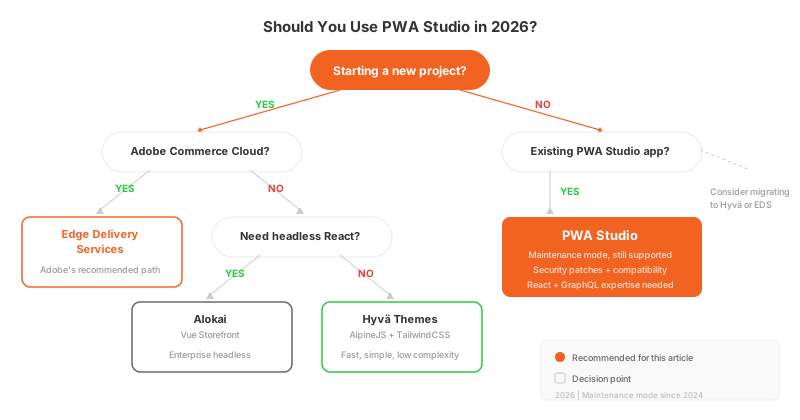
Adobe moved PWA Studio to maintenance mode in 2024. The team still releases security patches and compatibility updates, but no new features are in development.
Adobe now recommends Edge Delivery Services as its primary storefront solution for new projects. However, PWA Studio is not deprecated. Adobe follows the same approach as with the Luma frontend: continued support without active feature development.
PWA Studio still makes sense when:
- You have an existing PWA Studio storefront that works well
- Your team has deep React and GraphQL expertise
- You need specific PWA features (offline mode, push notifications, installable app)
- You want full control over a headless architecture without vendor lock-in
Consider alternatives when:
- You are starting a new project from scratch
- You want faster time to market with less complexity
- Your team prefers PHP-based frontend development (Hyvä)
- You need Adobe's full support and roadmap alignment (Edge Delivery Services)
PWA Studio System Requirements (2026)
| Component | Minimum Version | Recommended | Notes |
|---|---|---|---|
| Magento | 2.4.7 | 2.4.8 | Each PWA Studio release targets a specific Magento version |
| Node.js | 18.x | 20.x | Node 14 and 16 are no longer supported |
| Yarn | 1.12.0 | 1.22.x | Yarn 2+ (Berry) is not supported |
| PHP | 8.2 | 8.3 or 8.4 | For the Magento backend |
| MySQL | 8.0 | 8.4 | Or MariaDB 11.4 |
| Search Engine | OpenSearch 2.x | OpenSearch 2.19 | Or Elasticsearch 8.17 |
| Git | 2.x | Latest | For cloning the repository |
| SSL | Required | - | PWA features require HTTPS |
Your Magento 2.4 instance must have GraphQL enabled. PWA Studio communicates with the backend through GraphQL queries, not traditional REST API calls.
How to Install PWA Studio in Magento 2 (Step-by-Step)
This installation creates a PWA Studio project based on the Venia reference storefront. You need a functioning Magento 2.4 backend before proceeding.
If you do not have Magento installed yet, follow the Magento 2 installation guide first. For Debian servers, the step-by-step Debian guide covers the full setup.
Step 1: Verify Your Magento 2.4 Backend
Confirm that your Magento installation is running and accessible. PWA Studio needs a backend with GraphQL enabled.
Test the GraphQL endpoint:
curl -X POST https://your-magento-domain.com/graphql \
  -H "Content-Type: application/json" \
  -d '{"query": "{ storeConfig { store_name } }"}'
You should receive a JSON response with your store name. If this fails, check that your Magento instance is running and the GraphQL module is enabled.
Step 2: Install Node.js and Yarn
PWA Studio requires Node.js 18 or higher. Node.js 14 and 16 reached end of life and are no longer supported.
Install Node.js using NodeSource:
curl -fsSL https://deb.nodesource.com/setup_20.x | bash -
apt-get install -y nodejs
Install Yarn:
npm install --global yarn
Verify the installations:
node -v    # Should show v20.x or v18.x
yarn -v    # Should show 1.22.x
Do not use Yarn 2 (Berry). PWA Studio's monorepo structure is not compatible with Yarn 2.
Step 3: Clone the PWA Studio Repository
Clone the official repository from GitHub:
git clone https://github.com/magento/pwa-studio.git
cd pwa-studio
Important: The repository moved from magento-research/pwa-studio to magento/pwa-studio. Old URLs redirect, but use the current path for new installations.
To use a specific release version instead of the development branch:
git checkout v14.3.1
Use v14.3.1 for Magento 2.4.8 (latest stable combination). Version 14.5.0 targets the upcoming Magento 2.4.9. Check the official compatibility matrix for the right version pairing.
Step 4: Install Project Dependencies
Run Yarn from the project root directory to install all workspace dependencies:
yarn install
This process takes several minutes. Yarn resolves dependencies for all packages in the monorepo including Venia, Peregrine, and Buildpack.
If you encounter peer dependency warnings, they are safe to ignore. The monorepo manages its own dependency versions.
Step 5: Generate an SSL Certificate
PWA features like Service Workers and push notifications require HTTPS. Generate a trusted local SSL certificate:
yarn buildpack create-custom-origin packages/venia-concept
This command creates a self-signed certificate and trusts it in your system keychain. You may need to enter your system password.
Step 6: Configure the Environment File
Create the environment configuration file for the Venia storefront:
yarn buildpack create-env-file packages/venia-concept
This generates packages/venia-concept/.env with default values. Open this file and set your Magento backend URL:
MAGENTO_BACKEND_URL=https://your-magento-domain.com/
Point this URL to your running Magento 2.4 instance. The backend must have GraphQL enabled and be accessible from your development machine.
Step 7: Build and Start the Development Server
Build the project:
yarn run build
Start the development server:
yarn run watch:venia
This starts the Venia storefront with hot reloading enabled. Open the URL shown in your terminal (it uses a custom local domain with HTTPS).
Alternative start commands:
| Command | Purpose |
|---|---|
yarn run watch:venia |
Development server with hot reloading |
yarn run watch:all |
Full development experience with concurrent rebuilds |
yarn run build && yarn run stage:venia |
Build artifacts and run staging environment |
Setting Up a Reverse Proxy for Production
For production deployments, you need a reverse proxy to serve the PWA storefront. Apache or Nginx handles incoming requests and forwards them to the Node.js server.
Apache configuration:
sudo a2enmod proxy
sudo a2enmod proxy_http
<VirtualHost *:443>
    ServerName pwa.your-domain.com

    SSLEngine on
    SSLCertificateFile /path/to/cert.pem
    SSLCertificateKeyFile /path/to/key.pem

    ProxyPreserveHost On
    ProxyPass / http://127.0.0.1:8080/
    ProxyPassReverse / http://127.0.0.1:8080/
</VirtualHost>
sudo systemctl restart apache2
Running a headless PWA storefront adds server requirements beyond a standard Magento setup. Your managed Magento hosting environment needs to support both the PHP backend and the Node.js frontend process, with proper CDN configuration for static asset delivery.
Troubleshooting Common PWA Studio Errors
OpenSSL Legacy Provider Error
Node.js 17+ changed the default OpenSSL provider. You may see:
Error: error:0308010C:digital envelope routines::unsupported
Fix: Set the OpenSSL legacy provider before running build commands:
export NODE_OPTIONS=--openssl-legacy-provider
yarn run build
Yarn Workspace Resolution Failures
If yarn install fails with dependency resolution errors:
yarn cache clean
rm -rf node_modules
yarn install
If the issue persists, check that you are using Yarn 1.x (Classic), not Yarn 2 (Berry):
yarn --version # Must show 1.x.x
CORS Errors with Magento Backend
When the PWA frontend cannot reach the Magento GraphQL endpoint, you may see CORS errors in the browser console.
Add CORS headers in your Magento Nginx or Apache configuration:
Header set Access-Control-Allow-Origin "https://pwa.your-domain.com"
Header set Access-Control-Allow-Methods "GET, POST, OPTIONS"
Header set Access-Control-Allow-Headers "Content-Type, Authorization"
SSL Certificate Trust Issues
If your browser shows a security warning for the local development server:
yarn buildpack create-custom-origin packages/venia-concept --force
On macOS, you may need to add the certificate to your Keychain Access and set it to "Always Trust."
Version Mismatch Between PWA Studio and Magento
PWA Studio releases are tied to specific Magento versions. Check the official compatibility matrix on Adobe's developer documentation for specific version pairings.
If your Magento version is older than what PWA Studio expects, either upgrade Magento or use an older PWA Studio release that matches your version.
PWA Studio Alternatives in 2026
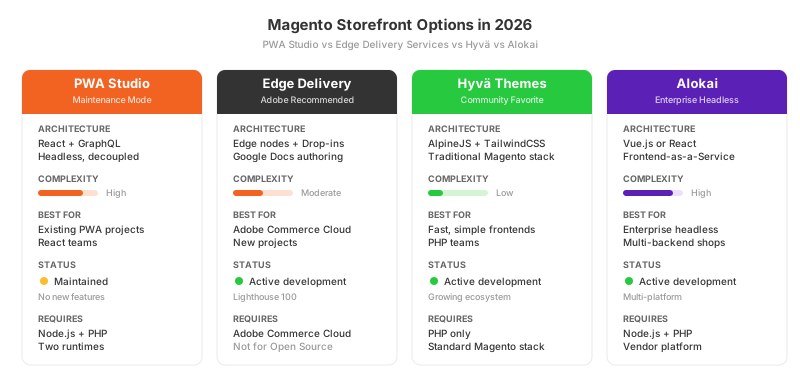
Since Adobe shifted focus away from PWA Studio, three alternatives have gained traction:
| Solution | Architecture | Best For | Complexity |
|---|---|---|---|
| Edge Delivery Services | Adobe's headless platform | Adobe Commerce Cloud customers | Moderate |
| Hyvä Themes | AlpineJS + TailwindCSS on Luma | Stores wanting fast, simple frontends | Low |
| Alokai (Vue Storefront) | Vue.js or React headless | Enterprise headless commerce | High |
Edge Delivery Services is Adobe's recommended path forward. It uses Google Docs or Sheets for content authoring, deploys to global edge nodes, and achieves Lighthouse scores of 100. The main limitation is that it requires Adobe Commerce Cloud.
Hyvä Themes takes a different approach. Instead of a headless JavaScript framework, Hyvä replaces the frontend layer while keeping the traditional Magento architecture. It uses AlpineJS and TailwindCSS for a fast, lightweight storefront that works with existing Docker-based development environments.
Alokai (the company behind Vue Storefront) provides a frontend-as-a-service platform with pre-built integrations for Magento 2, Shopify, and other backends.
FAQ
Is Magento PWA Studio deprecated? No. PWA Studio entered maintenance mode in 2024. Adobe still releases security patches and compatibility updates. It is not deprecated, but no new features are in development. Adobe recommends Edge Delivery Services for new projects.
What Node.js version does PWA Studio require? PWA Studio requires Node.js 18 or higher. Node.js 20 is the recommended version. Node.js 14 and 16 are no longer supported since PWA Studio version 14.0.1 (July 2023).
Can I use PWA Studio with Magento Open Source? Yes. PWA Studio works with both Magento Open Source and Adobe Commerce. The Venia storefront connects to any Magento 2.4 backend through GraphQL.
How long does PWA Studio installation take? With all prerequisites in place (Magento 2.4, Node.js, Yarn), the PWA Studio installation takes about 15 to 20 minutes. Most of that time is dependency installation and build compilation.
What is the Venia storefront? Venia is the official reference storefront included with PWA Studio. It provides a complete, working example of a PWA-based Magento storefront that you can customize for your store.
Does PWA Studio support Magento 2.4.8? Yes. PWA Studio 14.3.1 is the recommended version for Magento 2.4.8. Version 14.5.0 (released February 2026) targets Magento 2.4.9. Check the official compatibility matrix on Adobe's developer documentation for the correct version pairing.
What is the difference between PWA Studio and Hyvä? PWA Studio is a headless React framework that communicates with Magento through GraphQL. Hyvä replaces the frontend layer while keeping the traditional Magento architecture. PWA Studio offers native app features (offline mode, push notifications). Hyvä offers faster development time and lower complexity.
Do I need special hosting for PWA Studio? Yes. PWA Studio requires a Node.js server for the frontend in addition to the standard Magento PHP backend. Your hosting environment needs to support both runtimes, handle CDN delivery for static assets, and provide HTTPS certificates.
Can I use npm instead of Yarn? No. PWA Studio uses Yarn workspaces for its monorepo structure. npm does not support the specific workspace configuration that PWA Studio requires. Use Yarn 1.x (Classic).
What replaced PWA Studio? Adobe positioned Edge Delivery Services as the successor for new storefront projects. In the broader Magento ecosystem, Hyvä Themes and Alokai (Vue Storefront) have become popular alternatives. PWA Studio remains supported for existing implementations.
