

Magento 2 Purchase Orders: B2B Payment and Approval Guide
[Updated: March 16, 2026] Purchase orders let B2B customers pay for approved orders by referencing a PO number. Magento 2 supports two distinct systems: a simple PO payment method available in all editions, and a full B2B approval workflow exclusive to Adobe Commerce. This guide covers both.
Key Takeaways
- Magento 2 offers two purchase order systems: a PO payment method (all editions) and a B2B approval workflow (Adobe Commerce with B2B extension)
- The PO payment method lets customers enter a reference number at checkout for offline payment processing
- B2B purchase orders include approval rules based on order total, shipping cost, and SKU count
- Purchase orders create a price snapshot at creation time, protecting against later price changes
- Company administrators can bypass all approval rules for faster processing
What Are Purchase Orders in Magento 2?
Purchase orders in Magento 2 = A reference number system that lets B2B customers authorize and track payments through their accounts payable process. Available as a simple payment method in all editions or as a full approval workflow in Adobe Commerce.
Perfect for: B2B wholesalers, companies with procurement departments, stores serving corporate accounts with net payment terms.
Not ideal for: B2C-only stores, small retailers without corporate customers, stores that need instant payment confirmation.
A purchase order (PO) is a reference number that commercial customers use to authorize purchases. The buyer selects "Purchase Order" at checkout, enters their PO number, and the store processes the order. The buying company then handles payment through their accounts payable system once they receive the invoice.
Magento 2 supports two separate purchase order systems:
- PO Payment Method. Available in both Magento Open Source and Adobe Commerce. This is an offline payment method where customers enter a PO number at checkout.
- B2B Purchase Order Workflow. Available in Adobe Commerce with the B2B extension. This adds approval rules, company hierarchies, and role-based order authorization.
PO Payment Method vs B2B Purchase Order Workflow
Understanding this distinction is critical for choosing the right setup.
| Feature | PO Payment Method | B2B Purchase Order Workflow |
|---|---|---|
| Availability | Magento Open Source + Adobe Commerce | Adobe Commerce with B2B extension |
| Configuration | Sales > Payment Methods | General > B2B Features |
| Approval Rules | None | Order Total, Shipping Cost, SKU Count |
| Company Accounts | Not required | Required |
| Role-Based Access | No | Yes |
| Price Snapshot | No | Yes (locks prices at PO creation) |
| Online Payment Support | No (offline only) | Yes (after approval) |
How to Configure the PO Payment Method
This method works in both Magento Open Source and Adobe Commerce. Follow these three steps.
Step 1: Navigate to Payment Methods
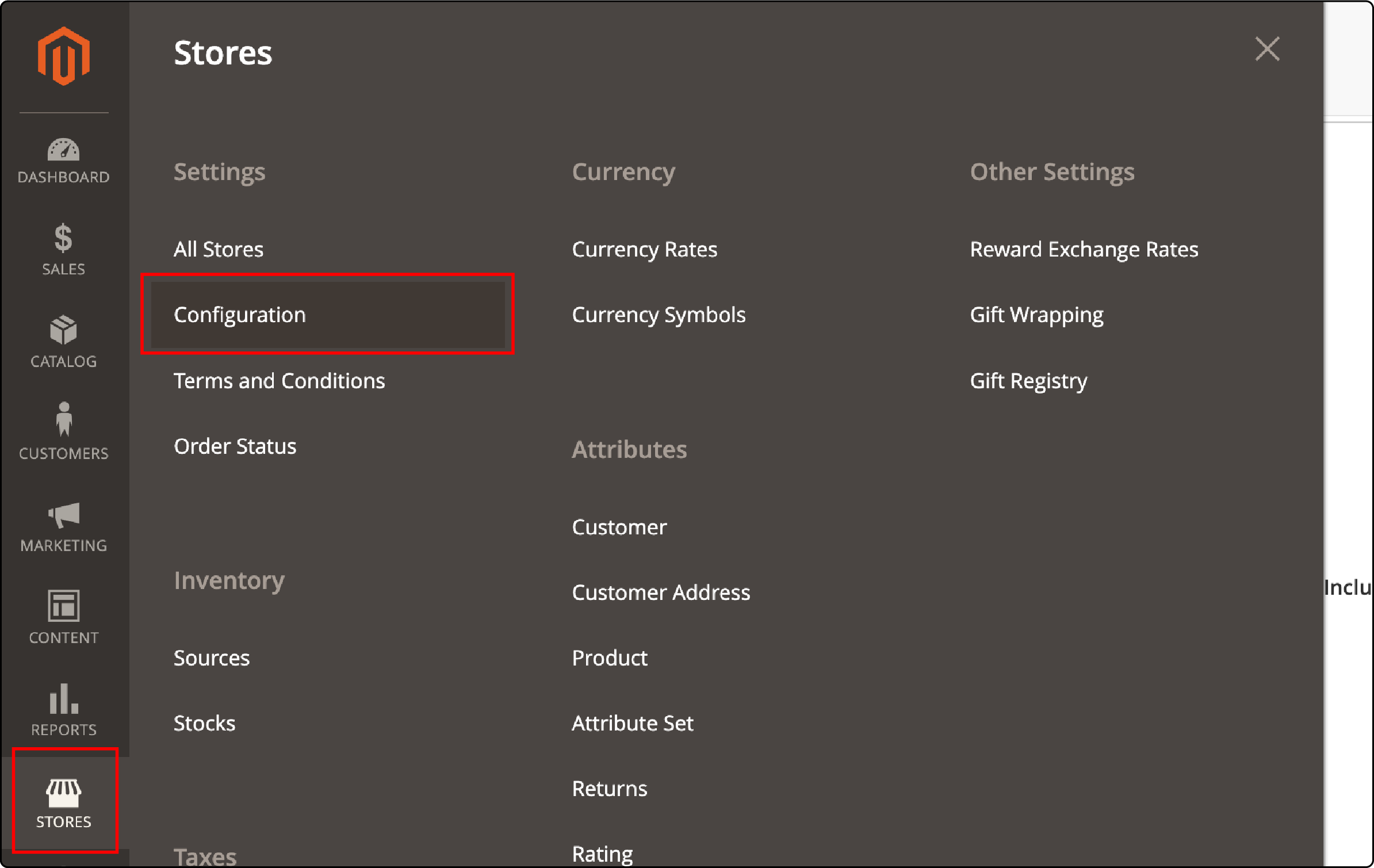
- Go to Stores in the Admin sidebar
- Select Settings > Configuration
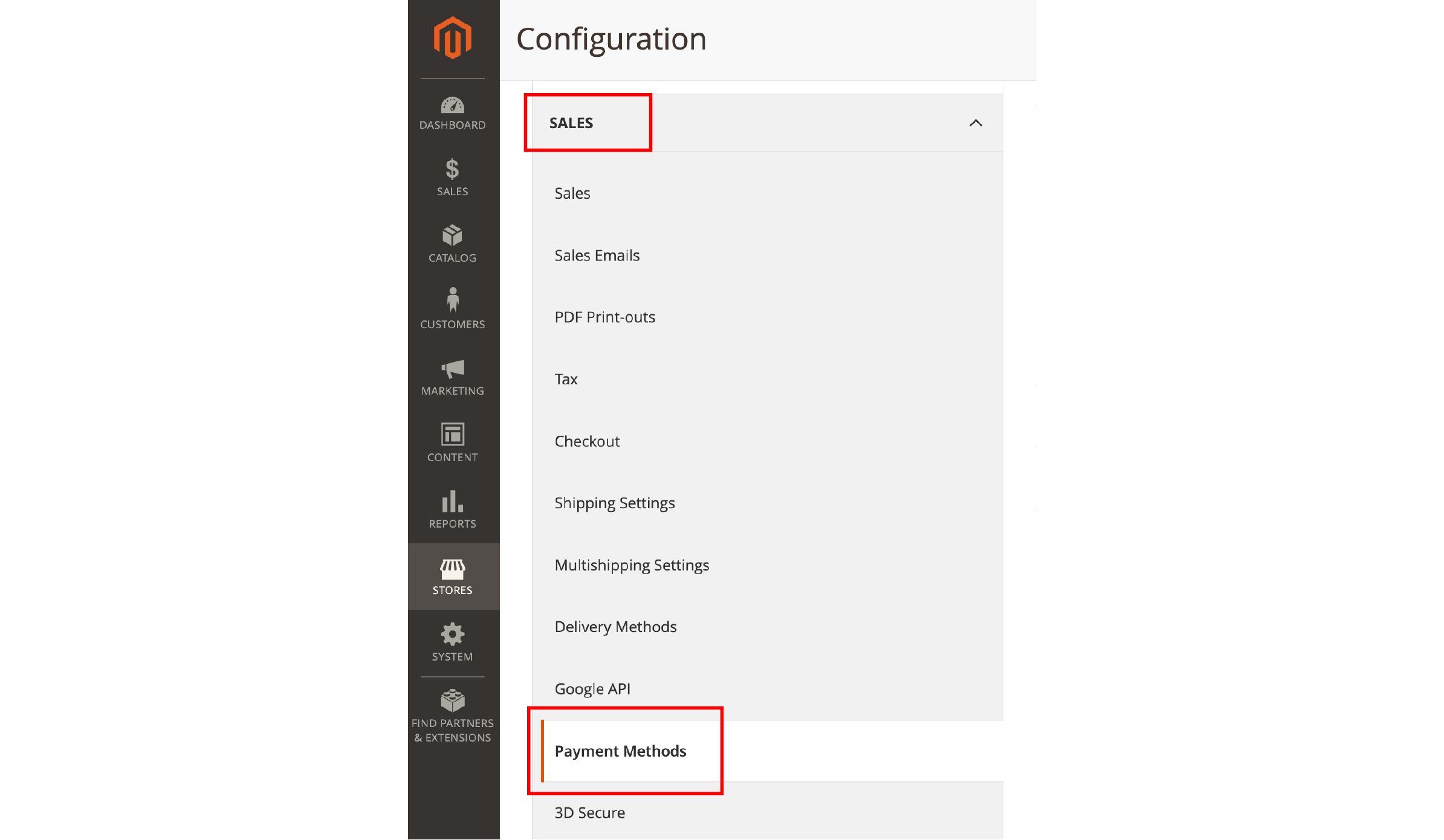
- In the left panel, expand Sales
- Click Payment Methods
- Locate and expand Purchase Order under Other Payment Methods
Step 2: Configure the Settings
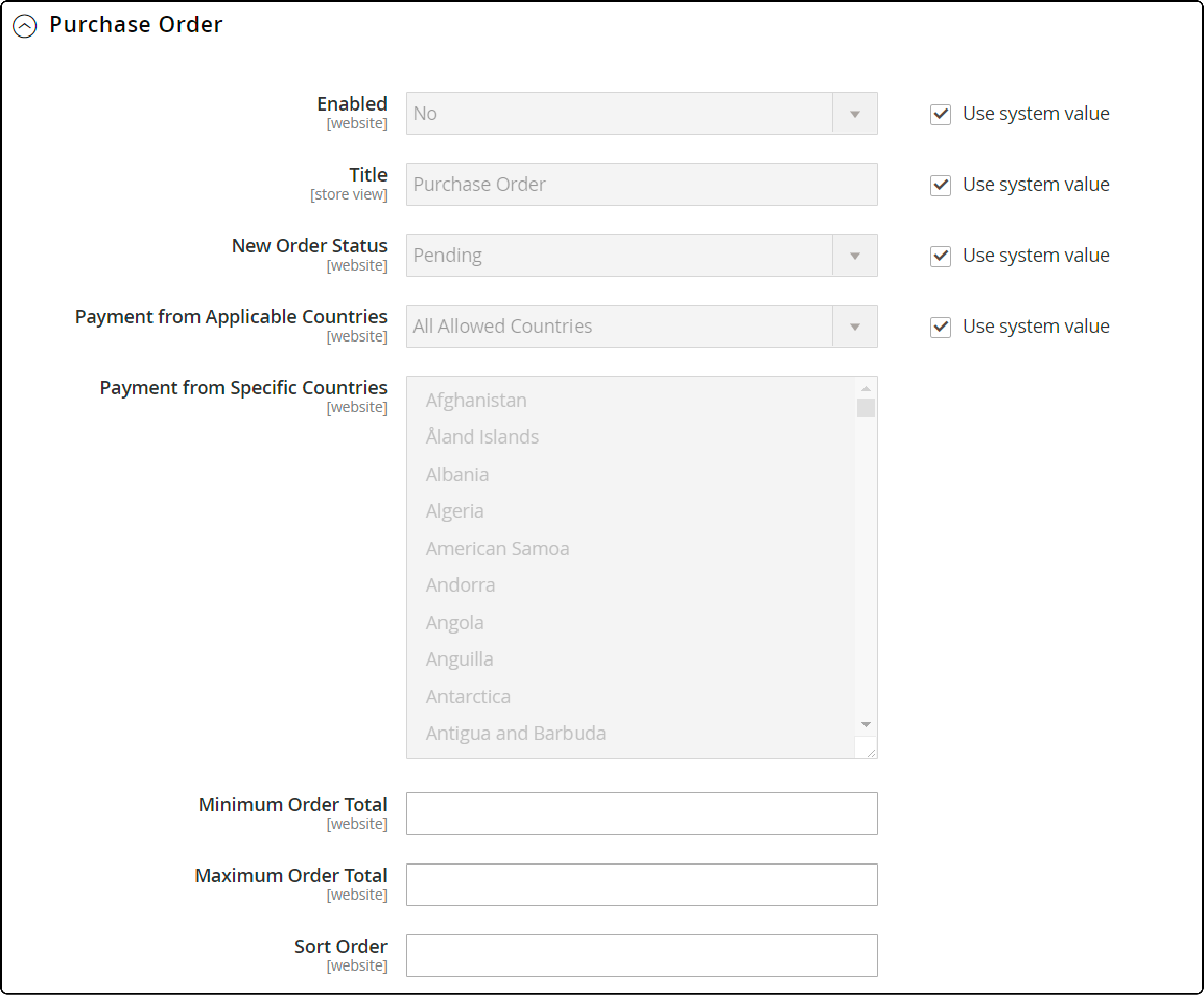
| Setting | Recommended Value | Purpose |
|---|---|---|
| Enabled | Yes | Activates PO as a checkout option |
| Title | Purchase Order | Display name shown during checkout |
| New Order Status | Pending | Holds orders until payment is authorized |
| Applicable Countries | All Allowed Countries or Specific | Controls geographic availability |
| Minimum Order Total | Set per business needs | Minimum qualifying amount |
| Maximum Order Total | Set per business needs | Maximum qualifying amount |
| Sort Order | Enter a number (0 = first) | Position in the Adobe payment configuration guide |
Clear the "Use system value" checkbox before modifying any setting. Verify the creditworthiness of commercial customers before accepting PO payments.
Step 3: Save and Verify
- Click Save Config in the upper right corner
- If prompted, refresh the page cache
- Test the checkout flow to confirm the PO option appears
At checkout, customers enter their PO number. The order stays in "Pending" status until you verify payment through the customer's accounts payable process.
How to Enable B2B Purchase Orders in Adobe Commerce
The B2B purchase order workflow requires Adobe Commerce with the B2B extension installed. This system adds approval hierarchies and spending controls for corporate accounts.
Enable Company Accounts First
- Navigate to Stores > Settings > Configuration > General > B2B Features
- Set Enable Company to Yes
- This activates Shared Catalog, B2B Quotes, and B2B payment/shipping methods
Enable Purchase Orders
- In the same B2B Features section, find Order Approval Configuration
- Set Enable Purchase Orders to Yes at the website level
- For individual companies: go to Customers > Companies, select the company, expand Advanced Settings, and enable purchase orders
Once enabled, all orders from company users become purchase orders with approval tracking. Learn more about the full set of Adobe Commerce B2B features that complement this workflow.
Purchase Order Approval Rules
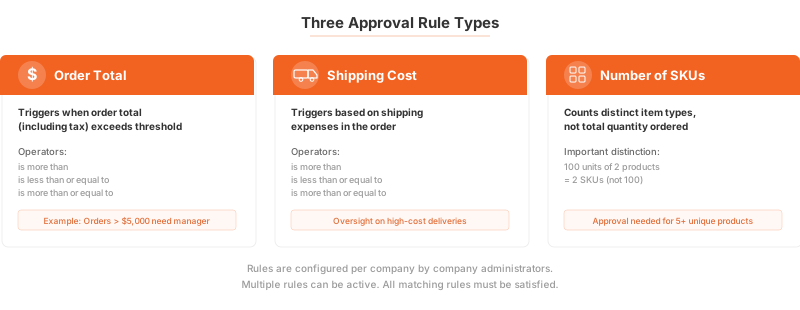
Company administrators create approval rules that enforce spending policies. Three rule types control when orders need authorization.
Order Total Rules
Require approval when the order total (including tax) exceeds a set threshold. Example: orders over $5,000 need manager sign-off.
Shipping Cost Rules
Trigger approval based on shipping expenses. Useful for companies that want oversight on high-cost deliveries.
Number of SKUs Rules
Require approval based on distinct item types in the order. This counts unique products, not total quantity. An order with 100 units across 2 SKUs triggers a "2 SKUs" rule, not a "100 items" rule.
How to Create an Approval Rule
- Open Approval Rules in the company account dashboard
- Click Add New Rule and set status to Enabled
- Enter a descriptive name
- Select which company roles the rule applies to
- Choose the rule type and set the threshold
- Designate required approvers by role
Key constraint: Ensure at least one user exists in each approver role. If a single user holds the approver role and creates the PO, the system auto-approves it. Multiple users in the same role prevent self-approval.
Auto-approve option. In Role Permissions, the "Auto-approve POs created within this role" setting lets purchase orders from users in that role get approved without manual intervention. See the official approval rules guide for full configuration details.
Purchase Order Lifecycle
Understanding the PO workflow helps optimize your B2B commerce capabilities:
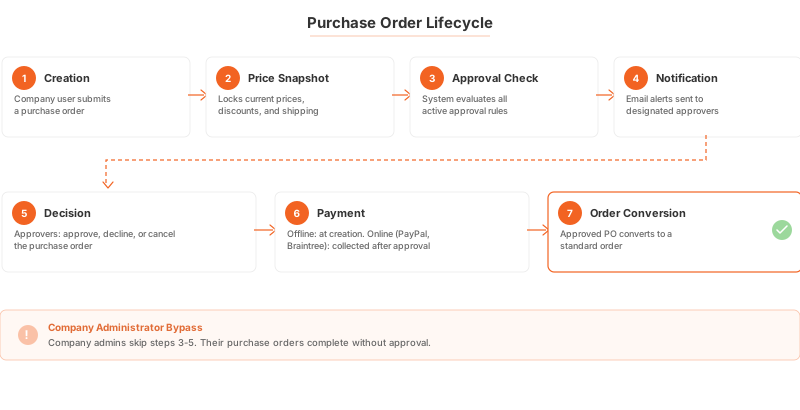
- Creation. A company user submits a purchase order.
- Price Snapshot. The system captures current prices, discounts, and shipping costs. Later price changes do not affect the PO.
- Approval Check. The system evaluates all active approval rules.
- Notification. Email alerts go to designated approvers.
- Decision. Approvers can approve, decline, or cancel the order.
- Payment. For offline methods, payment details are entered during creation. For online methods (PayPal, Braintree), payment is collected after approval.
- Order Conversion. The approved PO converts to a standard order.
Company administrators bypass all approval rules. Their purchase orders complete without waiting for authorization.
Best Practices for Purchase Order Management
Set clear approval thresholds. Start with conservative limits and adjust based on actual order patterns. Most B2B stores set order total thresholds between $1,000 and $10,000.
Use role-based approvals. Assign approval authority based on your company hierarchy. Junior buyers get lower thresholds than department managers.
Monitor pending orders. Purchase orders in "Pending" status tie up inventory. Set internal SLAs for approval turnaround times.
Verify customer creditworthiness. Before enabling PO payments for a customer, confirm their payment history and credit terms.
Invest in server performance. B2B checkout flows with approval workflows add server load. Managed Magento hosting ensures your store handles concurrent B2B transactions without slowdowns.
Pros and Cons of Magento 2 Purchase Orders
FAQ
What is a purchase order in Magento 2?
A purchase order is a reference number that commercial customers use to authorize and track payments. It serves as a commitment to pay for specific goods at agreed terms through the company's accounts payable process.
Is the PO payment method available in Magento Open Source?
Yes. The basic PO payment method is available in both Magento Open Source and Adobe Commerce. It allows customers to enter a PO number at checkout as an offline payment method.
What is the difference between PO payment and B2B purchase orders?
The PO payment method is a simple offline payment option where customers enter a reference number. B2B purchase orders (Adobe Commerce with B2B extension) add approval workflows, company hierarchies, and spending controls on top of the basic PO functionality.
How do approval rules work for purchase orders?
Company administrators create rules based on three criteria: order total, shipping cost, or number of SKUs. When a purchase order meets a rule condition, the system sends email notifications to designated approvers who can approve, decline, or cancel the order.
Can company administrators bypass approval rules?
Yes. Company administrators bypass all approval rules. Their purchase orders complete without requiring authorization from other users.
What happens to prices after a purchase order is created?
Magento creates a price snapshot at PO creation time. This locks in current prices, discounts, and shipping costs. Price changes made after creation do not affect the existing purchase order.
Which online payment methods work with B2B purchase orders?
B2B purchase orders support PayPal Express and Braintree for online payments. Payment details are collected after the PO receives approval. Offline methods like checks and bank transfers can process at any point in the workflow.
How do I set up purchase orders for a specific company?
Navigate to Customers > Companies in the admin panel. Select the company, expand Advanced Settings, and enable purchase orders. The company must have B2B features enabled at the website level first.
What Magento version supports B2B purchase orders?
B2B purchase orders require Adobe Commerce with the B2B extension. The current stable release is Magento 2.4.8 (released April 2025), running on PHP 8.3 or 8.4 with MySQL 8.4 or MariaDB 11.4.
Can I use purchase orders for B2C customers?
The basic PO payment method can be enabled for all customers. The B2B purchase order workflow with approval rules requires company accounts and is designed for business transactions between companies.
Summary
Magento 2 purchase orders serve two distinct purposes. The PO payment method provides a simple offline payment option for any store edition. The B2B purchase order workflow in Adobe Commerce adds approval rules, company hierarchies, and spending controls for corporate procurement.
Start with the basic PO payment method if you serve a mix of B2B and B2C customers. Upgrade to the full B2B workflow when your corporate customers need approval hierarchies and spending policies. For stores processing high volumes of B2B transactions, scalable Magento hosting keeps your purchase order workflows running smooth under peak load.
