

How to Configure Magento 2 Robots.txt for SEO
[Updated: March 12, 2026]
A misconfigured robots.txt file wastes crawl budget and hides pages from Google. Most Magento stores use the default, which leaves checkout pages, filter URLs, and AI crawlers unmanaged.
This guide covers how to configure robots.txt in Magento 2, with a production-ready template you can copy into your admin panel.
Key Takeaways
- Magento 2 generates robots.txt from the admin panel, not from a static file in the root directory
- Block checkout, customer account, cart, and filter URLs to save crawl budget
- Add your XML sitemap reference so search engines discover all pages
- AI crawlers like GPTBot, ClaudeBot, and PerplexityBot need separate user-agent rules in 2026
- Test every change with Google Search Console before it goes live
- Never expose your admin panel path in robots.txt (security risk)
What is a Robots.txt File?
Robots.txt = A plain text file that tells search engine crawlers which pages to access and which to skip. It controls crawl behavior, not indexing.
Perfect for: Store owners who want to protect sensitive URLs, save crawl budget, and guide search engines to valuable content.
Not ideal for: Hiding pages from Google (use noindex meta tags instead) or blocking access to sensitive data (use server authentication).
Every website has a robots.txt file at its root URL (e.g., yourstore.com/robots.txt). Search engines check this file before crawling your site. The file follows RFC 9309, the official internet standard ratified in 2022.
Robots.txt controls crawling, not indexing. A page blocked in robots.txt can still appear in search results if other pages link to it. To prevent indexing, use the noindex meta tag instead.
Google supports four directives in robots.txt: User-agent, Allow, Disallow, and Sitemap. All other directives (including Crawl-delay) are ignored by Googlebot.
How Magento 2 Handles Robots.txt
Unlike platforms that use a static text file, Magento 2 generates robots.txt from admin panel settings. There is no file to edit via FTP or SSH.
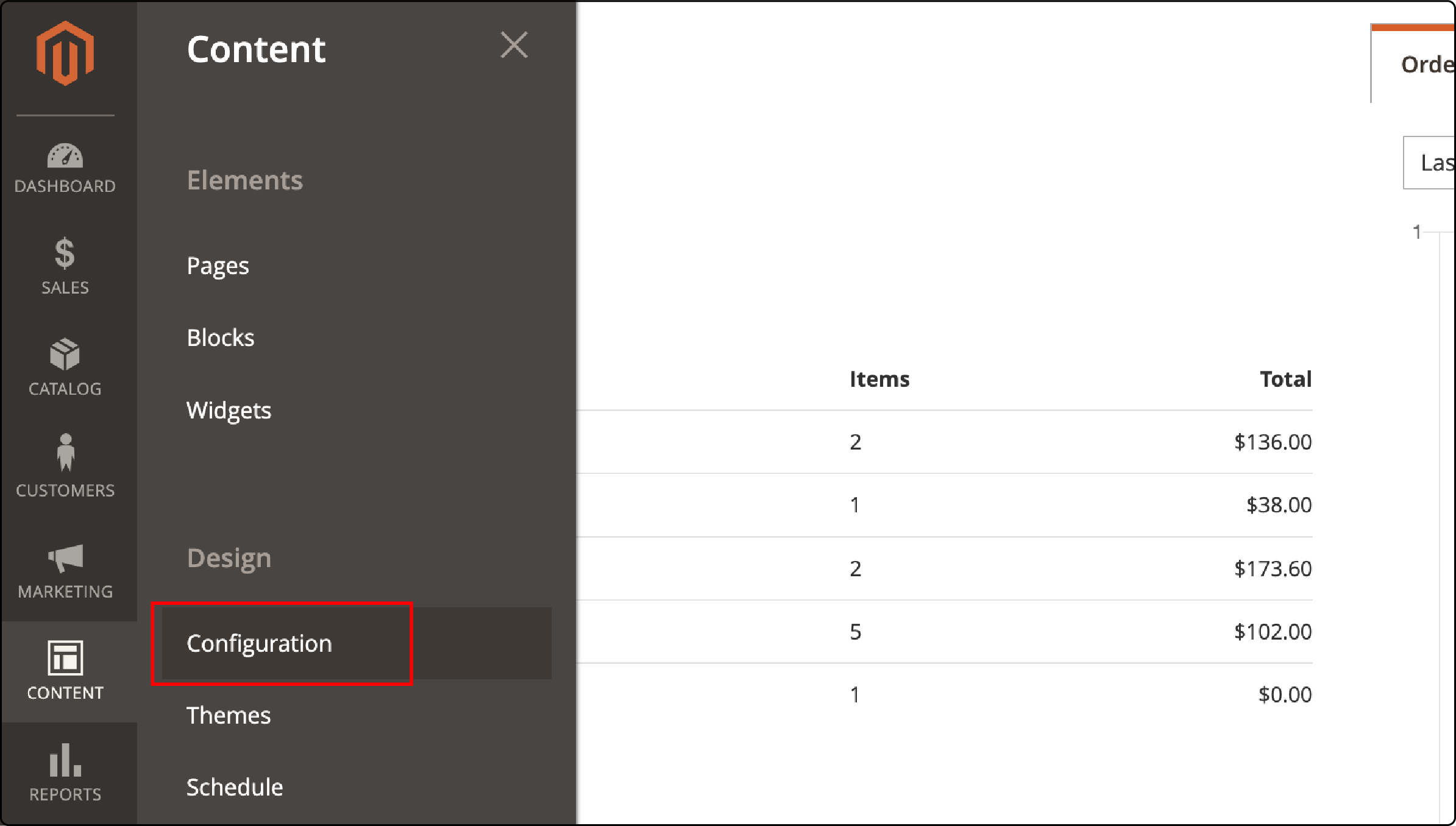
The configuration lives under Content → Design → Configuration → Search Engine Robots. Changes take effect after you save and clear the Magento cache.
For Adobe Commerce Cloud, the file gets stored in pub/media/ due to the read-only file system. A Fastly VCL snippet redirects /robots.txt requests to the correct location. On-premises installations generate the file at the web root. Make sure your server meets the Magento hosting requirements for proper file generation.
How to Configure Robots.txt in Magento 2
Follow these steps to set up robots.txt in Magento 2.4.
Step 1: Open the Configuration
Navigate to Content → Design → Configuration in your admin panel.
Step 2: Select Your Website
Choose the store view you want to configure. Each store view can have its own robots.txt rules.

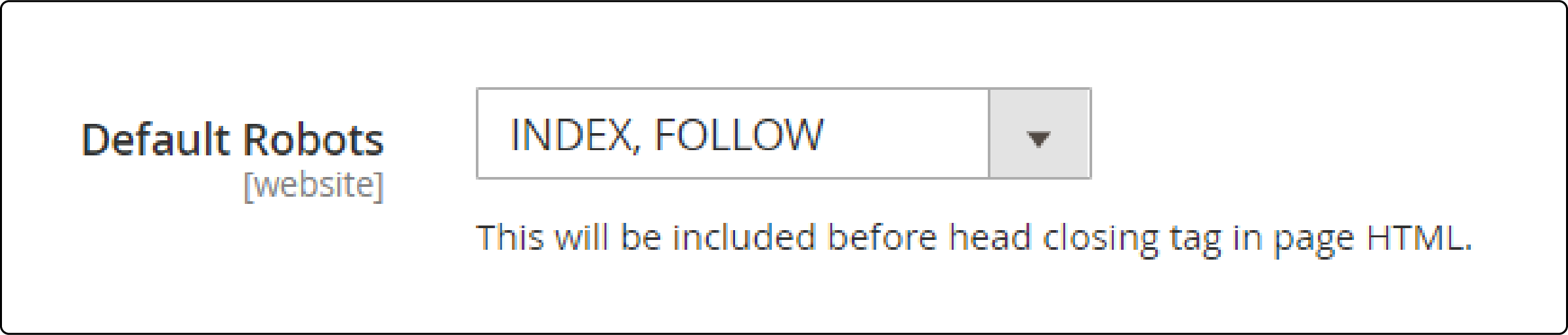
Step 3: Set Default Robots
Under Search Engine Robots, select the default meta robots tag:
| Option | Meaning | When to Use |
|---|---|---|
| INDEX, FOLLOW | Search engines index pages and follow links | Production stores (recommended) |
| NOINDEX, FOLLOW | Pages not indexed, but links are followed | Staging environments |
| INDEX, NOFOLLOW | Pages indexed, links not followed | Rare, not recommended |
| NOINDEX, NOFOLLOW | Full block from search engines | Development servers |
Step 4: Add Custom Instructions
Enter your custom directives in the Edit custom instruction of robots.txt File field. See the complete template in the next section for production-ready rules.
Step 5: Save and Clear Cache
Click Save Configuration, then flush the Magento cache. Verify the output by visiting yourstore.com/robots.txt in your browser.

Adding a Sitemap to Robots.txt
Your robots.txt should reference your XML sitemap so search engines can discover all pages. Two methods are available.
Automatic Method
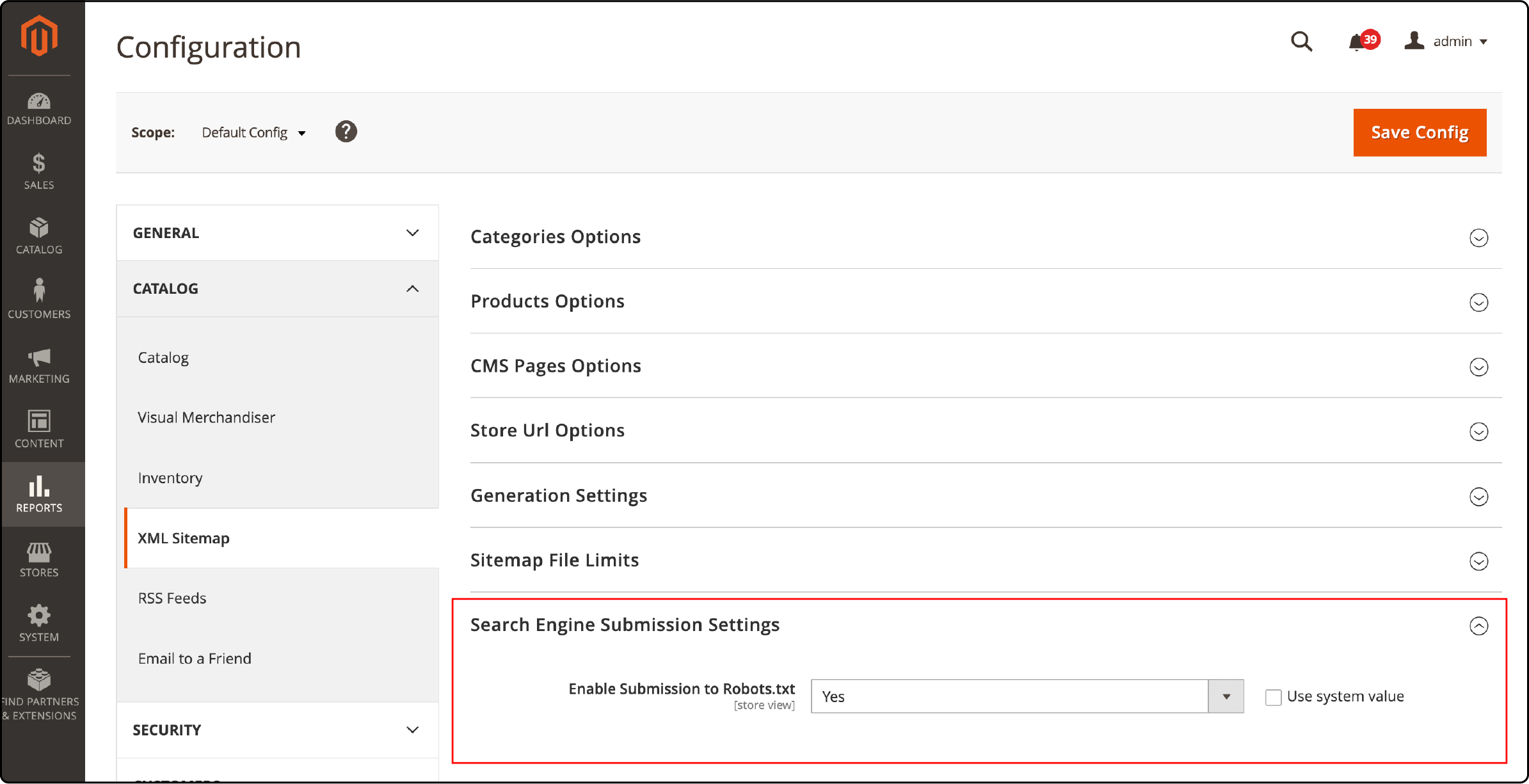
Navigate to Stores → Configuration → Catalog → XML Sitemap. Under Search Engine Submission Settings, set Enable Submission to Robots.txt to Yes. Save the configuration.
Manual Method
Add this line to your custom instructions:
Sitemap: https://yourstore.com/sitemap.xml
For multi-store setups, add a separate sitemap line for each store view. For a complete walkthrough on generating sitemaps, see our Magento 2 sitemap configuration tutorial.
Complete Robots.txt Template for Magento 2
Copy this template into your admin panel custom instructions field. Replace yourstore.com with your domain.
User-agent: *

# Allow essential resources (Google needs these for rendering)
Allow: /media/
Allow: /static/
Allow: /pub/media/
Allow: /pub/static/

# Block sensitive and low-value areas
Disallow: /checkout/
Disallow: /customer/
Disallow: /cart/
Disallow: /catalogsearch/
Disallow: /wishlist/
Disallow: /review/
Disallow: /sendfriend/
Disallow: /catalog/product_compare/
Disallow: /catalog/category/view/
Disallow: /catalog/product/view/

# Block system directories
Disallow: /app/
Disallow: /bin/
Disallow: /dev/
Disallow: /lib/
Disallow: /phpserver/
Disallow: /var/
Disallow: /report/

# Block layered navigation, filter, and session parameters
Disallow: /*?dir=
Disallow: /*?limit=
Disallow: /*?mode=
Disallow: /*?order=
Disallow: /*?price=
Disallow: /*?color=
Disallow: /*?size=
Disallow: /*?cat=
Disallow: /*?SID=
Disallow: /*?___store=
Disallow: /*?___from_store=

# Sitemap
Sitemap: https://yourstore.com/sitemap.xml
Important: Replace the admin path with your custom admin URL. Adobe recommends using a non-default admin path. Never use /admin/ in production, and never list your actual admin path in robots.txt. The file is public and attackers can read it.
Managing AI Crawlers in Your Robots.txt
AI companies deploy crawlers that scrape your content for model training and AI search results. As of 2026, two categories of AI crawlers exist, and managing them is now a standard part of robots.txt configuration.
Training crawlers collect data to build AI models. Block these if you do not want your content used for training:
-
GPTBot(OpenAI) -
ClaudeBot(Anthropic, training data collection) -
Google-Extended(Google AI training) -
CCBot(Common Crawl) -
Bytespider(ByteDance) -
Applebot-Extended(Apple AI training)
Anthropic updated its crawler documentation in February 2026 to a three-bot framework. ClaudeBot handles training data. Claude-User fetches pages when a Claude user asks a question. Claude-SearchBot indexes content for search results. Each bot has its own user-agent string and can be controlled independently.
Retrieval crawlers power real-time AI search features. These can send traffic and citations back to your store:
-
ChatGPT-User(OpenAI, user-initiated searches) -
OAI-SearchBot(OpenAI, search indexing) -
Claude-User(Anthropic, user-initiated fetches) -
Claude-SearchBot(Anthropic, search indexing) -
PerplexityBot(Perplexity AI) -
Amazonbot(Amazon)
The most common strategy for e-commerce: allow AI search and retrieval crawlers (they send traffic to your store) and block training crawlers (they use your content without attribution).
Add these rules to your custom instructions:
# Block AI training crawlers
User-agent: GPTBot
Disallow: /

User-agent: ClaudeBot
Disallow: /

User-agent: Google-Extended
Disallow: /

User-agent: CCBot
Disallow: /

User-agent: Bytespider
Disallow: /

User-agent: Applebot-Extended
Disallow: /

# Allow AI search and retrieval crawlers (they send traffic)
User-agent: ChatGPT-User
Allow: /

User-agent: OAI-SearchBot
Allow: /

User-agent: Claude-User
Allow: /

User-agent: Claude-SearchBot
Allow: /

User-agent: PerplexityBot
Allow: /
Robots.txt is a voluntary compliance mechanism. Major AI companies respect it. Smaller scrapers may not. For complete protection, combine robots.txt rules with server-side rate limiting.
Review your AI crawler rules every quarter. New bots emerge fast. The ai.robots.txt GitHub repository maintains an up-to-date list of known AI crawlers and their user-agent strings.
Crawl Budget Optimization
Google allocates a crawl budget to each website. Magento stores generate thousands of URLs through layered navigation, filters, and session parameters. If bots waste time on these pages, your product and category pages get crawled less often.
Focus your crawl budget on pages that drive revenue:
| Block These URLs | Why |
|---|---|
Filter parameters (?price=, ?color=) |
Create duplicate content with no SEO value |
Session parameters (?SID=) |
Unique per user, duplicates every page |
Sort parameters (?dir=, ?order=) |
Same content in different order |
Store switch parameters (?___store=) |
Multi-store duplicates |
Search results (/catalogsearch/) |
Thin content pages with low value |
| Cart and checkout pages | Personal data, zero search value |
A Magento store with 5,000 products and layered navigation can generate 50,000+ parameter URLs. Without proper Disallow rules, bots waste crawl budget on duplicate content instead of indexing your product pages.
For stores with more than 10,000 products, robots.txt alone is not enough. Combine it with canonical tags on filtered category pages so Google knows which URL version to index. This two-layer approach (robots.txt for crawl control, canonicals for index control) prevents duplicate content from both angles.
For stores under heavy crawl load, Magento speed optimization reduces the time bots spend per page, which stretches your crawl budget further.
Common Robots.txt Mistakes
Exposing your admin path. Adding Disallow: /admin_secret123/ to robots.txt reveals your admin URL to attackers. Robots.txt is a public file. Use firewall rules or IP restrictions to protect your admin panel. Adobe warns against this in their official best practices. Consider running a Magento security audit to find similar exposure risks.
Blocking CSS and JavaScript. Google needs access to render pages. Blocking /static/ or /media/ prevents Googlebot from seeing your site the way users do. This hurts rankings because Google cannot assess page layout and user experience.
Using robots.txt for indexing control. Robots.txt blocks crawling, not indexing. If you want a page removed from search results, use a noindex meta tag or the URL Removal tool in Google Search Console. A Disallow rule alone can still leave pages indexed if other sites link to them.
Forgetting to clear cache. Magento caches the robots.txt output. After saving changes in the admin panel, flush the cache under System → Cache Management. Otherwise your old rules continue to serve.
Ignoring parameter URLs. Layered navigation creates massive URL bloat. Without Disallow rules for filter parameters, search engine bots crawl thousands of duplicate pages while your valuable product pages wait.
Testing Your Robots.txt
Test your configuration before and after every change.
Google Search Console: Use the URL Inspection tool to check if specific pages are blocked. The Coverage report shows pages that Googlebot cannot reach.
Manual verification: Visit yourstore.com/robots.txt in your browser. Confirm the output matches your admin panel settings.
Crawl statistics: In Google Search Console under Settings → Crawl Statistics, monitor how Googlebot spends its crawl budget on your site. Look for pages that get crawled but should be blocked.
AI crawler testing: Use tools like Dark Visitors or crawlercheck.com to verify that your AI crawler rules work as expected. These services test whether specific bots (GPTBot, ClaudeBot, PerplexityBot) are blocked or allowed on your domain.
FAQ
What is the difference between robots.txt and meta robots tags?
Robots.txt blocks crawling at the server level before a page loads. Meta robots tags control indexing at the page level after a page loads. Use robots.txt for entire directories and URL patterns. Use meta robots for individual pages you want excluded from search results.
Does robots.txt work on Adobe Commerce Cloud?
Yes. Adobe Commerce Cloud stores the generated file in pub/media/. A Fastly VCL snippet redirects requests from /robots.txt to the correct location. You need ece-tools version 2002.0.12 or later for this to work.
Should I block AI crawlers in robots.txt?
It depends on your goals. Block training crawlers (GPTBot, ClaudeBot, CCBot) if you do not want your content used for AI model training. Allow retrieval crawlers (ChatGPT-User, Claude-SearchBot, PerplexityBot) if you want your store visible in AI search results. Review your rules every quarter as new crawlers emerge.
Should I block Google-Extended?
Yes, if you do not want Google to use your content for AI training (Gemini). Blocking Google-Extended does not affect Google Search rankings or AI Overviews. Those are powered by Googlebot, which is a separate crawler. You can block Google-Extended for training while keeping Googlebot allowed for organic search.
Can I use crawl-delay in Magento 2 robots.txt?
Google ignores the crawl-delay directive. It was never part of the official robots.txt specification (RFC 9309). To control Google's crawl rate, use the Crawl Rate setting in Google Search Console instead. Yandex still respects crawl-delay, but most major search engines recommend using their webmaster tools for crawl rate control.
How do I know if my robots.txt is working?
Check Google Search Console's URL Inspection tool. Enter a URL that should be blocked and verify it shows as "Blocked by robots.txt." Also monitor the Coverage report for unexpected blocked pages. Visit yourstore.com/robots.txt in your browser to confirm the raw output.
How often should I update my robots.txt?
Review your robots.txt when you add new store views, change URL structures, or install extensions that create new URL patterns. Check quarterly for new AI crawlers that need blocking or allowing. After every update, verify the changes in Google Search Console before assuming they work.
Does blocking a URL in robots.txt remove it from Google?
No. A Disallow rule prevents crawling, not indexing. If other sites link to a blocked page, Google may still index the URL with limited information. To remove a page from search results, use a noindex meta tag or the URL Removal tool in Google Search Console.
Can I have different robots.txt rules for each Magento store view?
Yes. In Magento 2, navigate to Content → Design → Configuration and select the specific store view. Each store view generates its own robots.txt output. This is useful for multi-language or multi-region stores that need different crawl rules per domain or subdirectory.
Summary
A well-configured robots.txt file protects sensitive pages, saves crawl budget, and guides search engines to your most valuable content. Use the template above as your starting point, add AI crawler rules for 2026, and test every change in Google Search Console.
For Magento stores that need reliable performance under heavy crawl loads, managed Magento hosting handles server optimization so you can focus on your store.
