

Magento 2 Website, Store, and Store View: Complete Hierarchy Guide
[Updated: March 13, 2026]
Running one store in one language works until your business grows beyond a single market. Magento 2 solves this with a four-level hierarchy that lets you manage multiple websites, stores, and store views from one installation.
This guide breaks down how Website, Store, and Store View differ, when to use each, and how to create and configure them for international commerce.
Key Takeaways
- Magento 2 uses a four-level hierarchy: Global, Website, Store, and Store View.
- Websites control payment methods, shipping, pricing, and customer bases.
- Stores share their parent website's checkout and admin but have separate product catalogs.
- Store Views handle language translations, currency symbols, and localized content.
- Scope settings cascade from Global down, so higher-level changes affect all levels below.
- Multi-store setups need proper hosting resources, with each store view consuming additional server memory.
What is the Magento 2 Store Hierarchy?
Magento 2 store hierarchy = a four-level structure (Global → Website → Store → Store View) that lets you run multiple storefronts from one installation. Each level controls different configuration scopes.
Perfect for: International merchants, B2B/B2C hybrid stores, multi-brand retailers, franchise operations
Not ideal for: Single-language single-currency shops with one product catalog
Understanding the 4-Level Hierarchy
Magento 2 organizes every installation into four distinct levels. Each level sits inside the one above it, creating a parent-child relationship.
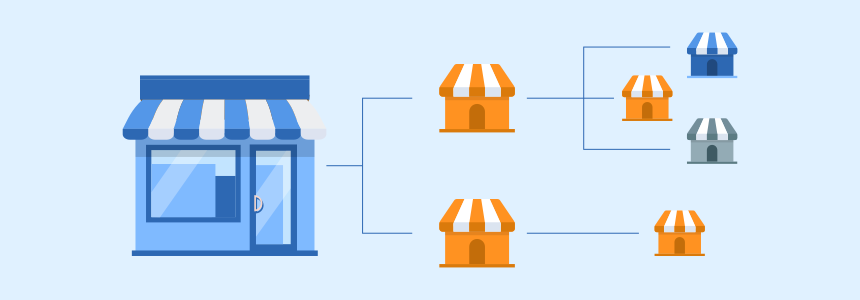
Global
The Global level is the foundation. Every Magento 2 installation has one Global scope. Settings applied here affect the entire system unless overridden at a lower level.
Global controls three core areas:
- Inventory: Default stock configuration for all products.
- Pricing: Base product prices shared across all websites.
- Customer data: Whether customer accounts are shared across websites or kept separate.
Changes at Global cascade down to every Website, Store, and Store View below it.
Website
Websites are the first subdivision below Global. After installation, Magento provides one default website called "Main Website." You can create additional websites to serve different markets or brands.
Each website gets its own domain or subdomain. A fashion retailer might run us.brand.com and de.brand.com as separate websites.
Websites control:
- Payment methods
- Shipping methods
- Product pricing and base currency
- Tax rules
- Customer base (shared or separate per website)
All Magento multi-store configurations start at the website level.
Store
Stores sit below Websites. A single website can host multiple stores. Each store gets its own root category, which determines the product catalog structure and main navigation menu.
Think of stores as product line divisions. Under us.brand.com, you might have one store for "Women's Fashion" and another for "Men's Fashion." Both share the same checkout, admin panel, payment methods, and shipping options from their parent website.
Key points about stores:
- Stores under the same website share admin and checkout
- Each store has a unique root category (main menu)
- Prices, taxes, and payment methods come from the parent website
You can read the multi-store setup tutorial for detailed instructions.
Store View
Store Views are the lowest level. Each store must have at least one default store view. Additional views let you present the same store in different languages or currencies.
A "Women's Fashion" store under us.brand.com might have English, Spanish, and French store views. All three share the same product catalog and category structure, but display content in different languages.
Store views control:
- Language and locale
- Currency symbols
- Translated content (product names, descriptions, CMS pages)
- Per-view pricing (optional)
Website vs Store vs Store View: Key Differences
| Feature | Website | Store | Store View |
|---|---|---|---|
| Domain | Own domain or subdomain | Shares parent website domain | Shares parent store domain |
| Payment methods | Configurable per website | Inherited from website | Inherited from website |
| Shipping methods | Configurable per website | Inherited from website | Inherited from website |
| Product prices | Configurable per website | Inherited from website | Optional override |
| Currency | Base currency per website | Inherited from website | Display currency per view |
| Tax rules | Configurable per website | Inherited from website | Inherited from website |
| Customer accounts | Shared or separate | Shared with website | Shared with website |
| Product catalog | Shared inventory | Own root category | Same as parent store |
| Language | N/A | N/A | Configurable per view |
| Main navigation | N/A | Own root category | Inherited from store |
When to Use Each Level
Create a new Website when:
- You need separate payment or shipping methods
- You want a distinct customer base
- Products require different base currencies
- You operate in regions with different tax regulations
Create a new Store when:
- You sell different product categories under one domain
- You want separate navigation menus
- You need different root categories
Create a new Store View when:
- You serve customers in multiple languages
- You want to display prices in different currencies
- You need localized content without changing the product structure
For setting up translations across store views, see the multi-language setup tutorial.
Scope Settings and Configuration Cascade
Every configuration field in the Magento admin panel has a scope indicator shown in small text below the field label. This tells you which hierarchy level the setting applies to.
The cascade works top-down:
- Global sets the default value
- Website can override Global for all stores below it
- Store can override Website for all views below it
- Store View can override Store for that specific view
To change a setting at a lower scope:
- Navigate to Stores > Configuration
- Select the target scope from the Store View dropdown (top left)
- Uncheck Use Website or Use Default next to the field
- Enter the new value
- Save
Single Store Mode
When your installation has one website, one store, and one store view, Magento enables Single Store Mode. This hides scope indicators and store view selectors to simplify the admin interface. You can toggle it under Stores > Configuration > General > Single-Store Mode.
How to Create a Store View in Magento 2
Step 1: Create the Store View
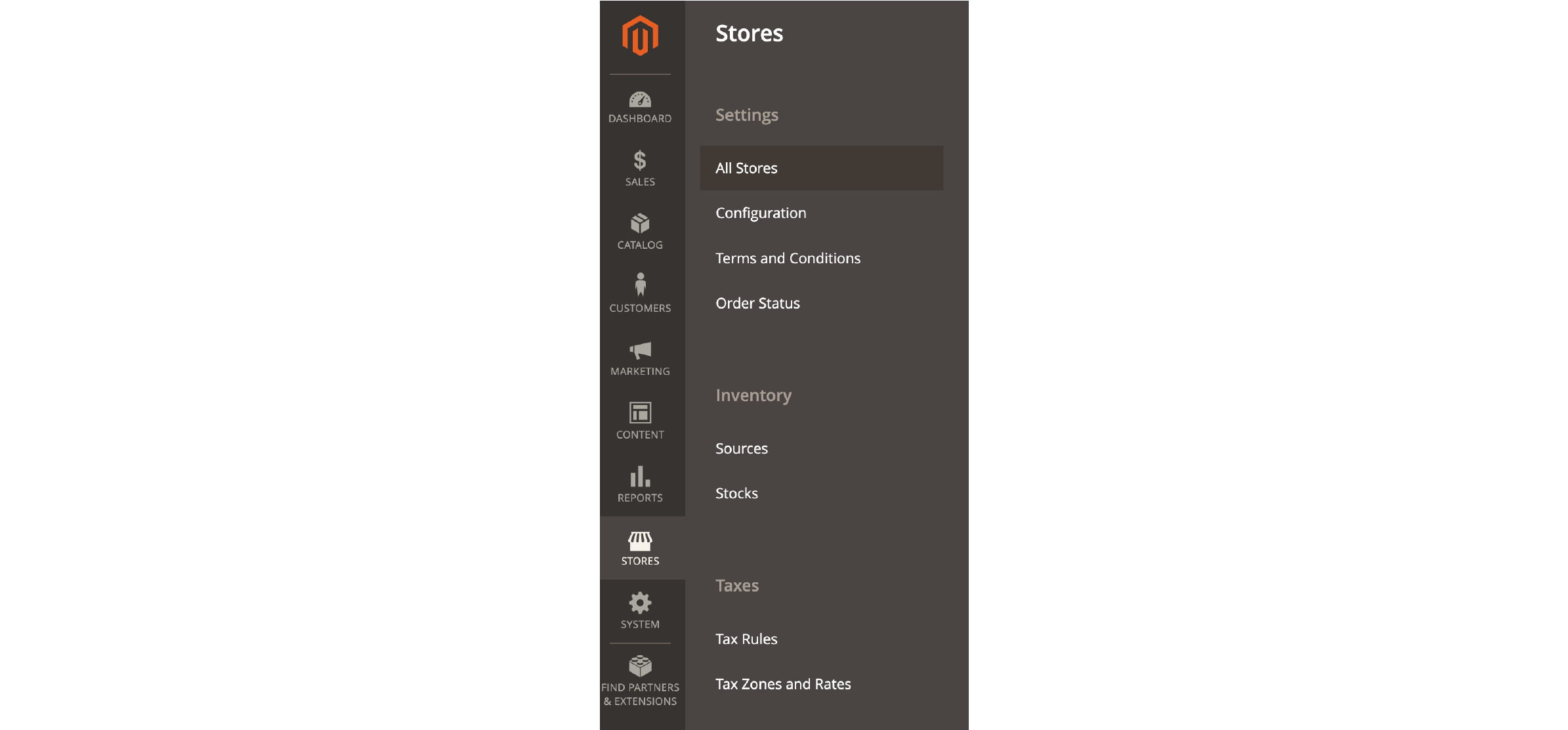
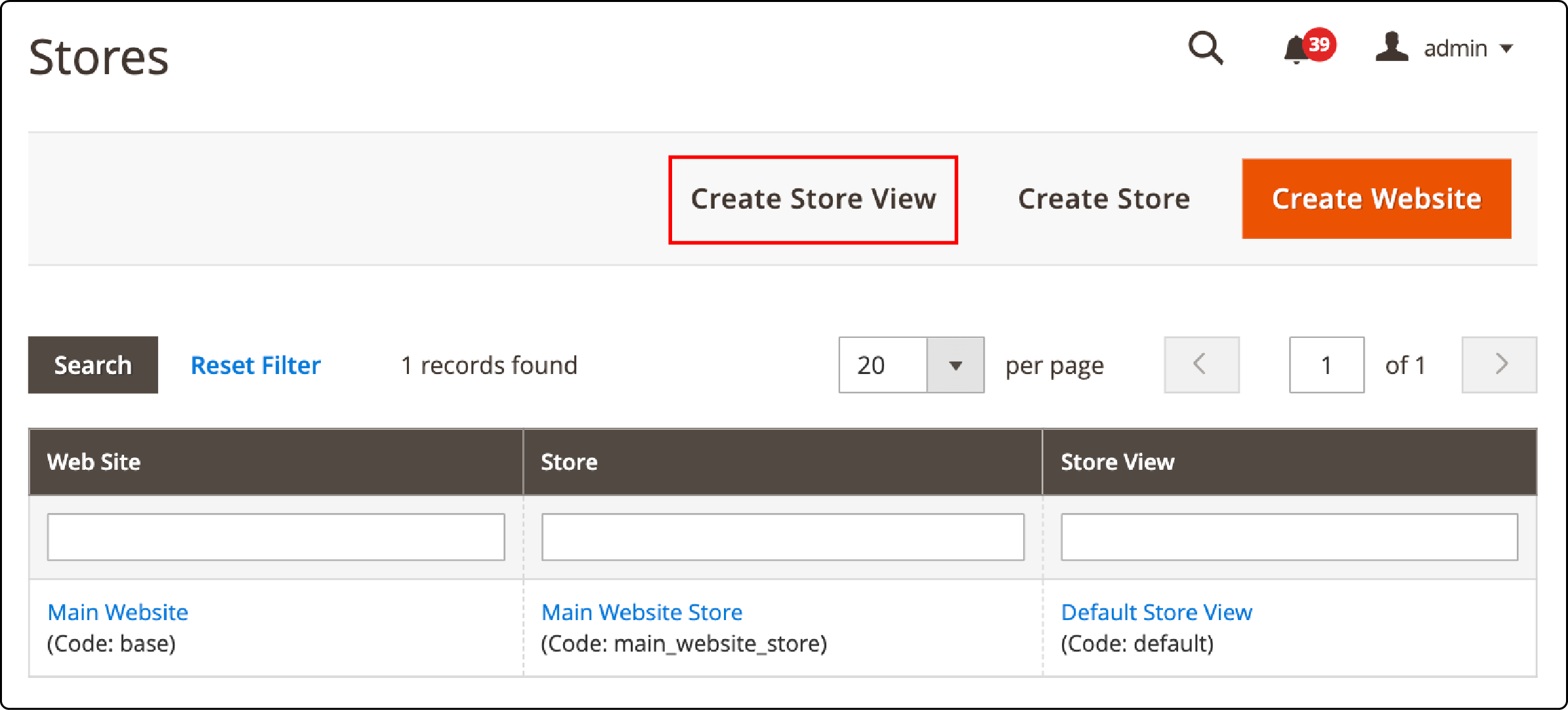
- Go to Stores > Settings > All Stores
- Click Create Store View
-
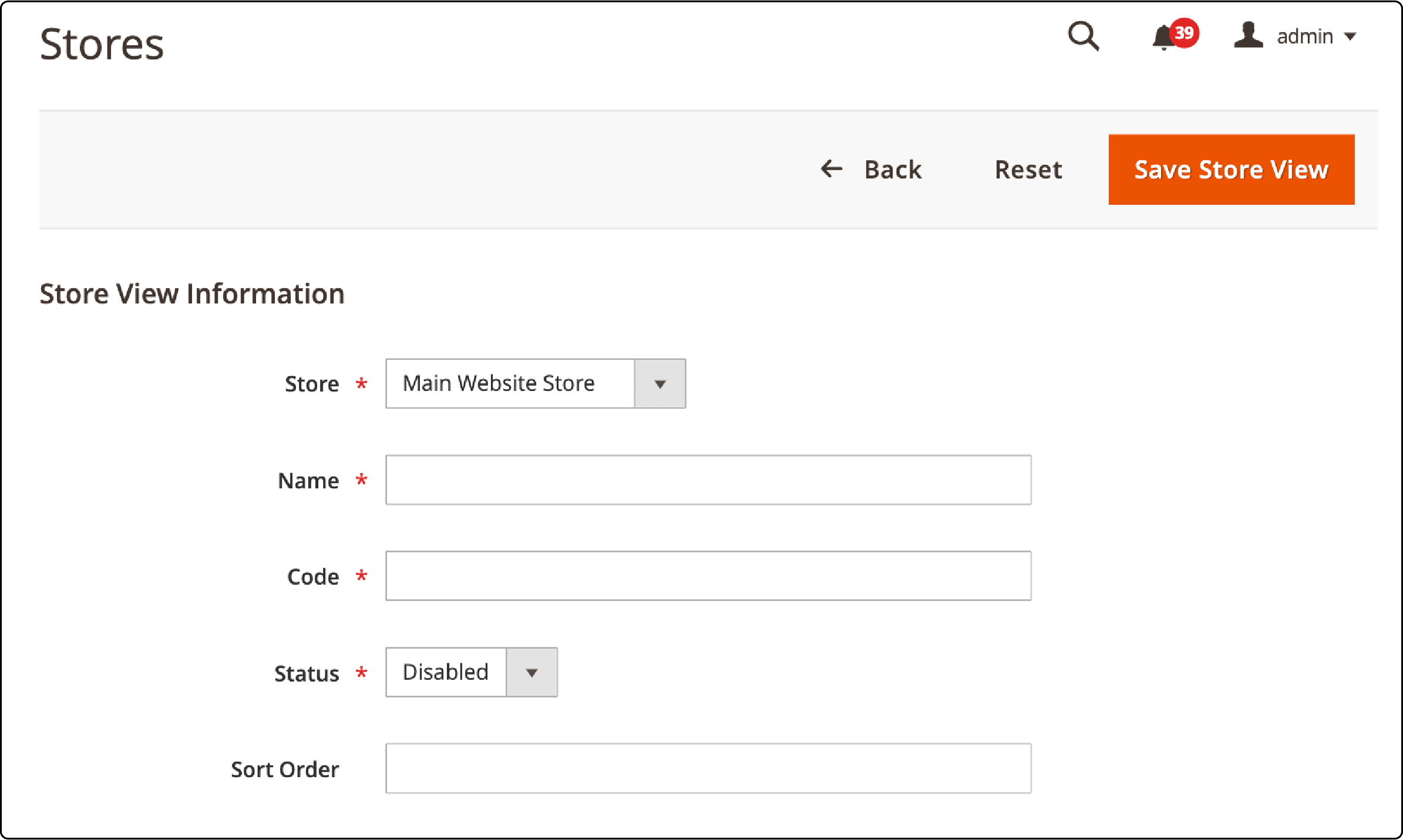
Fill in the store view details:
- Store: Select the parent store
- Name: Display name (e.g., "German" or "EUR Store")
-
Code: Unique identifier used in URLs (e.g.,
deoreur) - Status: Enabled or Disabled
- Sort Order: Position in the store switcher
-
Click Save Store View
Step 2: Configure Language and Locale
- Go to Stores > Configuration
- Switch to your new store view in the scope selector
- Navigate to General > Locale Options
- Uncheck Use Website and select the target language
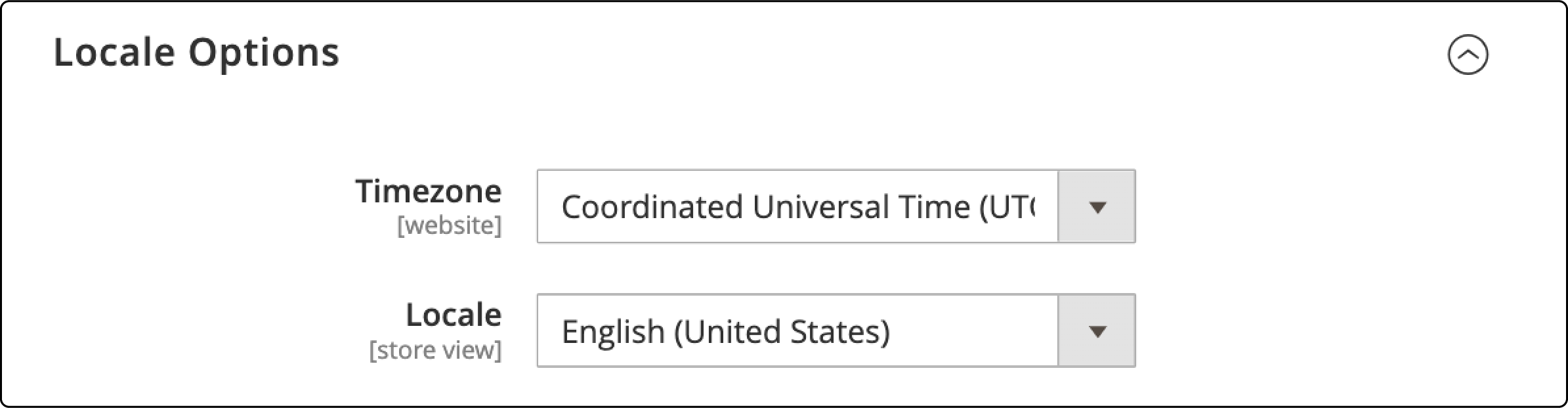
- Save the configuration
Step 3: Reindex and Verify
Run a full reindex to apply the changes:
php bin/magento indexer:reindex
php bin/magento cache:flush
After reindexing, a store switcher appears in the storefront header. Customers can select their preferred store view from the dropdown.
CLI Commands for Store View Management
Adobe Commerce 2.4.8 supports several CLI commands for managing store views:
# List all store views
php bin/magento store:list

# Show store view configuration
php bin/magento config:show --scope=stores --scope-code=de

# Set a configuration value for a specific store view
php bin/magento config:set --scope=stores --scope-code=de general/locale/code de_DE

# Reindex after changes
php bin/magento indexer:reindex

# Clear cache
php bin/magento cache:clean
php bin/magento cache:flush
These commands are useful for automated deployments and CI/CD pipelines where admin panel access is not available.
SEO Best Practices for Multiple Store Views
Running multiple store views without proper SEO configuration creates duplicate content issues. Google may index the same page from different views, diluting rankings.
Store Codes in URLs
Enable store codes in URLs to create distinct, crawlable paths for each view:
Stores > Configuration > General > Web > URL Options > Add Store Code to URLs → Yes
This produces URLs like:
-
example.com/en/product.html -
example.com/de/product.html -
example.com/fr/product.html
Hreflang Tags
Implement hreflang tags to tell search engines which language version to show in each market. Add these to the <head> of every page:
<link rel="alternate" hreflang="en" href="https://example.com/en/product.html" />
<link rel="alternate" hreflang="de" href="https://example.com/de/product.html" />
<link rel="alternate" hreflang="x-default" href="https://example.com/product.html" />
Most Magento SEO extensions handle hreflang generation. Manual implementation requires custom template modifications.
Per-View Meta Tags
Set unique meta titles and descriptions for each store view. Edit product and category meta data while in the correct store view scope. This prevents duplicate meta data across language versions.
Performance Considerations for Multi-Store Setups
Every store view consumes server resources. A single Magento installation running five store views processes five times the configuration data during bootstrapping.
Server Resource Guidelines
| Store Views | Recommended RAM | PHP Workers | Cache Size |
|---|---|---|---|
| 1-2 | 16 GB | 4-8 | 2 GB |
| 3-5 | 32 GB | 8-16 | 4 GB |
| 6-10 | 64 GB | 16-32 | 8 GB |
| 10+ | 128 GB+ | 32+ | 16 GB+ |
Optimization Tips
- Use Varnish: Full page cache eliminates most PHP processing for repeat visitors. Each store view gets its own cache variant.
- Redis for sessions: Separating session storage from file-based storage prevents lock contention across store views.
- Dedicated search service: OpenSearch or Elasticsearch should run on separate infrastructure for multi-store setups.
- CDN per domain: If your websites use different domains, configure separate CDN origins for each.
Adobe's multi-store performance guide covers additional catalog and pricing optimization strategies for production environments.
Multi-store setups benefit from managed Magento hosting that auto-scales resources based on traffic across all store views.
FAQ
What is the maximum number of store views in Magento 2?
Magento 2 has no hard-coded limit on store views. The practical limit depends on server resources. Production stores run 50+ store views with proper infrastructure, though performance degrades without adequate memory and caching.
Can I share products between different Magento websites?
Yes. All websites within the same installation share the product catalog by default. You control product visibility per website through the product editor. Navigate to the product page, scroll to Websites, and select which websites display that product.
How do I set different prices for different store views?
Switch to the target store view scope in the admin panel, then edit the product price. Uncheck Use Default Value to override the parent scope price. This works for both websites (base price override) and store views (display price override).
Does each store view need its own domain?
No. Store views can share a domain using store codes in the URL path (e.g., /en/, /de/). Separate domains or subdomains are configured at the website level, not the store view level.
What is the difference between scope "Default" and "Global" in Magento 2?
"Default" and "Global" refer to the same top-level scope. It is the highest configuration level that affects all websites, stores, and store views unless overridden at a lower level.
How do I delete a store view in Magento 2?
Go to Stores > Settings > All Stores. Click on the store view you want to remove. Click Delete Store View and confirm. Magento will prompt you to create a backup before deletion.
Can different store views have different themes?
Yes. Each store view can use a different theme. Go to Content > Design > Configuration, select the store view, and assign the theme. This lets you customize the visual appearance per language or region.
How does Magento 2.4.8 improve store view management?
Adobe Commerce 2.4.8 adds store view level configuration for the "Login as Customer" feature, which was limited to website scope before. Address attribute scoping now prevents unintended cross-scope influence when configuring country restrictions.
Do store views affect Magento performance?
Yes. Each store view adds to the configuration loading during Magento bootstrap. More views mean more memory usage and longer uncached response times. Proper caching with Varnish and Redis, combined with adequate server resources, mitigates this impact.
How do I migrate from a single store to multiple store views?
Start by planning your hierarchy: which store views you need and how they map to languages or currencies. Create the store views through the admin panel or CLI. Then translate your content, configure currencies, set up hreflang tags, and test each view before going live. No data migration is needed since all views share the same database.
Summary
The Magento 2 hierarchy of Global, Website, Store, and Store View gives merchants full control over multi-market commerce from one installation. Websites handle top-level business rules like payment and shipping. Stores organize product catalogs. Store views deliver localized experiences through language and currency.
Getting the hierarchy right from the start saves hours of reconfiguration later. Plan your store structure based on business requirements, not technical convenience.
For production multi-store setups, ensure your hosting infrastructure scales with each additional store view. Explore Magento hosting solutions that handle the server complexity so you can focus on growing your business.
