

Magento Enterprise Hosting: Architecture, Costs, and What You Need
[Updated: March 24, 2026]
Your Magento 2 store handles 2,000 orders a day without issues. Then Black Friday hits, traffic triples, and your single server buckles. Enterprise hosting prevents that.
This guide breaks down the architecture, real costs, and decision criteria for Magento enterprise hosting so you invest in the right hosting plan for your ecommerce store's scale.
Key Takeaways
- Enterprise hosting separates Magento into multiple specialized layers: web nodes, cache, database, and shared storage
- Three hosting models exist: self-managed infrastructure, managed hosting providers, and Adobe Commerce Cloud
- Real costs range from $300/month for managed hosting to $200,000+/year for Adobe Commerce Cloud
- Adobe's reference architecture recommends SSL-terminating load balancers, dedicated Varnish caching, Redis for sessions, and database replication
- Most Magento stores under 1,000 daily orders do not need enterprise hosting
What Is Magento Enterprise Hosting?
Magento enterprise hosting = server infrastructure designed to run Magento stores at scale with redundancy, high availability, and performance under heavy traffic. You trade single-server simplicity for multi-node architecture that eliminates downtime.
Perfect for: High-traffic ecommerce stores processing 1,000+ daily orders, businesses with seasonal traffic spikes, stores requiring 99.9%+ uptime, multi-region deployments
Not ideal for: Small stores under 500 daily visitors, development or staging environments, businesses with stable low traffic
Enterprise hosting splits your Magento application across multiple specialized servers. Instead of one machine handling web requests, database queries, caching, and cron jobs, each component runs on dedicated server infrastructure optimized for its role.
The result: when one component fails or gets overloaded, the rest of the system keeps running. A database spike during reindexing no longer affects checkout speed. A traffic surge no longer crashes the entire Magento store.
This hosting solution follows Adobe's own reference architecture for high availability, which recommends separating every layer with redundancy built in.
When Your Store Needs Enterprise Hosting
Not every Magento 2 store needs a multi-node hosting plan. A single-server web hosting setup works fine for stores with predictable, moderate traffic. Enterprise hosting becomes necessary when specific thresholds are crossed.
You need enterprise hosting when:
- Your Magento store processes more than 1,000 orders per day
- Peak traffic exceeds 5x your average (flash sales, seasonal events)
- Downtime costs you more than $1,000 per hour in lost revenue
- You operate in multiple geographic regions
- PCI DSS Level 1 compliance requires dedicated hosting infrastructure
- Your catalog exceeds 100,000 SKUs with complex pricing rules
You do NOT need enterprise hosting when:
- Daily traffic stays under 500 unique visitors
- Order volume is under 100 per day with no seasonal spikes
- A few minutes of downtime during deployments is acceptable
- Your hosting plan budget is under $200/month
The decision comes down to risk tolerance and revenue impact. A store generating $50,000/day cannot afford 30 minutes of downtime. A store generating $500/day can restart a single server without catastrophic losses.
Three Hosting Models Compared
Magento enterprise hosting comes in three distinct models. Each hosting solution trades control for convenience at different price points.
Self-Managed Infrastructure
You rent dedicated servers (bare metal or cloud VMs) and manage everything: OS updates, security patches, Magento configuration, monitoring, and scaling. Full control, full responsibility.
Requires: In-house DevOps team with Linux, NGINX, MySQL, Redis, and Varnish expertise. Budget for 24/7 on-call engineers.
Managed Magento Hosting
A fully managed Magento hosting provider handles dedicated server infrastructure, security, updates, and monitoring. You focus on your store, they focus on uptime. This model offers the best balance of performance and scalability for most ecommerce businesses.
Requires: Monthly hosting fee. No in-house server management needed.
Adobe Commerce Cloud Hosting
Adobe's own Platform-as-a-Service (PaaS) cloud hosting solution. Includes hosting, CI/CD pipelines, staging environments, and Adobe's support. Requires an Adobe Commerce license (separate from Magento Open Source).
In June 2025, Adobe launched Commerce as a Cloud Service (ACCS), a multi-tenant cloud platform with versionless upgrades and automated scaling.
Requires: Adobe Commerce license ($22,000 to $125,000+/year based on GMV) plus cloud hosting infrastructure fees.
Model Comparison
| Factor | Self-Managed | Managed Hosting | Adobe Commerce Cloud |
|---|---|---|---|
| Monthly cost | $100-500 (hardware) | $300-800 | $3,500-16,000+ |
| Setup time | Weeks to months | Days to weeks | Days (pre-configured) |
| DevOps required | Yes (24/7) | No | Minimal |
| Scaling | Manual or scripted | Provider handles it | Built-in auto-scaling |
| Security patches | Your responsibility | Provider applies them | Adobe applies them |
| PCI compliance | You manage it | Provider assists | Included |
| Magento version | Open Source or Commerce | Open Source or Commerce | Commerce only |
Enterprise Architecture: What the Stack Looks Like
Adobe's reference architecture defines the blueprint for enterprise Magento hosting. Every production hosting environment at scale follows this pattern with variations.
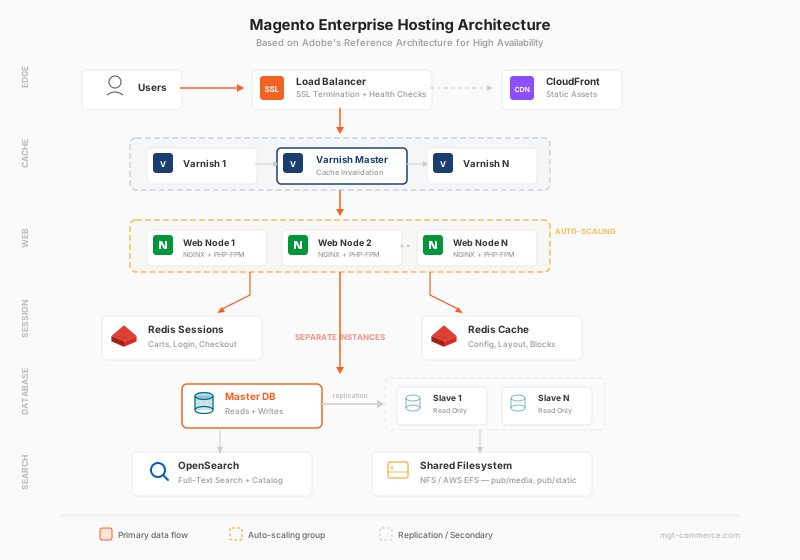
Layer 1: Load Balancer and SSL Termination
An SSL-terminating load balancer sits at the entry point. It handles HTTPS encryption, distributes traffic across backend servers, and removes unhealthy nodes from the pool. For high availability, Adobe recommends a two-tier Varnish setup behind the load balancer.
Layer 2: Varnish Full-Page Cache
Varnish caches complete HTML pages and serves them without touching PHP. Response times drop from seconds to milliseconds. A Varnish Master node coordinates cache invalidation across all instances, preventing stale content after catalog or CMS updates.
Layer 3: Web and Application Nodes
Multiple NGINX + PHP-FPM servers run identical Magento 2 code. Each node handles web requests in parallel. One designated node runs cron jobs (indexing, email queues, order processing). Running cron on multiple nodes causes duplicate emails and inventory conflicts.
Layer 4: Redis for Sessions and Cache
Two separate Redis instances serve different purposes. One stores session data (carts, login states, checkout progress) shared across all web nodes. The other handles object cache (configuration, layout XML, block output). Keeping them separate prevents a cache flush from destroying active customer sessions.
Layer 5: Database with Read Replicas
The MySQL/MariaDB master handles all write operations (orders, cart updates, admin changes). Read replicas handle catalog browsing, search queries, and reporting. This split scales read-heavy operations without bottlenecking the master.
Layer 6: Shared Filesystem
NFS or AWS EFS mounts the pub/media/ and pub/static/ directories across all web nodes. Product images uploaded on one node are accessible from every other node. Never share var/cache/ or var/session/ over NFS. Use Redis for those.
Current System Requirements
Your enterprise hosting environment must meet Adobe Commerce's technical requirements. Running outdated versions creates security vulnerabilities and compatibility issues.
Adobe Commerce 2.4.8 Stack (Latest Stable, March 2026)
| Component | Required Version |
|---|---|
| PHP | 8.3 or 8.4 |
| MariaDB | 11.4 |
| MySQL | 8.4 (on-premises) |
| OpenSearch | 2.x or 3.x |
| Elasticsearch | 8.x (on-premises) |
| Redis | 7.2 |
| Valkey | 8.x (Redis alternative) |
| Varnish | 7.6 or 7.7 |
| NGINX | 1.28 |
| RabbitMQ | 4.1 |
| Composer | 2.9.3+ |
Source: Adobe Commerce System Requirements
Hardware Recommendations
Adobe's official guidance for enterprise deployments:
- CPU: One core handles 2 to 4 Commerce requests. Formula: N[Cores] = (N[Expected Requests] / 2) + N[Cron Processes]
- PHP Memory: 2 GB for single-server, 2 GB on build servers, 1 GB on web nodes in pipeline deployments
- Database Memory: Close to half the size of stored data for effective indexation
- Network: Sufficient bandwidth for data exchange between web nodes, database, and cache servers
For Magento stores processing 1,000+ orders per day, plan for a minimum of 4 web nodes, 2 Redis instances, 1 Varnish layer, and a database master with at least one read replica.
Enterprise Hosting Costs: A Reality Check
Hosting costs vary based on the model, traffic volume, and required services. These ranges reflect real 2026 market pricing for Magento ecommerce hosting.
| Hosting Model | Typical Annual Cost | What's Included |
|---|---|---|
| Self-Managed (AWS/GCP) | $1,200-6,000/year | Hardware only. You manage everything. |
| Managed Hosting | $3,600-9,600/year | Server management, security, monitoring, support |
| Adobe Commerce Cloud | $40,000-200,000+/year | Hosting + CI/CD + staging + Adobe support |
The hidden cost of self-managed: A senior DevOps engineer costs $120,000-180,000/year. If your infrastructure requires 24/7 coverage, you need multiple engineers. The $100/month server becomes a $200,000+/year operation.
Adobe Commerce licensing adds to cloud hosting costs: The license fee runs $22,000 to $125,000+ per year based on your Magento store's Gross Merchandise Value (GMV). This is separate from hosting fees. Total cost for mid-market stores on Adobe Commerce Cloud runs $80,000 to $300,000+ per year.
Managed hosting hits the middle ground for most ecommerce businesses. You pay $300 to $800 per month for infrastructure that scales with your traffic without needing in-house DevOps. Most mid-market Magento stores ($1M to $20M annual revenue) choose this path.
Security and Compliance at Enterprise Scale
Enterprise Magento stores handle sensitive payment data, personal information, and high transaction volumes. Security failures at this scale trigger regulatory consequences, not lost sales alone.
PCI DSS Compliance
Payment Card Industry Data Security Standards require specific infrastructure controls. Enterprise hosting providers implement network segmentation, encryption at rest and in transit, access logging, and regular vulnerability scans. PCI compliance in Magento hosting demands dedicated (not shared) infrastructure for stores processing card payments.
Security Stack
| Component | Purpose |
|---|---|
| WAF (Web Application Firewall) | Blocks SQL injection, XSS, and bot attacks |
| DDoS Protection | Absorbs volumetric attacks before they reach servers |
| SSL/TLS Certificates | Encrypts all data in transit (TLS 1.2+ required) |
| Intrusion Detection | Monitors for unauthorized access attempts |
| Automated Patching | Applies security updates without manual intervention |
| Automated Backup | Daily backups with point-in-time recovery for disaster protection |
Data Residency
Enterprise stores serving EU customers must comply with GDPR data residency requirements. Choose hosting with data centers in the required regions. AWS Frankfurt, for example, satisfies EU data sovereignty requirements.
Performance at Scale: What to Expect
Enterprise hosting delivers consistent performance under load. Single-server setups degrade as traffic increases. Multi-node architecture maintains response times regardless of concurrent users.
Realistic performance benchmarks for enterprise setups:
| Metric | Single Server | Enterprise (Multi-Node) |
|---|---|---|
| TTFB (cached) | 100-300ms | 50-150ms |
| TTFB (uncached) | 800ms-3s | 200-600ms |
| Concurrent users | 200-500 | 5,000-50,000+ |
| Orders/hour | 100-300 | 2,000-10,000+ |
| Uptime SLA | 99.5% | 99.9-99.99% |
These numbers reflect real-world Magento stores running with extensions, custom themes, and large catalogs. Marketing claims of "sub-100ms" response times refer to cached, static pages on bare installs.
A performance audit identifies bottlenecks before scaling. Optimize database queries and caching configuration before adding servers. Throwing more hardware at a slow query wastes money.
Pros and Cons of Enterprise Hosting
FAQ
What is Magento enterprise hosting?
Magento enterprise hosting is multi-node server infrastructure designed for high-traffic Magento stores. It separates web serving, caching, database, and storage into dedicated layers with redundancy. This architecture prevents downtime during traffic spikes and enables stores to process thousands of orders per hour.
How much does enterprise Magento hosting cost?
Costs range from $300-800/month for managed Magento hosting to $40,000-200,000+/year for Adobe Commerce Cloud. Self-managed infrastructure starts at $100/month for hardware but requires in-house DevOps staff. The total cost depends on traffic volume, required support level, and whether you run Magento Open Source or Adobe Commerce.
What is the difference between managed hosting and Adobe Commerce Cloud?
Managed Magento hosting providers run your store on optimized infrastructure without requiring an Adobe Commerce license. Adobe Commerce Cloud is a PaaS solution that bundles hosting with Adobe's CI/CD tools, staging environments, and support, but requires an Adobe Commerce license ($22,000-125,000+/year). Managed hosting works with both Magento Open Source and Adobe Commerce.
Do I need enterprise hosting for Magento Open Source?
Yes, if your store handles high traffic. Enterprise hosting is about infrastructure architecture, not the Magento edition. A Magento Open Source store processing 2,000 daily orders needs the same multi-node setup as an Adobe Commerce store at the same scale.
What are the minimum system requirements for enterprise Magento hosting?
Adobe Commerce 2.4.8 requires PHP 8.3 or 8.4, MariaDB 11.4 or MySQL 8.4, OpenSearch 2-3 or Elasticsearch 8, Redis 7.2, Varnish 7.6-7.7, and NGINX 1.28. For enterprise deployments, plan for a minimum of 2 GB RAM per PHP node, with database memory close to half the size of your stored data.
How many web nodes does an enterprise Magento store need?
The number depends on concurrent traffic. Adobe's formula: N[Cores] = (N[Expected Requests] / 2) + N[Cron Processes]. A store handling 100 concurrent requests needs at least 50 CPU cores distributed across multiple nodes. Most enterprise Magento stores run 4 to 12 web nodes.
Can enterprise hosting improve Magento page speed?
Enterprise hosting reduces response times through Varnish full-page caching, Redis object caching, and database read replicas. Cached page responses drop from seconds to under 200 milliseconds. The impact on page speed depends on your Magento website's specific bottlenecks, which a performance audit identifies before scaling.
What is the difference between Magento Enterprise Edition and enterprise hosting?
Magento Enterprise Edition (now Adobe Commerce) is a software license with advanced features like B2B modules, staging, and customer segmentation. Enterprise hosting is the server infrastructure running the software. You can run Magento Open Source on enterprise hosting, and you can run Adobe Commerce on a single server. They are independent decisions.
Summary
Magento enterprise hosting distributes your ecommerce store across multiple dedicated servers for high availability, scalability, and redundancy. The architecture separates web serving, caching, database, and storage into dedicated layers that scale independent of each other.
Three hosting solutions serve different needs: self-managed infrastructure for teams with DevOps expertise, managed Magento hosting for stores that want best performance without server management, and Adobe Commerce Cloud for businesses committed to the Adobe ecosystem.
Start by determining if your Magento website needs enterprise infrastructure at all. If downtime costs exceed your hosting budget, if traffic spikes crash your current setup, or if compliance requirements demand dedicated hosting, enterprise hosting is the next step.
For stores ready to scale without building an internal infrastructure team, managed Magento hosting handles the architecture so you focus on growing revenue.
