

Magento Integration Guide: Connect Magento with Any Business System (2026)
[Updated: April 15, 2026]
Magento integration connects your store to the rest of your business stack: ERP, CRM, payment gateways, shipping carriers, marketing platforms, and analytics. This 2026 guide covers the four API methods Magento exposes, how to set up an integration in admin, category by category use cases with real examples, common challenges, and the hosting requirements that decide whether your integrations actually hold up under production load.
Key Takeaways
- Magento supports four core integration methods: REST API, GraphQL, SOAP, and Adobe I/O Events (Adobe Commerce only).
- Magento Open Source exposes Events and Observers internally, but native outbound webhooks are an Adobe Commerce only feature since 2.4.4.
- Magento 2.4.8-p4 (March 2026) runs RabbitMQ 4.x with quorum queues for async and bulk REST endpoints.
- Create a Magento integration under System > Extensions > Integrations and authenticate with OAuth 1.0a or token based auth.
- Integration heavy stores need specific hosting: Redis for cache and sessions, RabbitMQ for queues, and room for PHP consumers.
- The Adobe Commerce Marketplace lists 4,000+ extensions covering payment, shipping, ERP, CRM, marketing, PIM, and analytics.
- For complex multi system flows, iPaaS tools like Celigo or Workato reduce custom development but add per record costs.
What is Magento Integration?
Magento integration is the process of connecting Magento with external business systems so that data flows between them without manual copy paste work. Typical systems include enterprise resource planning (ERP), customer relationship management (CRM), payment gateways, shipping carriers, marketing platforms, product information management (PIM), and analytics pipelines.
An integration can be a one time sync, a scheduled batch, or a real time connection. Magento supports all three patterns through a mix of REST, GraphQL, SOAP, and event based APIs. The right pattern depends on volume, latency tolerance, and which side of the connection initiates the data transfer.
This guide walks through how Magento integration actually works in 2026, the API options, how to set up an integration in admin, category by category use cases, and the hosting requirements integration heavy stores often overlook.
How Magento Integration Works
Magento exposes four API surfaces. Each serves a different integration pattern.
REST API
The REST API is the default choice for third party integrations in 2026. It uses HTTP verbs against endpoints like https://<your-store>/rest/V1/products or https://<your-store>/rest/V1/orders. Authentication uses OAuth 1.0a or bearer tokens. REST covers almost every Magento entity: products, customers, orders, categories, invoices, shipments, credit memos, quotes, inventory, and more.
Magento 2.4.8 extends REST with two advanced modes:
-
Asynchronous REST at
/rest/<store>/async/V1/<resource>queues the request and returns a bulk UUID. The client does not wait for processing. -
Bulk REST at
/rest/<store>/async/bulk/V1/<resource>accepts an array of records and processes them through the message queue. Both async and bulk require RabbitMQ.
For teams building API integrations from scratch, read our Magento 2 API integration guide for a deeper technical walkthrough.
GraphQL API
Magento ships GraphQL at /graphql for storefront and headless commerce. It is available in both Magento Open Source and Adobe Commerce. GraphQL lets clients request exactly the fields they need in a single round trip, which reduces over fetching for mobile apps, PWAs, and modern storefronts.
GraphQL covers catalog browsing, product search, customer accounts, cart, checkout, order history, and wishlist. The schema is extensible so third party modules can add their own types and resolvers.
SOAP API (legacy)
SOAP is still supported in 2.4.8 but rarely used for new integrations. Most teams pick REST over SOAP for clarity, tooling, and developer experience. If an older ERP or legacy system only speaks SOAP, the endpoint is still at /soap/<store>?wsdl.
Events and Webhooks
This is the most misunderstood part of Magento integration and where many blog posts get it wrong.
- Magento Open Source has an internal Events and Observers system. Modules dispatch events in PHP, observers listen and react. This is internal only and does not send outbound HTTP calls to external systems.
- Adobe Commerce adds Adobe I/O Events for Adobe Commerce since version 2.4.4. This publishes Commerce events to Adobe App Builder asynchronously. External systems consume them through webhooks or the Adobe I/O Journaling API.
- Adobe Commerce Webhooks is a separate feature inside Adobe Commerce that sends synchronous outbound calls on specific Commerce events. It requires Adobe App Builder integration.
The short version: if your Magento store runs on Open Source, native outbound webhooks are not available. You either build observer based bridges that call external APIs, or you use an iPaaS connector. Adobe Commerce stores get richer event options out of the box.
Integration Categories and Use Cases
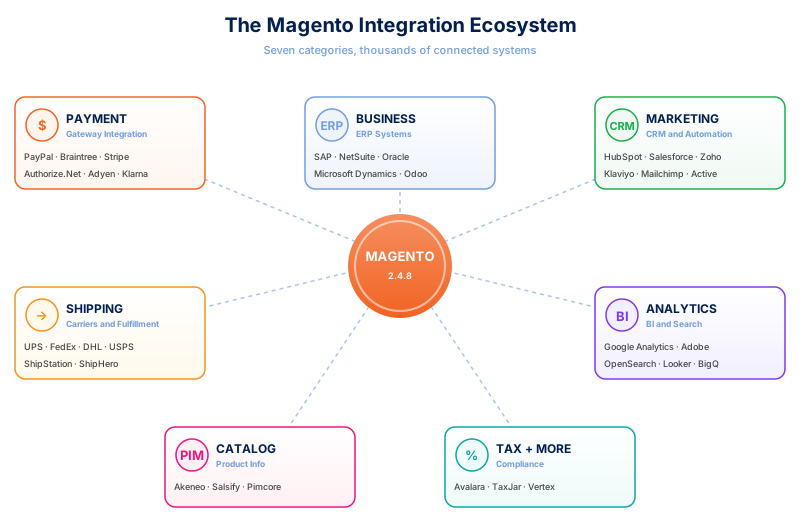
Magento integration breaks down into seven broad categories, and most stores use at least three of them.
Payment Gateway Integration
Payment integration is the most common scenario. Magento ships with several built in methods (PayPal, Braintree, Authorize.net) and thousands of third party modules in the Marketplace. For each gateway, integration handles authorization, capture, refund, tokenization, and 3D Secure.
See our Magento 2 PayPal integration setup for a step by step example of adding a specific payment provider.
ERP Integration
Connecting Magento to an ERP like SAP, Microsoft Dynamics, NetSuite, or Oracle keeps product data, inventory, pricing, and orders consistent between your web store and your finance system. ERP integrations usually sync in both directions: Magento receives catalog and stock updates, and sends orders and customer data back.
SAP is the most common enterprise ERP connection. Our Magento 2 SAP integration breakdown covers the ten most frequent SAP use cases. For teams hitting common ERP sync problems, read our ERP integration issues and fixes.
CRM and Marketing Integration
CRM systems (HubSpot, Salesforce, Zoho) pull customer data from Magento to power sales workflows, lead scoring, and email campaigns. Marketing automation platforms (Klaviyo, Mailchimp, ActiveCampaign) sync customer segments, purchase history, and abandoned carts to trigger automated emails and SMS flows.
Two common setups we cover in detail:
- HubSpot Magento integration for B2B and lead generation heavy stores
- Klaviyo Magento 2 integration for D2C email and SMS automation
Shipping and Fulfillment
Shipping integrations connect Magento to carriers (UPS, FedEx, DHL, USPS) and fulfillment systems (ShipStation, ShipHero, warehouse management systems). Real time rate lookups happen at checkout, shipping label generation happens at order processing, and tracking updates flow back to the customer account.
Analytics and Business Intelligence
Analytics integrations push order, product, customer, and search data to platforms like Google Analytics 4, Adobe Analytics, Looker, or custom data warehouses. For high traffic catalogs, the built in search index is not enough: many stores add Elasticsearch or OpenSearch for product search, reporting, and recommendation engines.
For the search engine setup, see our Magento 2 AWS Elasticsearch integration guide which walks through the full technology stack.
PIM and Content Integration
Product Information Management systems like Akeneo, Salsify, or Pimcore hold the master product catalog. Magento pulls descriptions, images, attributes, and variants on a schedule. PIM integration matters for stores with thousands of SKUs or complex attribute sets that multiple channels consume.
Other Common Integrations
- Tax engines: Avalara, TaxJar, Vertex
- Reviews: Trustpilot, Yotpo, Bazaarvoice
- Loyalty: LoyaltyLion, Smile.io
- Customer service: Zendesk, Freshdesk
- Personalization: Nosto, Dynamic Yield
How to Create an Integration in Magento Admin
For third parties that need controlled API access to your store, Magento provides a built in Integration configuration. This issues OAuth credentials and a predefined set of resource permissions.
Step 1: Open the Integrations Page
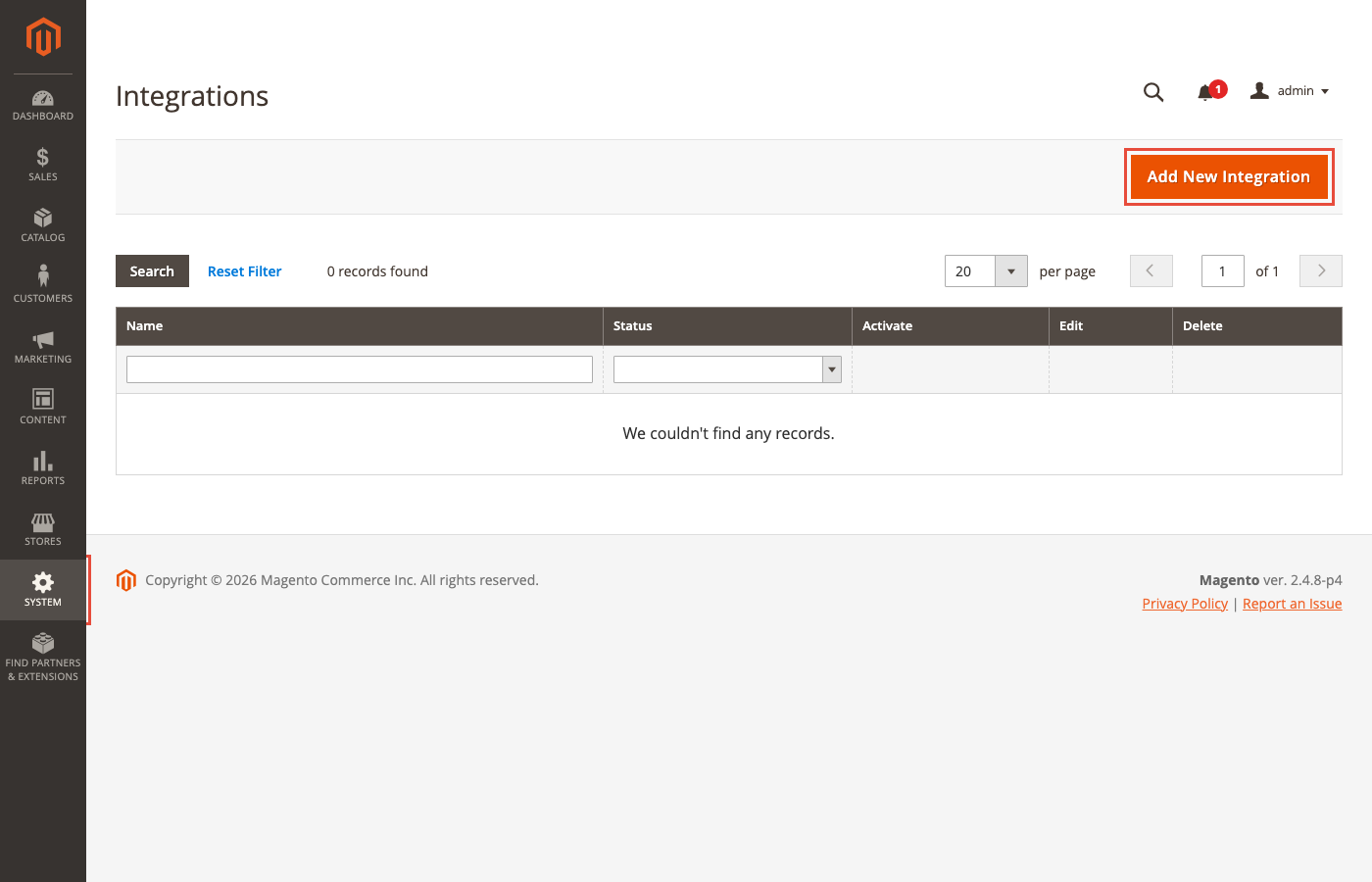
Log into Magento admin. Navigate to System > Extensions > Integrations. The page lists all existing integrations and has an Add New Integration button in the top right.
Step 2: Fill the Integration Info Form
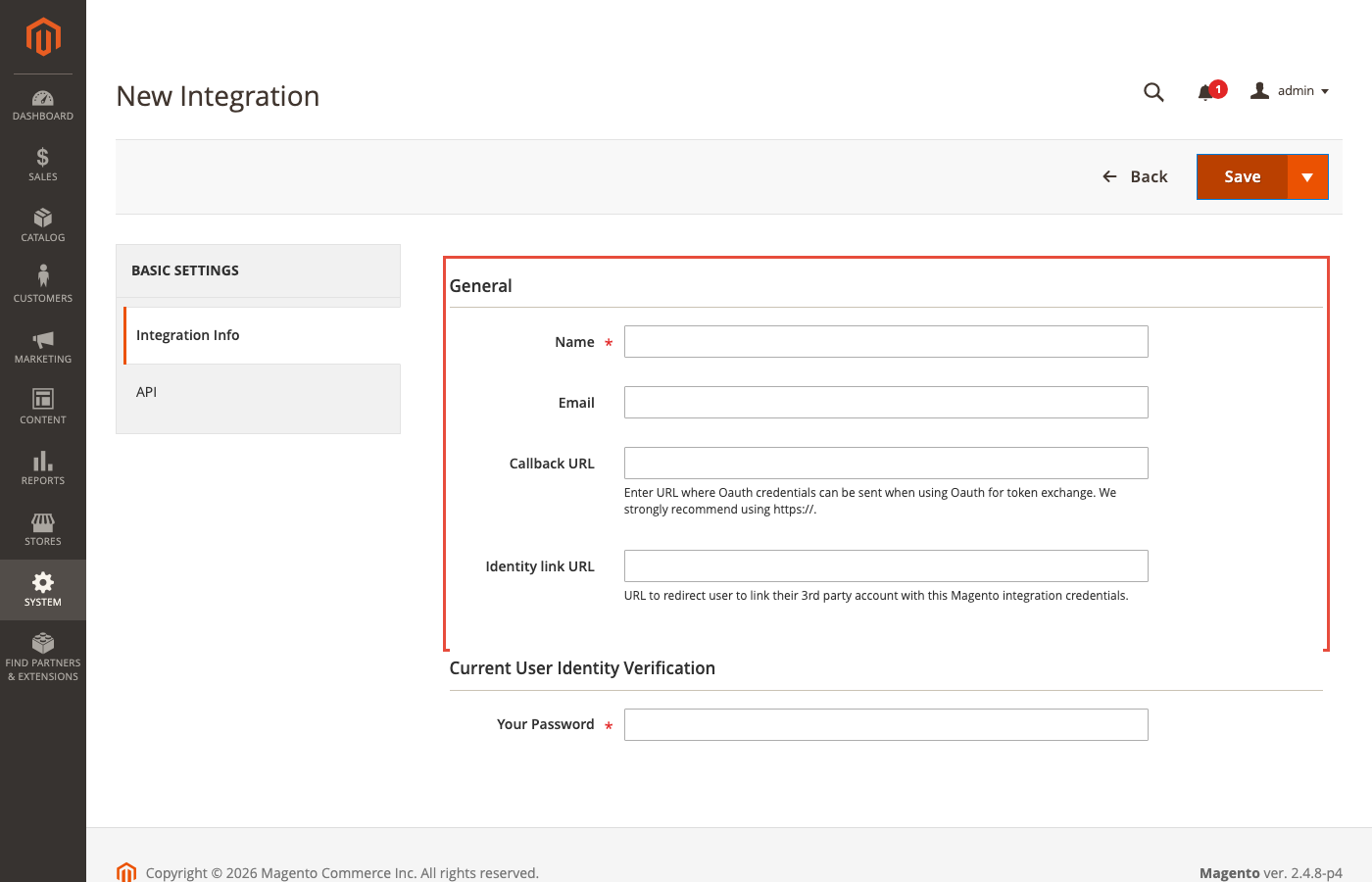
Click Add New Integration. The form asks for basic info: Name, Email, Callback URL, and Identity Link URL. The Callback URL is where Magento redirects after OAuth handshake. The Identity Link URL is where Magento verifies the third party application identity.
Step 3: Configure API Resource Access
Switch to the API tab in the left sidebar. Set Resource Access to All for full access, or Custom to tick only the specific endpoints the integration needs. Scoping access per integration is the recommended pattern for third party systems.
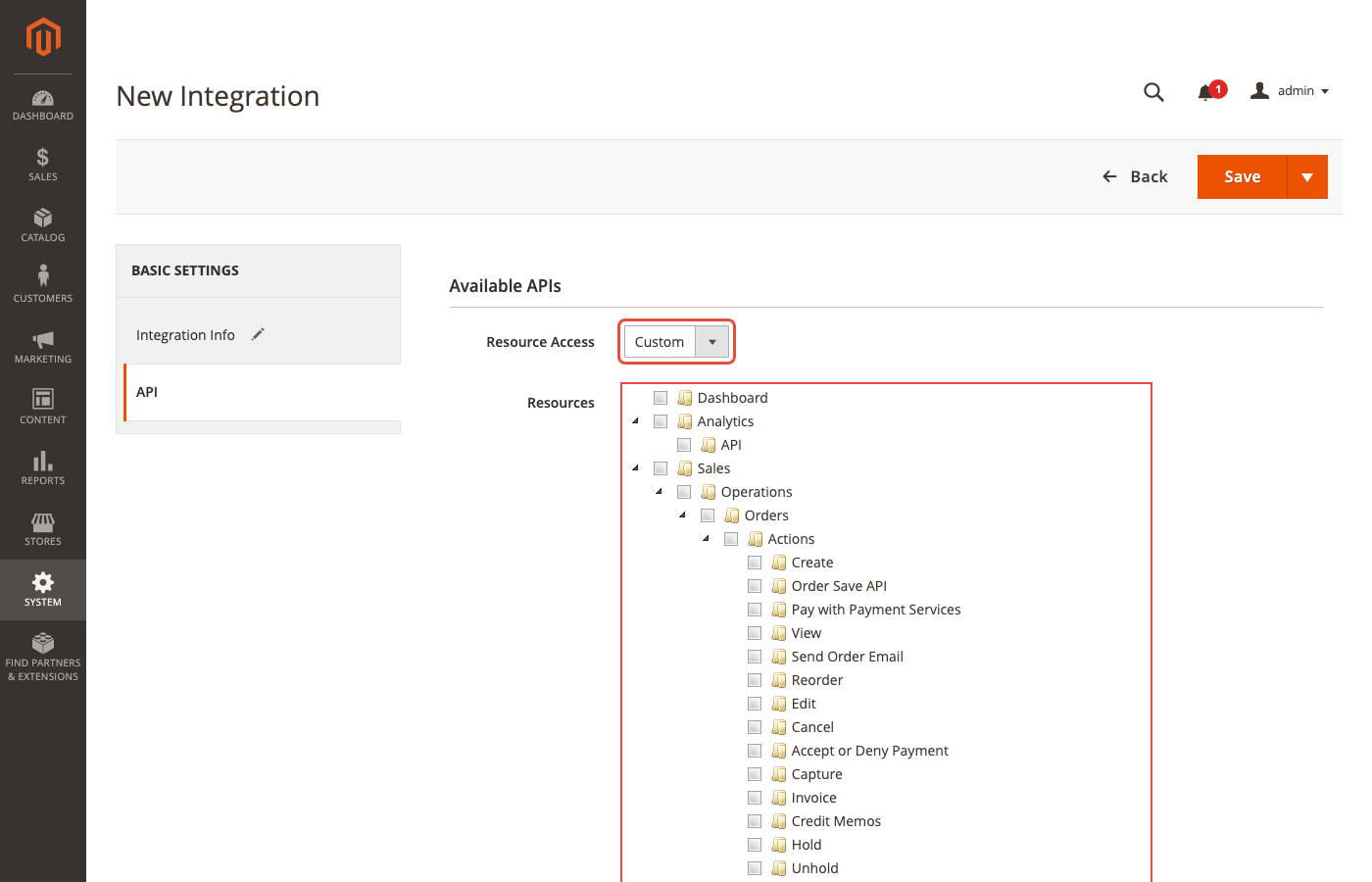
Step 4: Save and Activate
Click Save to store the integration, then click Activate on the list view. Magento generates four OAuth credentials on activation: Consumer Key, Consumer Secret, Access Token, and Access Token Secret. Copy the credentials into the third party system immediately. Magento only shows the tokens once for security.
This flow is the officially recommended way to give an external system access to Magento APIs. It scopes permissions per integration and lets you revoke access cleanly if the third party is compromised.
Authentication Methods Explained
Magento supports three authentication types for REST and SOAP APIs.
OAuth 1.0a is the primary method for third party integrations. It uses the Consumer Key, Consumer Secret, Access Token, and Access Token Secret generated in the admin integration flow. OAuth 1.0a signs every request, so tokens cannot be replayed from intercepted traffic.
Token based authentication covers admin tokens, customer tokens, and integration tokens. Admin users authenticate with username and password against /rest/V1/integration/admin/token and receive a bearer token valid for four hours by default. Customer tokens work the same way against /rest/V1/integration/customer/token and are valid for one hour. These are convenient for simple scripts but do not scale for production third party integrations.
Session based authentication applies only inside the Magento admin. It is not usable for external integrations.
For third party production integrations, use OAuth 1.0a with an admin configured integration. For internal scripts that your own team controls, admin tokens are fine for rapid development.
Hosting Requirements for Integration Heavy Stores
Most integration guides stop at the API level. The hosting infrastructure decides whether your integrations actually work under load, and this is where many stores run into trouble.
An integration heavy Magento store needs:
- Redis 7.2 for session and backend cache. Default file based cache cannot handle the write pressure of many concurrent API calls.
- RabbitMQ 4.x for async and bulk REST endpoints, for Magento cron events, and for background processing. Without a message queue, bulk operations fall back to synchronous mode and time out under load.
- PHP consumer workers running under a process supervisor (supervisord, systemd). Consumers read from the queue and process bulk imports, order placement, indexer updates, and third party sync jobs. Starve the consumers and your queue backs up.
- OpenSearch 3 or Elasticsearch 8 for product search, and optionally for analytics replication.
- Enough PHP FPM workers to handle external API calls without blocking checkout. Integration traffic is concurrent with customer traffic.
- Outbound network access for calls to external APIs (ERPs, CRMs, shipping carriers, payment gateways). Hosts behind strict egress firewalls can break integrations silently.
- Proper logging and monitoring on the queue depth, consumer lag, and API error rates.
This stack is non trivial to set up and tune correctly. Our Magento hosting platform ships with all seven components preconfigured: Redis, RabbitMQ 4.x, OpenSearch 3, supervised consumers, and monitoring out of the box. For the full technical requirements, see our Magento system requirements guide.
Common Integration Challenges and Solutions
Here are the issues integration projects hit most often and how to avoid them.
Challenge 1: API rate limits from third party services. Many external APIs rate limit by key, IP, or account tier. Magento can easily burst past those limits during bulk syncs. Solution: throttle calls on the Magento side with a queue consumer that sleeps between batches, or use exponential backoff on 429 responses.
Challenge 2: Data mapping mismatches. Magento attributes rarely map one to one with ERP or PIM fields. Solution: maintain a mapping layer (dedicated PHP module, iPaaS transform step, or middleware service) and document every mapping decision.
Challenge 3: Timing and consistency. Product stock, pricing, and order status often need near real time accuracy. Cron based syncs introduce delay. Solution: use the Magento message queue with dedicated consumers for critical entities and keep batch syncs for less sensitive data.
Challenge 4: Upgrades break custom integrations. Third party modules that touch core Magento code often fail during version upgrades. Solution: favor integrations that use public APIs only (REST, GraphQL, Events) and avoid patching core files.
Challenge 5: Queue workers stop unexpectedly. Consumers can die silently if they hit memory limits or PHP fatal errors. Solution: run consumers under supervisord or systemd with automatic restart and alerting on queue depth spikes.
Challenge 6: Network and firewall issues. Outbound API calls fail when the hosting environment blocks egress. Solution: whitelist specific outbound IPs and domains, and test integration endpoints during the hosting setup phase, not the day before go live.
iPaaS Tools, Custom Code, or Marketplace Extensions?
You have three paths to build an integration. Each has tradeoffs.
Marketplace extensions are the fastest. The Adobe Commerce Marketplace lists 4,000+ ready made extensions that cover popular integrations. Install, configure, done. Cost: one time extension fee (typically 50 to 500 USD per module) plus hosting. Tradeoff: you depend on the vendor for updates and compatibility with new Magento versions. Quality varies. Read reviews and check the last release date before buying.

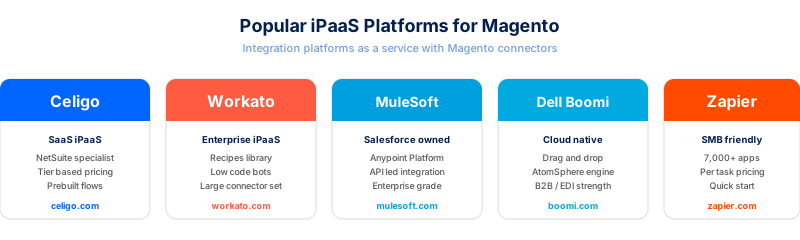
iPaaS platforms (integration platform as a service) like Celigo, Workato, MuleSoft, Dell Boomi, or Zapier provide visual workflow builders and prebuilt Magento connectors. Cost: monthly subscription based on record volume (typically 500 to 5,000 USD per month for mid market). Tradeoff: vendor lock in and per record pricing that can spike during promotions or big catalog imports. Good for complex multi system flows.
Custom code gives you full control and no recurring fees. Cost: developer time (one time build plus ongoing maintenance). Tradeoff: you own the code, the tests, and the upgrade path. Best for unique business logic that off the shelf tools cannot handle, or for high volume cases where per record iPaaS pricing would crush margins.
Most real stores combine all three: a Marketplace extension for the standard payment gateway, an iPaaS for cross system flows, and custom code for the one or two truly unique business rules. For more on extension selection, see our Magento plugins overview.
For teams that prefer done for you integration work, our Magento integration services guide covers the usual engagement models.
Which Integration Approach Should You Choose?
Skip the feature checklist. The right approach depends on three inputs: volume, uniqueness, and team skills.
Use Marketplace extensions if: you want a standard integration (one of the top payment gateways, a common ERP, a popular analytics tool), you do not have dedicated developer capacity, and the extension has recent reviews and a track record on current Magento versions.
Use an iPaaS platform if: you need to connect more than two systems, the flows involve transformations or branching logic, and the record volume fits the platform pricing (usually under a few million records per month).
Use custom code if: you have unique business rules, record volumes that would make iPaaS per record pricing impossible, existing developer capacity, or regulatory constraints that require code you control end to end.
Whichever path you pick, the hosting underneath the integration decides whether it holds up in production. An integration that works in staging and fails in live traffic is almost always a hosting or queue problem, not a code problem.
FAQ
What is the difference between Magento integration and a Magento extension? A Magento extension is a module installed inside your Magento codebase. A Magento integration is a connection between Magento and an external system. Some extensions enable integrations (they add API hooks or UI panels for a third party service) but not every extension is an integration.
Does Magento 2 have native webhooks? Magento Open Source does not have native outbound webhooks. It has internal Events and Observers in PHP, but those do not send HTTP calls to external systems. Adobe Commerce has Adobe I/O Events for Adobe Commerce since version 2.4.4 and Adobe Commerce Webhooks with App Builder. If you run Open Source, you build observer based bridges or use an iPaaS connector.
What is the REST API endpoint format in Magento 2.4.8?
The base format is https://<your-store>/rest/<store-view-code>/V1/<resource> for standard calls, https://<your-store>/rest/<store-view-code>/async/V1/<resource> for asynchronous calls, and https://<your-store>/rest/<store-view-code>/async/bulk/V1/<resource> for bulk operations. The store view code is optional for store agnostic calls.
What authentication does Magento 2 use for third party APIs?
OAuth 1.0a is the primary method for third party integrations, configured through System > Extensions > Integrations in admin. Bearer tokens from /rest/V1/integration/admin/token or /rest/V1/integration/customer/token work for simple scripts. For external production systems, use OAuth 1.0a with a dedicated integration configuration.
How many extensions does the Adobe Commerce Marketplace have? The Adobe Commerce Marketplace lists 4,000 plus extensions covering payment, shipping, ERP, CRM, marketing, PIM, analytics, and UI customization. Adobe does not publish an exact live count.
Can Magento Open Source use RabbitMQ? Yes. Magento Open Source supports RabbitMQ since version 2.3.0. Magento 2.4.8 adds RabbitMQ 4.x support with quorum queues, which replaces the older classic mirrored queues. RabbitMQ is required for async REST, bulk REST, and background consumers.
Do I need Adobe Commerce for real time integrations? No. Real time integration works on Magento Open Source through REST API polling, webhook bridges built on observers, or iPaaS connectors. Adobe Commerce makes it easier with Adobe I/O Events and native webhooks, but the pattern is achievable on Open Source with more setup work.
What hosting do I need for an integration heavy Magento store? You need Redis 7.2 for cache and sessions, RabbitMQ 4.x for queues, supervised PHP consumer workers, OpenSearch 3 or Elasticsearch 8 for search, and enough PHP FPM workers for concurrent API and customer traffic. Outbound firewall rules must allow calls to third party services.
Summary
Magento integration in 2026 means picking the right API surface for your use case, setting up authentication through the admin Integration flow, and running the right hosting infrastructure underneath.
REST is the default choice for third party integrations. GraphQL is for storefront and headless. SOAP is legacy. Events and Webhooks are Adobe Commerce only. Async and bulk REST need RabbitMQ 4.x. Custom code, iPaaS, and Marketplace extensions all work, and most stores combine all three.
The part most guides miss: an integration that runs smoothly in staging and falls over in production is almost always a hosting problem. Redis, RabbitMQ, OpenSearch, supervised consumers, and outbound network access decide whether your integrations actually hold up under real traffic.
For Magento stores that run a serious mix of integrations, our Magento hosting platform ships the full integration ready stack preconfigured. Redis, RabbitMQ 4.x, OpenSearch 3, supervised consumers, outbound networking, and monitoring are there from day one, so your integration code can focus on business logic instead of infrastructure.
