

Magento 2 Inventory Management (MSI) Guide: Adobe Commerce 2.4.8
[Updated: April 02, 2026]
Magento tracks every unit across every warehouse through its Multi-Source Inventory (MSI) system. One wrong configuration and your store oversells products that sit in a different facility.
This guide covers how MSI works in Adobe Commerce 2.4.8, which settings matter, and how to prevent the reservation inconsistencies that cause overselling.
Key Takeaways
- Magento 2.3+ includes Multi-Source Inventory (MSI) as the default system for tracking stock across warehouses
- MSI uses reservations instead of direct quantity updates — salable quantity = source qty minus pending orders
- Sources are physical locations, Stocks are logical groupings assigned to sales channels
- Run
inventory:reservation:list-inconsistenciesweekly to prevent overselling - MSI works well for 1-20 sources but struggles at 50+ sources (consider ERP integration)
- OpenSearch 2.x is required for 2.4.8 (Elasticsearch is deprecated)
- Never modify stock via SQL — always use Magento APIs or CLI
What is Magento Multi-Source Inventory?
Magento MSI = Multi-Source Inventory system that tracks stock across warehouses using reservations instead of direct quantity updates. Powerful for multi-location stores, but requires regular maintenance to prevent overselling.
Perfect for: Multi-warehouse retailers, stores with 1-20 inventory sources, businesses needing real-time stock sync
Not ideal for: Single-warehouse stores (disable MSI), operations with 50+ sources (consider ERP integration)
Magento 2.3+ includes MSI as the default inventory system. Unlike legacy inventory (direct quantity updates), MSI uses a reservation system that calculates "salable quantity" from source quantities minus pending orders.
Key concepts:
- Sources: Physical stock locations (warehouses, stores, vendors)
- Stocks: Logical groupings of sources assigned to sales channels
- Reservations: Pending quantity changes from orders not yet shipped
- Salable Quantity: Source qty minus reservations (what customers can buy)

For stores with 1-20 sources, MSI handles most scenarios. Stores with 50+ sources often face indexer slowdowns and checkout bottlenecks. Plan for performance optimization or third-party solutions at scale.
How to Configure Inventory in Magento 2
General Inventory Settings
Configure global settings in the Admin Panel:
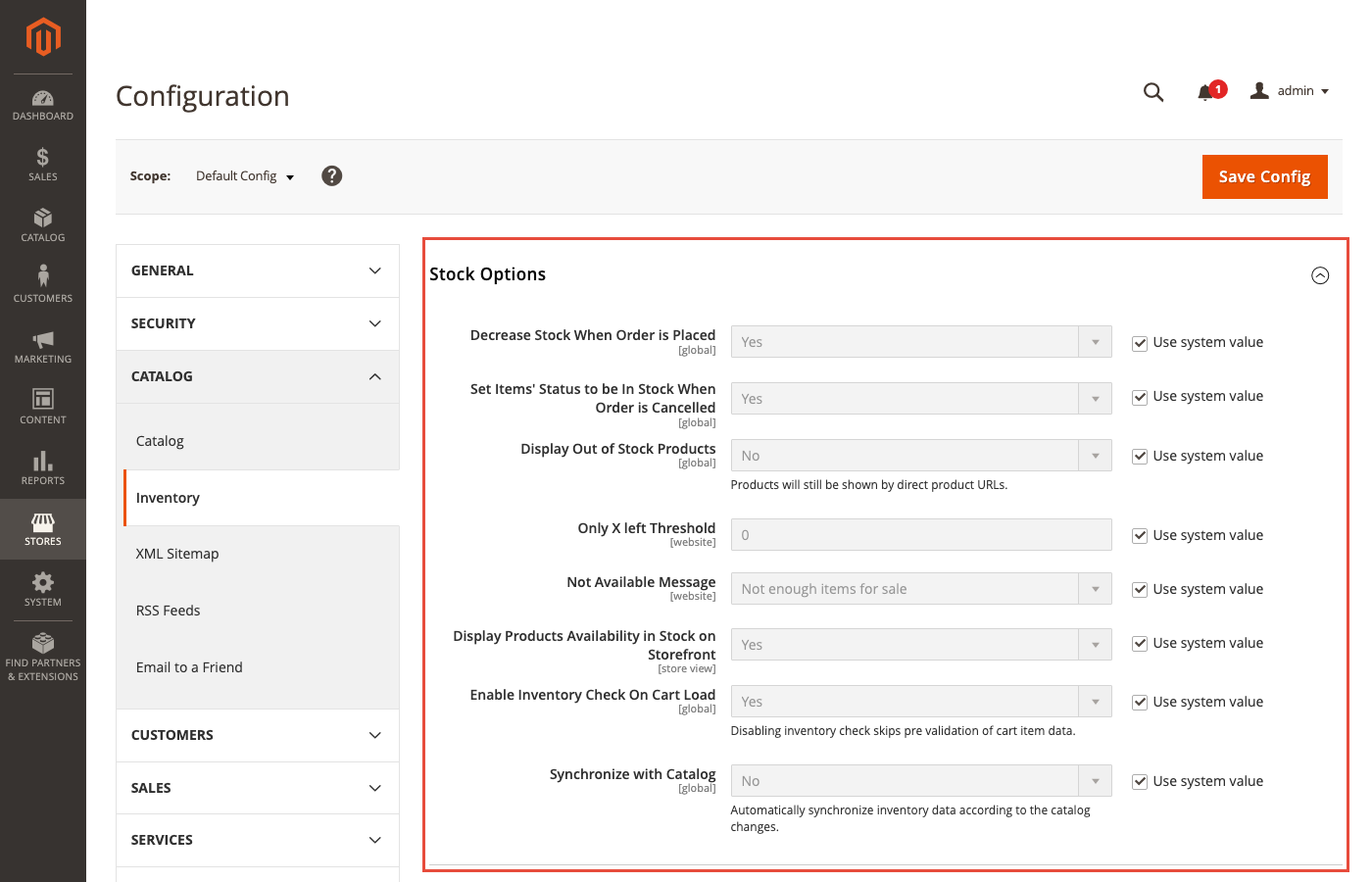
- Navigate to Stores > Configuration > Catalog > Inventory
- Adjust Stock Options and Product Stock Options
Security Note: Never use the default /admin path. Use a custom admin URL with enforced 2FA and IP restrictions. Learn more in our Magento security best practices guide or see Adobe Security Best Practices.
Advanced Inventory Settings
For product-level control:
- Go to Catalog > Products
- Select a product and click Edit
- Open Advanced Inventory under Advanced Settings
Override global settings per product for quantity, stock status, and backorder behavior.
Stock Options Explained
1. Decrease Stock When Order is Placed Creates a reservation when orders are submitted. Does not modify source quantity until shipment.
2. Set Items' Status to be in Stock When Order is Canceled Returns reserved quantity on cancellation. Essential for accurate salable quantity.
3. Display Out-of-Stock Products Controls zero-stock product visibility. Consider SEO implications before hiding products.
4. Only X Left Threshold Triggers admin notifications when salable quantity drops below this value.
Frontend behavior: Native themes like Luma display "Only X left" messages on product pages when threshold > 0 and salable qty <= threshold. This is built into Magento_Catalog::product/view/type/default.phtml. Custom themes may require modifications. See Adobe Inventory Configuration Docs.
Product Stock Options
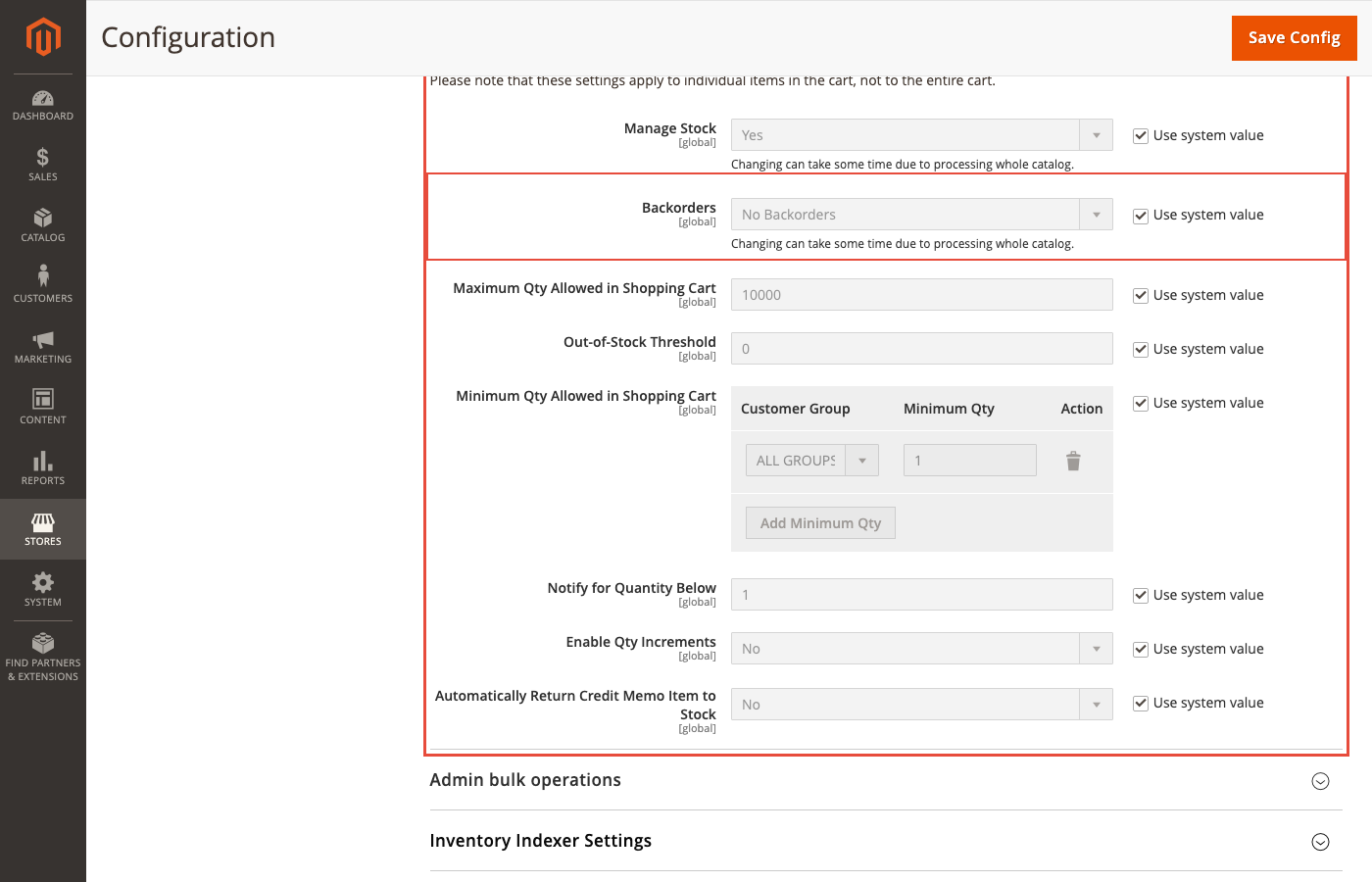
1. Manage Stock Enable or disable tracking per product. Disabled products show as in-stock.
2. Backorders Options: No Backorders, Allow Qty Below 0, Allow Qty Below 0 and Notify Customer.
Warning: Backorders with MSI can cause overselling from reservation inconsistencies, direct database modifications, or legacy extensions. Always use Magento APIs for stock changes.
3. Maximum Qty Allowed in Shopping Cart Limits per-product cart quantity.
4. Out-of-Stock Threshold The quantity level triggering out-of-stock status. Interacts with salable quantity across all sources.
5. Minimum Qty Allowed in Shopping Cart Sets minimum order quantity. Configurable per customer group.
6. Auto Return Credit Memo Item to Stock Returns refunded items to inventory. Verify alignment with your fulfillment workflow.
MSI Performance Considerations
When MSI Works Well
- 1-20 inventory sources
- Priority-based source selection
- Simple and configurable products
When MSI Struggles
Adobe release notes (2.4.7, 2.4.8) document performance issues with:
- 50+ sources: Indexer slowdowns, admin grid timeouts
- Grouped/bundle products: Resource-intensive salable quantity calculations
- High-volume checkout: Bottlenecks during concurrent orders
"For stores with 20+ sources and high order volume, dedicated inventory indexer resources and Redis-based caching are essential to keep checkout responsive," says Raphael Thiel, CEO of MGT Commerce.
For complex warehouse networks, consider managed Magento hosting with optimized infrastructure or ERP integration.
Common Overselling Causes
| Cause | Prevention |
|---|---|
| Direct SQL updates | Use bin/magento CLI or REST/GraphQL APIs |
| Legacy extensions | Audit for MSI compatibility before install |
| Missing compensations | Run reservation:list-inconsistencies weekly |
| Race conditions | Enable reservation during add-to-cart |
| CSV imports | Use StockItemImporter with MSI support |
Essential CLI Commands
# Check reservation inconsistencies (weekly)
bin/magento inventory:reservation:list-inconsistencies

# Generate compensation entries
bin/magento inventory:reservation:create-compensations

# Reindex inventory
bin/magento indexer:reindex inventory
Third-Party Inventory Extensions
Before installing any extension, verify:
- Compatibility with Magento 2.4.8+ and PHP 8.3/8.4
- OpenSearch 2.x support (Elasticsearch is deprecated)
- MSI reservation compatibility (must use
SourceItemsSaveInterface)
Critical: Many older extensions write to cataloginventory_stock_item instead of MSI tables, causing reservation inconsistencies. Audit extension code before deployment.
Inventory Management Techniques
-
Just-In-Time (JIT): Order as needed. Reduces storage costs, requires reliable suppliers.
-
First In, First Out (FIFO): Sell oldest stock first. Critical for perishables.
-
Par Levels: Minimum thresholds triggering reorder alerts.
-
ABC Analysis: Categorize by value (A = high, C = low) to prioritize effort.
-
Demand Forecasting: Native Magento lacks this. Consider ERP integration for advanced forecasting.
Who Should Use MSI?
| Business Type | Recommendation |
|---|---|
| Single warehouse, simple catalog | Disable MSI for simplicity |
| 2-20 warehouses | Use native MSI |
| 20-50 warehouses | MSI with performance optimization |
| 50+ warehouses or complex logic | ERP integration or specialized WMS |
| Drop-shipping heavy | MSI with source priority configuration |
Managing Inventory Sources
Sources represent physical stock locations. Create and manage them at Stores > Inventory > Sources.
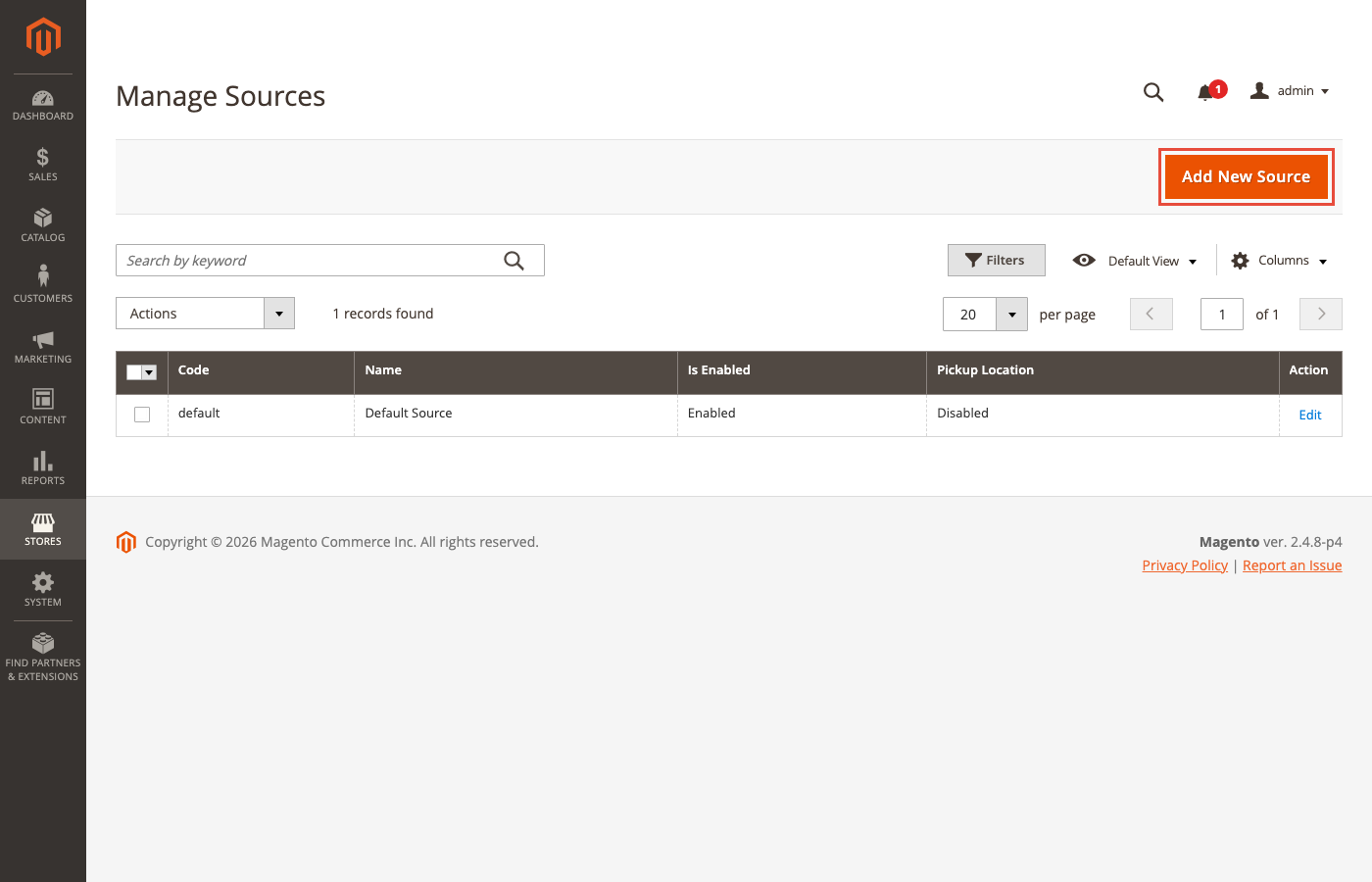
Each source needs a code, name, and address. Assign sources to stocks, then assign stocks to sales channels (websites). The source selection algorithm determines which source fulfills each order based on priority and distance.
Security and Maintenance 2026
Patch Schedule
| Patch Type | Frequency | Action |
|---|---|---|
| Monthly isolated security fixes | Monthly | Apply as soon as released |
| Annual full patch | May | Cumulative security + quality updates |
| Optional patch | November | Apply if relevant to your installation |
Supported Versions (2026)
| Version | Support Until | Notes |
|---|---|---|
| 2.4.8 | April 2028 | Current stable |
| 2.4.7 | April 2027 | Previous stable |
| 2.4.6 | August 2026 | End of life approaching |
Technical Requirements
For detailed server specifications, see our Magento system requirements guide.
| Component | Requirement |
|---|---|
| PHP | 8.3 & 8.4 supported |
| Search | OpenSearch 2.x (Elasticsearch deprecated) |
| Database | MySQL 8.0 or MariaDB 10.6+ |
| Cache | Redis 7.x or Valkey |
Weekly Maintenance Checklist
- Run
inventory:reservation:list-inconsistencies - Apply pending security patches
- Review low-stock notifications
- Verify source quantities match physical counts
FAQ
Does Magento have built-in inventory management? Yes. Magento 2.3+ includes Multi-Source Inventory (MSI) for managing stock across warehouses with reservation-based tracking.
How do I access inventory settings? Navigate to Stores > Configuration > Catalog > Inventory for global settings. Product-level settings are in Catalog > Products > Edit > Advanced Inventory.
What are inventory sources? Sources represent physical stock locations: warehouses, retail stores, or drop-ship vendors. Create them at Stores > Inventory > Sources.
How do I add inventory to a product? Edit the product, scroll to Sources, and enter quantity for each assigned source.
What causes salable quantity problems? Order processing errors, canceled orders not reversed, direct database modifications, or extensions bypassing the reservation system.
How do I fix reservation inconsistencies?
Run bin/magento inventory:reservation:list-inconsistencies to detect issues, then bin/magento inventory:reservation:create-compensations to fix them.
Should I disable MSI for a single warehouse? Yes. Single-warehouse stores benefit from the simplicity of disabled MSI. Requires careful data migration on existing stores.
How often should I check for inconsistencies? Weekly minimum. High-volume stores should automate daily checks via cron.
What happens if I modify stock via SQL? MSI reservations become inconsistent, leading to overselling or phantom stock. Always use Magento APIs or CLI.
Can MSI handle drop-shipping? Yes. Create sources for each vendor with appropriate priority. MSI allocates orders based on source selection algorithm.
Summary
Magento MSI provides solid multi-warehouse inventory management for stores with moderate complexity. Success depends on proper configuration, regular maintenance, and avoiding direct database modifications.
Key actions:
- Run reservation checks weekly
- Audit extensions before installation
- Apply security patches on release
- Plan for optimization at 50+ sources
Ready to run your inventory on infrastructure built for Magento? Explore managed Magento hosting with optimized server resources for MSI workloads.
