

Magento 2 Lazy Load: Native and Extension Methods to Speed Up Your Store
[Updated: March 20, 2026]
Slow product pages cost you sales. Every second of delay pushes visitors toward competitors. Magento 2 lazy load defers offscreen images until users scroll to them, cutting initial page load time and improving Core Web Vitals scores.
This guide covers both the native lazy loading built into Magento 2.4+ and popular extensions that offer advanced configuration options.
Key Takeaways
- Magento 2.4+ includes native lazy loading via the
loading="lazy"HTML attribute on catalog images - Extensions add advanced features like placeholder effects, CSS background lazy loading, and selective exclusions
- Never lazy load above-the-fold images or your Largest Contentful Paint (LCP) element
- Lazy loading reduces bandwidth, improves page speed scores, and lowers bounce rates
- Combine lazy loading with WebP images and a CDN for maximum performance gains
What Is Lazy Loading?
Lazy loading = A performance technique that delays loading offscreen images and media until users scroll to them. It reduces initial page weight and speeds up first render.
Perfect for: Product catalog pages, image-heavy CMS pages, stores with high-resolution product photography
Not ideal for: Hero banners, above-the-fold content, LCP elements that need to load first
Lazy loading works by replacing image src attributes with placeholder values. The browser loads the actual image file when it enters or approaches the viewport. This prevents the browser from downloading dozens of offscreen images on initial page load.
For Magento stores with hundreds of product images on category pages, lazy loading can reduce initial page weight by 50% or more. Research shows 47% of users expect pages to load in under 2 seconds, and a 1-second delay causes an 11% decrease in page viewers.
Native Lazy Loading in Magento 2.4+
Since Magento 2.4.0, the platform includes native lazy loading support. Adobe added the loading="lazy" HTML attribute to catalog product images through the image_with_borders.phtml template.
How it works:
The browser's built-in lazy loading uses the loading="lazy" attribute:
<img src="product-image.jpg" loading="lazy" alt="Product Name" width="300" height="300">
Modern browsers (Chrome, Firefox, Edge, Safari) all support this attribute. No JavaScript libraries required.
What native lazy loading covers:
- Product images on category and listing pages
- Search result page images
- Related, upsell, and cross-sell product images
What it does NOT cover:
- CSS background images
- CMS page images added through Page Builder
- Custom theme image elements
- iFrame embeds (videos, maps)
For stores running Magento 2.4+ with standard catalog templates, native lazy loading works without any extension.
When You Need a Lazy Load Extension
Native lazy loading handles the basics. Extensions fill the gaps:
| Feature | Native (2.4+) | Extension |
|---|---|---|
| Product catalog images | Yes | Yes |
| CSS background images | No | Yes |
| CMS/Page Builder images | No | Yes |
| iFrame lazy loading | No | Yes |
| Placeholder effects (blur, low-res) | No | Yes |
| Selective exclusion by CSS class | No | Yes |
| Custom loading threshold | No | Yes |
| Loading animation/spinner | No | Yes |
If your store uses custom banners, Page Builder content blocks, or embedded videos, an extension provides the coverage native lazy loading misses.
Popular Magento 2 Lazy Load Extensions (2026)
| Extension | Price | Magento Support | Key Feature |
|---|---|---|---|
| WeltPixel Lazy Load | Free | 2.3.0 - 2.4.8-p3 | Open source since Jan 2026, 4.75/5 rating |
| Magefan Image Lazy Load | Free plan | 2.3.0 - 2.4.8-p4 | WebP compatible, Page Builder support |
| Mageplaza Lazy Loading | $79 | 2.4.4 - 2.4.8 | 4 loading scripts (jQuery, Native JS, Vanilla, Lozad) |
| Amasty Lazy Load | Paid | 2.4.x | Multiple script engine options |
| Magezon Lazy Load | Free | 2.4.x | Broad page type coverage |
All extensions install through Composer and configure through Stores > Configuration in the admin panel.
How to Implement Lazy Loading in Magento 2
Method 1: Native Lazy Loading (Magento 2.4+)
Native lazy loading is active by default on catalog product images in Magento 2.4+. Verify it works:
- Open a category page in your browser
- Right-click a product image and select Inspect
- Check for
loading="lazy"on the<img>tag
If the attribute is missing, your theme may override the default template. Add it to your theme's image_with_borders.phtml:
<img src="<?= $block->getImageUrl() ?>"
     loading="lazy"
     alt="<?= $block->getLabel() ?>"
     width="<?= $block->getWidth() ?>"
     height="<?= $block->getHeight() ?>">
Always include width and height attributes. Without them, the browser cannot reserve space for the image, causing layout shift problems.
Method 2: Extension Installation via Composer
- Access your server via SSH
- Navigate to your Magento root directory:
cd /path/to/magento2 - Require the extension package:
composer require vendor/extension-package-name - Run setup commands:
php bin/magento setup:upgradephp bin/magento setup:di:compilephp bin/magento cache:clean - Configure in Stores > Settings > Configuration > [Extension] > Lazy Loading
After installation, clear the Magento cache to ensure the store recognizes the new extension.
Extension Configuration Options
Most lazy load extensions offer these settings:
Enable/Disable: Toggle lazy loading on or off.
Apply For: Select which page types use lazy loading, including category pages, product pages, CMS pages, search results, and checkout.
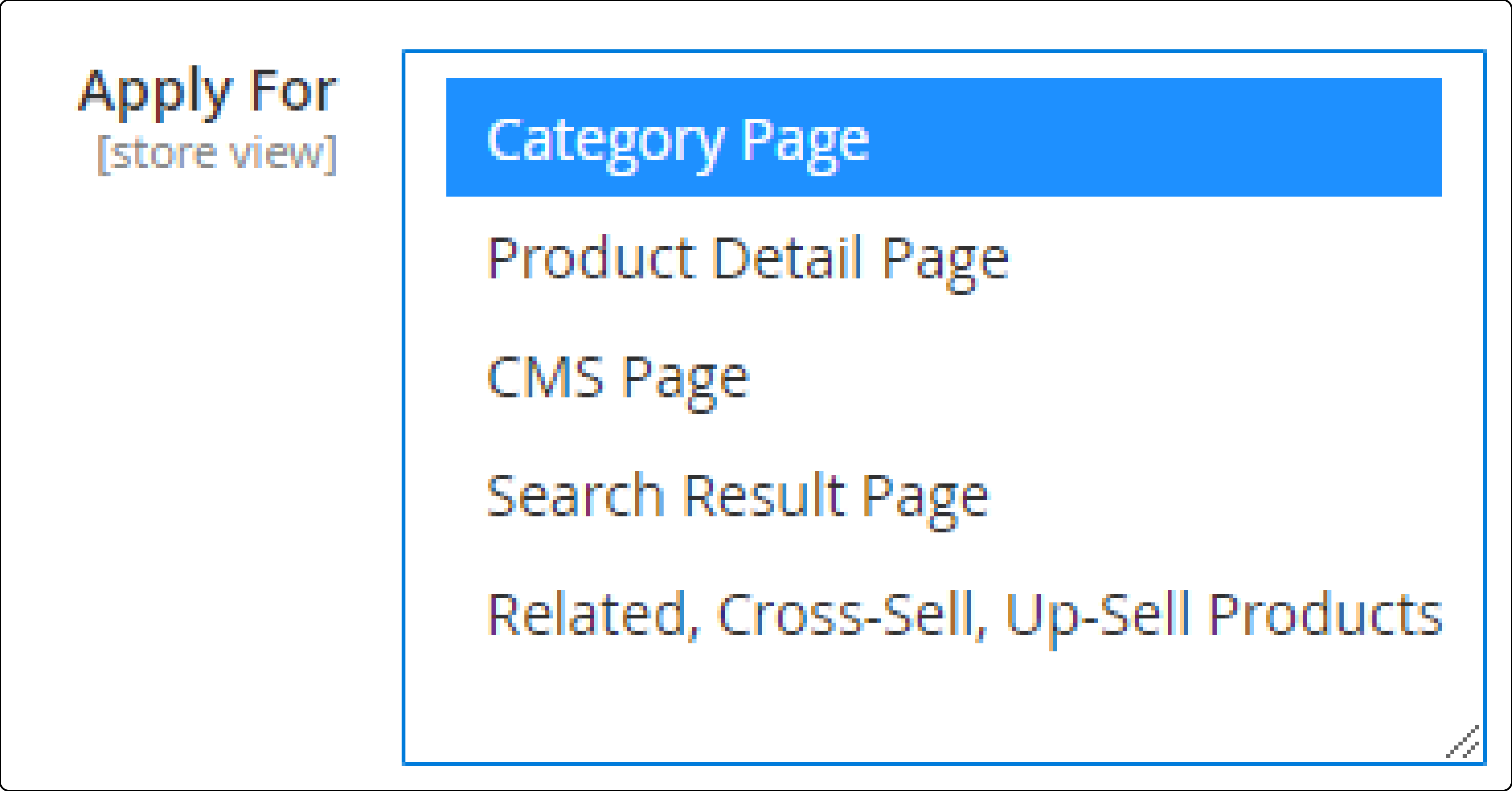
Loading Threshold: Set the distance (in pixels) from the viewport that triggers image loading. A value of 200-500px preloads images before they become visible, preventing visual delays during fast scrolling.
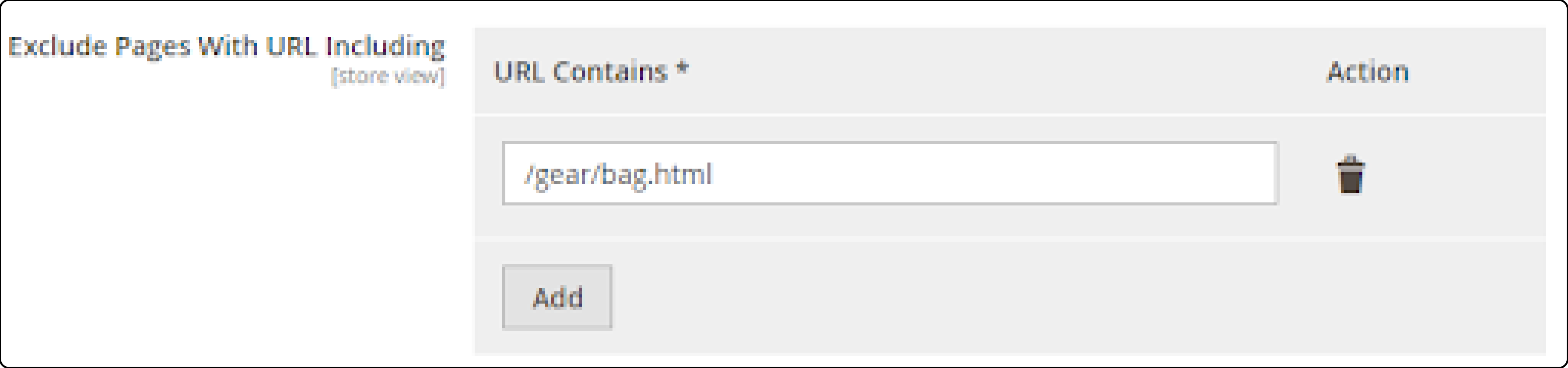
Exclusions: Exclude specific pages (by URL), CSS classes, or image alt/title text from lazy loading.
Placeholder Type:
- Transparent: Shows empty space until the image loads
- Blurred: Displays a blurred version of the image
- Low Resolution: Shows a compressed preview image
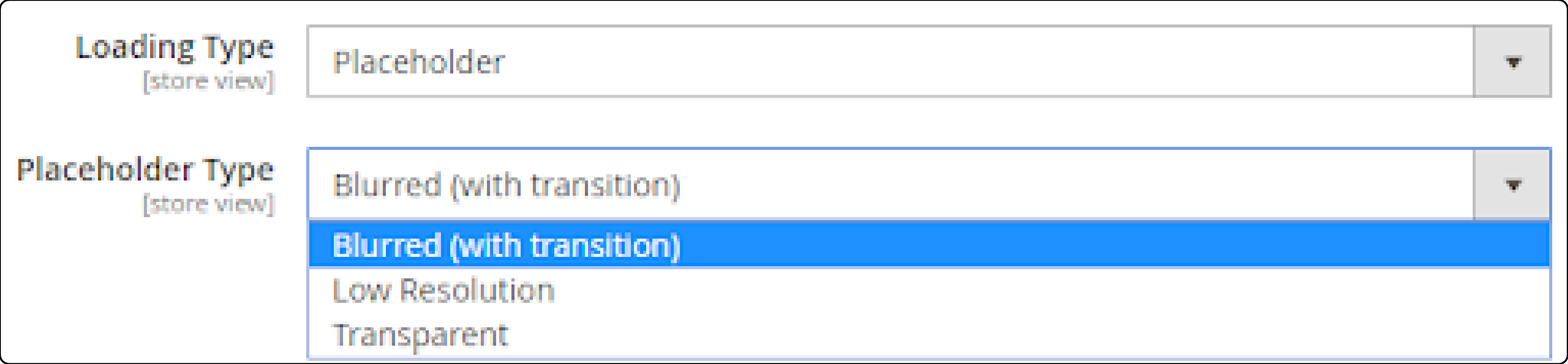
Loading Icon: Upload a custom spinner or animation to display while images load. Default size is 64x64px. Supports GIF, PNG, JPG, and SVG formats.
Core Web Vitals and Lazy Loading
Google uses three Core Web Vitals as ranking signals. Lazy loading affects two of them. Proper implementation is part of any Magento 2 speed optimization strategy.
Largest Contentful Paint (LCP)
LCP measures how fast the largest visible element loads. Never lazy load your LCP element. For most Magento pages:
- Homepage: Hero banner image is the LCP element. Do NOT lazy load it.
- Category pages: First visible product image may serve as LCP.
- Product pages: Main product image is the LCP element. Load it with full priority.
Use loading="eager" or remove the loading attribute for LCP images. Add fetchpriority="high" for faster loading:
<img src="hero-banner.jpg" fetchpriority="high" alt="Hero Banner">
Cumulative Layout Shift (CLS)
Images without defined dimensions cause layout shifts when they load. Always set width and height on lazy loaded images:
<img src="product.jpg" loading="lazy" width="300" height="300" alt="Product">
This lets the browser reserve the correct space before the image downloads.
Best Practices for Magento 2 Lazy Loading
1. Skip Above-the-Fold Images
Images visible on first render should load with full priority. Lazy loading them delays your LCP score. Header images, hero banners, and the first row of product thumbnails need to load right away.
2. Use WebP Format
WebP images are 25-34% smaller than JPEG at comparable quality. Combined with lazy loading, WebP reduces both initial and deferred load times. Magento 2.4+ supports WebP through its built-in image adapter. Use Fastly CDN for image optimization to enable automatic format conversion.
3. Set Proper Thresholds
Configure a loading threshold of 200-500px. This preloads images just before they scroll into view. Too small (0px) causes visible pop-in. Too large (1000px+) defeats the purpose of lazy loading.
4. Test on Mobile Devices
Mobile viewports show fewer images per screen. Test lazy loading behavior on phones and tablets to ensure smooth scrolling. Mobile users on slower connections benefit most from deferred loading.
5. Combine With a CDN
A content delivery network serves images from edge servers close to your visitors. Lazy loading decides when to load images. A CDN decides where to load them from. Together, they minimize both timing and latency.
6. Monitor Performance
Use Google PageSpeed Insights or Lighthouse to measure the impact. Track these metrics before and after enabling lazy loading:
- LCP (target: under 2.5 seconds)
- Total page weight (expect 30-60% reduction on catalog pages)
- Time to Interactive
Troubleshooting Common Issues
| Issue | Cause | Solution |
|---|---|---|
| Images not loading on scroll | Extension disabled or misconfigured | Check Stores > Configuration, verify the extension is enabled |
| Layout shifts when images load | Missing width/height attributes | Add explicit width and height to all <img> tags |
| Slow LCP score despite lazy loading | LCP image is lazy loaded | Remove loading="lazy" from the hero or main product image |
| Blank images on fast scroll | Threshold too small | Increase loading threshold to 300-500px |
| Extension conflicts | Multiple lazy load scripts active | Use one lazy load solution and remove duplicates |
| Images broken after theme update | Theme overrides template | Re-add loading="lazy" to your custom image_with_borders.phtml |
Pros and Cons of Lazy Loading
FAQ
1. Does Magento 2 support lazy loading natively?
Yes. Since Magento 2.4.0 (released July 2020), native lazy loading is built into the catalog image templates using the HTML loading="lazy" attribute. Extensions are optional for stores that need placeholder effects, CSS background support, or broader page coverage.
2. Which image format works best with lazy loading?
WebP delivers the best results. It offers 25-34% smaller file sizes than JPEG with comparable visual quality. Magento 2.4+ includes a built-in image adapter that supports WebP conversion. Smaller files load faster when triggered by lazy loading.
3. Should I lazy load all images on my Magento store?
No. Exclude above-the-fold images, hero banners, and your LCP element. These should load with full priority. Lazy load offscreen images such as product galleries below the fold, related products, and CMS content images.
4. What is a good loading threshold for lazy loading?
Set the threshold between 200-500px. This preloads images just before they enter the viewport. Values below 100px cause visible pop-in during scrolling. Values above 1000px load too many images too early and reduce the benefit.
5. Can lazy loading hurt my SEO?
Not when implemented correct. Google's crawler processes loading="lazy" and indexes lazy loaded images without issues. Problems only arise when lazy loading blocks the LCP element or causes excessive layout shifts.
6. Do I need an extension if I run Magento 2.4+?
Native lazy loading covers standard catalog product images. You need an extension if your store relies on CSS background images, Page Builder content blocks, embedded iFrames, or if you want visual effects like blurred placeholders during loading.
7. What is the performance impact of lazy loading?
Stores with image-heavy category pages see initial page weight reductions of 30-60%. Time to Interactive improves because the browser loads fewer resources upfront. Google PageSpeed scores increase across both mobile and desktop tests.
8. How do I check if lazy loading works on my store?
Open your store in Chrome, right-click an offscreen image, and select Inspect. Look for loading="lazy" on the <img> tag. You can also open the Network tab in DevTools and scroll down the page to watch images load on demand.
9. Can I use lazy loading with Varnish or full page cache?
Yes. Lazy loading is a client-side technique handled by the browser. The HTML delivered by Varnish or the Magento cache system includes the loading="lazy" attribute. The browser performs the deferred loading after receiving the cached page.
10. What is the difference between lazy loading and image optimization?
Lazy loading controls when images load (on scroll vs on page load). Image optimization controls how large the files are (compression, format, dimensions). Both techniques complement each other. Use lazy loading with optimized WebP images for the best results.
Summary
Magento 2 lazy load reduces initial page weight by deferring offscreen images until users scroll to them. Since Magento 2.4.0, native lazy loading comes built into the catalog templates. Extensions add advanced features for stores that need CSS background image support, placeholder effects, or selective exclusions.
The right approach depends on your store:
- Magento 2.4+ with standard templates: Native lazy loading works out of the box
- Custom themes or image-heavy CMS pages: Add a free extension like WeltPixel or Magefan
- Full control over loading behavior: Consider paid extensions with multiple script engines
Combine lazy loading with WebP images, proper image dimensions, and a CDN for the strongest performance gains.
Ready to optimize your store's performance? Explore managed Magento hosting plans built for speed and reliability.
